
Sanus OSSATM1-B2
SANUS OSSATM1-B2 Soundbar TV Mount Instruction Manual
For Sonos Arc & Sonos Arc Ultra Soundbars
1. Introduction
This manual provides detailed instructions for the installation, operation, and maintenance of your SANUS OSSATM1-B2 Soundbar TV Mount. This mount is specifically designed for the Sonos Arc and Sonos Arc Ultra soundbars, ensuring optimal audio performance and seamless integration with your television.
The SANUS OSSATM1-B2 mount is compatible with televisions ranging from 50 to 90 inches and offers both height and depth adjustment capabilities to enhance your listening experience, especially for Dolby Atmos content.
2. Safety Information
WARNING: Failure to read and follow these instructions can result in serious personal injury, property damage, or voiding of your warranty. If you do not understand these instructions or have doubts about the safety of the installation, contact SANUS Customer Care.
- Ensure the mounting surface can safely support the combined weight of the mount, TV, and soundbar.
- Do not exceed the weight capacity of the mount.
- Use only the hardware provided or specified by SANUS.
- Always use two people for lifting and installation of heavy equipment.
- Keep children and pets away during installation.
- Periodically check all connections to ensure they remain secure.
3. What's in the Box
The SANUS OSSATM1-B2 Soundbar TV Mount package includes all necessary hardware for installation. Please verify that all components are present before beginning installation.

Image: All components of the SANUS OSSATM1-B2 Soundbar TV Mount, including the main bracket and soundbar attachment arms, shown with a Sonos Arc soundbar for scale.
4. Setup and Installation
The SANUS OSSATM1-B2 mount features a straightforward 3-step installation process, requiring no drilling into your wall. It is designed to attach directly to your existing TV mount.
4.1 Compatibility
- Designed for Sonos Arc and Sonos Arc Ultra soundbars.
- Universal compatibility with most TV mounts and VESA patterns.
- Supports TVs from 50 to 90 inches.

Image: A graphic illustrating the mount's compatibility with most TVs between 50 and 90 inches.
4.2 Installation Steps
- Remove your mounted TV: Carefully detach your television from its existing wall mount. This step is crucial for accessing the TV's VESA mounting holes.
- Attach soundbar mount to TV: Secure the SANUS soundbar mount to the back of your TV using the provided hardware. The mount is designed to integrate with your TV's VESA pattern.
- Attach soundbar to mount: Once the mount is securely fastened to the TV, attach your Sonos Arc or Sonos Arc Ultra soundbar to the mount's dedicated brackets.
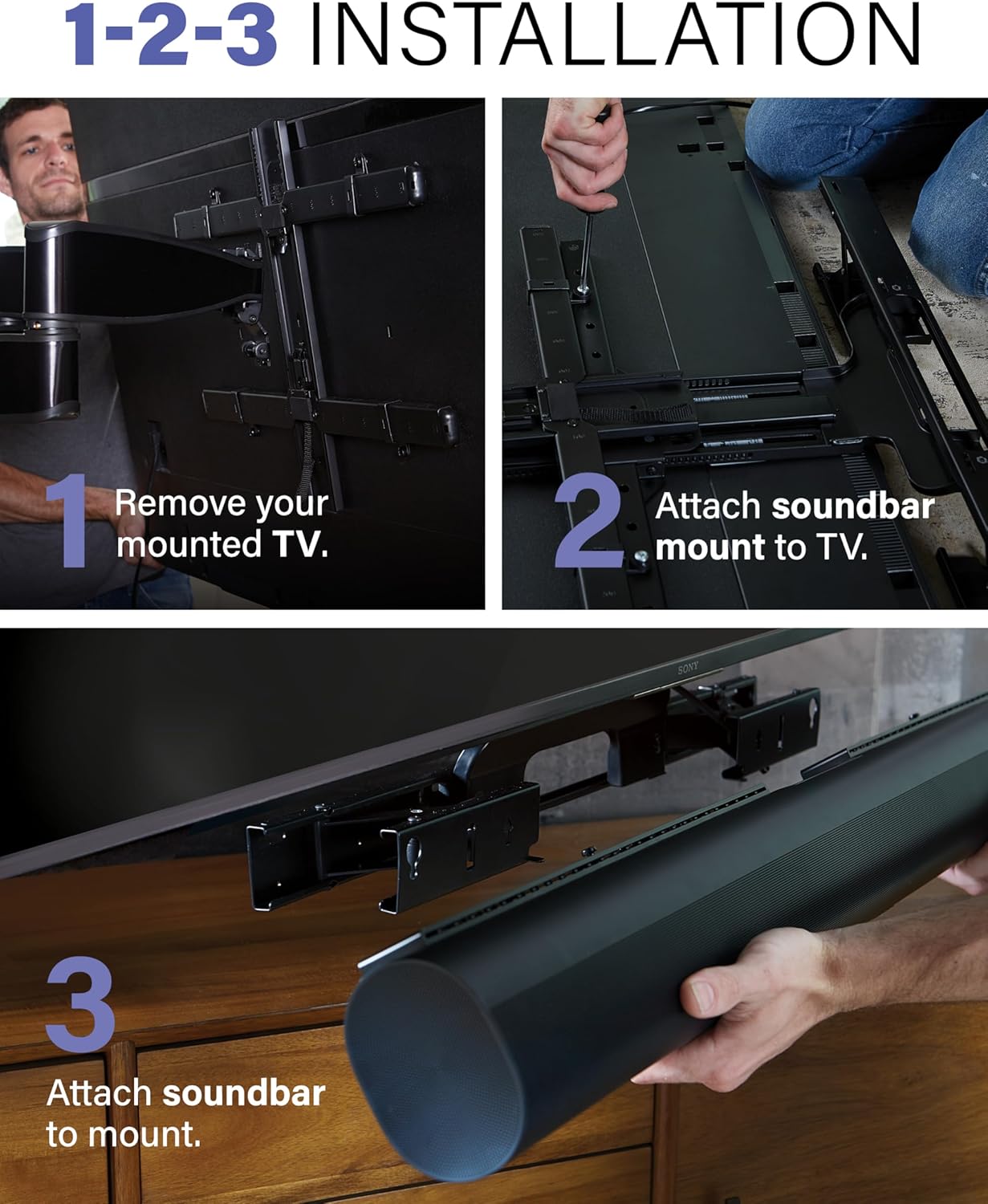
Image: A visual guide demonstrating the three-step installation process: removing the TV, attaching the mount to the TV, and then attaching the soundbar to the mount.
5. Operating Instructions
The SANUS OSSATM1-B2 mount offers adjustable features to optimize your soundbar's position relative to your TV.
5.1 Height Adjustment
The mount allows for up to 15 inches of height adjustment. Use the easy release latch to effortlessly raise or lower the soundbar to your preferred listening height, ensuring it aligns perfectly with your TV's bottom edge or is positioned for optimal audio dispersion.
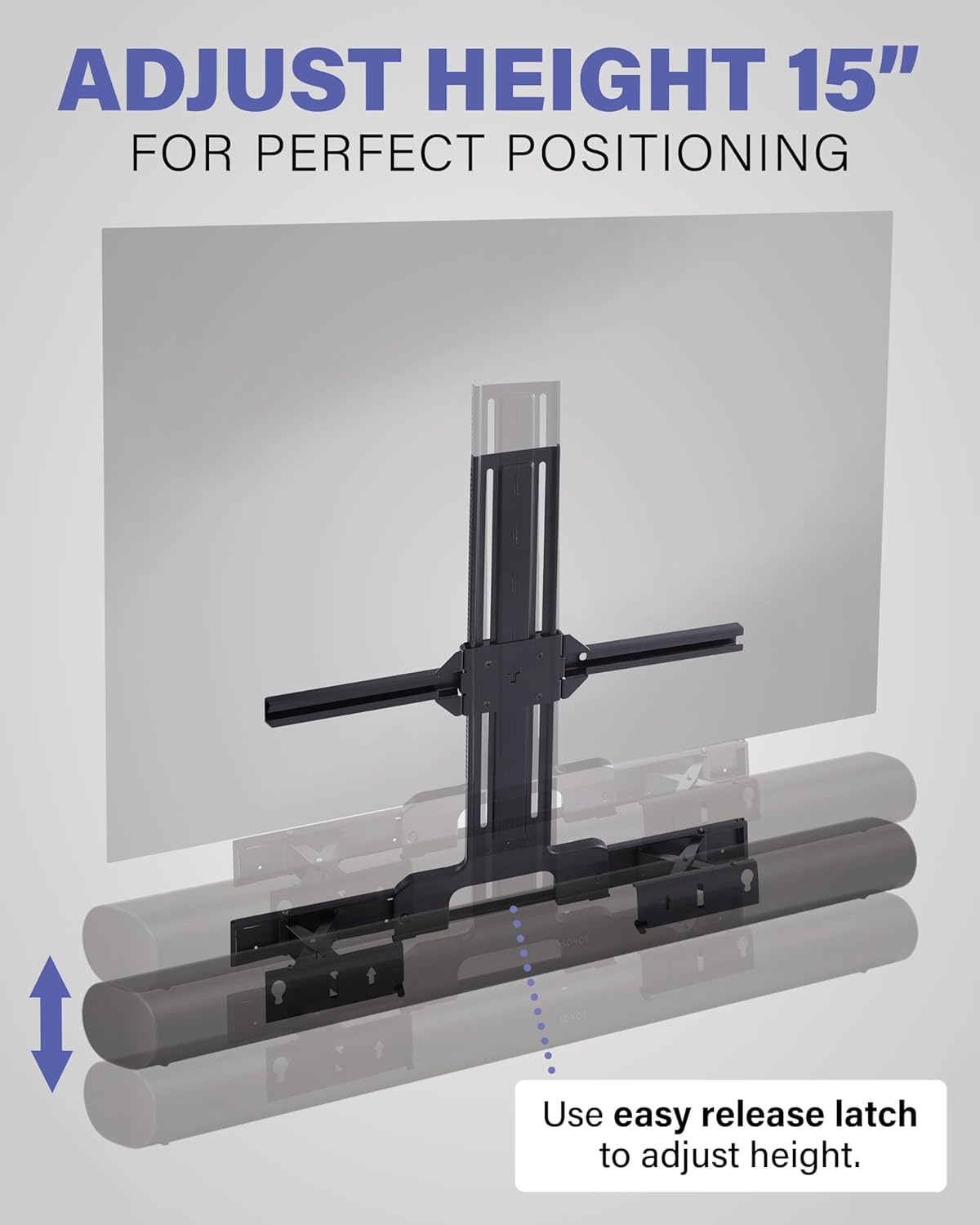
Image: A graphic illustrating the 15-inch height adjustment capability of the soundbar mount, showing the soundbar moving up and down relative to the TV.
5.2 Depth Adjustment
The mount features 5 inches of depth adjustment. This allows you to position the soundbar forward or backward, ensuring clear access to the soundbar's I/O buttons, power ports, microphones, and unobstructed upward-firing Dolby Atmos drivers.

Image: A visual representation of the 5-inch depth adjustment feature, showing the soundbar extending forward from the TV to optimize Dolby Atmos sound projection.
5.3 Full-Motion TV Mount Integration
When paired with a full-motion TV mount, the soundbar moves in conjunction with your television, maintaining optimal sound projection regardless of the TV's position.

Image: A living room setup showing a soundbar mounted below a TV, both moving together on a full-motion TV mount, ensuring consistent audio experience.
6. Maintenance
To ensure the longevity and proper function of your SANUS Soundbar TV Mount, follow these simple maintenance guidelines:
- Cleaning: Dust the mount periodically with a soft, dry cloth. Avoid abrasive cleaners or solvents that could damage the finish.
- Connection Check: Every 6-12 months, inspect all screws and connections to ensure they remain tight and secure. Re-tighten if necessary.
- Movement Check: If using the height or depth adjustment features frequently, periodically check for smooth operation and ensure all locking mechanisms engage properly.
7. Troubleshooting
If you encounter any issues with your SANUS Soundbar TV Mount, refer to the following common troubleshooting tips:
- Soundbar not level: Ensure the mount is installed evenly on the TV's VESA holes. Adjust the height and depth mechanisms to fine-tune the soundbar's alignment.
- Difficulty adjusting height/depth: Check that the easy release latch is fully disengaged for height adjustment. For depth adjustment, ensure no cables are obstructing the movement. Lubrication is generally not required, but ensure no debris is in the tracks.
- Cables obstructed: Utilize the depth adjustment feature to move the soundbar forward, providing better access to ports. Ensure cables are routed neatly and not pinched by the mount.
- Mount feels unstable: Re-check all mounting screws connecting the mount to the TV and the soundbar to the mount. Ensure they are tightened according to the installation instructions. Verify that your TV mount is securely installed to the wall.
If problems persist, contact SANUS Customer Care for further assistance.
8. Specifications
| Feature | Detail |
|---|---|
| Model Number | OSSATM1-B2 |
| Brand | Sanus |
| Compatible Soundbars | Sonos Arc, Sonos Arc Ultra |
| Compatible TV Sizes | 50" to 90" |
| Height Adjustment | Up to 15 inches |
| Depth Adjustment | Up to 5 inches |
| Mounting Type | TV Mount Attachment |
| Color | Black |
| Item Weight | 0.01 ounces (shipping weight may vary) |
| Package Dimensions | 29.45 x 12.99 x 2.76 inches |
9. Warranty and Support
9.1 Warranty Information
The SANUS OSSATM1-B2 Soundbar TV Mount is backed by a 10-Year Limited Warranty. This warranty covers defects in materials and workmanship under normal use. Please retain your proof of purchase for warranty claims.

Image: A graphic highlighting the 10-year limited warranty and SANUS's commitment to quality and safety-tested products.
9.2 Customer Support
For technical assistance, installation questions, or warranty inquiries, please contact SANUS Customer Care. Our US-based expert customer care team is available 7 days a week to provide support.
Visit the official Sanus Store on Amazon for more information and contact details.
Related documentsOSSATM1-B2


Ask a question about this manual
Ask about setup, troubleshooting, compatibility, parts, safety, or missing instructions. Manuals+ will review the question and use this page’s manual context to help answer it.