
Merkury Innovations Merkury 3-in-1 Device Stand
Contents
Merkury 3-in-1 Device Stand Desktop Charging Station User Manual
Model: Merkury 3-in-1 Device Stand
Introduction
This user manual provides essential information for the proper setup, operation, and maintenance of your Merkury 3-in-1 Device Stand Desktop Charging Station. Please read this manual thoroughly before using the product to ensure optimal performance and safety.

Image: Front view of the Merkury 3-in-1 Device Stand Desktop Charging Station product box, showcasing the device stand with an iPhone, AirPods, and Apple Watch in place.
Setup Instructions
The Merkury 3-in-1 Device Stand is designed for easy setup. It requires your existing Apple Lightning cables and Apple Watch charger (not included) to function as a charging station.
- Prepare Cables: Gather your Apple Lightning cables (for iPhone and AirPods) and your Apple Watch magnetic charging cable.
- Route iPhone Cable: Carefully route one Apple Lightning cable through the designated channel for the iPhone stand. Ensure the Lightning connector protrudes from the bottom of the stand's phone slot.
- Route AirPods Cable: Route a second Apple Lightning cable through the channel for the AirPods charging case slot. The Lightning connector should be positioned to connect to the AirPods case.
- Install Apple Watch Charger: Insert your Apple Watch magnetic charging cable into the circular cutout for the Apple Watch. The magnetic charging puck should sit flush within the cutout. Route the cable through the provided channel underneath the stand.
- Connect to Power: Connect the USB ends of all routed cables to a multi-USB power adapter (not included).
- Place Devices: Place your iPhone, AirPods charging case, and Apple Watch onto their respective positions on the stand.

Image: An illustrative diagram showing the internal cable routing for the iPhone, AirPods, and Apple Watch charging cables within the Merkury 3-in-1 Device Stand.

Image: Rear view of the Merkury 3-in-1 Device Stand, demonstrating the integrated cable management system designed to keep charging cables organized and out of sight.
Operating Instructions
Once set up, the Merkury 3-in-1 Device Stand operates by simply placing your compatible devices onto their designated charging points.
- iPhone Charging: Place your iPhone vertically into the front slot. The Lightning connector will engage, initiating charging. The stand holds the iPhone upright for easy viewing.
- AirPods Charging: Insert your AirPods charging case into the dedicated slot. The Lightning connector will connect, and charging will begin.
- Apple Watch Charging: Place your Apple Watch onto the magnetic charging puck. The watch will magnetically align and begin charging. The stand positions the Apple Watch to function as a decorative timepiece.
- Fast Charging: The stand supports fast charging, provided your connected USB power adapter and cables also support fast charging.

Image: The Merkury 3-in-1 Device Stand in active use on a desk, simultaneously charging an iPhone, AirPods, and Apple Watch, demonstrating its compact and organized design.

Image: A close-up view of the Merkury 3-in-1 Device Stand with an iPhone, AirPods, and Apple Watch successfully docked and charging, highlighting the neat arrangement of devices.
Maintenance
To ensure the longevity and proper function of your Merkury 3-in-1 Device Stand, follow these simple maintenance guidelines:
- Cleaning: Wipe the stand with a soft, dry, or slightly damp cloth. Do not use abrasive cleaners, solvents, or harsh chemicals, as these may damage the plastic material.
- Cable Management: Periodically check that cables are securely routed within the stand's channels to prevent tangling or damage.
- Storage: When not in use for extended periods, store the device stand in a cool, dry place away from direct sunlight and extreme temperatures.
Troubleshooting
If you encounter issues with your Merkury 3-in-1 Device Stand, refer to the following common problems and solutions:
| Problem | Possible Cause | Solution |
|---|---|---|
| Device not charging. |
|
|
| Stand feels unstable. |
|
|
Specifications
- Product Name: Merkury 3-in-1 Device Stand Desktop Charging Station
- Model: Merkury 3-in-1 Device Stand
- Brand: Merkury Innovations
- Material: Plastic
- Color: Pink
- Compatible Devices: Cellular Phones (iPhone), Headphones (AirPods), Smartwatches (Apple Watch)
- Compatible iPhone Models: iPhone 12 / 12 Pro / 12 mini / 12 Pro Max, 11 / 11 Pro / 11 Pro Max, XS / XS Max / XR / X / 8 / 8 Plus, 7 / 7 Plus, 6 / 6s Plus
- Compatible Apple Watch Models: Series SE / 6 / 5 / 4 / 3 / 2 / 1 (44mm, 42mm, 40mm, 38mm)
- Compatible AirPods Models: AirPods / AirPods Pro
- Total USB Ports: 3 (for connecting cables to power adapter)
- Wattage: 10 watts (Requires compatible power adapter)
- Product Dimensions: 17.78 x 13.97 x 6.35 cm
- Product Weight: 241 g
- Special Feature: Fast Charging (Requires compatible power adapter and cables)
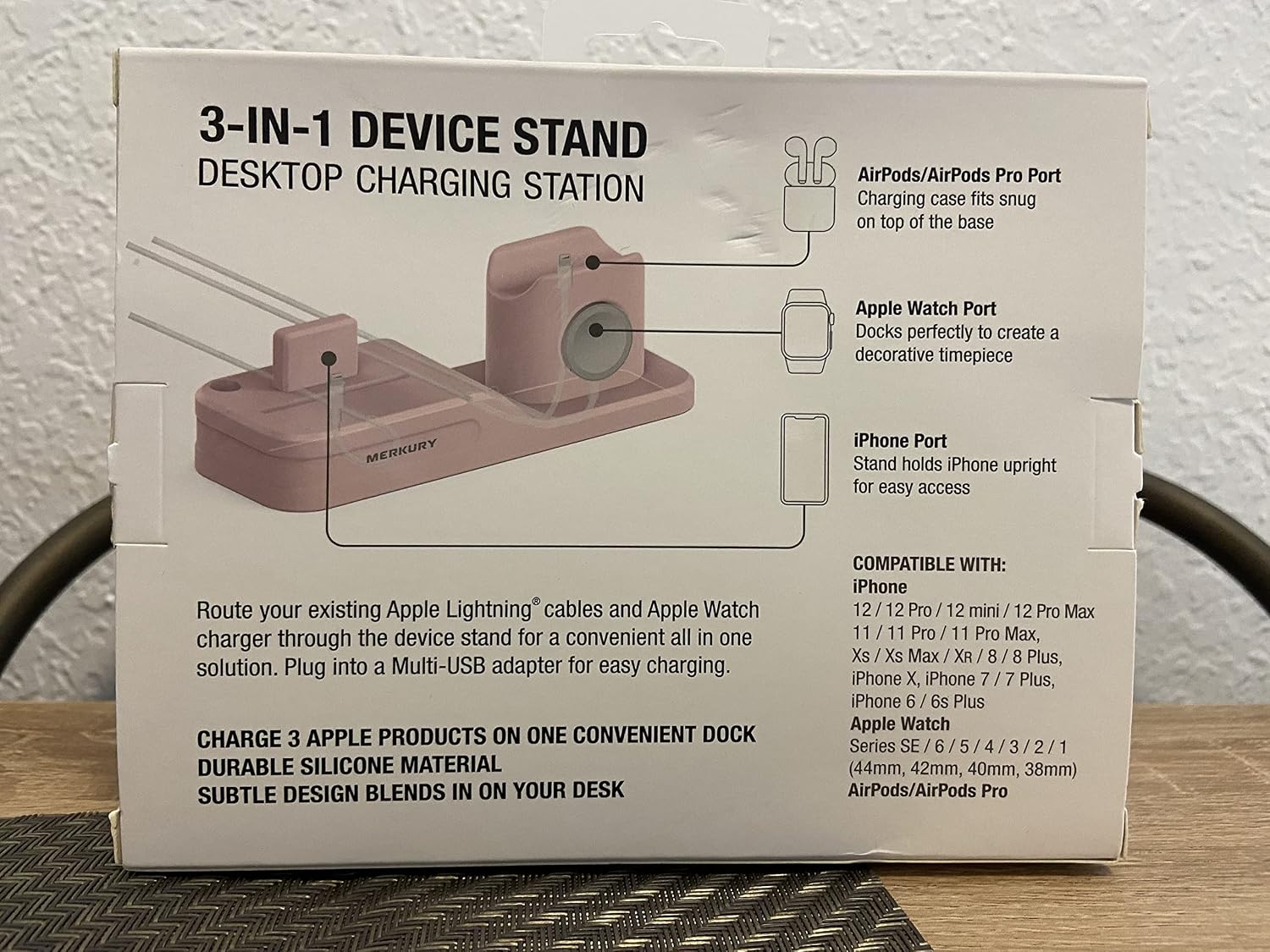
Image: Back view of the Merkury 3-in-1 Device Stand product box, providing detailed information on the specific ports for AirPods, Apple Watch, and iPhone, along with a comprehensive list of compatible device models.

Image: Side view of the Merkury 3-in-1 Device Stand product box, emphasizing the "WIRE PASS-THROUGH" feature designed to keep your desk neat and organized by managing cables effectively.
Warranty Information
Specific warranty details are typically provided with the product packaging or on the manufacturer's official website. Please refer to the documentation included with your purchase or visit the Merkury Innovations website for the most current warranty policy.
Customer Support
For technical assistance, troubleshooting beyond this manual, or general inquiries, please contact Merkury Innovations customer support. Contact information can usually be found on the product packaging or their official website.
Manufacturer: Merkury Innovations
Website: www.merkuryinnovations.com
Documents and downloads
Ask a question about this manual
Ask about setup, troubleshooting, compatibility, parts, safety, or missing instructions. Manuals+ will review the question and use this page’s manual context to help answer it.