Introduction
Thank you for choosing the Tronsmart Mega Pro Portable Wireless Speaker. This manual provides detailed instructions for setting up, operating, and maintaining your device. Please read this manual thoroughly before use to ensure optimal performance and longevity of your speaker.
Product Overview
The Tronsmart Mega Pro is a high-performance portable wireless speaker designed to deliver powerful audio with enhanced bass and versatile features. It includes SoundPulse technology, multiple EQ modes, an intuitive touch panel, and IPX5 water resistance.
Key Features
- 360° Surround Sound: Equipped with dual full-range drivers for detailed audio and powerful bass.
- Light Show: Customizable light display to enhance the audio-visual experience.
- Stereo Pairing (TWS): Connect two Mega Pro speakers for an immersive stereo sound experience.
- Extended Playtime: Up to 10 hours of continuous playback on a single charge (at 50% volume).
- Ultra-portable Design: Compact and lightweight for easy transport.
- SoundPulse® Technology: Patented technology for powerful 60W audio output.
- Three EQ Effects: Switch between Deep Bass (default), Vocal, and 3D audio modes.
- Intuitive Touch Panel: Responsive touch controls with integrated lighting.
- IPX5 Water Resistance: Dust and splash-proof design for outdoor use.
- Smart Voice Assistant: Supports Siri, Cortana, and Google Assistant.
- Inbuilt USB-A Power Bank: Can charge other devices.
- NFC Seamless Connection: Quick pairing with NFC-enabled devices.
Package Contents
Please check that all items are present:
- Tronsmart Mega Pro Portable Wireless Speaker
- USB-C Charging Cable
- 3.5mm Audio Cable
- User Manual
- Warranty Card
Setup
1. Charging the Speaker
Before first use, fully charge the speaker. Connect the provided USB-C charging cable to the speaker's charging port and a compatible USB power adapter (not included). The charging indicator light will show the charging status.

Image: The Tronsmart Mega Pro speaker, showing its general design and indicating where the charging port would be located.
2. Power On/Off
- To power on, press and hold the Power button for 2 seconds.
- To power off, press and hold the Power button for 2 seconds.
3. Bluetooth Pairing
- Turn on the speaker. It will automatically enter Bluetooth pairing mode, indicated by a flashing blue LED.
- Enable Bluetooth on your device (smartphone, tablet, etc.).
- Search for "Tronsmart Mega Pro" in your device's Bluetooth list and select it to connect.
- Once connected, the LED indicator will turn solid blue.
4. NFC Pairing (Near Field Communication)
For quick pairing with NFC-enabled devices:
- Ensure NFC is enabled on your device and the speaker is powered on.
- Place your NFC-enabled device near the NFC area on the speaker (usually indicated by an NFC logo).
- Confirm the pairing on your device when prompted.
5. True Wireless Stereo (TWS) Pairing
To pair two Tronsmart Mega Pro speakers for stereo sound:
- Ensure both speakers are powered on and not connected to any other Bluetooth device.
- On one speaker (this will be the primary speaker), press the TWS button. The TWS indicator will flash.
- The two speakers will automatically connect to each other. Once connected, the TWS indicator on both speakers will turn solid.
- Now, connect your device to the primary speaker via Bluetooth as described in step 3.

Image: Two Tronsmart Mega Pro speakers demonstrating True Wireless Stereo pairing for an enhanced audio experience.
Operating Instructions
1. Touch Panel Functions
The Tronsmart Mega Pro features an intuitive touch panel with integrated lighting for easy control.

Image: A detailed view of the speaker's touch-sensitive control panel, highlighting the illuminated buttons for various functions.
| Button/Gesture | Function |
|---|---|
| Power Button | Press and hold for 2 seconds to Power On/Off. |
| Play/Pause | Press to Play/Pause music. |
| Volume Up (+) | Tap to increase volume. Swipe right on the volume bar to increase volume continuously. |
| Volume Down (-) | Tap to decrease volume. Swipe left on the volume bar to decrease volume continuously. |
| Next Track (>>) | Press to skip to the next track. |
| Previous Track (<<) | Press to go to the previous track. |
| EQ Button (M) | Press to cycle through EQ modes: Deep Bass, Vocal, 3D. |
| Voice Assistant Button | Press to activate your device's voice assistant (Siri, Cortana, Google Assistant). |
| Light Button | Press to change or turn off the light effects. |
2. EQ Modes
The Mega Pro offers three distinct equalizer audio effects to suit your listening preference. Press the 'M' (EQ) button to switch between them:
- Deep Bass (Default): Emphasizes low frequencies for a powerful bass experience.
- Vocal: Optimizes mid-range frequencies for clear vocal reproduction.
- 3D: Creates a wider, more immersive soundstage.

Image: Visual representation of the three available EQ modes (Deep Bass, Vocal, 3D) that can be selected on the speaker.
3. Voice Assistant
Activate your smartphone's voice assistant (Siri, Cortana, Google Assistant) by pressing the dedicated Voice Assistant button on the speaker's touch panel. Ensure your phone is connected via Bluetooth and the voice assistant feature is enabled on your device.
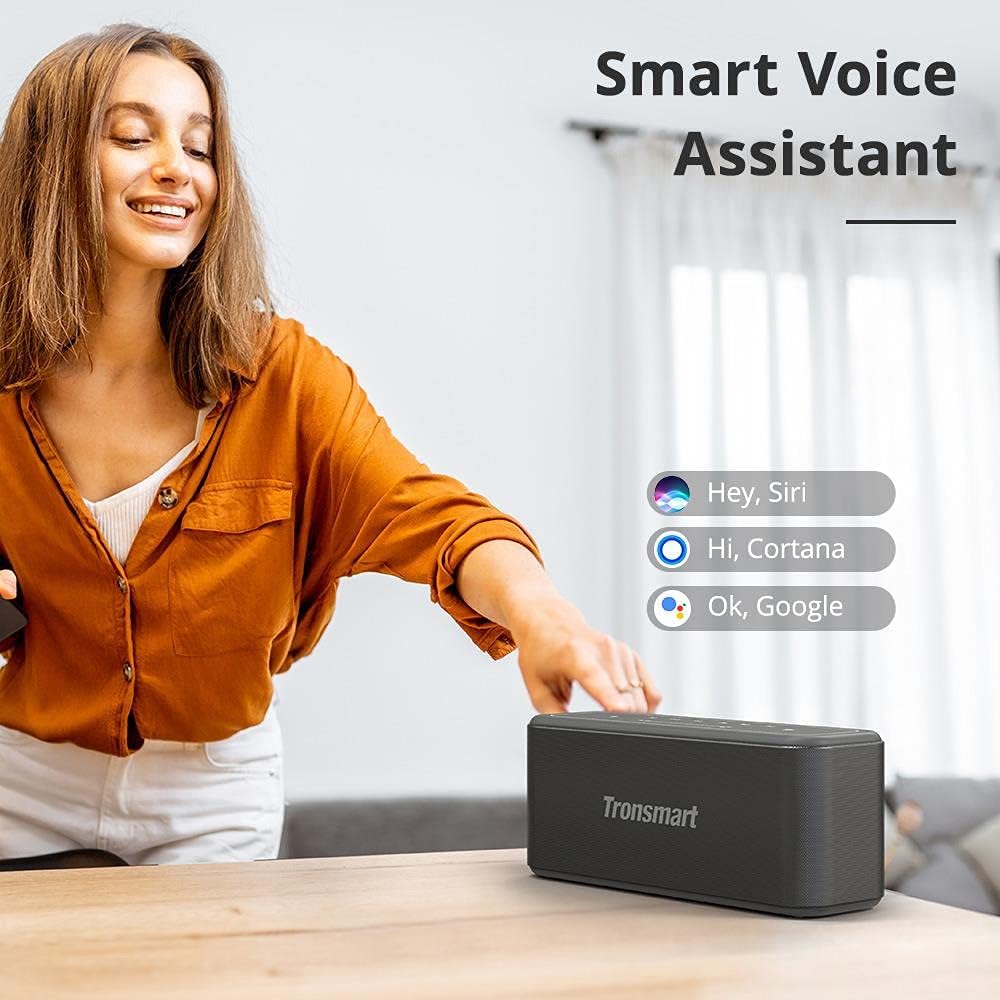
Image: A user demonstrating the activation of a smart voice assistant through the Tronsmart Mega Pro speaker.
4. Using as a Power Bank
The Tronsmart Mega Pro can be used to charge other devices. Connect your device to the speaker's USB-A output port using a compatible charging cable. The speaker's internal battery will then supply power to your device.
5. Aux-in Mode
Connect an external audio device (e.g., MP3 player, computer) to the speaker using the provided 3.5mm audio cable. The speaker will automatically switch to Aux-in mode. Use the connected device to control playback.
6. MicroSD/USB Playback
Insert a MicroSD card or a USB flash drive (with supported audio files) into the respective ports on the speaker. The speaker will automatically detect and begin playing music from the storage device. Use the speaker's controls to manage playback.
Maintenance
1. Cleaning
Wipe the speaker with a soft, damp cloth. Do not use abrasive cleaners, alcohol, or chemical solvents, as these may damage the surface or internal components.
2. Storage
Store the speaker in a cool, dry place away from direct sunlight and extreme temperatures. If storing for an extended period, charge the battery to approximately 50% every three months to prolong battery life.
3. Water Resistance (IPX5)
The Tronsmart Mega Pro is IPX5 water-resistant, meaning it is protected against low-pressure water jets from any direction. It is splash-proof and dust-proof. Do not submerge the speaker in water or expose it to heavy rain for prolonged periods. Ensure the charging port cover is securely closed before exposure to water.

Image: The Tronsmart Mega Pro speaker shown with water splashing on it, illustrating its IPX5 dust and splash-proof capabilities.
Troubleshooting
| Problem | Possible Cause | Solution |
|---|---|---|
| Speaker does not turn on. | Low battery. | Charge the speaker fully. |
| Cannot pair via Bluetooth. | Bluetooth not enabled on device; speaker already connected to another device; speaker too far from device. | Ensure Bluetooth is on. Disconnect from other devices. Move speaker closer to device (within 10 meters). Restart both devices. |
| No sound. | Volume too low; incorrect input mode; device not playing. | Increase volume on speaker and device. Check if the correct input mode (Bluetooth, Aux-in, MicroSD/USB) is selected. Ensure music is playing on the connected device. |
| Sound distortion. | Volume too high; low battery; poor audio source. | Reduce volume. Charge the speaker. Try a different audio source or file. |
| TWS pairing fails. | Speakers too far apart; one speaker already connected to a device. | Ensure speakers are close to each other. Disconnect both speakers from any Bluetooth devices before initiating TWS pairing. |
Specifications
| Feature | Detail |
|---|---|
| Model Name | Mega Pro |
| Brand | Tronsmart |
| Maximum Speaker Output Power | 60 Watts |
| Connectivity Technology | Bluetooth, NFC |
| Audio Output Mode | Stereo |
| Mounting Type | Tabletop |
| Material | Plastic |
| Special Feature | Waterproof (IPX5) |
| Recommended Uses | For smartphones or tablets |
| Batteries | 2 Lithium Polymer batteries required, included |
| Dimensions | 25 x 8.2 x 10.4 cm (9.84 x 3.23 x 4.09 inches) |
| Weight | 1.78 kg (3.92 lbs) |
| Playtime | Up to 10 hours (at 50% volume) |

Image: The Tronsmart Mega Pro speaker with its physical dimensions clearly marked.
Warranty and Support
Tronsmart products are covered by a warranty. Please refer to the warranty card included in your package for specific terms and conditions. For technical support or customer service, please visit the official Tronsmart website or contact their customer support team.
You can find more information and support at the Tronsmart Store on Amazon.


