
Ensenior 4I-5CCT-12PACK
Ensenior 4 Inch LED Recessed Ceiling Light Instruction Manual
Model: 4I-5CCT-12PACK
1. Introduction
Thank you for choosing the Ensenior 4 Inch LED Recessed Ceiling Light. This manual provides essential information for the safe and efficient installation, operation, and maintenance of your new lighting fixtures. These canless wafer downlights feature 5 selectable color temperatures (2700K-5000K), 5%-100% smooth dimming, and are designed for easy installation in various indoor settings.

Image 1: Ensenior 4 Inch LED Recessed Ceiling Light with included junction box.
2. Important Safety Information
Please read all instructions carefully before installation. Failure to do so may result in electric shock, fire, or other hazards. Keep this manual for future reference.
- WARNING: Risk of electric shock. Disconnect power at the fuse or circuit breaker before installing or servicing.
- WARNING: Risk of fire. Use only in circuits with the specified voltage (120V).
- This product must be installed in accordance with the applicable installation code by a person familiar with the construction and operation of the product and the hazards involved.
- Suitable for damp locations. Avoid direct water contact.
- IC Rated: Suitable for direct contact with insulation.
- ETL & Energy Star certified, UL-certified wire terminals ensure safety and quality.
3. Package Contents
Your package should include the following items:
- LED Recessed Lights (Quantity: 12)
- Junction Boxes (Quantity: 12)
- Cutting Template
- Instruction Manual (this document)
4. Product Specifications
| Specification | Detail |
|---|---|
| Brand | Ensenior |
| Model Number | 4I-5CCT-12PACK |
| Size | 4 inch |
| Color Temperature | 2700K, 3000K, 3500K, 4000K, 5000K (5CCT Selectable) |
| Brightness | 750 Lumens |
| Wattage | 9 Watts |
| Voltage | 120 Volts |
| Dimmability | 5%-100% Smooth Dimming |
| Material | Aluminum (Fixture), Glass (Shade) |
| Product Dimensions | 4.72"L x 4.72"W x 0.94"H |
| Cutting Diameter | 4 Inches (Recommended hole sizes: 4.25" ~ 4.6") |
| Lifespan | 50,000 hours |
| Certifications | ETL, Energy Star, FCC, IC Rated |
| Water Resistance Level | Moisture Resistant (Damp location available) |
| Installation Type | Ceiling Mount |

Image 2: Product dimensions and recommended hole size.
5. Installation Instructions
Follow these steps for a hassle-free installation:
- Turn off Power: Ensure power is disconnected at the circuit breaker before beginning installation.
- Cut a Hole: Use the provided cutting template to mark and cut a 4.25" to 4.6" diameter hole in the ceiling.
- Connect Wiring: Open the junction box. Connect the household electrical wires (black to black, white to white, ground to ground) to the UL-certified wire terminals inside the junction box. Secure the wires.
- Select Color Temperature: Before closing the junction box, use the switch on the side of the box to select your desired color temperature (2700K, 3000K, 3500K, 4000K, or 5000K).
- Connect Light Panel: Connect the male/female cable from the light fixture to the cable extending from the junction box.
- Mount Light: Gently push the spring clips on the light fixture upwards and insert the fixture into the ceiling hole. The clips will secure the light in place.
- Restore Power: Turn the power back on at the circuit breaker.

Image 3: Visual guide for the installation process.
Video 1: This video demonstrates the process of selecting color temperature and connecting the recessed light, highlighting its ultra-thin design and ease of installation.
6. Operating Instructions
6.1 Color Temperature Selection (5CCT)
Your Ensenior recessed light offers five color temperature options to suit different environments and preferences. The selection switch is located on the side of the junction box. Choose from:
- 2700K: Warm White (Ideal for bedrooms)
- 3000K: Soft White (Ideal for bathrooms)
- 3500K: Neutral White (Ideal for studies)
- 4000K: Cool White (Ideal for kitchens)
- 5000K: Daylight (Ideal for living rooms)

Image 4: Recommended color temperatures for different room types.
6.2 Dimming Functionality
The Ensenior recessed lights are 5%-100% smoothly dimmable, allowing you to adjust the brightness to create the perfect ambiance. These lights are compatible with most Lutron dimmers. Ensure you use a compatible dimmer switch for optimal performance and to avoid flickering.
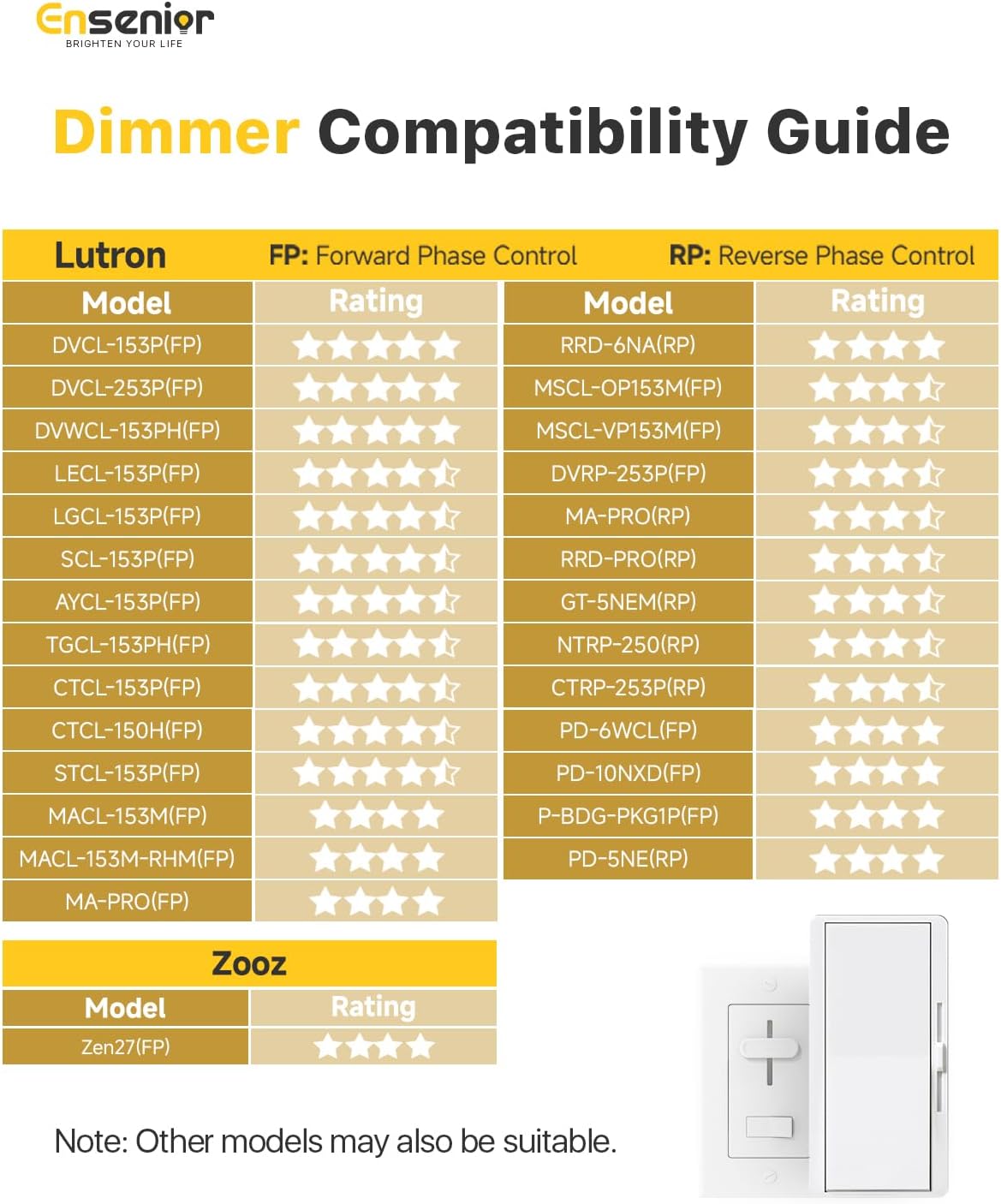
Image 5: Dimmer compatibility guide.
Video 2: This video provides an overview of the ultra-thin LED recessed ceiling light, showcasing its features and application in various home settings.
7. Maintenance
To ensure the longevity and optimal performance of your Ensenior LED Recessed Ceiling Lights, follow these simple maintenance guidelines:
- Cleaning: Ensure power is off before cleaning. Use a soft, dry, or slightly damp cloth to wipe the surface of the light fixture. Do not use harsh chemicals or abrasive cleaners, as these can damage the finish or the LED lens.
- Inspection: Periodically check the light fixtures for any signs of damage or loose connections. If any issues are found, disconnect power and consult a qualified electrician.
- Bulb Replacement: These LED fixtures are designed for a long lifespan (50,000 hours) and do not require bulb replacement. If the light stops working, refer to the troubleshooting section or contact customer support.
8. Troubleshooting
If you encounter any issues with your Ensenior LED Recessed Ceiling Light, please refer to the following common problems and solutions:
| Problem | Possible Cause | Solution |
|---|---|---|
| Light does not turn on | No power, loose wiring, incorrect CCT selection, faulty fixture. | Check circuit breaker. Verify all wire connections. Ensure CCT switch is set correctly. Test with another fixture if available. |
| Light flickers or dims inconsistently | Incompatible dimmer switch, loose wiring, voltage fluctuations. | Ensure a compatible dimmer is used (refer to compatibility guide). Check wiring connections. Consult an electrician for voltage issues. |
| Incorrect color temperature | CCT switch set incorrectly. | Turn off power, remove fixture, and adjust the CCT switch on the junction box to the desired setting. |
If the problem persists after trying these solutions, please contact Ensenior customer service for further assistance.
9. Warranty and Support
Ensenior provides a 5-year warranty for this product, covering defects in materials and workmanship under normal use. Our commitment is to your satisfaction, and our friendly customer service team is available to address your concerns within 12 hours.
For warranty claims, technical support, or any questions regarding your Ensenior LED Recessed Ceiling Lights, please contact us through the platform where you purchased the product or visit the official Ensenior website for contact information.
Related documents4I-5CCT-12PACK


Ask a question about this manual
Ask about setup, troubleshooting, compatibility, parts, safety, or missing instructions. Manuals+ will review the question and use this page’s manual context to help answer it.