
Introduction
Thank you for choosing the Candy ROW4854DXHZ-19 Washing Machine. This manual provides essential information for the safe and efficient use of your appliance. Please read these instructions carefully before installation, operation, and maintenance. Keep this manual for future reference.
This washing machine features an 8 kg capacity, a maximum spin speed of 1400 rpm, 16 wash programs, and WiFi connectivity for enhanced control.
Safety Information
- Ensure the appliance is properly grounded before use.
- Do not allow children to play with or operate the washing machine.
- Keep packaging materials out of reach of children.
- Do not install the machine in areas exposed to extreme temperatures or high humidity.
- Always unplug the appliance before cleaning or performing any maintenance.
- Do not force the door open during operation.
- Only use detergents suitable for automatic washing machines.
Setup
1. Unpacking
Carefully remove all packaging materials, including the polystyrene base and any protective films. Remove the transport bolts located at the rear of the machine. Keep these bolts for future transport if needed.
2. Location
Place the washing machine on a firm, level surface, away from direct sunlight and heat sources. Ensure there is adequate space around the machine for ventilation and maintenance.
3. Leveling the Machine
Adjust the four adjustable leveling feet at the bottom of the machine to ensure it is perfectly stable and level. Use a spirit level to check. A level machine reduces vibration and noise during operation.
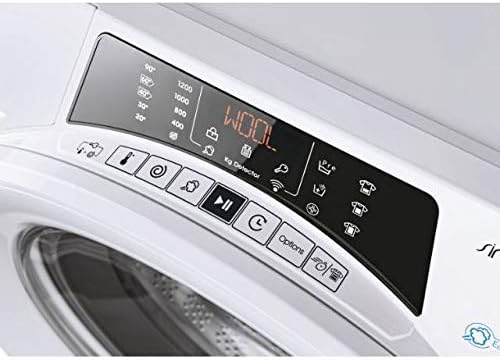
Image: Bottom view of the washing machine, highlighting the adjustable leveling feet used for stability.
4. Water Connection
Connect the cold water inlet hose to the cold water tap and the corresponding inlet on the machine. Ensure all connections are tight to prevent leaks.
5. Drain Hose Connection
Position the drain hose into a standpipe or over the edge of a sink, ensuring it is securely fixed to prevent displacement during draining. The end of the drain hose should be between 60 cm and 100 cm from the floor.
6. Electrical Connection
Plug the power cord into a grounded electrical outlet (220V). Do not use extension cords or adapters.
Operating Instructions
1. Control Panel Overview

Image: A detailed view of the washing machine's control panel, showing the digital display, program selector, and various function buttons.
The control panel features a program selector dial, a digital display, and various push buttons for options such as spin speed, temperature, delay start, and extra rinse. The display shows program information, remaining time, and error codes.
2. Loading Laundry
Open the washing machine door. Load laundry into the drum, ensuring not to overload the machine. Leave enough space for clothes to tumble freely. Close the door firmly until it clicks.

Image: The Candy washing machine with its front door open, illustrating how to load laundry into the drum.
3. Adding Detergent
Pull out the detergent dispenser drawer. Add the appropriate amount of detergent to the main wash compartment and fabric softener to its designated compartment. Refer to detergent packaging for dosage recommendations.

Image: Top view of the washing machine, showing the detergent dispenser drawer pulled out for adding detergent and fabric softener.
4. Selecting a Program
Turn the program selector dial to choose one of the 16 available wash programs (e.g., Cotton, Synthetics, Delicates, Wool, Quick Wash). The display will show the default settings for the selected program.
5. Adjusting Options
Use the option buttons to customize your wash cycle. You can adjust the spin speed (up to 1400 rpm), water temperature, add a pre-wash, or select an extra rinse. The digital display will update with your selections.
6. Starting the Cycle
Press the Start/Pause button to begin the wash cycle. The machine will automatically lock the door and start filling with water.
7. WiFi Connectivity
This appliance supports WiFi connectivity. Download the Candy simply-Fi app on your smartphone or tablet to connect and control your washing machine remotely, access additional programs, and receive maintenance tips.
Maintenance
1. Cleaning the Detergent Dispenser
Regularly clean the detergent dispenser drawer to prevent detergent residue buildup. Remove the drawer, rinse it under running water, and use a brush to clean any stubborn deposits. Reinsert the drawer.
2. Cleaning the Filter
The drain pump filter should be cleaned periodically to ensure proper drainage. Locate the filter cover at the bottom front of the machine. Place a shallow container underneath to catch any residual water. Unscrew the filter, remove any lint or foreign objects, rinse it, and screw it back in securely.
3. Cleaning the Drum
Run a maintenance wash cycle (e.g., a hot wash with no laundry and a descaling agent or white vinegar) once a month to keep the drum clean and free from odors.
4. Exterior Cleaning
Wipe the exterior of the machine with a soft, damp cloth. Do not use abrasive cleaners or solvents.
Troubleshooting
| Problem | Possible Cause | Solution |
|---|---|---|
| Machine does not start | Power cord unplugged, door not closed, program not selected, Start button not pressed. | Check power connection, ensure door is latched, select a program, press Start. |
| Water not filling | Water tap closed, inlet hose kinked, water pressure too low. | Open water tap, straighten hose, check water supply. |
| Water not draining | Drain hose kinked or blocked, pump filter clogged. | Straighten drain hose, clean pump filter. |
| Excessive vibration/noise | Machine not level, transport bolts not removed, uneven load. | Adjust leveling feet, remove transport bolts, redistribute laundry. |
| Detergent residue in dispenser | Detergent dispenser clogged, too much detergent used. | Clean dispenser, reduce detergent amount. |
If the problem persists after attempting these solutions, please contact customer support.
Specifications
| Feature | Specification |
|---|---|
| Brand | Candy |
| Model Number | ROW4854DXHZ-19 |
| Capacity | 8 kg |
| Maximum Spin Speed | 1400 rpm |
| Number of Wash Programs | 16 |
| Number of Spin Cycles | 8 |
| Loading Type | Front Load |
| Control Type | Push Button |
| Voltage | 220 Volts |
| Drum Material | Stainless Steel |
| Product Dimensions (D x W x H) | 66 cm x 68.5 cm x 106.5 cm |
| Item Weight | 65 kg |
| Special Features | Adjustable leveling feet |
| Compliance | Energy Star |
Warranty and Support
Warranty Information
This product is eligible for a two-year warranty provided by the manufacturer/brand from the date of purchase. For specific terms and conditions, please refer to the warranty card included with your appliance or contact the manufacturer directly.
Customer Support
For technical assistance, spare parts, or any inquiries regarding your Candy washing machine, please contact your local Candy service center or the seller from whom you purchased the appliance. Have your model number (ROW4854DXHZ-19) and purchase date ready when contacting support.


