
FANGOR Fangor F802
FANGOR F802 5G WiFi Projector User Manual
Model: F802 | Brand: FANGOR
Product Overview
The FANGOR F802 is a portable 5G WiFi projector designed for versatile entertainment and presentation needs. It supports up to 1080P Full HD resolution, offers a large display size, and features a 360° stereo speaker with Bluetooth 5.0 connectivity. Its compact design and multiple input options make it suitable for various environments, from home entertainment to outdoor movie nights and office presentations.

Figure 1: FANGOR F802 5G WiFi Projector with smartphone screen mirroring illustration.
Key Features:
- Supports 1080P Full HD resolution with native 720P.
- Capable of projecting a display up to 300 inches.
- Integrated 360° omnidirectional stereo speaker.
- Bluetooth 5.0 for wireless audio device connection.
- 5G WiFi and USB cable support for smartphone screen synchronization (iOS/Android).
- Multiple connectivity options: HDMI, AV, USB.
- Portable and compact design with a convenient handle.
What's in the Box
Upon opening the package, verify that all components are present and in good condition. The standard package includes:
- FANGOR F802 Projector
- Remote Control
- Power Adapter
- HDMI Cable
- AV Cable
- User Manual
Setup Guide
1. Placement
Position the projector on a stable, flat surface. Ensure there is adequate ventilation around the unit. For optimal viewing, place the projector perpendicular to the projection surface (wall or screen). The ideal projection distance ranges from 1 to 5 meters to achieve a display size up to 300 inches.

Figure 2: Example of projector placement for a large display.
2. Power Connection
Connect the provided power adapter to the projector's power input port and then plug it into a wall outlet. The projector requires continuous power to operate.
3. Initial Power On
Press the power button on the projector or the remote control to turn on the device. The power indicator light will illuminate.
4. Focus Adjustment
Rotate the focus ring located on the projector lens until the projected image appears clear and sharp on the screen.
Operating Instructions
1. Input Source Selection
Use the 'Source' button on the remote control or the projector's control panel to select the desired input source (e.g., HDMI, AV, USB, WiFi).
2. Connecting Devices
- HDMI Connection: Connect your TV Stick, PS4, laptop, or other HDMI-enabled devices to the projector's HDMI port using an HDMI cable.
- AV Connection: Use the provided AV cable to connect DVD players or other devices with AV output to the projector's AV port.
- USB Connection: Insert a USB drive into the USB port to play media files directly. For smartphone screen synchronization, connect your iOS or Android phone via a USB cable (no HDMI adapter needed).
- Wireless (WiFi) Connection:
- Select the 'WiFi' input source.
- Follow the on-screen instructions to connect the projector to your home WiFi network.
- For iOS devices, use AirPlay/Screen Mirroring. For Android devices, use the screen mirroring function. Ensure both the projector and your smartphone are connected to the same WiFi network.
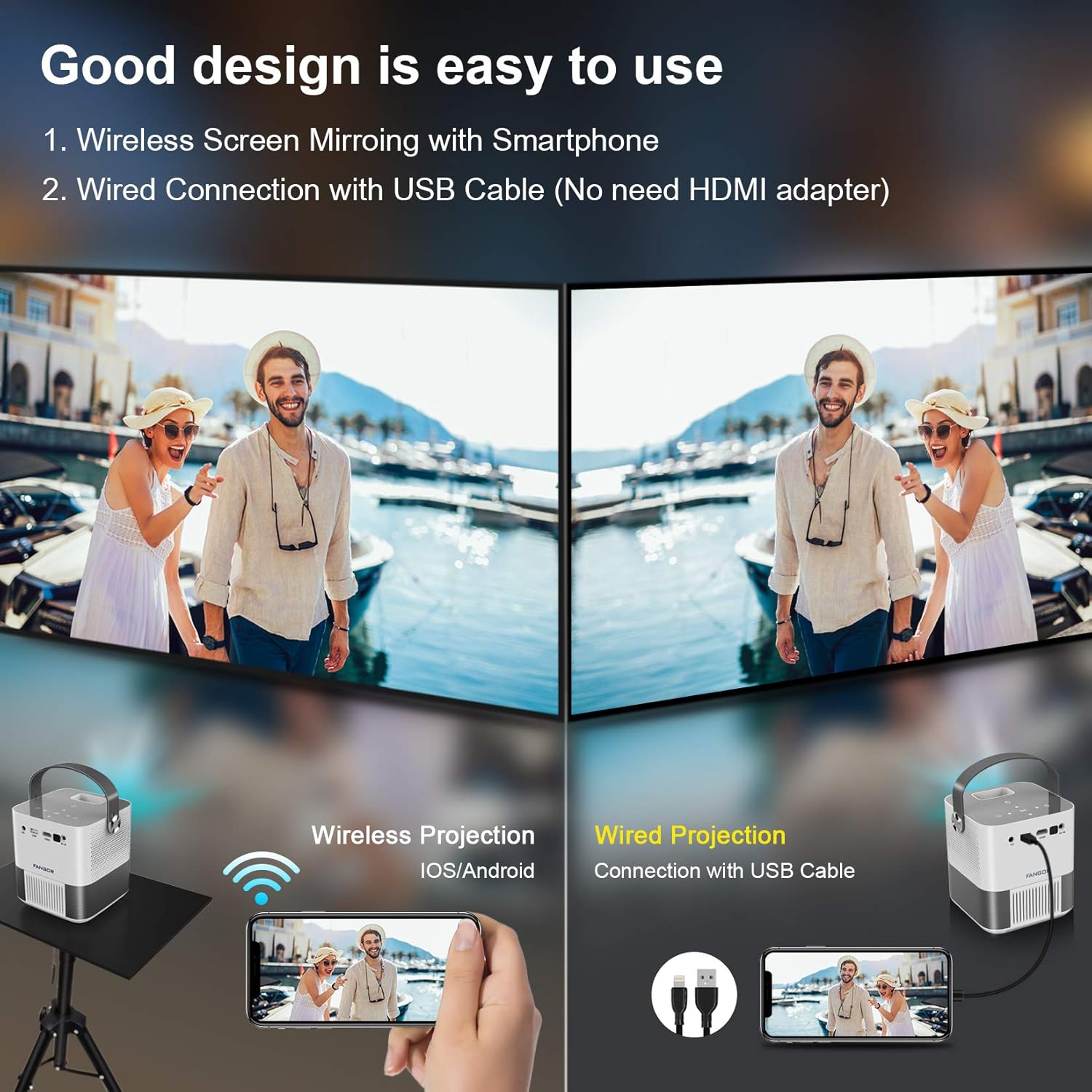
Figure 3: Wireless and wired smartphone connection options.
3. Bluetooth Audio Connection
The projector features Bluetooth 5.0 for connecting external audio devices (speakers, headphones). This function only supports audio output.
- Ensure your Bluetooth audio device is in pairing mode.
- On the projector, navigate to the Bluetooth settings menu.
- Select your device from the list to pair.

Figure 4: The FANGOR F802 projector features a 360° HIFI speaker.
Maintenance
1. Lens Cleaning
Use a soft, lint-free cloth specifically designed for optical lenses to gently wipe the projector lens. Avoid using abrasive cleaners or cloths that could scratch the lens surface.
2. Ventilation
Ensure the projector's ventilation vents are clear of dust and obstructions. Regular cleaning with a soft brush or compressed air can help maintain optimal airflow and prevent overheating.
3. Storage
When not in use, store the projector in a cool, dry place away from direct sunlight and extreme temperatures. Use the original packaging or a protective case to prevent dust accumulation and physical damage.
Troubleshooting
| Problem | Possible Cause | Solution |
|---|---|---|
| No image projected / Power off | Power cable disconnected; Projector not powered on. | Check power connections; Press the power button. |
| Blurry image | Focus not adjusted; Keystone correction needed. | Adjust the focus ring; Access menu for keystone correction. |
| No sound | Volume too low; Incorrect audio output selected; Bluetooth device not connected. | Increase volume; Check audio settings; Re-pair Bluetooth device. |
| Cannot connect via WiFi/Screen Mirroring | Projector and device on different networks; Network issues; App restrictions (e.g., Netflix). | Ensure both devices are on the same 5G WiFi network; Restart router/projector; Use wired USB connection for restricted apps. |
| Remote control not working | Batteries low/dead; Obstruction between remote and projector. | Replace batteries; Ensure clear line of sight to the projector's IR receiver. |
For further assistance, please refer to the "Warranty and Support" section.
Specifications
- Model: F802
- Dimensions: 4.33 x 4.33 x 6.22 inches
- Weight: 5.14 pounds
- Native Resolution: 720P
- Supported Resolution: Up to 1080P Full HD
- Brightness: 10000L (Lumens)
- Display Size: Up to 300 inches
- Connectivity: 5G WiFi, Bluetooth 5.0, HDMI, AV, USB
- Speaker: 360° Stereo Speaker
Warranty and Support
FANGOR products come with a 1-Month refund and exchange policy and a 1-Year warranty from the date of purchase. For any product-related issues, technical support, or warranty claims, please contact the FANGOR Support team.
You can visit the official FANGOR store for more information and contact details: FANGOR Official Store
Please retain your purchase receipt for warranty validation.
Related documentsFangor F802


Ask a question about this manual
Ask about setup, troubleshooting, compatibility, parts, safety, or missing instructions. Manuals+ will review the question and use this page’s manual context to help answer it.