
1. Product Overview
The DALY BMS 24S 72V 200A LiFePO4 Battery Protection Module is a sophisticated PCB designed to optimize the performance and extend the lifespan of 18650 LiFePO4 battery packs. It integrates essential protection features including overcurrent, overcharge, overdischarge, short circuit, and temperature protection. This standard BMS model comes equipped with a cooling fan for enhanced thermal management.

Figure 1: DALY BMS 24S 72V 200A LiFePO4 Battery Protection Module (Top View)
2. Key Features
- Comprehensive Protection: Overcurrent, overcharge, overdischarge, short circuit, and temperature protection ensure battery safety and longevity.
- Enhanced Durability: Features double protection via injection patent technology and a patent shell, making it waterproof, dustproof, shockproof, and anti-static.
- High-Quality Components: Constructed with pressure-resistant and durable materials, ensuring high acquisition accuracy.
- Integrated Cooling Fan: Provides active cooling for optimal performance, especially under high load conditions.
- Easy Installation: Designed for straightforward plug-and-play connections, simplifying the electrical connection between the battery pack and the BMS.

Figure 2: Exploded View of DALY BMS Components
3. Setup and Installation
Proper installation is crucial for the safe and effective operation of your DALY BMS. Follow these steps carefully:
- Prepare Battery Pack: Ensure your 24S LiFePO4 battery pack is assembled and all cells are balanced. Mark the battery pack's positive (B+) and negative (B-) terminals, as well as individual cell connection points (B1, B2, ..., B24).
- Determine Sampling Points: The video below demonstrates how to accurately determine the sampling points on your battery pack. This involves identifying the total negative electrode (B-), and then sequentially marking the connection points between each cell (B1, B2, etc.) up to the total positive electrode (B+).
- Verify Sampling Points with Multimeter: Before connecting the balance wires, use a multimeter to verify the voltage at each sampling point. Set the multimeter to DC voltage mode. Place the black meter pen at the B- (total negative) point. Then, place the red meter pen at B1, B2, and so on. The voltage should increase incrementally (approximately 3V per cell for LiFePO4) as you move up the string. If the voltage does not increase consistently, your sampling points or battery connections may be incorrect.
- Connect Balance Wires: The BMS comes with a sampling cable. The black wire of this cable connects to the total negative electrode (B-). The subsequent red wires connect to B1, B2, and so on, in ascending order, up to B24. Ensure all balance wires are securely connected to their corresponding sampling points.
- Connect BMS to Battery Pack: After all balance wires are connected and verified, connect the main positive (P+) and negative (P-) terminals of the BMS to your battery pack's main output terminals.
- Final Check: Double-check all connections for proper polarity and secure fit.
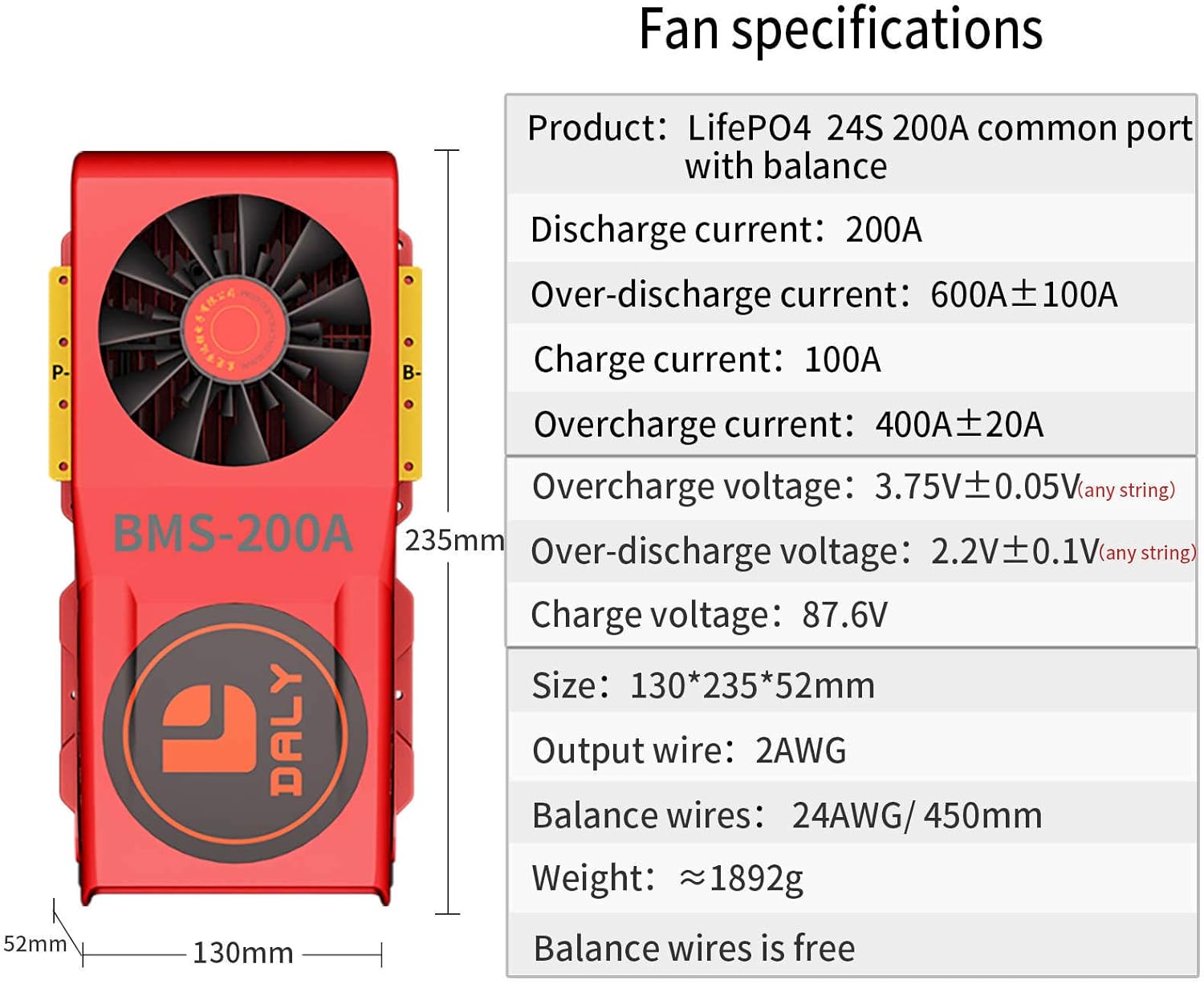
Figure 3: BMS Wiring Instructions Manual and Fan Specifications
Installation Video Guide:
Video 1: DALY Smart BMS Wiring Tutorial (Sampling point determination)
This video provides a detailed visual guide on how to correctly identify sampling points and wire your DALY BMS to a battery pack. It demonstrates the use of a multimeter to verify connections and ensure proper voltage readings, which is critical for safe operation.
4. Operating Instructions
The DALY 24S 72V 200A Standard BMS operates automatically to protect your LiFePO4 battery pack. As a standard BMS, it does not feature communication functions (e.g., Bluetooth, UART, RS485, CAN). Its primary function is to monitor and protect the battery cells from various electrical hazards.
Once properly installed and connected, the BMS will continuously monitor the battery pack's voltage, current, and temperature. It will automatically engage its protection mechanisms if any parameter exceeds safe operating limits (e.g., during overcharge, overdischarge, overcurrent, or short circuit events). The integrated cooling fan will activate as needed to manage the temperature of the BMS itself.
No direct user interaction is required for its protective functions. For systems requiring data monitoring or advanced control, a Smart BMS with communication capabilities would be necessary.
5. Maintenance
To ensure the longevity and optimal performance of your DALY BMS and battery pack, consider the following maintenance guidelines:
- Regular Visual Inspection: Periodically inspect the BMS and all wiring connections for any signs of damage, corrosion, or loose connections.
- Keep Clean and Dry: Ensure the BMS is kept clean and free from dust, dirt, and moisture. While it is dustproof and waterproof, prolonged exposure to harsh conditions should be avoided.
- Check for Overheating: Although equipped with a cooling fan, ensure adequate airflow around the BMS, especially during high-current operation, to prevent excessive heat buildup.
- Battery Health: The BMS protects the battery, but the overall health of the battery cells is also important. Ensure your battery cells are of good quality and properly matched.
6. Troubleshooting
If you experience issues with your battery pack or the BMS, consider these basic troubleshooting steps:
- No Output Voltage: Check all wiring connections, especially the main positive and negative terminals, and the balance wires. Ensure they are secure and correctly connected. Verify the battery pack's total voltage directly at the battery terminals.
- BMS Not Activating: Confirm that the balance wires are correctly connected and that the voltage at each sampling point is within the expected range. An incorrect wiring sequence can prevent the BMS from functioning.
- Over-Protection Issues: If the BMS frequently triggers protection (e.g., cutting off power), check if the load current exceeds the BMS's rated continuous discharge current (200A). Also, verify that individual cell voltages are not consistently too high or too low, indicating an imbalance or faulty cell.
- Overheating: Ensure the cooling fan is operating. Check for any obstructions to airflow around the BMS. Reduce the load if continuous high current is causing excessive heat.
- Unusual Noises or Smells: Immediately disconnect the battery pack from the load and charging source. This may indicate a serious fault within the BMS or battery.
7. Specifications
| Specification | Value |
|---|---|
| Product Dimensions | 9.25 x 5.12 x 2.05 inches |
| Item Weight | 9.26 pounds |
| Model Number | d25d3e82-d82a-42a5-8a8c-59abfbcf598f |
| Brand | DALY |
| Color | Standard BMS |
| Output Voltage | 12 Volts (Note: This is likely a generic listing value, the product is 72V) |
| UPC | 782912399792 |
| Manufacturer | Dongguan Daly Electronics Co., Ltd |
| Country of Origin | China |

Figure 4: DALY BMS Dimensions
8. Warranty and Support
DALY BMS products come with a quality guarantee, being ISO/FCC/RoHS/PSE/CE APPROVED. The manufacturer, Dongguan Daly Electronics Co., Ltd., offers 24-hour one-on-one customer service and lifetime technical support for their products.
If you encounter any issues or require assistance with your DALY BMS, please contact their online customer service. They are committed to standing behind their product and ensuring customer satisfaction, as evidenced by their responsive support for product replacements and technical inquiries.