1. Introduction
Thank you for choosing the Sunsun Biochemical Aquarium Sponge Filter JF-160. This manual provides essential information for the safe and efficient operation, installation, and maintenance of your new aquarium filter. Please read these instructions carefully before use and retain them for future reference.
2. Product Overview
2.1. Features
- Lifting Design: Facilitates easy inspection and cleaning of the filter sponge.
- Drawer Filter Basket: Allows for the placement of various filter media to enhance biochemical filtration.
- Multi-stage Filtering: Incorporates drip, tide, and waterfall filtering methods for effective water purification and quiet operation.
- Expandable: Multiple filters can be connected to accommodate larger aquariums or increased filtration needs.
- Efficient Filtration: Designed to provide both mechanical and biological filtration for a healthy aquatic environment.
2.2. Components
The Sunsun Biochemical Aquarium Sponge Filter JF-160 typically includes the following main components:
- Sponge Filter Units (x2)
- Central Riser Tube with Air Outlet
- Filter Base with Integrated Pump
- Suction Cups for attachment
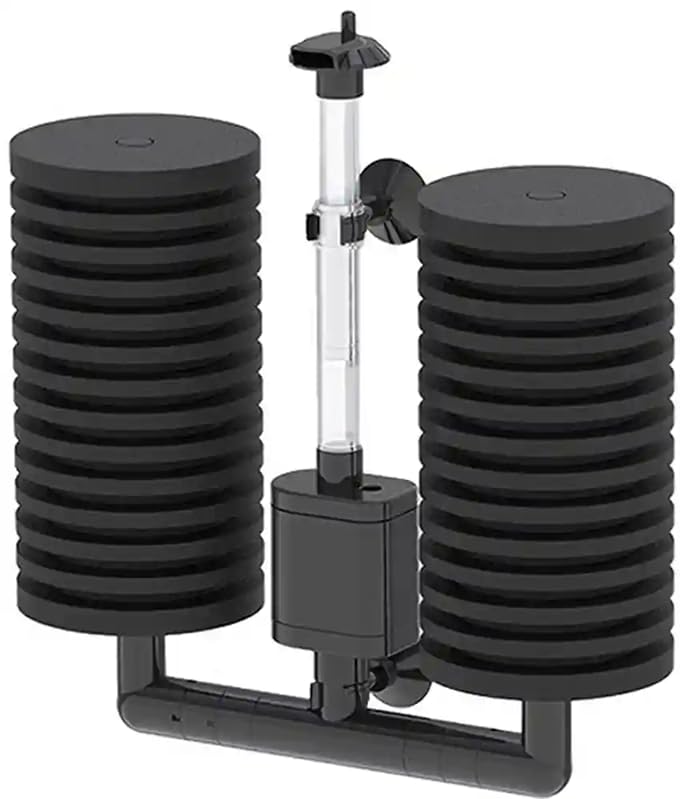
Image 1: Sunsun Biochemical Aquarium Sponge Filter JF-160, showing its main components including the two sponge filters, central tube, and base with integrated pump.
3. Safety Instructions
- Always disconnect power to all aquarium equipment before performing any maintenance or handling the filter.
- Ensure your hands are dry before plugging or unplugging any electrical devices.
- This filter is designed for submersible use only within an aquarium. Do not operate it dry.
- Keep out of reach of children.
- Do not use if any part of the filter or its components are damaged.
- Ensure the filter is fully submerged in water during operation.
4. Setup
Follow these steps to set up your Sunsun Biochemical Aquarium Sponge Filter JF-160:
- Unpack: Carefully remove all components from the packaging. Inspect for any damage.
- Assemble:
- Attach the two sponge filter units to the filter base/connector.
- Insert the central riser tube into the designated opening on the filter base.
- Ensure the air outlet/diffuser is securely placed at the top of the central tube.
- Position in Aquarium: Place the assembled filter inside your aquarium. Use the provided suction cups to securely attach the filter to the aquarium glass, ensuring it is fully submerged.
- Check Submersion: Verify that the entire filter, especially the sponge units and pump intake, is completely underwater.
- Connect Power: Plug the filter's power cord into a suitable electrical outlet. Ensure a drip loop is formed to prevent water from traveling along the cord to the outlet.

Image 2: The Sunsun Biochemical Aquarium Sponge Filter JF-160 packaging. The filter is designed to be removed from this packaging and assembled for use.
5. Operating Instructions
- Initial Start-up: Once the filter is correctly assembled, fully submerged, and plugged in, the internal pump will begin to draw water through the sponge filters and expel filtered water, often with aeration bubbles from the air outlet.
- Continuous Operation: The filter is designed for continuous operation. Ensure the water level in your aquarium is always maintained above the minimum operating level for the pump to prevent dry running.
- Adjust Air Flow (if applicable): Some models may have an adjustable air intake to control the amount of aeration.
The sponge filters provide mechanical filtration by trapping debris and biological filtration by providing a large surface area for beneficial bacteria to colonize, breaking down harmful ammonia and nitrites.
6. Maintenance
Regular maintenance is crucial for the optimal performance and longevity of your filter and the health of your aquarium inhabitants.
- Disconnect Power: Always unplug the filter from the power outlet before performing any maintenance.
- Remove Filter: Carefully remove the filter from the aquarium.
- Clean Sponge Filters: Gently squeeze and rinse the sponge filters in a bucket of old aquarium water (water removed during a water change). Do not use tap water directly, as chlorine can kill beneficial bacteria. Rinse until most visible debris is removed.
- Clean Filter Basket (if applicable): If you have added additional filter media to the drawer basket, rinse it gently in old aquarium water as well.
- Clean Pump and Riser Tube: Periodically check and clean the pump impeller and the central riser tube to ensure no blockages from algae or debris.
- Reassemble and Reinstall: Reassemble the filter and place it back into the aquarium, ensuring it is fully submerged before plugging it back into the power outlet.
Frequency: Clean the sponge filters every 1-2 weeks, or more frequently if water flow is noticeably reduced or the sponges appear heavily soiled. Avoid cleaning all filter media thoroughly at once to preserve beneficial bacteria.
7. Troubleshooting
| Problem | Possible Cause | Solution |
|---|---|---|
| Reduced water flow/bubbles |
|
|
| Filter not operating |
|
|
| Water remains cloudy |
|
|
8. Specifications
| Model | JF-160 |
| Dimensions (LxWxH) | 22 x 6.5 x 28 cm |
| Item Weight | 336 g |
| Power Consumption | 3W |
| Max Flow Rate | 350 L/H |
| Country of Origin | China |
9. Warranty and Support
Specific warranty information for the Sunsun Biochemical Aquarium Sponge Filter JF-160 may vary by region and retailer. Please refer to your purchase documentation or contact the seller directly for details regarding warranty coverage and claims.
For technical support or further assistance, please contact the Sunsun customer service or the retailer from whom you purchased the product.


