
Introduction
This manual provides detailed instructions for the installation, operation, and maintenance of the BANVIE Car Keyless Entry System, model KS022. This system offers convenient remote control for your vehicle's central door locking, trunk release, and car finding functions.
Product Overview

Image: Overview of the BANVIE Keyless Entry System's primary functions, including remote door lock/unlock, window roll-up control, remote trunk release, car finding, and automatic door locking while driving. The image also shows the remote control unit.
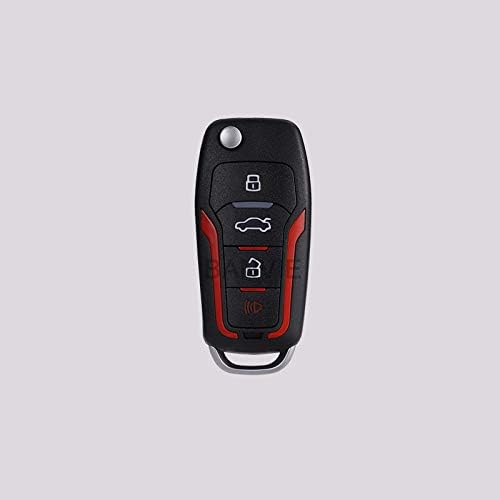
Image: A close-up view of the BANVIE 4-button remote control transmitter, featuring buttons for lock, unlock, trunk release, and car finding.
Setup and Installation
Professional installation is recommended for this keyless entry system. Refer to the wiring diagram for proper connections. Ensure the vehicle's power is disconnected before beginning installation.

Image: Comprehensive installation diagram illustrating the wiring connections for the BANVIE Keyless Entry System. It details connections to the 12V battery, central door lock system (electrical/pneumatic), parking lights, foot-brake switch, LED indicator, and trunk release. Jumper settings for trunk output and central door locking time are also shown.
Key Installation Notes:
- Power Supply: Connect the system to a 9-15V DC power source.
- Central Door Locking System Time Option:
- For electric central lock systems, set the jumper for 0.5 seconds.
- For pneumatic central lock systems, set the jumper for 5 seconds.
- Trunk Output Option: There are jumpers for trunk release output ("+" or "-"). The factory setting for trunk release output is "+". Refer to the diagram for specific options.
- Window Rolling Up (Optional): If your car has a window closer module, the system can provide a 21-second negative output for window closing. An extra relay is needed for positive output.
- Code Learning: The system supports code learning for remote control pairing.
Operating Instructions
1. Unlock Function
Press the unlock button once on the remote control. The central lock will unlock, and the parking lights will flash twice. The LED indicator will stop blinking.
2. Lock Function
Press the lock button once on the remote control. The central lock will lock, and the parking lights will flash once. The LED indicator will begin blinking.
3. Car Finding
- In Arm Status: Press and hold the lock button for 2 seconds. The flash lights will gleam 10 times to alert the car owner.
- In Any Status: Press the locating button once. The parking lights will flash 10 times.
4. Trunk Release
- Press and hold the unlock button for 2 seconds to release the trunk.
- Alternatively, press and hold the dedicated trunk button for 2 seconds. The flash lights will gleam 3 times, then the trunk will be released.
5. Window Rolling Up (with optional module)
In disarm status, press the arm button once. The central door lock will lock, and the parking light will flash once. The system will then provide a 21-second negative output for window closing (an additional relay is required for positive output).
6. Automatic Central Door Lock
- Manual Lock/Unlock while Moving: When the vehicle is moving and all doors are closed, press the lock or unlock button on the remote to control the central door lock.
- Automatic Lock on Driving: When the vehicle is moving and all doors are closed, press the foot-brake after 5 seconds, and the central door lock will automatically lock. After parking and removing the key, the doors will automatically unlock.
Maintenance
The BANVIE Car Keyless Entry System KS022 requires minimal maintenance. Keep the remote control clean and dry. Avoid exposing the remote or the main unit to extreme temperatures or moisture. Replace remote control batteries as needed to ensure optimal performance. Do not attempt to open or repair the main unit yourself; refer to qualified technicians for service.
Troubleshooting
- System Not Responding: Check the vehicle's battery connection and ensure the main unit is receiving power. Verify remote control battery status.
- Remote Range Issues: Ensure there are no obstructions between the remote and the vehicle. Replace remote batteries if the range is significantly reduced.
- Lock/Unlock Malfunction: Re-check all wiring connections according to the installation diagram. Ensure the central door lock system is functioning correctly independently of the keyless entry system.
- Trunk Release Not Working: Verify the trunk output jumper setting (positive/negative) matches your vehicle's requirements. Check the trunk release motor and wiring.
- Automatic Lock/Unlock Issues: Ensure the foot-brake switch is correctly connected and functioning.
- If problems persist, consult a professional automotive electrician.
Specifications
| Feature | Detail |
|---|---|
| Working Voltage | 9-15V DC |
| Static Current | ≤12mA |
| Brand | BANVIE |
| Model | KS022 |
| Compatible Devices | Cars, Trucks, Vans, SUVs |
| Remote Control Included | Yes |
| UPC | 727523075475 |
| GTIN | 727523075475 |
Warranty Information
No specific warranty information is provided in the product details. Please refer to your purchase documentation or contact the retailer for warranty terms and conditions.
Support
For technical assistance, installation queries, or further support, please contact your product retailer or the manufacturer, BANVIE. Keep your purchase receipt and product model number (KS022) ready when seeking support.


