
1. Introduction
The Zhurui EPM6700 Electrical Parameter Tester is a versatile device designed for comprehensive electrical measurement. It features a 2.8-inch TFT LCD with touch-key operation, integrating functions for power, power factor, voltage, current, electric energy, frequency, temperature, and cumulative time measurement. This manual provides detailed instructions for the safe and effective use of your EPM6700 meter.
2. Key Features
- Digital operation and control for precise measurements.
- 2.8-inch TFT color LCD display for clear data visualization.
- Automatic power resolution switching: W (<1000W), kW (3 decimals <10kW), kW (2 decimals >10kW).
- Selectable measurement for Temperature or Frequency.
- Temperature units switchable between Celsius (℃) and Fahrenheit (℉).
- Tracking of total time (since meter activation, clearable) and working time (accumulated when power > 0, clearable).
- Configurable upper and lower limit alarms for voltage, current, power, and temperature, with audible alerts.
- One-button clear function for accumulated time, working time, and total electricity.
- Energy-saving setting for screen auto-off (1, 5, 10 minutes, or always on). Screen reactivates on touch.
- Over-range indication for out-of-limit measurements.
- Designed for mounting in a standard 86-type box, with a thickness of 36.5mm.
- Supports 1000:1 or 2000:1 current transformers, with a maximum current of 120A.
- Working voltage: AC85~265V.
- Electricity measurement range: 0~999999kWh.
- Working frequency: 50~60Hz.
- Current measurement range: 0.02~120A.
- Temperature measurement range: -10℃~110℃.
3. Package Contents
Upon opening the package, verify that all components are present and undamaged. The standard package includes:
- 1 x Zhurui EPM6700 Energy Meter
- 1 x Current Transformer
- 1 x Temperature Sensor
- 2 x Mounting Screws
- 1 x User Manual (this document)
- 1 x Warranty Card
- 1 x Certification
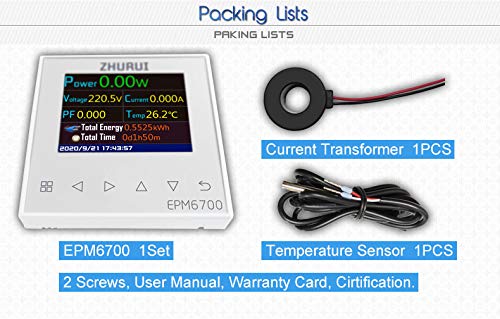
Figure 3.1: Contents of the EPM6700 package, including the meter, current transformer, and temperature sensor.
4. Setup and Installation
The EPM6700 is designed for fixed installation. Ensure power is disconnected before beginning installation to prevent electric shock.
4.1 Wiring Diagram
Follow the wiring diagram carefully for correct installation. The meter supports connection with a current transformer and an optional temperature sensor.
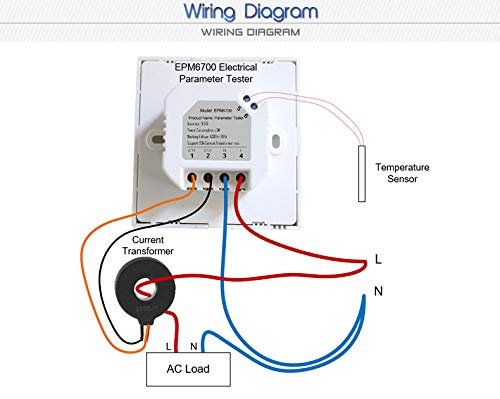
Figure 4.1: Wiring diagram for the EPM6700, showing connections for the current transformer, AC load, and temperature sensor.
- Power Connection: Connect the L (Live) and N (Neutral) wires from your AC power source to the corresponding terminals on the meter (terminals 4 and 3 respectively, as indicated on the back of the unit). The working voltage range is AC85V~AC265V.
- Current Transformer (CT) Connection: Pass the live wire of the circuit you wish to measure through the current transformer. Connect the two wires from the current transformer to the CT1 and CT2 terminals on the meter (terminals 1 and 2). Ensure the current transformer is never open-circuited when power is applied, as this can lead to high voltage output and safety hazards.
- Temperature Sensor Connection (Optional): If using the temperature measurement function, connect the temperature sensor to the designated terminals.
- Mounting: Install the meter into a standard 86-type mounting box. The meter's thickness is 36.5mm. Secure it using the provided mounting screws.
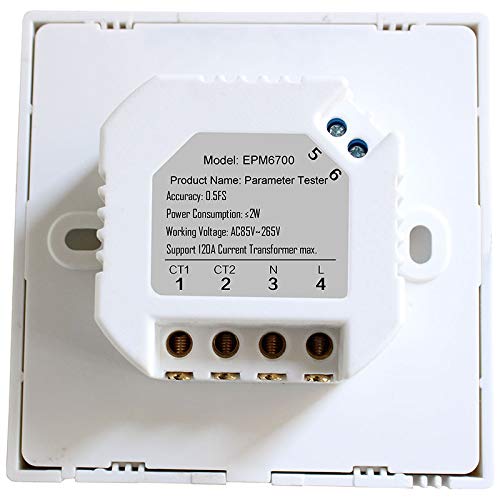
Figure 4.2: Rear view of the EPM6700 showing the wiring terminals for power (L, N) and current transformer (CT1, CT2).
5. Operating Instructions
The EPM6700 features a touch-key interface for navigation and settings adjustment.

Figure 5.1: Front view of the EPM6700 displaying real-time measurements such as Power, Voltage, Current, Power Factor, Temperature, Total Energy, and Total Time.
5.1 Display and Navigation
The 2.8-inch TFT LCD displays various electrical parameters simultaneously. Use the touch-keys located below the screen to navigate through menus and adjust settings.
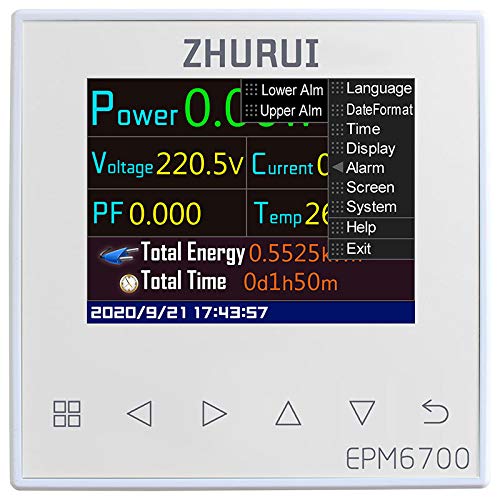
Figure 5.2: EPM6700 display showing the main menu options for configuration, including alarm settings, language, date format, and screen settings.
5.2 Setting Alarms
The meter allows setting upper and lower limits for voltage, current, power, and temperature. If a measured value exceeds these limits, an audible alarm will sound.
- Navigate to the "Alarm" setting in the menu.
- Select the parameter (Voltage, Current, Power, Temperature) for which you want to set limits.
- Adjust the upper and lower limit values using the navigation keys.
- Confirm your settings.
5.3 Clearing Data
To clear accumulated time, working time, and total electricity data, press the designated clear button (often marked with a reset or clear icon, refer to the meter's interface for exact button). This action will reset these specific measurements.
5.4 Energy-Saving Settings
To conserve energy, the screen can be configured to turn off automatically after a period of inactivity (1, 5, or 10 minutes). The screen can also be set to remain always on. Touching any button will reactivate the screen if it is off.
- Access the "Screen" or "Display" settings in the menu.
- Select the desired auto-off duration or choose "Always On".
6. Maintenance
To ensure the longevity and accurate operation of your EPM6700 meter, follow these maintenance guidelines:
- Environmental Conditions: Operate and store the meter in a normal temperature and humidity environment. Avoid hot, humid, dusty, or corrosive gas environments.
- Cleaning: Use a soft, dry cloth to clean the display and casing. Do not use abrasive cleaners or solvents.
- Inspection: Periodically inspect the wiring connections to ensure they are secure and free from damage.
7. Troubleshooting
If you encounter issues with your EPM6700 meter, consider the following:
- No Display/Power: Verify that the AC power supply is within the specified range (AC85V~AC265V) and properly connected. Check circuit breakers or fuses.
- Incorrect Readings:
- Ensure the current transformer is correctly installed and not open-circuited.
- Confirm the current being measured does not exceed the maximum current of the current transformer (120A).
- Check all wiring connections for looseness or corrosion.
- Alarm Triggering: Review your set upper and lower alarm limits to ensure they are appropriate for your application.
- Screen Auto-off: If the screen turns off unexpectedly, check the energy-saving settings.
- Device Malfunction: Do not attempt to open the machine or replace parts yourself. This can lead to electric shock and void the warranty. If the machine fails to work correctly after basic troubleshooting, contact the manufacturer or authorized service personnel.
8. Specifications
| Parameter | Value |
|---|---|
| Working Voltage | AC85~265V |
| Working Frequency | 50~60Hz |
| Current Range | 0.02~120A |
| Electricity Range | 0~999999kWh |
| Temperature Range | -10℃~110℃ |
| Accuracy | 0.5FS |
| Power Consumption | ≤2W |
| Display | 2.8-inch TFT Color LCD |
| Mounting Type | 86-type box |
| Dimensions (L x W x H) | 3.39 x 3.39 x 1.44 inches (86 x 86 x 36.5 mm) |
| Item Weight | 9.88 ounces (280 Grams) |
| Supported CT Ratio | 1000:1 or 2000:1 |
| Max CT Current | 120A |
9. Safety Information and Legal Disclaimer
Important Safety Considerations:
- The machine is not designed for hot and humid environments. Use it only in normal temperature and humidity conditions.
- The working voltage range is AC85V~AC265V. Ensure your power supply is within this range.
- The working current must not exceed the maximum current rating of the connected current transformer.
- Never operate the current transformer in an open-circuit condition. Doing so can cause it to output dangerously high voltage, posing a severe safety risk.
- Protect the machine from dust, corrosive gases, and other harmful substances during use and storage.
- Always perform installation procedures with the power supply disconnected. Live operation is strictly prohibited to avoid electric shock.
- If the machine malfunctions, do not attempt to open it or replace parts yourself. This can lead to electric shock and may void any applicable warranty. Contact the manufacturer for assistance.
10. Warranty and Support
This product comes with a warranty as specified on the included Warranty Card. For technical support, troubleshooting assistance beyond what is covered in this manual, or warranty claims, please contact the manufacturer, Zhurui, or your authorized dealer. Refer to the contact information provided with your product or visit the official Zhurui website for support details.
Manufacturer: Shenzhen Zhurui Technology Co.,ltd
