1. Introduction
The Fafeicy HT107D Digital LCD Socket Tester is a compact and portable device designed for quick and accurate verification of electrical socket wiring and RCD (Residual Current Device) functionality. It features an LCD display for voltage readings and LED indicators to identify various wiring faults. This manual provides essential information for safe and effective use of the device.
2. Safety Information
- Always ensure the socket tester is in good condition before use. Do not use if damaged.
- Do not attempt to open or modify the device. Refer all servicing to qualified personnel.
- This device is intended for testing standard electrical sockets. Do not use it for purposes other than its intended function.
- Always exercise caution when working with electricity. Ensure hands are dry and avoid contact with live parts.
- The RCD test function should only be performed on circuits protected by an RCD. This test will trip the RCD, cutting power to the circuit. Ensure all connected devices are safely shut down before performing this test.
3. Product Overview
The Fafeicy HT107D Socket Tester features a clear LCD display, multiple LED indicator lights, and a dedicated RCD test button. Familiarize yourself with the components shown below:

Figure 1: Front panel of the HT107D Socket Tester, highlighting the LCD display, indicator lights, and leakage test button.
- LCD Display: Shows phase voltage (L-N) and leakage voltage (N-E).
- Indicator Lights: Seven LED lights indicate various wiring conditions.
- Leakage Test Button (RCD Test): Initiates the RCD trip test.
4. Specifications
| Parameter | Value |
|---|---|
| Brand | Fafeicy |
| Model | HT107D |
| Manufacturer Reference | Fafeicymzaw9y468x |
| Minimum Operating Voltage | 90 Volts |
| Measurement Type | Voltmeter |
| Color | Black |
| Item Weight | 105 Grams |
| Certifications | CE |
| Country of Origin | China |
5. Setup
The HT107D Socket Tester requires no complex setup. Simply ensure the device is clean and undamaged before use.
- Inspect the device for any visible damage.
- Ensure the electrical socket you intend to test is easily accessible and free from obstructions.
- Carefully insert the socket tester into the electrical outlet. Ensure it is fully seated.
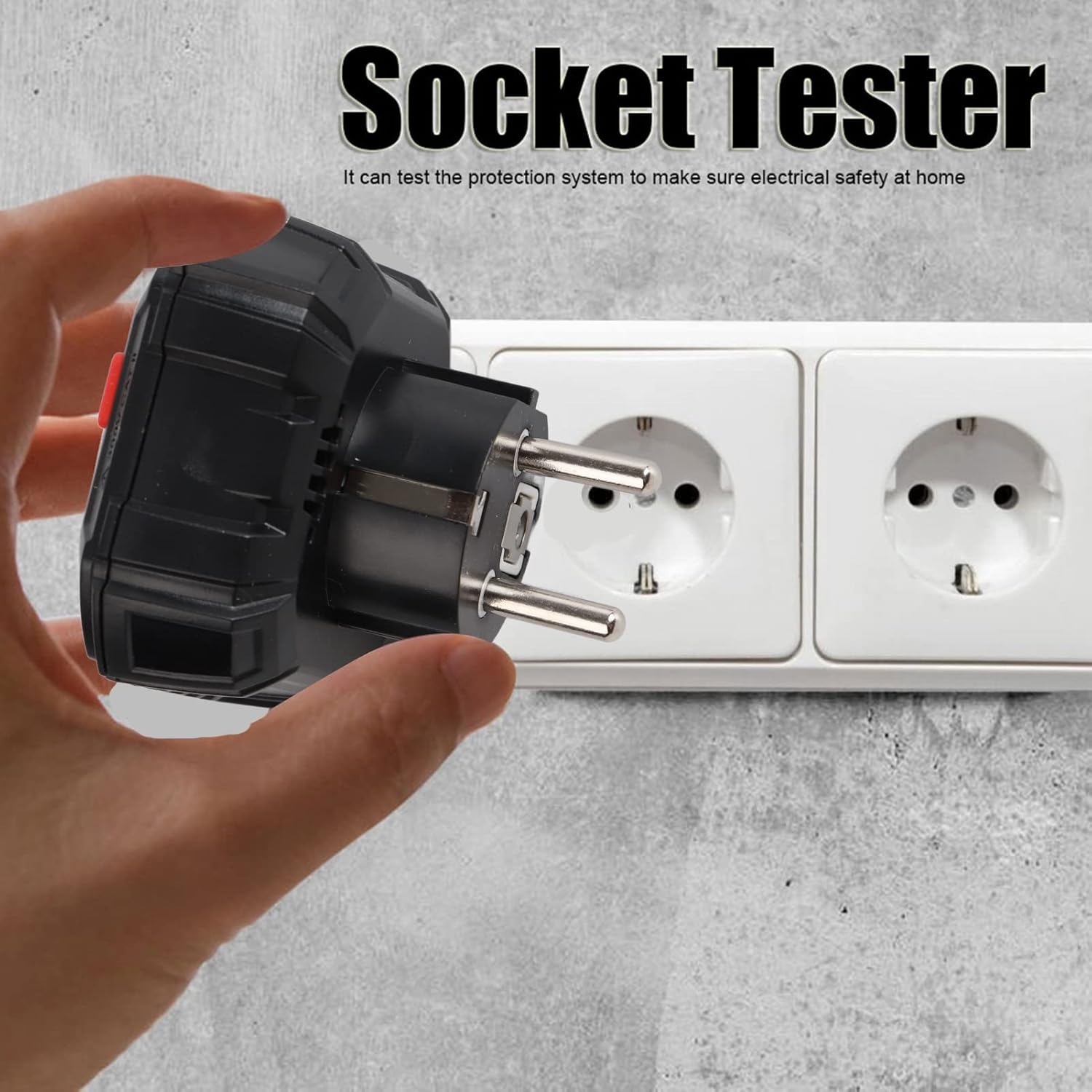
Figure 2: Proper insertion of the socket tester into an electrical outlet.
6. Operating Instructions
6.1 Basic Socket Test
Once the tester is plugged into a socket, it will automatically begin testing the wiring. The LCD display will show voltage readings, and the LED indicators will illuminate to show the wiring status.
- LCD Display: The LCD shows the phase voltage (L-N) and leakage voltage (N-E). A green backlight indicates a correctly grounded circuit, while an orange backlight indicates an open ground or missing ground wire.

Figure 3: The LCD display showing voltage readings and backlight color changes based on wiring status.
6.2 RCD (Leakage) Test
The RCD test function verifies the functionality of Residual Current Devices. Warning: This test will trip the RCD, cutting power to the circuit. Ensure all connected devices are safely shut down before proceeding.
- Plug the HT107D into a socket protected by an RCD.
- Observe the LED indicators to confirm correct wiring (see Section 7).
- Press the red 'RCD TEST' button on the device.
- If the RCD is functioning correctly, it should trip, and the power to the circuit will be cut.
- Reset the RCD at your consumer unit/fuse box.

Figure 4: Pressing the RCD test button on the socket tester.
7. Understanding LED Indicators
The HT107D features seven LED indicator modes to quickly identify the wiring status of a socket. Refer to the diagram and table below for interpretation:
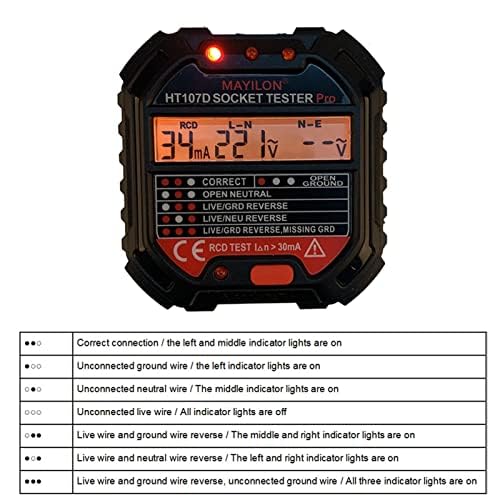
Figure 5: Diagram illustrating the LED indicator patterns and their corresponding wiring conditions.
| LED Pattern | Wiring Condition |
|---|---|
| ● ● ● | Correct connection (Left and middle indicator lights are on) |
| ● ○ ○ | Unconnected ground wire (Left indicator light is on) |
| ○ ● ○ | Unconnected neutral wire (Middle indicator light is on) |
| ○ ○ ○ | Unconnected live wire (All indicator lights are off) |
| ● ● ○ | Live wire and ground wire reverse (Middle and right indicator lights are on) |
| ● ○ ● | Live wire and neutral wire reverse (Left and right indicator lights are on) |
| ○ ● ● | Live wire and ground wire reverse, unconnected ground wire (All three indicator lights are on) |
8. Applications
The Fafeicy HT107D Socket Tester is suitable for a wide range of electrical testing and maintenance scenarios, including:
- Residential electrical safety checks.
- Office and commercial building electrical maintenance.
- Educational institutions and laboratories.
- Industrial facilities and factories.
- Testing power strips and extension cords.

Figure 6: Examples of environments where the socket tester can be used.
9. Maintenance
To ensure the longevity and accuracy of your HT107D Socket Tester:
- Cleaning: Wipe the device with a soft, dry cloth. Do not use abrasive cleaners or solvents.
- Storage: Store the tester in a cool, dry place, away from direct sunlight and extreme temperatures.
- Inspection: Periodically inspect the device for any signs of wear or damage, especially the pins and casing.
10. Troubleshooting
- No display or indicators: Ensure the tester is fully inserted into a live socket. Check if the socket itself is functional using another device.
- Inconsistent readings: Ensure a stable connection. Test in multiple sockets to confirm if the issue is with the tester or the specific outlet.
- RCD test does not trip: If the RCD test button is pressed and the RCD does not trip, it indicates a potential fault with the RCD itself or the wiring. Consult a qualified electrician immediately.
- Backlight always orange: This indicates an open ground wire. This is a serious wiring fault and should be addressed by a qualified electrician.
11. Warranty and Support
For warranty information or technical support, please refer to the documentation provided at the point of purchase or contact your retailer. Keep your purchase receipt as proof of purchase.


