Introduction
Thank you for choosing the JAYEGT Motorized Rotating Display Stand. This device is designed to provide a stable and versatile platform for showcasing various items with 360-degree rotation. It is ideal for product photography, video creation, retail displays, and personal collections. Please read this manual carefully to ensure proper setup and operation.
Package Contents
Upon unpacking, please ensure all the following items are present:
- 1 x JAYEGT Motorized Rotating Display Stand
- 1 x USB Charging Cable
- 1 x 18650 Lithium Ion Battery (pre-installed or included separately)

Image: The JAYEGT Motorized Rotating Display Stand and its packaging, including the USB charging cable.
Features
- Wide Application: Suitable for displaying jewelry, watches, digital products, bags, models, collectibles, and cakes in various settings such as shops, studios, exhibition halls, and living rooms.
- Adjustable Rotation: Control speed, direction, and angle.
- Direction Control: Rotate clockwise (R) or counterclockwise (L).
- Speed Regulation (SR): Two gear speed regulation options: 1-2 revolutions per minute. Turntable rotates one round in 8, 15, or 30 seconds.
- Angle Adjustment (ASA): Adjust rotation angles to 90, 180, or 360 degrees.
- Dual Power Supply: Operates via USB power or an included 18650 Lithium Ion battery.
- Compact Design: Diameter 14.6cm * height 3.5cm, lightweight 0.3kg.
- High Load Capacity: Supports a maximum load of 10KG (approximately 22 pounds).
- Stable and Quiet Operation: Designed for good stability and low noise during rotation.
Setup
- Battery Installation: If the 18650 Lithium Ion battery is not pre-installed, open the battery compartment on the underside of the stand and insert the battery, ensuring correct polarity.
- Power Connection: For continuous operation or charging, connect the provided USB cable to the 'IN 5V' port on the display stand and plug the other end into a compatible USB power source (e.g., computer, wall adapter, power bank).
- Placement: Place the display stand on a flat, stable surface.

Image: Illustration of the two power supply methods: rechargeable battery and USB cable connection.
Operating Instructions
The display stand features intuitive button controls for easy operation.
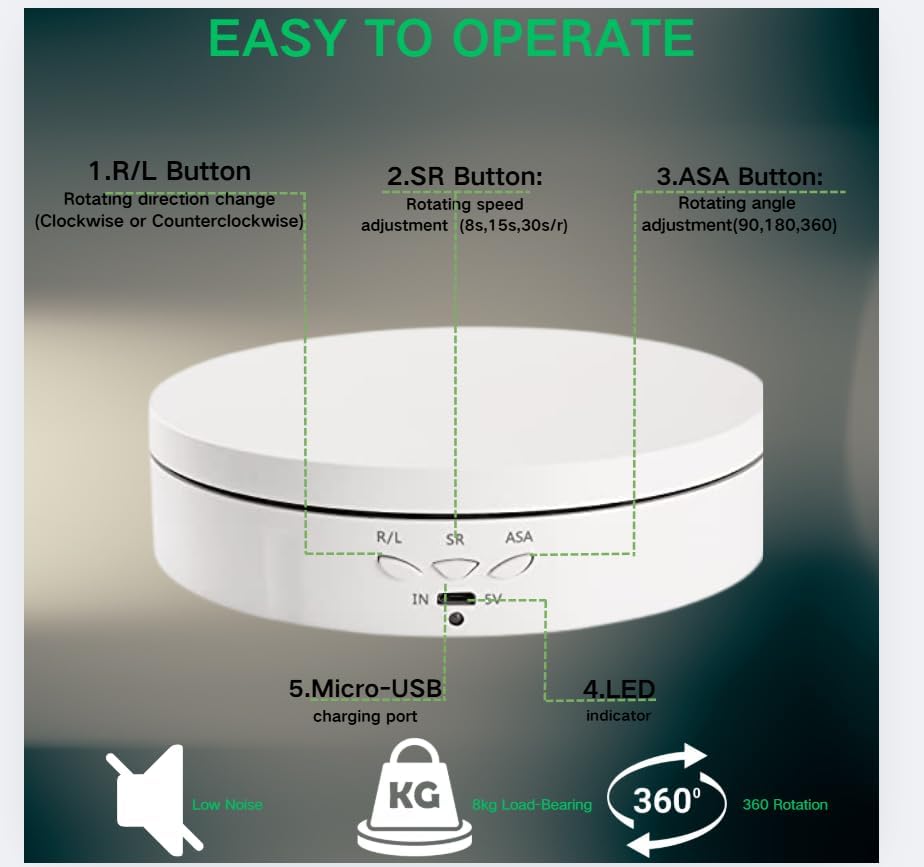
Image: Close-up of the control buttons and ports on the display stand.

Image: Labeled diagram of the control buttons and ports for easy identification.
- Power On: Click any one of the buttons (R/L, SR, or ASA) to turn on the display stand.
- Power Off: Long press any one of the buttons for 3 seconds to shut down the display stand.
- R/L Button (Rotation Direction): Press this button to switch between clockwise and counterclockwise rotation.
- SR Button (Speed Regulation): Press this button to cycle through different rotation speeds: 8 seconds per round, 15 seconds per round, or 30 seconds per round.
- ASA Button (Angle Adjustment): Press this button to set the rotation angle. Options include 90-degree, 180-degree, or 360-degree rotation. The stand will rotate to the selected angle and then reverse direction if set to 90 or 180 degrees, or continuously rotate for 360 degrees.

Image: Visual representation of the variable angle rotation feature.
Video: This video provides a comprehensive overview of the JAYEGT Motorized Rotating Display Stand, demonstrating its rotation capabilities, speed adjustments, and how it can be used to showcase various products effectively.
Video: Watch this video to see the JAYEGT Motorized Rotating Display Stand in action, highlighting its smooth 360-degree rotation and ease of use for displaying items like jewelry or small products.
Specifications
| Feature | Specification |
|---|---|
| Brand | JAYEGT |
| Model | B08K2QTZVL |
| Load Capacity | 22 Pounds (10 KG) |
| Dimensions | 14.6 cm (Diameter) x 3.5 cm (Height) |
| Item Weight | 8.8 ounces (0.25 Kilograms) |
| Power Supply | USB (DC-5V) or 18650 Lithium Ion Battery (included) |
| Rotation Speeds | 8, 15, 30 seconds per round |
| Rotation Angles | 90°, 180°, 360° |
| Assembly Required | No |
Maintenance
- Cleaning: Wipe the display stand with a soft, dry cloth. Avoid using abrasive cleaners or solvents that may damage the surface.
- Battery Care: To prolong battery life, avoid fully discharging the battery frequently. Recharge the battery when the power indicator light shows low battery. If storing for an extended period, charge the battery to about 50% and store in a cool, dry place.
- Storage: Store the display stand in a dry environment away from direct sunlight and extreme temperatures.
Troubleshooting
- Stand is not rotating:
- Ensure the stand is powered on by pressing any button.
- Check the battery level. If low, connect the USB charging cable.
- Verify that the load on the stand does not exceed the maximum capacity of 22 pounds.
- Battery not holding charge:
- Ensure the USB cable is securely connected to both the stand and the power source.
- Allow sufficient time for the battery to fully charge.
- If the issue persists, the battery may need replacement. Contact customer support for assistance.
- Rotation is uneven or jerky:
- Ensure the item placed on the stand is centered and balanced.
- Reduce the weight of the item if it is close to the maximum load capacity.
- Ensure the stand is on a flat and stable surface.
Warranty and Support
This product is sold by JAYEGT. For any issues or support, please refer to your purchase platform's return policy, which typically includes a 30-day return/replacement period. For further assistance, you may contact the seller directly through the platform where the product was purchased.
