
Introduction
This manual provides instructions for the VINABTY RC-1034 replacement remote control. This remote is designed to function as a direct replacement for original remote controls used with DENON audio receivers and home cinema systems. It is compatible with various models, including the DENON DRA-F102.
Setup
1. Battery Installation
The VINABTY RC-1034 remote control requires two AAA alkaline batteries (not supplied). Follow these steps to install them:
- Locate the battery compartment cover on the back of the remote control.
- Slide the cover downwards or press the latch to open it.
- Insert two AAA batteries, ensuring the positive (+) and negative (-) terminals align correctly with the markings inside the compartment.
- Replace the battery compartment cover, sliding it back into place until it clicks securely.

Figure 1: Battery compartment with batteries inserted.
2. Initial Use
No programming or pairing is required for this remote control. Once batteries are installed, it is ready for immediate use with compatible DENON devices. Ensure there is a direct line of sight between the remote control's infrared emitter and the device's IR sensor, without any obstructions.
Operating Instructions
The VINABTY RC-1034 remote control provides comprehensive control over your compatible DENON audio receiver or home cinema system. Below is a general overview of common button functions:
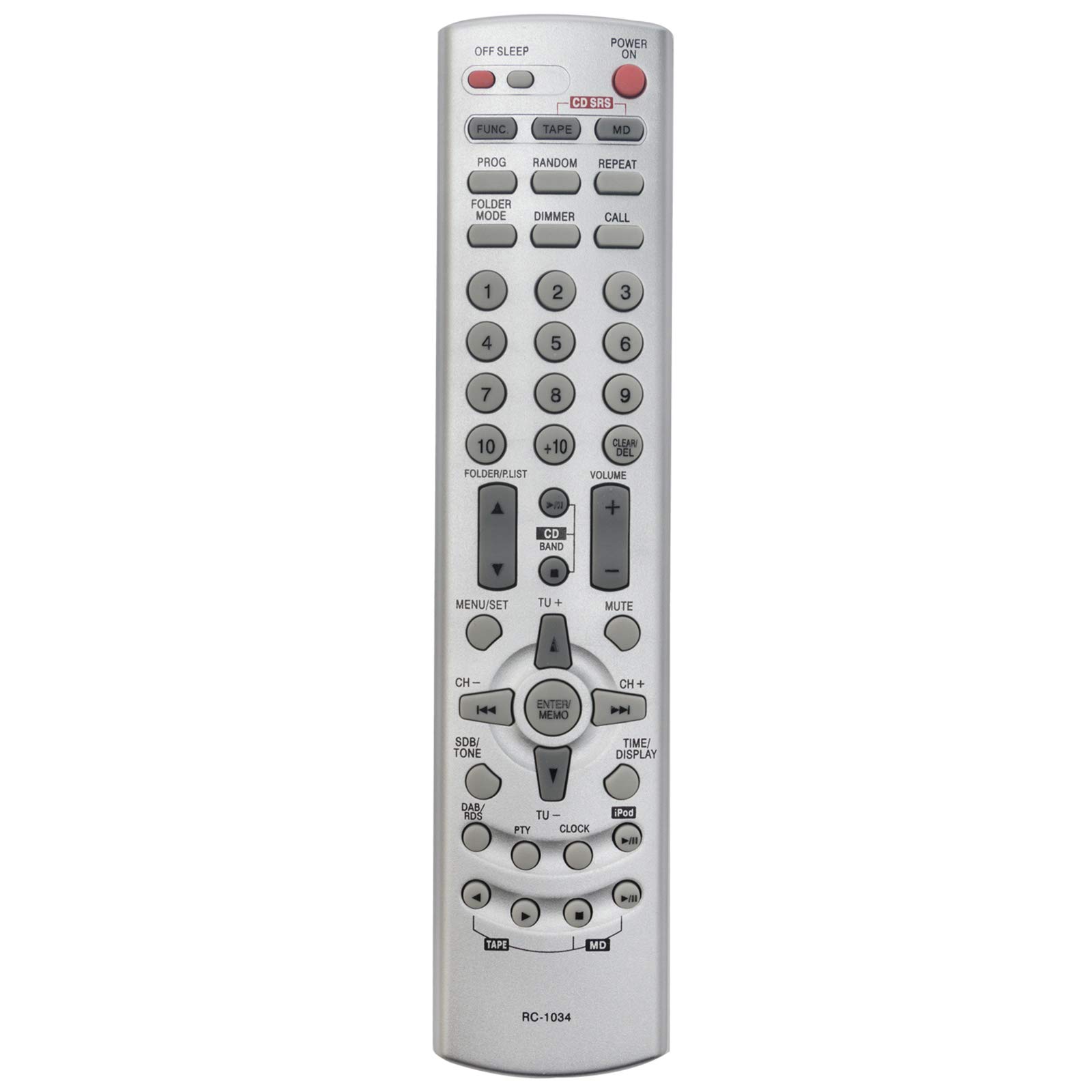
Figure 2: Front view of the VINABTY RC-1034 remote control.
- POWER ON/OFF: Turns the device on or off.
- OFF SLEEP: Activates the sleep timer function.
- FUNC / TAPE / CD / MD: Selects the input source (Function, Tape, CD, MiniDisc).
- PROG / RANDOM / REPEAT: Controls playback modes such as program, random, or repeat.
- FOLDER MODE / DIMMER / CALL: Accesses folder navigation, display dimmer, or call functions.
- Numeric Keypad (0-9, +10): Directly selects tracks, radio presets, or enters numerical values.
- FOLDER/LIST: Navigates through folders or lists.
- CLEAR/DEL: Clears entries or deletes items.
- VOLUME +/-: Adjusts the master volume level.
- MUTE: Silences the audio output.
- MENU/SET: Accesses the device's menu and confirms selections.
- CD BAND / TU+/-: Selects CD band or tunes radio frequencies up/down.
- Navigation Arrows (Up, Down, Left, Right): Navigates through menus and options.
- ENTER/MEMO: Confirms selections or stores settings in memory.
- CH+/-: Changes channels or presets.
- SDB/TONE: Adjusts sound balance or tone settings.
- DAB/RDS: Accesses Digital Audio Broadcasting or Radio Data System functions.
- PTY / CLOCK / TIME/DISPLAY / iPod: Accesses Program Type, Clock settings, Time/Display information, or iPod controls.
- Playback Controls (Play, Pause, Stop, Skip, Fast Forward/Rewind): Standard media playback functions.
For specific functions, refer to your DENON device's original user manual.
Maintenance
To ensure the longevity and optimal performance of your VINABTY RC-1034 remote control, follow these maintenance guidelines:
- Battery Replacement: Replace batteries when the remote's response becomes sluggish or stops working. Always replace both batteries at the same time with new ones.
- Cleaning: Wipe the remote control with a soft, dry cloth. For stubborn dirt, slightly dampen the cloth with water or a mild, non-abrasive cleaner. Avoid using harsh chemicals or solvents.
- Storage: Store the remote control in a cool, dry place away from direct sunlight and extreme temperatures. If the remote will not be used for an extended period, remove the batteries to prevent leakage.
- Avoid Drops: Protect the remote from physical impact, as drops can damage internal components.
Troubleshooting
If you encounter issues with your VINABTY RC-1034 remote control, try the following troubleshooting steps:
- Remote Not Responding:
- Check if the batteries are correctly installed and have sufficient charge. Replace them if necessary.
- Ensure there are no obstructions between the remote control and the device's infrared sensor.
- Verify that you are pointing the remote directly at the device.
- Specific Buttons Not Working:
- This may indicate a dirty contact under the button. Try gently pressing the button multiple times. If the issue persists, the remote may require professional cleaning or replacement.
- Device Not Responding to Any Remote:
- Check the power status of your DENON device.
- Ensure the device's IR sensor is not covered or damaged.
If these steps do not resolve the issue, or if you are unsure about the remote's compatibility with your specific DENON model, please contact customer support for further assistance.
Specifications
| Brand | VINABTY |
| Model Number | RC-1034 |
| Connectivity Technology | Infrared (IR) |
| Special Feature | Wireless |
| Color | Black |
| Maximum Supported Devices | 1 |
| Compatible Devices | DENON Audio Receivers, Home Cinema Systems (e.g., DRA-F102) |
| Number of Buttons | Multiple function buttons |
| Maximum Range | 10 Meters |
| Battery Type | AAA Alkaline (not included) |
Warranty Information
A 60-day warranty is provided for this VINABTY RC-1034 replacement remote control, covering manufacturing defects from the date of purchase. Please retain your proof of purchase for warranty claims.
Customer Support
For any questions, technical assistance, or warranty inquiries regarding your VINABTY RC-1034 remote control, please do not hesitate to contact VINABTY customer support. We are committed to responding to your messages within 24 hours to provide prompt and helpful service.
