
1. Introduction
The Motorola E201 is a stylish and user-friendly DECT digital cordless telephone designed for reliable communication. This manual provides essential information for setting up, operating, and maintaining your single handset DECT phone, ensuring you get the most out of its features, including a 50-name and number phonebook, hands-free speakerphone, and Caller ID/Call Waiting functionality.
2. Package Contents
Please check that your package contains the following items:
- 1 x Handset
- 1 x Base Unit
- 1 x Power Adapter for Base Unit
- 1 x Telephone Line Cord
- 2 x AAA Rechargeable Batteries
- 1 x User Manual (this document)
3. Product Overview
3.1 Handset Layout
Familiarize yourself with the buttons and display on your Motorola E201 handset.

Image: Front view of the Motorola E201 handset, showing the monochrome display, navigation buttons, numeric keypad, and call control buttons.
- Display: Monochrome display with orange backlight.
- MENU/OK Button: Accesses the menu, confirms selections.
- Up/Down Navigation Buttons: Scrolls through menu options, adjusts volume.
- Call Button: Makes and answers calls.
- End/Power Button: Ends calls, powers handset on/off.
- Speakerphone Button: Activates hands-free mode.
- Redial/Pause Button: Redials the last number, inserts a pause.
- Numeric Keypad: For dialing numbers and entering text.
3.2 Base Unit
The base unit serves as the charging cradle and connects to your telephone line.
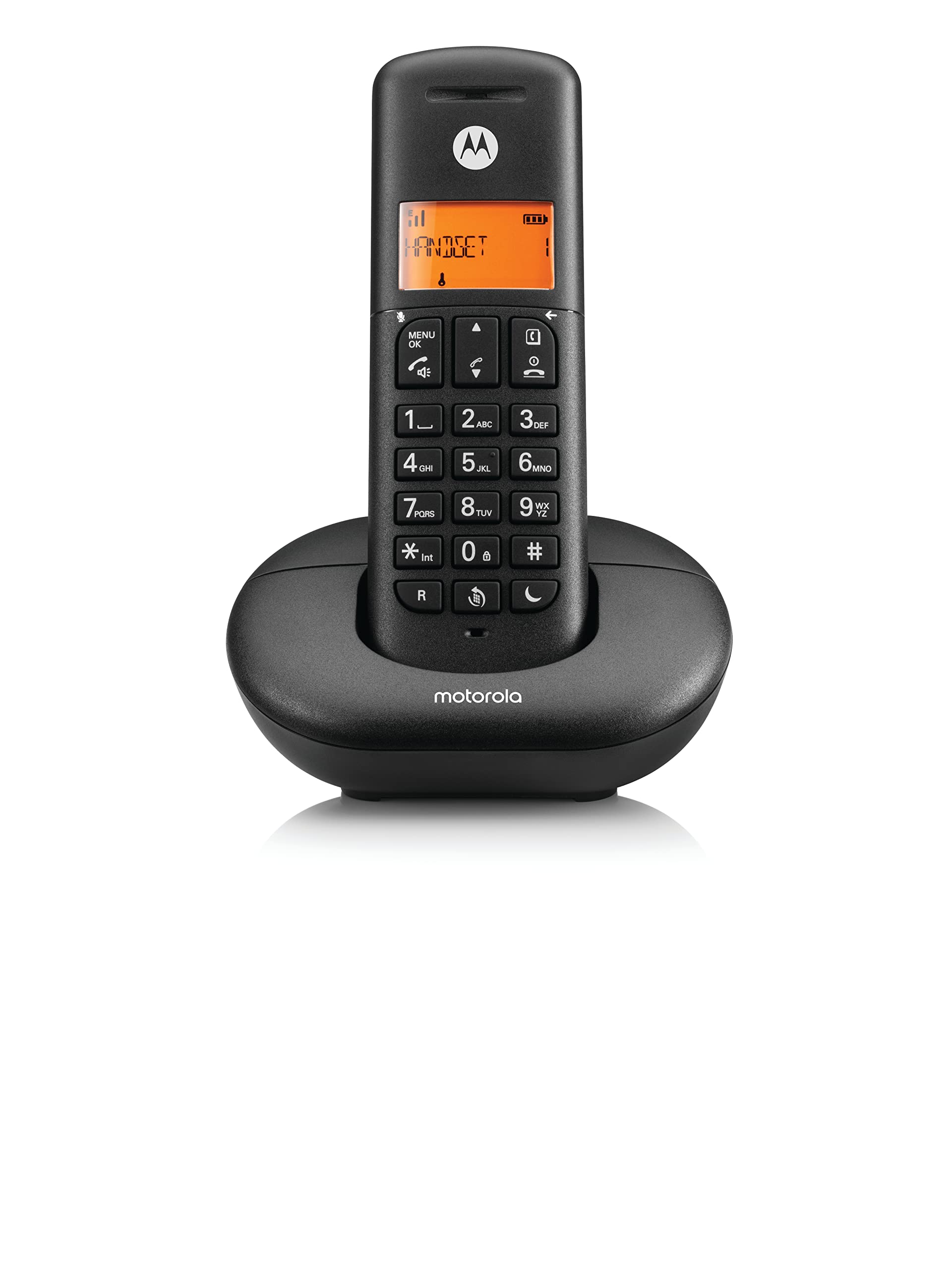
Image: Motorola E201 handset resting in its black base unit, illustrating how the handset sits for charging.
- Charging Contacts: For charging the handset.
- Paging Button: Locates misplaced handsets.
- Power Socket: Connects to the power adapter.
- Telephone Line Socket: Connects to your telephone wall socket.
4. Setup
4.1 Battery Installation
- Open the battery compartment cover on the back of the handset.
- Insert the two supplied AAA rechargeable batteries, observing the correct polarity (+ and -).
- Close the battery compartment cover securely.
4.2 Connecting the Base Unit
- Plug the small end of the power adapter into the 'DC IN' socket on the back of the base unit.
- Plug the large end of the power adapter into a mains power outlet.
- Plug one end of the telephone line cord into the 'LINE' socket on the back of the base unit.
- Plug the other end of the telephone line cord into your telephone wall socket.
4.3 Charging the Handset
Place the handset on the base unit. The handset display will show a charging icon. For optimal battery performance, charge the handset for at least 16 hours before its first use.
4.4 Registering Additional Handsets (Optional)
The Motorola E201 base unit supports up to 4 handsets. If you have purchased additional handsets, they must be registered to the base unit before use. Refer to the specific instructions provided with your additional handset for the registration process, which typically involves placing the handset on the base and initiating a registration sequence from the handset menu.
5. Operating Instructions
5.1 Making a Call
- Press the Call button or lift the handset from the base.
- Dial the desired telephone number using the numeric keypad.
- Press the End button to end the call.
5.2 Answering a Call
When the phone rings, press the Call button or lift the handset from the base to answer.
5.3 Adjusting Earpiece/Speaker Volume
During a call, press the Up or Down navigation buttons to adjust the volume.
5.4 Hands-free Speakerphone
During a call, press the Speakerphone button to activate hands-free mode. Press it again to switch back to the earpiece.
5.5 Mute Function
During a call, press the Mute button (often represented by a microphone icon with a line through it) to mute your microphone. The other party will not hear you. Press again to unmute.
6. Phonebook
Your Motorola E201 can store up to 50 names and numbers in its phonebook.
6.1 Adding a New Entry
- Press MENU/OK.
- Scroll to 'PHONEBOOK' and press OK.
- Scroll to 'ADD NEW' and press OK.
- Enter the name using the keypad (multiple presses for letters).
- Press OK.
- Enter the telephone number.
- Press OK to save.
6.2 Dialing from Phonebook
- Press the Up or Down navigation button to access the phonebook directly, or navigate via MENU/OK > 'PHONEBOOK'.
- Scroll to the desired entry.
- Press the Call button to dial.
7. Caller ID / Call Waiting
These features require subscription from your telephone service provider.
7.1 Caller ID
When you receive an incoming call, the caller's number (and name, if available in your phonebook or provided by your service) will be displayed on the handset screen before you answer.
7.2 Call Waiting
If you are on a call and another call comes in, you will hear a tone. The new caller's information may appear on the display. To switch to the new call, follow the on-screen prompts or consult your service provider for specific instructions.
8. Maintenance
8.1 Cleaning
Wipe the handset and base unit with a soft, damp cloth. Do not use abrasive cleaners or solvents. Ensure the phone is disconnected from power before cleaning.
8.2 Battery Care
- Use only the supplied rechargeable AAA batteries.
- If the handset will not be used for an extended period, remove the batteries to prevent leakage.
- Dispose of old batteries responsibly according to local regulations.
9. Troubleshooting
If you experience issues with your Motorola E201, try the following solutions:
| Problem | Solution |
|---|---|
| No dial tone | Ensure the base unit is properly connected to the power outlet and telephone line. Check if the handset is charged. |
| Cannot make/receive calls | Check the telephone line connection. Ensure the handset is registered to the base. Verify your telephone service is active. |
| Poor sound quality | Move closer to the base unit. Check for interference from other electronic devices. Ensure the handset batteries are fully charged. |
| Handset display is blank | Place the handset on the base unit to charge. Check battery installation. |
| Handset not charging | Ensure the base unit power adapter is securely plugged in. Clean the charging contacts on both the handset and base unit. |
10. Specifications
- Model: Motorola E201
- Type: DECT Digital Cordless Phone
- Phonebook Capacity: 50 names and numbers
- Batteries: 2 x AAA rechargeable batteries (included)
- Color: Black
- Material: Plastic
- Features: Hands-free Speakerphone, Caller ID/Call Waiting
- Compatible Devices: PSTN, VoIP services
11. Warranty and Support
For warranty information and technical support, please refer to the warranty card included with your product or visit the official Motorola support website. You may also find additional resources and FAQs there.
A PDF version of the user guide is available for download: Motorola E201 User Guide (PDF)


