
1. Introduction
This manual provides essential information for the safe and effective use of your Maccx Lab Support Jack, model LSJ150-001. Please read these instructions thoroughly before operating the device and retain this manual for future reference.
The Maccx Lab Support Jack is designed to provide stable and adjustable vertical positioning for various laboratory objects and instruments. Constructed from anodized aluminum, it offers good corrosion resistance and high stability for precise adjustments.
2. Safety Information
- Always ensure the lab jack is placed on a stable, level surface before use.
- Do not exceed the maximum load capacity of 80 kg (176 lbs). Overloading can cause instability and damage.
- Distribute the load evenly on the platform to maintain stability.
- Avoid sudden movements or impacts when adjusting the height.
- Keep hands and fingers clear of the scissor mechanism during operation to prevent pinching.
- Inspect the lab jack for any signs of damage or wear before each use. Do not use if damaged.
- This device is intended for laboratory and scientific applications. Do not use for purposes other than its intended design.
3. Product Overview
The Maccx Lab Support Jack LSJ150-001 features a robust design for reliable performance in laboratory settings.
Key Features:
- Platform Dimensions: 5.9" x 4.76" (150mm x 121mm)
- Maximum Height: Up to 10.63" (270mm)
- Construction Material: Anodized Aluminum (gold color)
- Drive Screw Material: Plastic (for adjustment knob)
- Corrosion Resistance: Good, due to anodized aluminum.
- High stability and load-carrying capacity.
Components:
- Top Platform: The surface where objects are placed.
- Base Plate: Provides stability on the work surface.
- Scissor Mechanism: Interlocking arms that expand and contract to adjust height.
- Adjustment Knob: Used to turn the drive screw for height adjustment.
- Drive Screw: Connects to the adjustment knob and moves the scissor mechanism.

Figure 1: Maccx Lab Support Jack LSJ150-001 in its compact state. This image shows the overall gold-colored aluminum construction and the black adjustment knob on the side.

Figure 2: Dimensions of the Maccx Lab Support Jack LSJ150-001. The top platform measures 5.9 inches (150mm) by 4.76 inches (121mm). The minimum height is 3.1 inches (78mm) and the maximum height is 10.63 inches (270mm).
4. Setup
The Maccx Lab Support Jack LSJ150-001 requires minimal assembly. Follow these general steps:
- Unpacking: Carefully remove the lab jack from its packaging. Inspect for any shipping damage.
- Placement: Place the lab jack on a stable, flat, and level work surface. Ensure there is sufficient clearance around the jack for operation and to prevent accidental tipping.
- Initial Adjustment: Before placing any load, turn the adjustment knob to familiarize yourself with the raising and lowering mechanism. Ensure smooth movement throughout the height range.
Note: While the product description mentions "Assembly required, follow instructions provided," no specific assembly steps beyond unpacking are typically needed for this type of lab jack. If additional components are included, refer to any supplementary documentation.
5. Operating Instructions
Operating the Maccx Lab Support Jack is straightforward:
- Placing the Load: Carefully place the object or instrument you wish to lift onto the center of the top platform. Ensure the load is stable and balanced.
- Raising the Platform: To raise the platform, turn the adjustment knob clockwise. The scissor mechanism will expand, lifting the platform vertically.
- Lowering the Platform: To lower the platform, turn the adjustment knob counter-clockwise. The scissor mechanism will contract, lowering the platform.
- Fine Adjustment: Turn the knob slowly for precise height adjustments.
- Securing the Position: Once the desired height is reached, release the adjustment knob. The jack is designed to hold its position securely.

Figure 3: Illustration of the Maccx Lab Support Jack's operation. Turning the knob clockwise raises the platform, and turning it counter-clockwise lowers it. This image also reiterates the minimum and maximum height specifications.
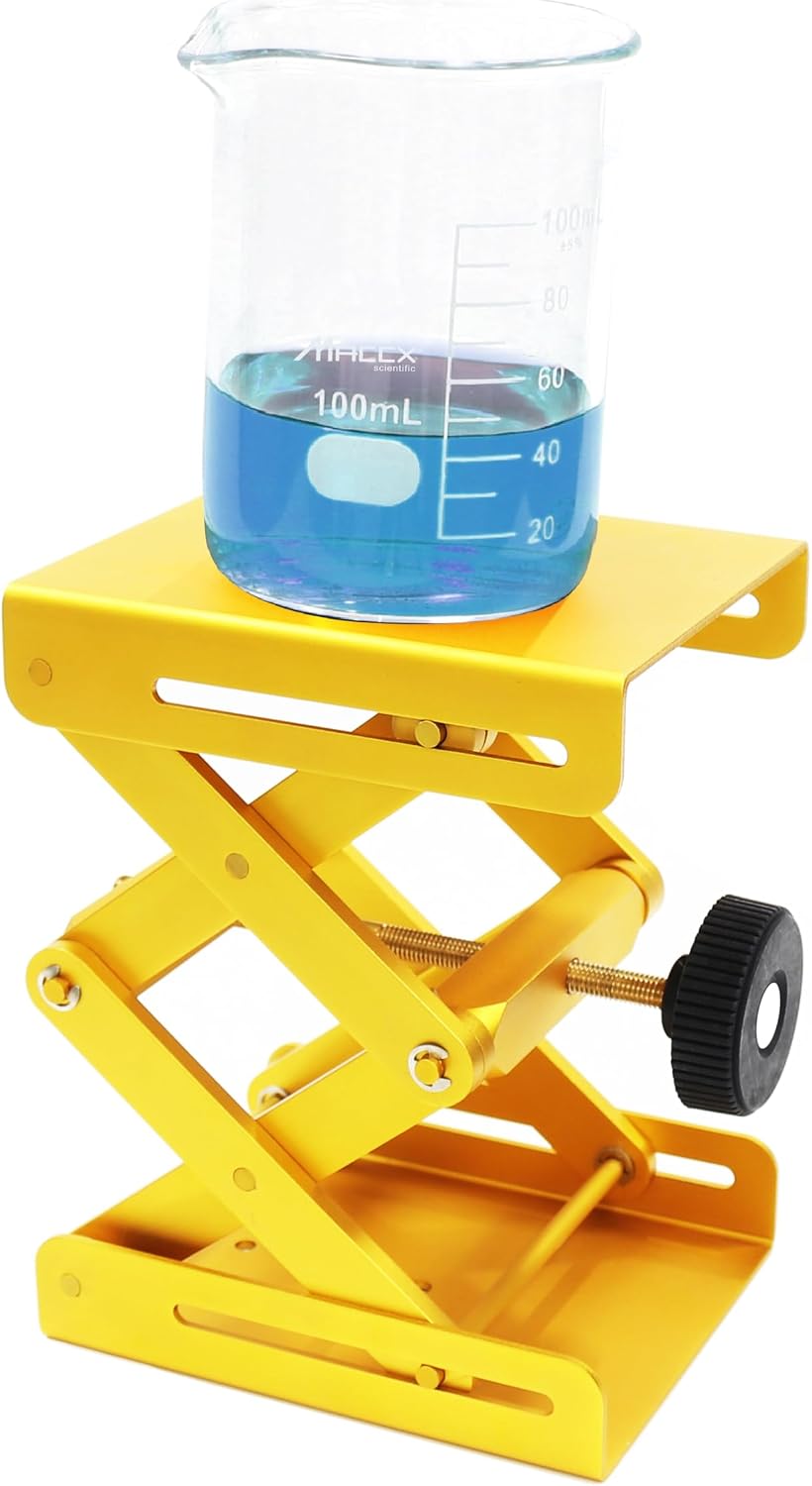
Figure 4: The Maccx Lab Support Jack supporting a beaker, demonstrating a typical laboratory application. The gold finish is visible, and the jack is extended to an intermediate height.
6. Maintenance
Proper maintenance ensures the longevity and smooth operation of your lab jack.
- Cleaning: Wipe down the surfaces with a soft, damp cloth. Avoid abrasive cleaners or solvents that could damage the anodized finish.
- Lubrication: Periodically apply a small amount of lithium grease or a similar appropriate lubricant to the drive screw and pivot points of the scissor mechanism. This will ensure smooth operation and prevent wear.
- Inspection: Regularly check all moving parts, screws, and rivets for tightness and signs of wear or damage. Address any issues promptly.
- Storage: Store the lab jack in a clean, dry environment when not in use.
7. Troubleshooting
| Problem | Possible Cause | Solution |
|---|---|---|
| Difficulty turning adjustment knob / Stiff operation | Lack of lubrication on drive screw or pivot points. | Apply lithium grease to the drive screw and pivot points (refer to Maintenance section). |
| Platform wobbles or is unstable | Uneven load distribution; Loose components; Uneven surface. | Ensure load is centered and balanced. Check all fasteners for tightness. Place jack on a flat, stable surface. |
| Jack does not hold height | Excessive load; Worn drive screw or mechanism. | Reduce load to within specified capacity. Inspect drive screw for wear; if severely worn, replacement may be necessary. |
8. Specifications
| Feature | Detail |
|---|---|
| Model | LSJ150-001 |
| Material | Anodized Aluminum (Gold Color) |
| Platform Dimensions | 5.9" x 4.76" (150mm x 121mm) |
| Minimum Height | 3.1" (78mm) |
| Maximum Height | 10.63" (270mm) |
| Item Weight | 2.33 pounds (1.06 kg) |
| Static Maximum Load Capacity | 80 kg (176 lbs) |
| Assembly Required | Yes (minimal) |
9. Warranty and Support
Maccx products are manufactured to high standards. While specific warranty details are not provided in this manual, please contact the seller or manufacturer directly for any warranty claims or technical support inquiries.
For assistance, please reach out to Maccx Scientific Co.,Ltd or your authorized reseller. When contacting support, please have your product model (LSJ150-001) and purchase information available.
You can often find contact information on the product packaging or the retailer's website where the product was purchased.