
XTRONS CM195HD
XTRONS CM195HD 19.5-Inch Car Overhead Monitor User Manual
Model: CM195HD
Introduction
This manual provides comprehensive instructions for the installation, operation, and maintenance of your XTRONS CM195HD 19.5-inch Car Overhead Monitor. Please read this manual thoroughly before using the product to ensure proper function and safety.
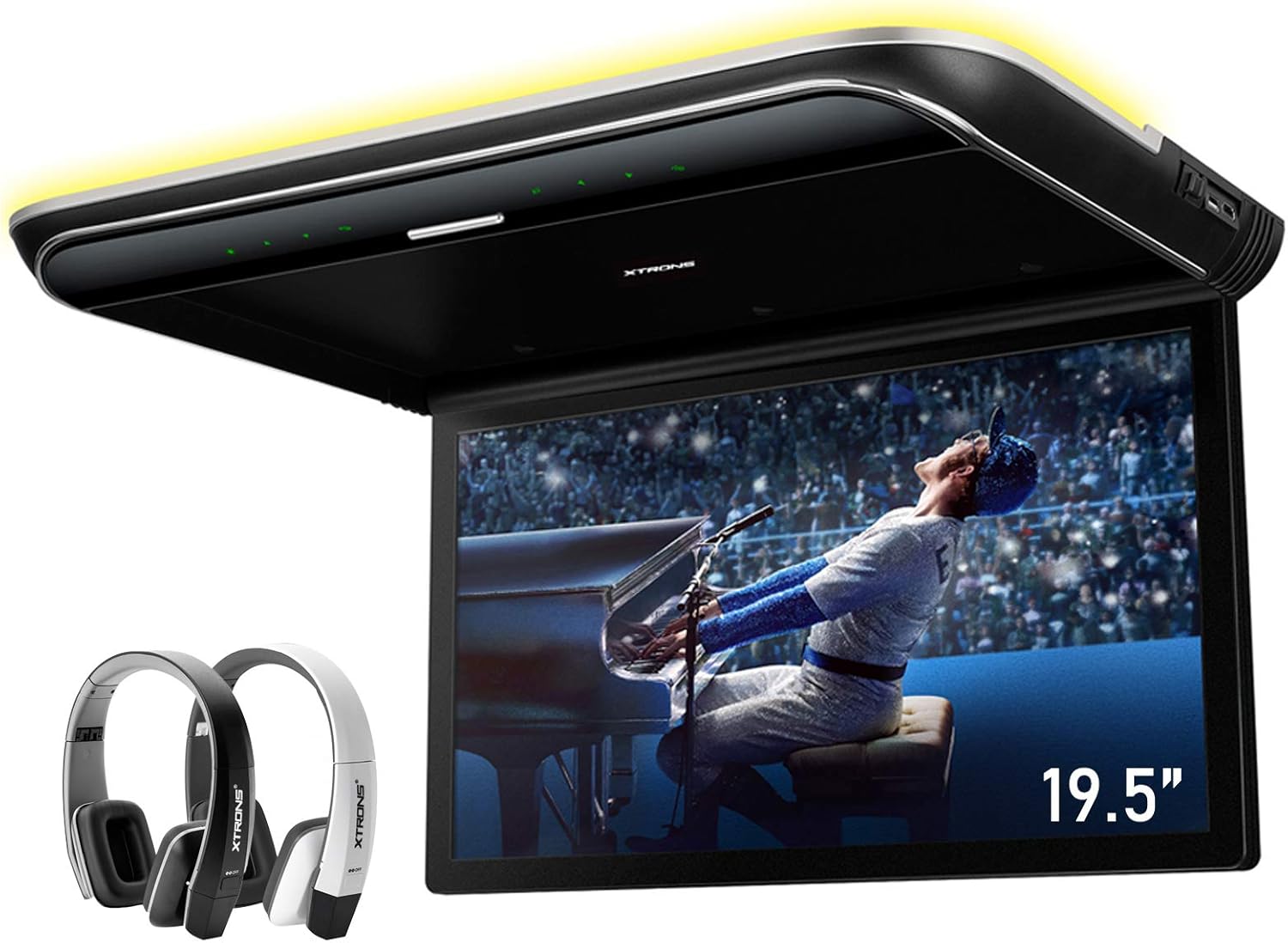
Image: The XTRONS CM195HD 19.5-inch car overhead monitor, shown with two IR headphones (black and white) that may be included with certain packages. The monitor is in the open position, displaying video content.
Product Features
- 19.5-inch Digital Screen: Large display suitable for various vehicles, including buses, coaches, and motor homes.
- High Resolution Display: 1600 x 900 TFT display for vivid and detailed visuals.
- 1080P Video Playback: Supports smooth Full HD 1080P video playback.
- Multiple Inputs: HDMI, USB, and AV input ports for connecting various devices.
- Virtual Touch Buttons: Sleek design with buttons that appear when powered on.
- 170° Max Open Angle: Adjustable screen for optimal viewing positions.
- Sound Output Options: Built-in stereo speakers, IR transmitter for wireless headphones, and FM transmitter.
- Automatic Lighting Control: Integrates with vehicle door status for automatic light operation.
- Ambient Illumination: Customizable multi-color ambient lighting.

Image: The 19.5-inch screen of the XTRONS CM195HD monitor, illustrating its large size suitable for vehicles such as coaches, buses, and motor homes.

Image: A comparison showing the vivid cinematic display of the XTRONS 16:9 wide screen with 1600x900 resolution versus a lower resolution display.
Setup and Installation
Package Contents
Before installation, please verify that all components are present:
- 1 x XTRONS CM195HD Overhead Monitor
- 1 x Remote Control
- 6 x Mounting Nuts
- 1 x User Manual (this document)
- (Optional: IR Headphones DWH005 and/or DWH006, if purchased as part of a bundle)

Image: Contents of the XTRONS CM195HD package, showing the remote control, six mounting nuts, and the user manual.
Wiring Diagram
Follow the wiring diagram carefully for proper electrical connection. Professional installation is recommended.
- B+: Connect to constant 12V power.
- ACC: Connect to accessory power (switched 12V).
- GND: Connect to vehicle ground.
- Door Control -: Connect to negative door trigger for automatic light control.
- Door Control +: Connect to positive door trigger for automatic light control.
- Audio Left Input 1: Left audio channel for AV Input 1.
- Audio Right Input 1: Right audio channel for AV Input 1.
- Audio Right Input 2: Right audio channel for AV Input 2.
- Audio Left Input 2: Left audio channel for AV Input 2.
- Video Input 1: Video signal for AV Input 1.
- Video Input 2: Video signal for AV Input 2.

Image: Detailed wiring diagram showing connections for power, ground, door control, and dual AV inputs for the XTRONS CM195HD monitor.
Mounting
Securely mount the monitor to the vehicle's roof using the provided mounting nuts. Ensure the mounting location is stable and does not interfere with vehicle safety features or structural integrity. The unit can be opened up to a 170-degree angle for optimal viewing.

Image: Illustration demonstrating the 170-degree maximum open angle of the XTRONS CM195HD monitor, allowing for flexible viewing positions.
Operating Instructions
Power On/Off and Basic Controls
The monitor features virtual touch buttons that illuminate when the unit is powered on. Press the power button to turn the unit on or off. Use the remote control or the on-unit buttons to navigate menus and select functions.

Image: The sleek design of the XTRONS CM195HD showing virtual touch buttons that appear when the unit is powered on and disappear when powered off, maintaining a tidy appearance.
Input Selection
The CM195HD supports multiple input sources. Use the 'Source' button on the remote or unit to cycle through HDMI, USB, AV Input 1, and AV Input 2.
- HDMI: Connect external devices like smartphones (with adapter), game consoles, or digital TV boxes.
- USB: Play media files directly from a USB drive.
- AV Input 1 & 2: Connect to other car entertainment systems or video sources.

Image: A close-up view of the side interfaces of the XTRONS CM195HD, highlighting the USB and HD IN (HDMI) ports, demonstrating connectivity options for various devices like game consoles, digital TV boxes, cameras, and video recorders.

Image: Illustration showing the dual AV input channels of the XTRONS CM195HD, allowing users to easily switch between two different external video sources, such as a head unit or a rear-seat DVD player.
Media Playback
The monitor supports a wide range of digital media formats for both video and audio playback. Ensure your media files are compatible for optimal performance.
Compatible Formats:
- Video: AVI, 3GP, MPG, MPEG, MP4, XVID
- Audio: MP3, WMA, WAV, AAC
- Image: JPG, JPEG, BMP, PNG

Image: Graphic illustrating the ultimate digital media file compatibility of the XTRONS CM195HD, showing various supported formats like MOV, MP4, FLAC, WMV, WMA, AVI, and MKV.
Audio Output Options
The CM195HD offers flexible audio output solutions:
- Built-in Stereo Speakers: Enjoy audio directly from the monitor.
- IR Transmitter: For private listening, use compatible XTRONS IR headphones (e.g., DWH005, DWH006).
- FM Transmitter: Broadcast audio to your vehicle's FM radio for sound through the car's speaker system.

Image: Diagram showing the various sound output choices for the XTRONS CM195HD, including built-in infrared (IR-TX) and FM transmitters (FM-TX) for wireless headphones or car stereo integration.

Image: The XTRONS CM195HD monitor displaying video, with visual cues indicating sound emanating from its built-in stereo speakers.
Automatic Lighting and Ambient Illumination
The monitor features integrated LED lighting. If connected to the vehicle's door control wires (positive or negative trigger), the lights can automatically turn on or off when the doors are opened or closed. The unit also offers multiple colors of ambient illumination to match your vehicle's interior or personal preference.

Image: Illustration of the automatic lighting control feature of the XTRONS CM195HD, showing how the unit's lights turn on when a car door is opened and off when closed, based on door control wire connection.

Image: Graphic displaying the range of multiple colors available for the ambient illumination feature of the XTRONS CM195HD, allowing users to customize the lighting mood.
Maintenance
To ensure the longevity and optimal performance of your XTRONS CM195HD monitor, follow these maintenance guidelines:
- Cleaning the Screen: Use a soft, lint-free cloth specifically designed for electronics screens. Do not use abrasive cleaners, solvents, or alcohol-based solutions, as these can damage the display.
- Cleaning the Unit: Wipe the exterior of the unit with a soft, dry cloth. Avoid using excessive moisture.
- Avoid Extreme Temperatures: Do not expose the unit to extreme heat or cold for extended periods.
- Secure Connections: Periodically check all wiring connections to ensure they are secure and free from corrosion.
- Software Updates: Check the official XTRONS website for any available firmware updates that may improve performance or add features.
Troubleshooting
If you encounter issues with your XTRONS CM195HD monitor, refer to the following common problems and solutions:
| Problem | Possible Cause | Solution |
|---|---|---|
| No Power |
|
|
| No Video Signal |
|
|
| No Audio |
|
|
| Remote Control Not Working |
|
|
If the problem persists after attempting these solutions, please contact XTRONS customer support.
Specifications
| Feature | Detail |
|---|---|
| Model | CM195HD |
| Screen Size | 19.5 Inches |
| Display Type | TFT LCD |
| Display Resolution | 1600 x 900 pixels |
| Video Playback | Supports 1080P Full HD |
| Aspect Ratio | 16:9 Wide Screen |
| Input Ports | HDMI, USB, 2x AV Input |
| Audio Output | Built-in Stereo Speakers, IR Transmitter, FM Transmitter |
| Max Open Angle | 170° |
| Product Dimensions | Approx. 19.5 x 15.6 x 19.5 inches (folded) |
| Item Weight | Approx. 13.82 pounds |

Image: A size comparison chart showing the 19.5-inch CM195HD monitor relative to an A4 paper and other XTRONS monitor sizes (14.32", 17.3"), indicating its suitability for large vehicles like motor homes and buses.
Warranty and Support
Warranty Information
XTRONS provides a 1-year warranty for the CM195HD Car Overhead Monitor. This warranty covers manufacturing defects and ensures your rights and interests are protected. Please retain your proof of purchase for warranty claims.
Customer Support
For technical assistance, warranty claims, or any questions regarding your XTRONS product, please contact us:
- Via Amazon: Use the "Ask a question" feature on the product page or contact the seller "Xtrons" directly through your Amazon order history.
- XTRONS Official Store: Visit the XTRONS Store on Amazon for more information and contact options.
Our professional technical support team will respond as soon as possible.
Related documentsCM195HD

Ask a question about this manual
Ask about setup, troubleshooting, compatibility, parts, safety, or missing instructions. Manuals+ will review the question and use this page’s manual context to help answer it.