
Motorola XT2087-1 (International Model)
Motorola Moto G9 Plus User Manual
Model: XT2087-1 (International Model)
Brand: Motorola
Introduction
This manual provides essential information for setting up, operating, and maintaining your Motorola Moto G9 Plus smartphone. Please read this manual carefully to ensure proper use and to maximize the device's capabilities.
What's in the Box
- Motorola Moto G9 Plus Smartphone
- 30W USB Wall Adapter
- USB-C to USB-C Cable
- Clear Protective Case
- SIM Ejector Tool

Figure 1: Motorola Moto G9 Plus device, showing the front display and the rear camera module.
Initial Setup
1. Inserting the SIM Card and MicroSD Card
- Locate the SIM tray on the left side of the device.
- Insert the SIM ejector tool into the small hole on the SIM tray to open it.
- Carefully pull out the SIM tray.
- Place your Nano-SIM card(s) and/or microSD card into the designated slots on the tray. Ensure the gold contacts are facing down.
- Gently push the tray back into the device until it clicks into place.
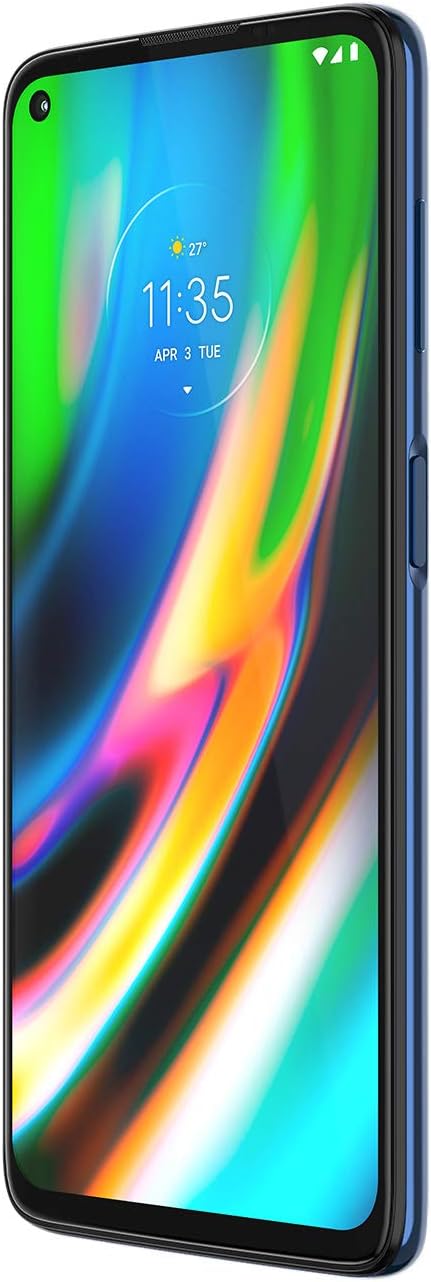
Figure 2: Side view of the device, highlighting the SIM tray location and power/volume buttons.
2. Powering On and Initial Configuration
- Press and hold the Power button (located on the right side) until the Motorola logo appears.
- Follow the on-screen prompts to select your language, connect to a Wi-Fi network, and set up your Google account.
- Configure security features such as fingerprint unlock and face unlock for enhanced device security.
Key Features
Display
The Motorola Moto G9 Plus features a large 6.81-inch IPS LCD display with a resolution of 1080p (2400 x 1080 pixels) and a pixel density of 386 PPI. Its 20:9 aspect ratio provides a tall and narrow form factor, ideal for media consumption and comfortable one-handed grip. The screen-to-body ratio is approximately 84.3%.

Figure 3: Front view of the Motorola Moto G9 Plus, showcasing its large display with a punch-hole camera.
Camera System
The device is equipped with a versatile quad-camera setup on the rear and a high-resolution front camera.
- Rear Cameras:
- 64MP Main Camera
- 8MP Ultra-wide Angle Camera
- 2MP Depth Sensing Camera (for portrait mode)
- 2MP Macro Camera
- Front Camera: 16MP (situated in a punch-hole design on the upper left of the display).
Video recording capabilities extend up to 4K resolution at 30 frames per second (fps) with no recording limit. The camera app offers various modes including Portrait, Cutout, Macro, Spot Color, Night Vision, Cinemagraph, Panorama, Ultra-Res, Live Filter, Slow Motion, and Timelapse.

Figure 4: Rear view of the device, highlighting the quad-camera module and Motorola logo.
Performance and Storage
The Motorola Moto G9 Plus is powered by the Qualcomm Snapdragon 730G processor and comes with 4GB of RAM, providing smooth performance for daily tasks and moderate gaming. It offers a generous 128GB of internal storage, which can be further expanded via a microSD card.
Battery and Charging
Equipped with a robust 5000mAh internal battery, the Moto G9 Plus offers extended usage times. The device supports 30W fast charging, allowing for quick replenishment of the battery. A compatible 30W USB wall adapter is included in the box.
Connectivity
The device supports 4G, 3G, and 2G cellular technologies. It features a USB-C port for charging and data transfer, a 3.5mm headphone jack, and NFC for contactless payments and quick pairing with compatible devices.


Figure 5: Bottom view (left) showing the USB-C port and speaker, and top view (right) showing the 3.5mm headphone jack.
Operating Your Device
Security Features
- Fingerprint Sensor: The side-mounted fingerprint sensor, integrated with the power button, allows for quick and secure unlocking of your device. To set up, navigate to Settings > Security > Fingerprint.
- Face Unlock: For convenient unlocking, you can set up face unlock. Go to Settings > Security > Face unlock and follow the instructions.
Camera Usage
To open the camera, tap the camera icon on your home screen or use the quick gesture (double twist of the wrist, if enabled). The camera interface allows you to switch between main, ultra-wide, and macro lenses. You can also select various photo and video modes from the menu within the camera app.
For detailed close-up shots, select the "Macro" mode. For wider scenes, switch to the "Ultra-wide" lens. Both photo and video modes support the ultra-wide angle camera.
Care and Maintenance
- Keep your device dry. Avoid exposure to water or high humidity.
- Clean the screen and body with a soft, lint-free cloth. Avoid abrasive cleaners.
- Protect your device from extreme temperatures.
- Use only approved chargers and accessories.
- Regularly back up your data to prevent loss.
- Keep the software updated to ensure optimal performance and security.
Troubleshooting
Common Issues and Solutions
| Issue | Possible Solution |
|---|---|
| Device not powering on | Ensure the battery is charged. Connect to the 30W charger for at least 15 minutes. Try a forced restart by holding the power button for 10-15 seconds. |
| Apps crashing or freezing | Clear the app's cache (Settings > Apps > [App Name] > Storage > Clear cache). Restart the device. Ensure all apps are updated. |
| Poor battery life | Reduce screen brightness. Close unused apps running in the background. Disable unnecessary features like GPS or Bluetooth when not in use. Check for app battery usage in settings. |
| Fingerprint sensor not responding | Ensure your finger is clean and dry. Re-register your fingerprint in Settings > Security > Fingerprint. |
Technical Specifications
| Feature | Specification |
|---|---|
| Model | XT2087-1 (International Model) |
| Display | 6.81-inch IPS LCD, 2400 x 1080 pixels (FHD+), 386 PPI |
| Processor | Qualcomm Snapdragon 730G |
| RAM | 4GB |
| Internal Storage | 128GB (expandable via microSD) |
| Rear Camera | 64MP (Main) + 8MP (Ultrawide) + 2MP (Depth) + 2MP (Macro) |
| Front Camera | 16MP |
| Battery | 5000mAh |
| Charging | 30W Fast Charging |
| Operating System | Android 10.0 |
| Connectivity | 4G, 3G, 2G, Wi-Fi, Bluetooth, NFC, USB-C |
| Audio Port | 3.5mm Headphone Jack |
| Dimensions | 6 x 4 x 2 inches |
| Weight | 14.9 ounces (422 grams) |
Warranty and Support
For warranty information and detailed support, please refer to the official Motorola website or the warranty card included with your product. You may also find additional resources and FAQs on the Motorola support page.
A digital version of the user manual is available at: Motorola Moto G9 Plus User Manual (PDF)
Related documentsXT2087-1 (International Model)


Ask a question about this manual
Ask about setup, troubleshooting, compatibility, parts, safety, or missing instructions. Manuals+ will review the question and use this page’s manual context to help answer it.