
Retevis RT668
Retevis RT668 Walkie Talkies User Manual
Model: RT668 | Brand: Retevis
1. Introduction
Thank you for choosing the Retevis RT668 Walkie Talkies. This professional two-way radio system is designed for reliable long-range communication in various environments, including logistics, manufacturing, and general adult use. Featuring a rugged design, efficient charging, and clear audio, the RT668 ensures you stay connected. This manual provides essential information for safe and effective operation.

2. Safety Information
Before using this radio, please read this guide carefully. It contains important operating instructions for safe usage and RF energy awareness, ensuring compliance with applicable standards and regulations. Keep the device away from fire and water.
Battery Warning: Keep out of reach of children. Swallowing can lead to chemical burns, perforation of soft tissue, and death. Severe burns can occur within 2 hours of ingestion. Seek medical attention immediately.
3. Package Contents
The Retevis RT668 package includes the following items:
- 6 x RT668 Walkie Talkies
- 6 x 1200mAh Batteries
- 6 x RT668 Original Earpieces
- 6 x Belt Clips
- 6 x Slings
- 1 x RTC68 Six-Way Charger
- 1 x User Manual (this document)

4. Setup Guide
4.1. Battery Installation
To install the battery, align it with the battery compartment on the back of the walkie talkie and gently press until it clicks into place. Ensure it is securely fastened.
4.2. Back Clip Installation and Removal
The belt clip allows for convenient carrying. To remove the back clip, first remove the battery from the walkie-talkie. Then, press the upper part of the back clip with your left hand, press the lower part of the back clip with your right hand, and push the back clip upwards. To install, align the back clip with the corresponding hole and press down firmly until it locks.
4.3. Charging the Radios
The RT668 comes with a six-way charger, allowing you to charge up to six radios or batteries simultaneously. Place the walkie talkie into a charging slot. The charger indicator light will turn red when the radio is charging. When fully charged, the indicator light will turn green. You can also remove the battery and charge it separately in the charger. Always turn off the radio when charging.

5. Operating Instructions
5.1. Power On/Off and Channel Selection
To power on the radio, rotate the top knob clockwise. To power off, rotate it counter-clockwise. The RT668 features 16 channels. To communicate with another PMR446 16-channel radio, ensure both radios are tuned to the same channel using the channel selector knob.
5.2. Transmitting and Receiving
To transmit, press and hold the Push-To-Talk (PTT) button on the side of the radio and speak clearly into the microphone. The indicator light on the transmitting radio will be red. When receiving a transmission, the indicator light on your radio will be green. Release the PTT button to listen.
5.3. VOX Function (Voice Operated Exchange)
The RT668 features a VOX function, allowing for hands-free communication. When activated, you can transmit simply by speaking, without needing to press the PTT button. This is particularly useful when your hands are busy.

5.4. Earpiece Usage
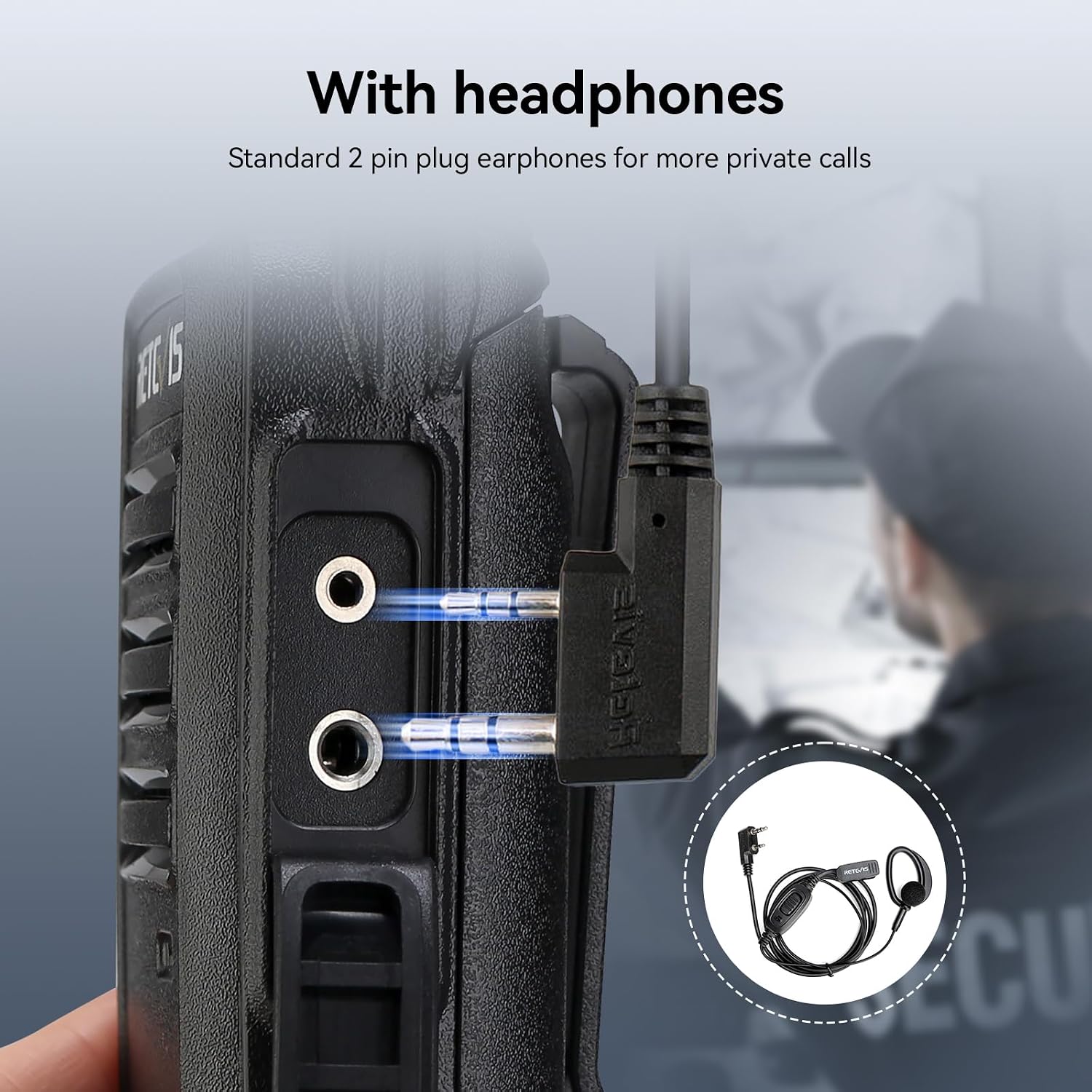
For private calls or use in noisy environments, connect the included earpiece to the standard 2-pin plug on the side of the radio. The earpieces offer clear sound and comfortable wearing, improving communication efficiency.

6. Maintenance
To ensure the longevity and optimal performance of your Retevis RT668 walkie talkies, follow these maintenance guidelines:
- Cleaning: Use a soft, damp cloth to clean the radio's exterior. Avoid using harsh chemicals or abrasive cleaners.
- Battery Care: Fully charge batteries before first use. For long-term storage, charge batteries to about 50% and store in a cool, dry place. Avoid overcharging or completely draining the battery.
- Storage: Store radios in a dry, dust-free environment when not in use.
- Environmental Conditions: The RT668 is designed to withstand shock and vibration in harsh environments due to its sturdy PC plastic shell. However, avoid exposing the radio to extreme temperatures, direct sunlight for prolonged periods, or excessive moisture.

7. Troubleshooting
If you encounter issues with your Retevis RT668 walkie talkies, consider the following common problems and solutions:
| Problem | Possible Cause | Solution |
|---|---|---|
| No power | Battery drained or not properly installed. | Ensure battery is fully charged and correctly inserted. |
| Cannot transmit or receive | Incorrect channel, out of range, or obstacles. | Verify both radios are on the same channel. Move closer to the other radio or to an open area. Terrain and obstacles significantly affect range. |
| Poor audio quality / Static | Weak signal, interference, or squelch level too low/high. | Move to an area with better signal. Adjust the squelch level (0-9 levels available). Ensure earpiece is fully plugged in if used. |
| Short range | Environmental factors (buildings, terrain), low battery. | Ensure batteries are fully charged. For optimal range, operate in open areas. The RT668 offers workshop coverage up to 150,000 sq. ft. or 10-15 floors. |


8. Specifications
| Feature | Detail |
|---|---|
| Model Number | RT668 |
| Brand | Retevis |
| Batteries | 6 Lithium Ion batteries required (included), 1200mAh capacity |
| Product Dimensions | 11.6 x 5 x 3.5 cm |
| Item Weight | 161 Grams |
| Color | Black |
| Water Resistance Level | Water Repellent |
| Frequency Range | 446.00625-446.19375MHz (PMR446) |
| Compatible Devices | PMR446 walkie-talkies |
| Work Time | Up to 15 hours (approx.) |
| Standby Time | Up to 30 hours (approx.) |
9. Warranty and Customer Support
Retevis provides comprehensive customer support for your RT668 walkie talkies:
- Warranty: 3-year warranty for the radio body and 1-year warranty for accessories.
- Returns: 30-day no-reason return policy.
- Response Time: Customer inquiries on Amazon will receive a reply within 12 hours.
- Technical Support: Lifetime technical support is provided.
For any issues or questions, please contact Retevis customer support via Amazon.
Related documentsRT668


Ask a question about this manual
Ask about setup, troubleshooting, compatibility, parts, safety, or missing instructions. Manuals+ will review the question and use this page’s manual context to help answer it.