
Introduction
Thank you for choosing the Lamicall DP01 Adjustable Foldable Aluminum Phone and Tablet Stand. This manual provides essential information for setting up, operating, and maintaining your device. Designed for superior stability and versatility, this stand is a perfect desktop accessory for hands-free viewing, video calls, and more.
Product Features
- Dual-Hinge Adjustment: Features two robust hinges tested for 6000 rotations, allowing for easy adjustment and secure positioning at various angles.
- Enhanced Stability: Constructed from high-quality aluminum alloy with a larger, heavier base to provide solid support for your devices.
- Wide Compatibility: Supports all smartphones and tablets ranging from 4 to 11 inches, including various iPhone and Galaxy models, iPad Mini, and 9.7'' iPad/Pro/Air.
- Portable Design: Folds compactly to 4.2" x 3.5" x 0.98" (107 mm × 89 mm × 25 mm) for easy transport during travel or business trips.
- Cable Management: Designed with an opening to route charging cables for a tidy setup.
Setup Instructions
Follow these steps to set up your Lamicall DP01 stand:
- Unfold the Stand: Gently unfold the stand from its compact, folded position. The dual hinges will allow the stand to extend into an upright position.
- Adjust the Angle: Use the dual hinges to adjust the viewing angle to your preference. The hinges are designed to be tight to ensure stability once set.
- Place Your Device: Carefully place your smartphone or tablet onto the cradle. Ensure the device is centered for optimal balance.

Image: Adjusting the dual hinges for optimal viewing.
Video: A detailed demonstration of unfolding and adjusting the Lamicall DP01 stand, showcasing its sturdy design and how to position a phone.
Operating Instructions
The Lamicall DP01 stand offers flexible usage options:
- Portrait or Landscape: Position your phone or tablet vertically (portrait mode) or horizontally (landscape mode) depending on your activity. For devices larger than 8 inches, landscape mode is recommended for a better experience.
- Charging While in Use: Utilize the cutout at the bottom of the stand to route your charging cable, keeping your device powered while maintaining a clean desktop.
Image: Demonstrating enhanced stability with a phone on the stand and a charging cable.
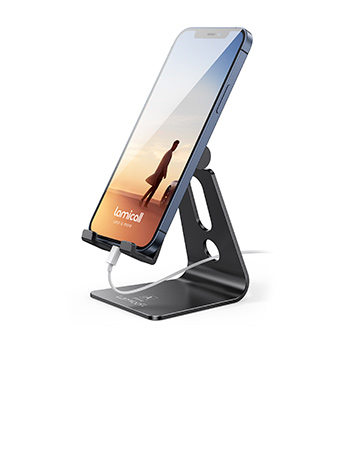
Image: The stand supporting a tablet in landscape mode, illustrating wide compatibility.
Video: Demonstrates how to place a phone on the stand, adjust its angle, and highlights the stand's foldable design for portability.
Maintenance
To ensure the longevity and optimal performance of your Lamicall DP01 stand, follow these simple maintenance guidelines:
- Cleaning: Wipe the stand with a soft, dry cloth to remove dust and fingerprints. For stubborn marks, a slightly damp cloth can be used, followed by immediate drying. Avoid abrasive cleaners or solvents.
- Hinge Care: The hinges are designed to be tight for secure positioning. Avoid excessive force when adjusting to prevent damage. No lubrication is typically required.
- Storage: When not in use or for travel, fold the stand into its compact form to protect it from potential damage.
Troubleshooting
If you encounter any issues with your Lamicall DP01 stand, please refer to the following common solutions:
- Stand Instability: Ensure your device is placed centrally on the cradle. For larger devices (over 8 inches), always use the stand in landscape mode to maximize stability. Verify the stand is on a flat, stable surface.
- Difficulty Adjusting Hinges: The hinges are intentionally stiff to hold your device securely. Apply firm, even pressure when adjusting. If they become too stiff or loose over time, contact customer support.
- Device Slipping: Check the silicone pads on the cradle and base for any dirt or wear. Clean them gently. If pads are damaged, contact customer support for assistance.
Specifications
| Feature | Detail |
|---|---|
| Brand | Lamicall |
| Model Number | DP01 |
| Material | Aluminum Alloy |
| Color | Sliver |
| Item Weight | 7.4 ounces |
| Package Dimensions | 5.08 x 3.7 x 1.34 inches |
| Compatible Devices | 4-11 inch smartphones and tablets (e.g., iPhone 14/13/12 series, Galaxy S series, Note series, LG, Google Pixel, iPad Mini, 9.7'' iPad/Pro/Air) |
Portability and Storage
The Lamicall DP01 stand is designed for maximum portability:
- Folding Mechanism: The stand features a unique folding design that allows it to collapse into a flat, compact form. This makes it easy to store in a bag, backpack, or luggage.
- Travel-Friendly: Its small size and durable construction make it an ideal companion for travel, ensuring you always have a stable viewing solution wherever you go.
Image: The stand folds compactly for easy storage and transport.
Video: A quick review demonstrating the folding mechanism of the Lamicall phone holder, emphasizing its compact size for travel.
Warranty and Support
Lamicall stands behind the quality of its products. For any questions, concerns, or support needs regarding your DP01 stand, please refer to the following:
- Return Policy: This product is eligible for a 30-day return period from the date of purchase. Please refer to your retailer's specific return policy for details.
- Manufacturer Support: For further assistance, you can visit the official Lamicall Store online.
