
Introduction
This manual provides essential instructions for the setup, operation, and maintenance of your Everest SM-18 2.4Ghz Optical Wireless Mouse. Please read this manual thoroughly before using the product to ensure optimal performance and longevity.
Safety Information
- Do not expose the mouse to water or excessive moisture.
- Avoid dropping or subjecting the mouse to strong impacts.
- Keep out of reach of children.
- Dispose of batteries according to local regulations.
Package Contents
- Everest SM-18 Wireless Mouse
- USB Nano Receiver
- User Manual (this document)
Product Overview
Familiarize yourself with the components of your wireless mouse.
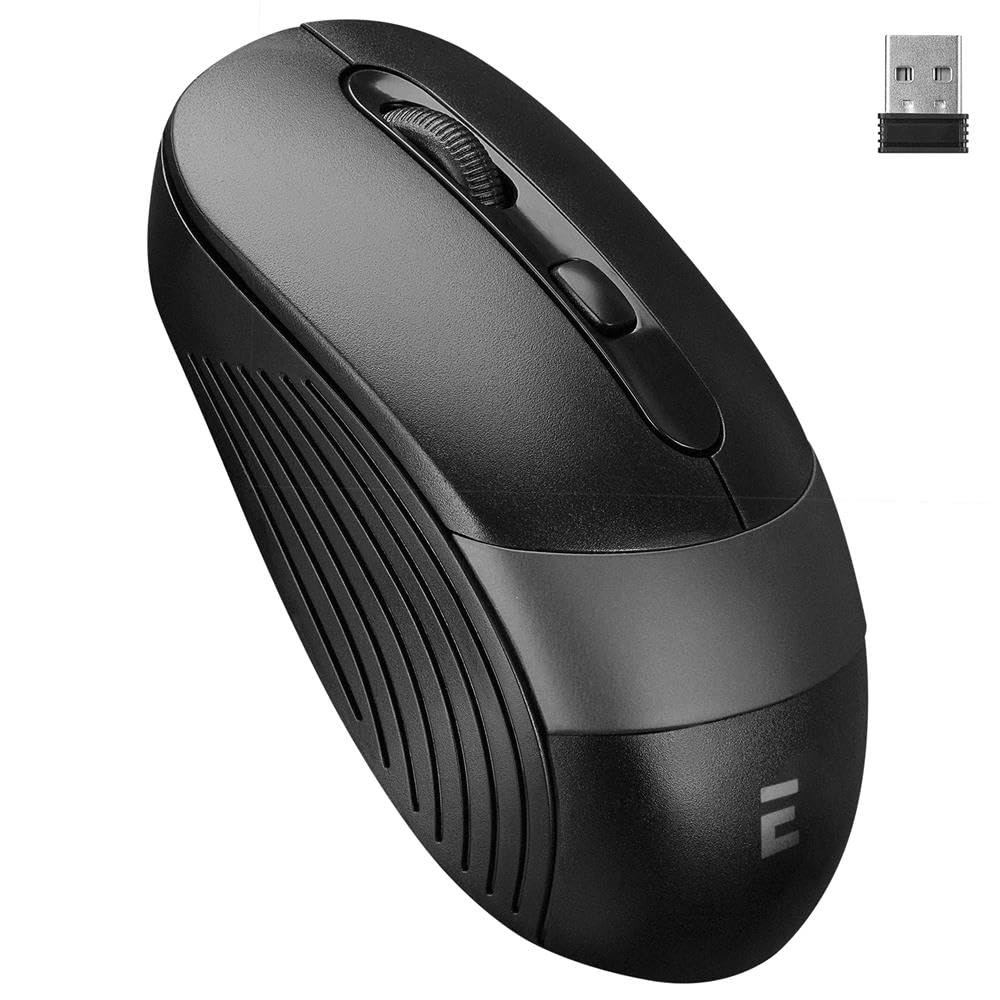
Image Description: A black and grey Everest SM-18 wireless mouse. The image shows the top view of the mouse, highlighting the left-click button, right-click button, scroll wheel, and two side buttons. The USB nano receiver is also shown detached from the mouse.
- Left Click Button
- Right Click Button
- Scroll Wheel / Middle Button
- DPI Adjustment Button
- Forward Button (Side)
- Back Button (Side)
- USB Nano Receiver Storage (Bottom)
- Battery Compartment (Bottom)
- Power ON/OFF Switch (Bottom)
Setup
1. Installing Batteries
The Everest SM-18 mouse requires two (2) AA batteries (not included).
- Turn the mouse upside down.
- Locate the battery compartment cover.
- Slide the cover open.
- Insert two AA batteries, ensuring correct polarity (+/-).
- Close the battery compartment cover securely.
2. Connecting the USB Receiver
The USB Nano Receiver is stored inside the mouse for convenience.
- Gently remove the USB Nano Receiver from its storage slot on the bottom of the mouse.
- Plug the USB Nano Receiver into an available USB port on your computer.
- Your computer should automatically detect and install the necessary drivers. This may take a few moments.
3. Powering On the Mouse
Locate the ON/OFF switch on the bottom of the mouse and slide it to the "ON" position. The mouse is now ready for use.
Operating the Mouse
Basic Functions
- Left Click: Primary selection and activation.
- Right Click: Opens contextual menus.
- Scroll Wheel: Scrolls documents and web pages vertically. Pressing it often acts as a middle-click.
- Side Buttons (Forward/Back): Navigate web pages or folders.
DPI Adjustment
The SM-18 mouse features adjustable DPI (Dots Per Inch) settings, allowing you to change cursor sensitivity.
- Press the DPI Adjustment Button (usually located behind the scroll wheel) to cycle through available DPI settings: 800, 1200, and 1600 DPI.
- Select the sensitivity that best suits your preference and task.
Maintenance
Cleaning Your Mouse
To maintain optimal performance, clean your mouse regularly.
- Disconnect the USB receiver from your computer.
- Turn off the mouse using the ON/OFF switch.
- Use a soft, lint-free cloth slightly dampened with water or a mild cleaning solution to wipe the surface of the mouse.
- Avoid using harsh chemicals or abrasive materials.
Battery Replacement
When the mouse performance degrades or stops responding, it's time to replace the batteries.
- Follow the "Installing Batteries" steps in the Setup section to replace the old batteries with new AA batteries.
- Ensure proper disposal of used batteries.
Troubleshooting
- Mouse not responding:
- Ensure the mouse is turned ON.
- Check if the batteries are correctly installed and have sufficient charge. Replace if necessary.
- Ensure the USB Nano Receiver is securely plugged into a working USB port on your computer. Try a different USB port.
- Move the mouse closer to the USB receiver to rule out interference.
- Cursor movement is erratic or jumpy:
- Clean the optical sensor on the bottom of the mouse.
- Use the mouse on a clean, non-reflective surface or a mouse pad.
- Check for low battery power.
Specifications
| Feature | Detail |
|---|---|
| Brand | Everest |
| Model | SM-18 |
| Connectivity | 2.4Ghz Wireless, USB Nano Receiver |
| Sensor Type | Optical |
| DPI Settings | 800 / 1200 / 1600 DPI |
| Number of Buttons | 6 (Left, Right, Scroll, DPI, Forward, Back) |
| Working Distance | Up to 10 meters |
| Battery Type | 2 x AA Batteries |
| Compatible Devices | Desktop Computer, Laptop, Personal Computer |
| Dimensions | 108 x 64 x 35 mm (approx.) |
| Weight | 0.1 Kilograms (without batteries) |
Warranty and Support
The Everest SM-18 Wireless Mouse comes with a 24-month warranty period from the date of purchase.
For technical support or warranty claims, please contact your retailer or the Everest customer service department. Keep your proof of purchase for warranty validation.


