
1. Introduction
The Pyle PREA86BTH is a versatile Bluetooth Hybrid Stereo Home Pre-Amplifier designed to enhance your home audio and entertainment system. This unit converts weak electrical signals into a robust output signal suitable for further processing or direct connection to a power amplifier and speakers. It features multiple input options, Bluetooth connectivity, and a dual 10-band graphic equalizer for precise audio control.
2. Safety Instructions
Please read these instructions carefully before operating the unit. Retain this manual for future reference.
- Power Source: Connect the unit only to an AC 120V/60Hz or AC 240V/50Hz power supply as indicated on the unit. Ensure the voltage selector switch on the rear panel is set correctly for your region.
- Ventilation: Do not block ventilation openings. Ensure adequate airflow around the unit to prevent overheating.
- Water and Moisture: Do not expose the unit to rain, moisture, or excessive humidity. Do not place objects filled with liquids, such as vases, on the unit.
- Heat: Keep the unit away from heat sources such as radiators, heat registers, stoves, or other heat-producing appliances.
- Cleaning: Clean only with a dry cloth. Disconnect the power cord before cleaning.
- Servicing: Do not attempt to service this unit yourself. Refer all servicing to qualified service personnel.
- Placement: Place the unit on a stable, flat surface. Avoid placing it in direct sunlight or near strong magnetic fields.
3. Package Contents
Verify that all items are present in the box:
- Pyle PREA86BTH Hybrid Stereo Pre-Amplifier
- Remote Control
- FM Antenna
- Rack Mount Handles (2)

Image: Contents of the Pyle PREA86BTH package, showing the amplifier unit, remote control, FM antenna, and two rack mount handles.
4. Product Features
- Hybrid Pre-Amplifier for home entertainment and karaoke systems.
- Integrated Bluetooth for wireless music streaming (Bluetooth 5.0).
- Multiple audio inputs: USB reader, AUX 3.5mm, 2 Microphone inputs, Optical/Coaxial Digital, HDMI, AC-3, and DVD inputs.
- FM Radio tuner with auto-search scan.
- Front panel controls with digital LED display.
- Rotary controls for Microphone Volume, Treble, Bass, Echo, Delay, Input Selection, and Master Volume.
- Dual 10-band graphic equalizer for left and right channels.
- Headphone jack for private listening.
- Universal rack mount design.
5. Front Panel Controls
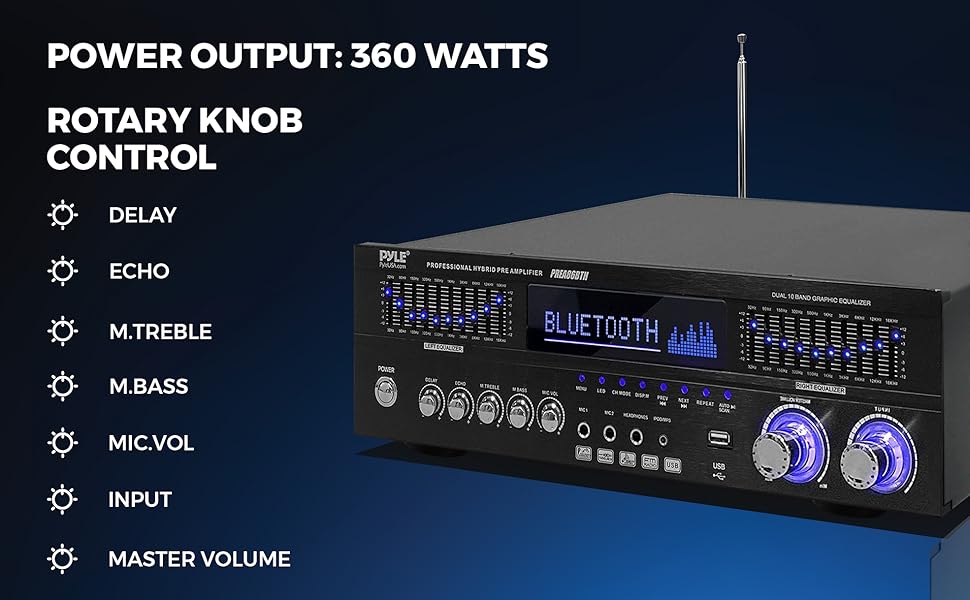
Image: Detailed view of the Pyle PREA86BTH front panel, highlighting the power button, equalizer sliders, digital display, input selectors, and rotary controls for various audio adjustments.
- Power Button: Turns the unit ON or OFF.
- Digital LED Display: Shows current input, frequency, and other status information.
- Input Selector: Cycles through available audio inputs (Bluetooth, USB, AUX, Optical, Coaxial, HDMI, AC-3, DVD, FM).
- Microphone Inputs (MIC1, MIC2): 1/4" jacks for connecting microphones.
- Headphone Jack: 1/4" jack for connecting headphones.
- USB Port: For connecting USB flash drives for MP3 audio playback.
- Microphone Controls: Rotary knobs for MIC VOL (volume), ECHO, and DELAY.
- Tone Controls: Rotary knobs for M.TREBLE (microphone treble) and M.BASS (microphone bass).
- Master Volume: Large rotary knob to adjust the overall output volume.
- Graphic Equalizer: Dual 10-band sliders for precise frequency adjustment of the left and right audio channels.
- FM Radio Controls: Buttons for auto-scan, next/previous station, and repeat functions.
6. Rear Panel Connections
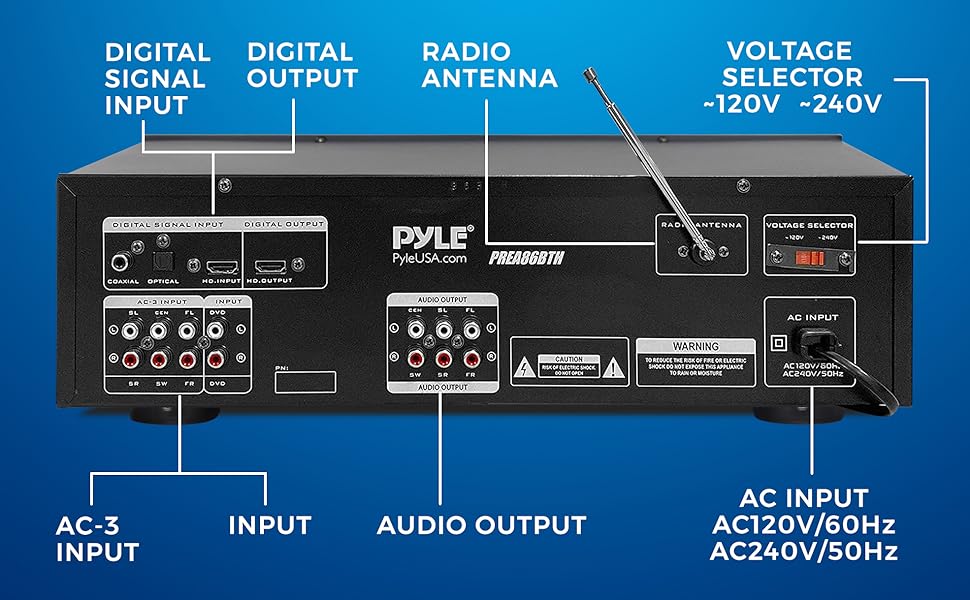
Image: Rear panel connections of the Pyle PREA86BTH, including digital signal inputs (Coaxial, Optical, HDMI), AC-3 inputs, RCA audio inputs/outputs, FM antenna connector, and AC power input with voltage selector.
- Digital Signal Inputs: COAXIAL, OPTICAL, HDMI (HD.INPUT). Connect digital audio sources.
- AC-3 Inputs: Multi-channel audio inputs for compatible devices.
- DVD Input: RCA stereo audio input for DVD players or other analog sources.
- Audio Input (AUX): RCA stereo audio input for general analog sources.
- Audio Output: RCA stereo audio output to connect to a power amplifier or recording device.
- FM Antenna: Connector for the included FM antenna.
- Voltage Selector: Switch between 120V and 240V AC power. Ensure this is set correctly for your region before connecting power.
- AC Input: Power cord connection.
7. Setup
Follow these steps to set up your Pyle PREA86BTH pre-amplifier:
- Placement: Place the pre-amplifier on a stable, flat surface or install it into a standard audio rack using the provided handles. Ensure adequate ventilation.
- Connect Speakers/Amplifier: Connect the RCA Audio Output from the PREA86BTH to the input of your power amplifier or active speakers. This unit is a pre-amplifier and requires a separate power amplifier to drive passive speakers.
- Connect Audio Sources:
- For digital sources (TV, Blu-ray player), use the Optical, Coaxial, or HDMI inputs.
- For analog sources (CD player, turntable with pre-amp, DVD player), use the AUX or DVD RCA inputs.
- For USB playback, insert a USB flash drive into the front panel USB port.
- Connect FM Antenna: Attach the included FM antenna to the FM ANTENNA connector on the rear panel for radio reception. Extend the antenna for better reception.
- Power Connection: Before connecting the power cord, ensure the VOLTAGE SELECTOR switch on the rear panel is set to the correct voltage for your region (120V or 240V). Then, connect the power cord to the AC INPUT on the rear panel and plug it into a wall outlet.
8. Operating Instructions
8.1 Power On/Off
Press the POWER button on the front panel to turn the unit ON or OFF.
8.2 Input Selection
Press the INPUT button on the front panel or remote control to cycle through the available audio sources (Bluetooth, USB, AUX, Optical, Coaxial, HDMI, AC-3, DVD, FM).
8.3 Volume Control
Adjust the MASTER VOLUME rotary knob on the front panel to control the overall output volume. For microphone volume, use the MIC VOL knob.
8.4 Bluetooth Pairing
- Select 'Bluetooth' as the input source using the INPUT button. The LED display will show 'BLUETOOTH' and indicate pairing mode.
- On your mobile device (smartphone, tablet, laptop), enable Bluetooth and search for available devices.
- Select 'PYLEUSA' from the list of devices.
- Once paired, the unit will confirm the connection, and you can stream audio wirelessly.

Image: A smartphone displaying a music player interface, with the Pyle PREA86BTH amplifier in the background, illustrating Bluetooth connectivity.
8.5 USB Playback
- Insert a USB flash drive containing MP3 audio files into the front panel USB port.
- Select 'USB' as the input source. The unit will automatically begin playing audio files.
- Use the playback controls (Play/Pause, Next, Previous, Repeat) on the front panel or remote control.

Image: A hand inserting a USB flash drive into the front panel USB port of the Pyle PREA86BTH amplifier, demonstrating the USB playback feature.
8.6 FM Radio Operation
- Select 'FM' as the input source.
- Press the 'AUTO SCAN' button to automatically search and store available FM radio stations.
- Use the 'NEXT' and 'PREV' buttons to navigate through stored stations.
8.7 Microphone Usage
- Connect microphones to the MIC1 or MIC2 inputs on the front panel.
- Adjust the MIC VOL knob to control microphone volume.
- Use the ECHO and DELAY knobs to add effects to the microphone audio.
- Adjust M.TREBLE and M.BASS for microphone tone control.
8.8 Equalizer Adjustment
Use the DUAL 10 BAND GRAPHIC EQUALIZER sliders on the front panel to fine-tune the frequency response of your audio. Adjust the sliders for the Left and Right channels independently to achieve your desired sound profile.
9. Troubleshooting
If you encounter issues with your Pyle PREA86BTH, refer to the following common problems and solutions:
- No Power:
- Check if the power cord is securely connected to the unit and the wall outlet.
- Ensure the VOLTAGE SELECTOR switch on the rear panel is set correctly (120V or 240V).
- Verify the wall outlet is functioning.
- No Sound Output:
- Ensure the pre-amplifier is connected to a power amplifier or active speakers. This unit does not directly power passive speakers.
- Check all audio cable connections (RCA, Optical, Coaxial, HDMI) between the pre-amplifier and your audio sources/power amplifier.
- Verify the correct input source is selected on the pre-amplifier.
- Increase the MASTER VOLUME on the pre-amplifier and the volume on your power amplifier/active speakers.
- If using headphones, ensure they are properly plugged in and the main output is not muted.
- Bluetooth Connection Issues:
- Ensure 'Bluetooth' input is selected on the pre-amplifier.
- Make sure your device's Bluetooth is enabled and within range (typically up to 40+ feet).
- Try unpairing and re-pairing the device.
- Ensure no other devices are currently connected to the pre-amplifier via Bluetooth.
- USB Playback Not Working:
- Ensure 'USB' input is selected.
- Verify the USB drive contains compatible MP3 audio files.
- Try a different USB drive.
- Poor FM Radio Reception:
- Extend and reposition the FM antenna for better signal reception.
- Perform an 'AUTO SCAN' to find available stations.
- Remote Control Not Responding:
- Ensure there are no obstructions between the remote and the unit's IR sensor.
- Replace the batteries in the remote control.
10. Specifications
| Feature | Specification |
|---|---|
| Model Number | PREA86BTH |
| Product Dimensions | 16.93 x 7.87 x 4.72 inches |
| Item Weight | 8.68 pounds |
| Manufacturer | Pyle |
| ASIN | B08JMBTN36 |
| Date First Available | September 21, 2020 |
11. Warranty and Support
Pyle products are designed for reliability and performance. For warranty information or technical support, please refer to the documentation included with your purchase or visit the official Pyle website. Keep your proof of purchase for warranty claims.
For further assistance, you may contact Pyle customer service directly.


