
Introduction
The Wolezek 4-Head Full Spectrum LED Grow Light is designed to provide optimal lighting conditions for indoor plants. This manual provides detailed instructions for assembly, operation, and maintenance to ensure proper use and longevity of your grow light.

Image: Wolezek 4-Head Full Spectrum LED Grow Light with its adjustable tripod stand, illuminating various potted plants.
Safety Instructions
- Read all instructions before using the product.
- Do not expose the grow light to water or high humidity. This product is for indoor use only.
- Ensure the power source matches the voltage requirements of the grow light (5V DC).
- Unplug the grow light from the power outlet before cleaning or performing any maintenance.
- Do not attempt to disassemble or modify the grow light. Refer all servicing to qualified personnel.
- Keep out of reach of children and pets.
- Avoid direct eye exposure to the LED lights, as prolonged exposure may cause discomfort.
Package Contents
Verify that all components are present in the package:
- 1 x 4-Head LED Grow Light with Flexible Goosenecks
- 1 x Adjustable Tripod Stand
- 1 x Integrated Controller (on power cord)
- 1 x USB Power Adapter
Product Overview
Key Features
- Adjustable Tripod Stand: Extendable from 15 inches to 61 inches, suitable for various plant heights.
- Flexible Goosenecks: 360-degree rotation for precise light positioning.
- Full Spectrum LED: Composed of 3000K warm white, 6500K cold white, and 660nm red LEDs to support all plant growth stages.
- 3 Light Modes: Offers different spectral combinations for specific plant needs.
- 5 Dimming Levels: Adjustable brightness (20%, 40%, 60%, 80%, 100%) to control light intensity.
- Auto On/Off Timer: Built-in circular memory timer with 6, 12, or 16-hour settings.
Spectral Information
The grow light utilizes a full spectrum design to mimic natural sunlight, providing essential wavelengths for photosynthesis.

Image: A graph illustrating the full spectrum light distribution (380nm-800nm) with peaks at 450nm (Germinal) and 630nm (Blossom & Burnish), including descriptions for 3000K Warm White, 6500K White, and 660nm Red LEDs and their functions in plant growth.
- 3000K Warm White LEDs: Increase light intensity and enhance photosynthesis.
- 6500K White LEDs: Promote plant germination and increase growth rate.
- 660nm Red LEDs: Contribute to photosynthesis, germination, flowering, and fruiting.
Setup Instructions
Follow these steps to assemble and set up your Wolezek Grow Light:

Image: A visual guide showing four steps for assembling the grow light: opening the tripod, attaching the light head, adjusting light tubes, and connecting power.
- Open the Tripod Stand: Gently spread the legs of the tripod stand outwards until it is stable.
- Attach the Grow Light: Place the grow light head onto the tripod stand's mounting screw and rotate clockwise until fully secured.
- Adjust Height and Position: Loosen the adjustment knobs on the tripod stand to extend or retract the height (15-61 inches). Tighten the knobs to secure the desired height. Bend the flexible goosenecks to position the light heads over your plants.
- Connect Power: Plug the USB power adapter into a suitable power outlet. Connect the USB cable from the grow light's controller to the power adapter.

Image: The adjustable tripod stand, demonstrating its height extension capabilities from 15 to 61 inches, providing flexibility for various plant sizes.

Image: Close-up of the grow light fixture, highlighting the 80 lamp beads, 360-degree flexible goosenecks, height adjustment mechanism, and sturdy tripod stand for easy installation and positioning.
Operating Instructions
The grow light is controlled via an integrated inline controller on the power cord.
Controller Functions
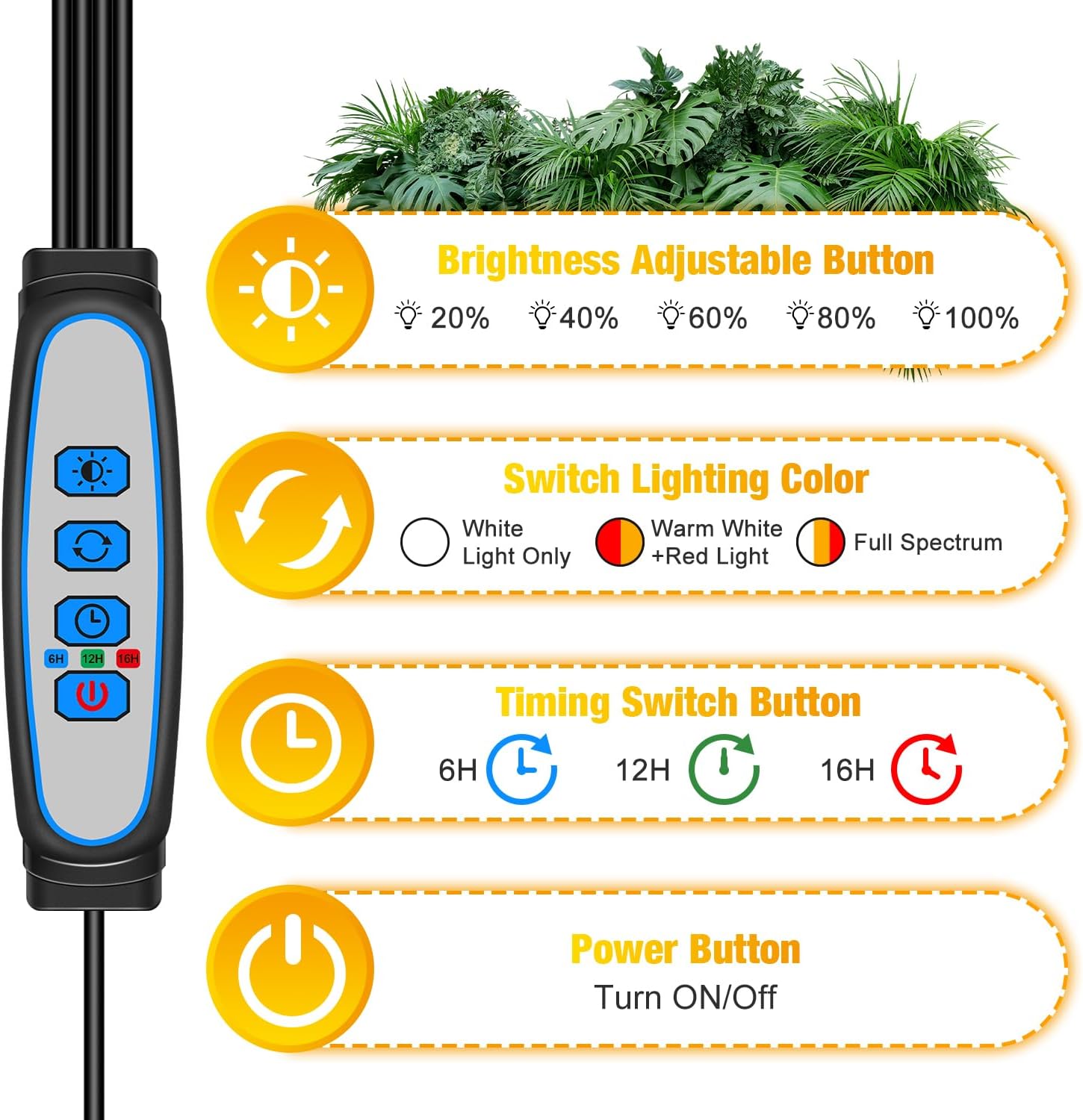
Image: A close-up of the grow light's inline controller, showing buttons for adjusting brightness, switching lighting color, setting the timer, and power on/off.
- Brightness Adjustable Button (Sun Icon): Press to cycle through 5 dimming levels (20%, 40%, 60%, 80%, 100%).
- Switch Lighting Color Button (Arrows Icon): Press to switch between 3 light modes: White Light Only, Warm White + Red Light, and Full Spectrum (Mix Light).
- Timing Switch Button (Clock Icon): Press to set the automatic timer for 6, 12, or 16 hours. The light will turn on and off automatically at the set interval each day.
- Power Button (Circle with Line Icon): Press to turn the grow light ON or OFF.
Light Modes and Dimming

Image: Visual representation of the three available light modes (Red+Warm White, White, and Mixed/Full Spectrum) and five dimming levels (20%, 40%, 60%, 80%, 100%) for the grow light.
- Red + Warm White Light: Enhances photosynthesis and light intensity, beneficial for flowering and fruiting stages.
- White Light: Supplements natural light, suitable for all growth cycles.
- Mix Light (Full Spectrum): Combines all LED types for comprehensive plant growth support.
Timer Functionality
Once the timer is set (6H, 12H, or 16H), the grow light will automatically turn on and off at the same time each day. This feature provides consistent light cycles for your plants without manual intervention. If power is interrupted, the timer setting may need to be reset.

Image: A circular graphic depicting the auto timer controller, showing the light turning on during the day and off at night, ensuring consistent light cycles for plants.
Maintenance
- Cleaning: Ensure the grow light is unplugged before cleaning. Use a soft, dry cloth to wipe down the light heads and stand. Do not use abrasive cleaners or immerse any part of the unit in water.
- Storage: When not in use for extended periods, unplug the unit, clean it, and store it in a cool, dry place away from direct sunlight.
Troubleshooting
| Problem | Possible Cause | Solution |
|---|---|---|
| Light does not turn on. | No power, loose connection, power button not pressed. | Check power outlet, ensure USB cable is securely connected, press the power button on the controller. |
| Timer function is not working correctly. | Timer not set, power interruption. | Ensure the timer is set to 6H, 12H, or 16H. If power was interrupted, reset the timer by pressing the timer button again. |
| Lights are dim or flickering. | Low brightness setting, power supply issue. | Increase brightness using the brightness button. Ensure the power adapter is functioning correctly and providing stable 5V DC. |
Specifications
| Feature | Detail |
|---|---|
| Model Number | 4GL802 |
| Power Source | Corded Electric (USB) |
| Voltage | 5 Volts (DC) |
| Brightness | 2450 Lumen |
| Light Source Type | LED (80 total lamp beads) |
| Color Temperature | 3000K, 6500K, 660nm (Red) |
| Dimming Levels | 5 (20%, 40%, 60%, 80%, 100%) |
| Timer Settings | 6H, 12H, 16H (Auto On/Off) |
| Tripod Stand Height | Adjustable from 15 to 61 inches |
| Material | Metal, Iron |
| Product Dimensions | 10"L x 10"W x 10"H (approximate, collapsed) |
| Item Weight | 2.95 pounds |
Warranty and Support
Wolezek provides customer service for this product. If you encounter any issues or have questions regarding your grow light, please contact customer support via the platform where the product was purchased. They are available to provide assistance and satisfactory service.