
KitchenAid KCG8433BM
KitchenAid Burr Coffee Grinder - KCG8433 Instruction Manual
Model: KCG8433BM | Brand: KitchenAid
1. Introduction
This instruction manual provides detailed guidance for the safe and efficient operation, maintenance, and troubleshooting of your KitchenAid Burr Coffee Grinder, Model KCG8433. Designed for precision and consistency, this grinder allows you to achieve the perfect grind size for various brewing methods, from French Press to Espresso. Please read this manual thoroughly before first use and retain it for future reference.

Figure 1: KitchenAid Burr Coffee Grinder (KCG8433BM)
2. Important Safety Information
Always follow basic safety precautions when using electrical appliances to reduce the risk of fire, electric shock, and injury to persons. This appliance is for household use only.
- Read all instructions before operating the grinder.
- Do not immerse the appliance, cord, or plug in water or other liquids.
- Close supervision is necessary when any appliance is used by or near children.
- Unplug from outlet when not in use, before putting on or taking off parts, and before cleaning.
- Avoid contact with moving parts.
- Do not operate any appliance with a damaged cord or plug, or after the appliance malfunctions or has been dropped or damaged in any manner.
- The use of attachments not recommended or sold by KitchenAid may cause fire, electric shock, or injury.
- Do not use outdoors.
- Do not let cord hang over edge of table or counter, or touch hot surfaces.
- Do not place on or near a hot gas or electric burner, or in a heated oven.
- Do not use appliance for other than intended use.
3. Product Components
Familiarize yourself with the main parts of your KitchenAid Burr Coffee Grinder:
- Bean Hopper: Transparent container for whole coffee beans.
- Hopper Lid: Covers the bean hopper.
- Grind Size Selector: Dial to adjust the fineness of the grind (70 settings).
- Digital Display: Shows grind size, cups/shots, and grind time.
- Program Button: For saving custom grind settings.
- Start/Stop Button: Initiates or pauses grinding.
- Grind Time/Cups/Shots Dial: Adjusts the quantity of coffee to be ground.
- Grounds Container: Removable container for collecting ground coffee.
- Portafilter Holder: Attachment for direct grinding into an espresso portafilter.
- Conical Burrs: Commercial-grade stainless steel burrs for precise grinding.
4. Setup
Before first use, ensure all packaging materials are removed and clean all removable parts as described in the "Maintenance" section.
- Place the Grinder: Position the grinder on a clean, dry, and stable surface.
- Install Grounds Container: Ensure the grounds container is properly seated in its designated slot.
- Fill Bean Hopper: Lift the hopper lid and pour whole coffee beans into the bean hopper. Replace the lid securely.
- Plug In: Connect the power cord to a grounded electrical outlet.

Figure 2: Removing the bean hopper for filling or emptying.
5. Operating Instructions
Your KitchenAid Burr Coffee Grinder features Smart Dosing Technology and 70 precise grind settings for optimal flavor extraction.
5.1 Selecting Grind Size
The grind size selector allows you to choose from 70 settings, catering to various brewing methods:
- Coarse (Settings 1-20): Ideal for French Press and Cold Brew.
- Medium (Settings 21-50): Suitable for Perc (Percolator) and Drip coffee makers.
- Fine (Settings 51-70): Perfect for Espresso and other fine grind requirements.
Rotate the grind size selector ring to your desired setting. The digital display will show the selected grind size.

Figure 3: Digital display showing precise grind settings.
5.2 Setting Quantity (Cups/Shots or Grind Time)
Use the Grind Time/Cups/Shots dial to select the amount of coffee you need. The Smart Dosing Technology automatically adjusts grind time to deliver the proper volume.
- Rotate the dial to increase or decrease the number of cups/shots or the grind time.
- The display will update to reflect your selection.

Figure 4: Smart Dosing Technology ensures the perfect amount of ground coffee.
5.3 Grinding Coffee
Once grind size and quantity are set, press the Start/Stop button to begin grinding. The grinder will automatically stop when the selected quantity is reached.
- For direct grinding into a portafilter, attach the portafilter holder and place your portafilter into it before starting.

Figure 5: Achieving consistent grind for various brewing methods.

Figure 6: Commercial-grade stainless steel conical burrs for superior grinding precision.
6. Maintenance and Cleaning
Regular cleaning ensures optimal performance and extends the life of your grinder. Always unplug the grinder before cleaning.
6.1 Daily Cleaning
- Grounds Container: Remove the grounds container and empty it. Wipe with a dry cloth or wash with warm, soapy water, then rinse and dry thoroughly.
- Bean Hopper: If changing bean types or for daily cleaning, twist and lift the removable bean hopper to empty any remaining beans. Wipe the inside with a dry cloth.
- Exterior: Wipe the exterior of the grinder with a damp cloth. Do not use abrasive cleaners.

Figure 7: Designed for minimal mess during grinding.
6.2 Deep Cleaning (Weekly/Bi-weekly)
- Remove Burrs: Follow the instructions in your user guide to safely remove the upper conical burr. Use the provided cleaning brush to remove any accumulated coffee grounds from both burrs and the grinding chamber.
- Clean Static Tips: If static buildup occurs, gently dust off the two small silver tips located along the perimeter where the grounds come out.
- Reassemble the burrs and hopper securely.
7. Troubleshooting
If you encounter issues with your grinder, refer to the following common problems and solutions:
| Problem | Possible Cause | Solution |
|---|---|---|
| Grinder does not start. | Not plugged in; Hopper/grounds container not properly seated. | Ensure power cord is securely plugged in. Check that the bean hopper and grounds container are correctly installed and locked into place. |
| Grinder stops during operation or produces error code. | Overload; Beans jammed; Burrs clogged. | Unplug the grinder. Remove beans from hopper. Clean burrs and grinding chamber thoroughly. Allow motor to cool if it was overloaded. |
| Ground coffee is inconsistent. | Burrs are dirty or worn; Incorrect grind setting. | Clean the burrs as per maintenance instructions. Adjust grind size setting to match your brewing method. |
| Excessive static cling of grounds. | Static buildup on discharge chute. | Clean the static discharge tips and the grounds chute with a dry brush or cloth. |
8. Specifications
- Model: KCG8433BM
- Color: Matte Black
- Brand: KitchenAid
- Product Dimensions: 5"L x 8.2"W x 15"H
- Item Weight: 6.48 pounds
- Voltage: 120 Volts
- UPC: 883049522739
- Grind Settings: 70 precise settings
- Burr Type: Commercial-grade, stainless steel conical burrs
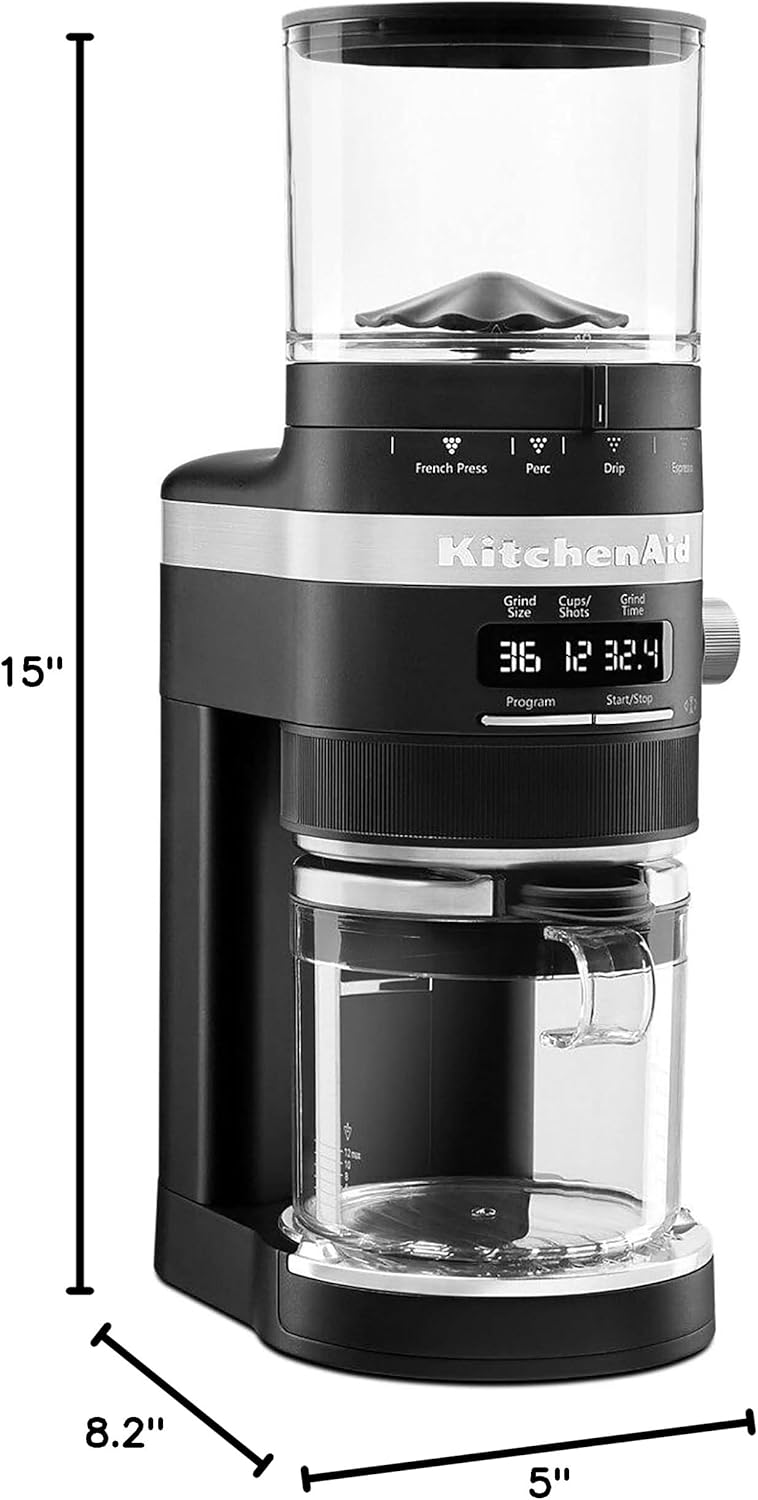
Figure 8: Product Dimensions.
9. Warranty and Support
For detailed warranty information and customer support, please refer to the official KitchenAid website or the warranty card included with your product. You may also contact KitchenAid customer service directly for assistance with product registration, parts, or service.
Official User Guide (PDF): Download Here
Related documentsKCG8433BM


Ask a question about this manual
Ask about setup, troubleshooting, compatibility, parts, safety, or missing instructions. Manuals+ will review the question and use this page’s manual context to help answer it.