
1. Introduction
This manual provides comprehensive instructions for the K&F Concept ND2-32 & CPL Filter 82mm. This innovative 2-in-1 filter combines the functionalities of a variable neutral density (ND) filter and a circular polarizer (CPL) filter, designed to enhance your photographic and videographic capabilities. It allows for precise light control and improved image quality in various lighting conditions.
2. Product Overview
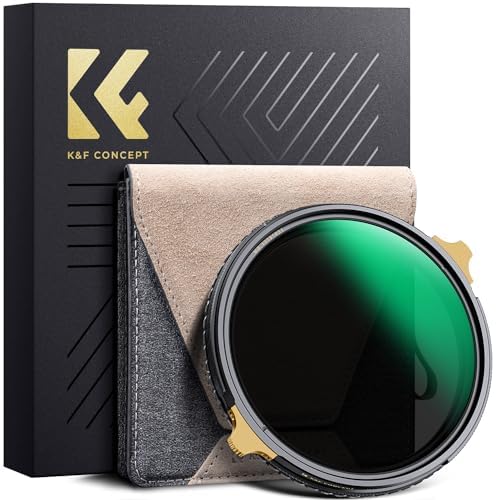
The K&F Concept Nano-X PRO ND2-32 & CPL Filter is engineered for professional use, offering superior optical performance and durability. Key features include:
- 2-in-1 Functionality: Combines variable ND (ND2-32, 1 to 5 stops) and CPL effects in a single filter.
- High-Quality Construction: Features a robust brass frame with CNC pattern design for enhanced hardness and flexibility, ensuring smooth installation and durability.
- Advanced Multi-Coating: Double-sided 36-layer nano coating provides waterproof, dirt-resistant, and scratch-resistant properties, maintaining optical clarity.
- Low Reflectivity: Achieves an ultra-low 0.15% reflectivity, minimizing stray light, ghosting, and glare.
- Ultra-Thin Frame: Designed with 0.01mm processing accuracy to prevent vignetting, even on wide-angle and telephoto lenses.
- Precise Adjustment: Self-locking frame technology allows for accurate 1-5 stop light reduction settings.
- 8K Video Ready: Supports high-resolution video capture without compromising image quality.
3. Setup
To attach the filter to your camera lens:
- Ensure your camera lens has an 82mm filter thread. This filter is compatible with lenses featuring an 82mm front filter thread.
- Carefully align the filter's thread with the lens's front thread.
- Gently rotate the filter clockwise until it is securely fastened. Avoid overtightening to prevent damage to both the filter and the lens. The brass frame is designed for smooth installation.
- To remove, rotate the filter counter-clockwise until it detaches from the lens.
4. Operating Instructions
This filter offers dual functionality:
4.1. Variable Neutral Density (ND) Function
The ND function reduces the amount of light entering your lens, allowing for slower shutter speeds or wider apertures in bright conditions. This is ideal for achieving motion blur effects (e.g., silky water, blurred clouds) or maintaining a shallow depth of field in bright light.
- Adjusting Light Reduction: Rotate the outer ring of the filter to adjust the neutral density from ND2 (1 stop) to ND32 (5 stops).
- Visual Feedback: As you rotate, the filter will progressively darken, reducing the light reaching your camera sensor.
- Optimal Range: Operate within the marked 1-5 stop range for optimal performance and to avoid potential 'X-cross' patterns at extreme settings.
4.2. Circular Polarizer (CPL) Function
The CPL function helps to reduce reflections from non-metallic surfaces (like water or glass) and enhances color saturation, particularly in skies and foliage.
- Adjusting Polarization: While looking through your camera's viewfinder or live view, slowly rotate the outer ring of the filter.
- Observing Effects: You will observe changes in reflections and sky intensity. Rotate until the desired effect is achieved. For maximum polarization, the sun should be at a 90-degree angle to your shooting direction.
- Enhancing Colors: The CPL effect will deepen blue skies and make green foliage more vibrant by reducing atmospheric haze and reflections.
5. Maintenance
Proper care ensures the longevity and performance of your filter:
- Cleaning: Use a clean, soft microfiber lens cloth to gently wipe the filter surfaces. For stubborn smudges or fingerprints, apply a small amount of lens cleaning solution to the cloth (not directly to the filter) and wipe carefully.
- Storage: Always store the filter in its provided genuine leather storage bag when not in use. This protects it from dust, scratches, and impacts.
- Handling: Avoid touching the glass surfaces directly with your fingers to prevent oil and dirt transfer.
- Environmental Protection: While the filter is waterproof, dirt-resistant, and scratch-resistant, avoid prolonged exposure to harsh chemicals or extreme temperatures.
6. Troubleshooting
Here are solutions to common issues you might encounter:
- "X-Cross" Shadow or Uneven Darkening: This can occur with variable ND filters when rotated beyond their intended range. Ensure you operate the filter within the marked 1-5 stop settings. If the effect persists within the range, slightly adjust the rotation.
- Color Shift: While the filter is designed to minimize color shift, slight variations can occur under specific lighting conditions or at maximum ND settings. Minor color adjustments can typically be corrected in post-processing.
- Vignetting (Dark Corners): The ultra-thin frame design significantly reduces vignetting. If dark corners appear, especially on wide-angle lenses, ensure the filter is correctly and fully seated on the lens. In rare cases, extreme wide-angle lenses might still exhibit minimal vignetting.
- Difficulty Attaching/Removing: Ensure the filter thread and lens thread are clean and free of debris. Apply gentle, even pressure when screwing on or off. Avoid forcing the filter. The brass frame is designed for smooth operation.
- Reduced Image Sharpness: Ensure the filter is clean and free from smudges or dust. A dirty filter can degrade image quality.
7. Specifications
| Feature | Specification |
|---|---|
| Brand | K&F CONCEPT |
| Model Name | Nano-X PRO |
| Model Number | KF01.2003 |
| Filter Type | Variable Neutral Density (ND2-32) & Circular Polarizer (CPL) |
| Filter Thread Size | 82 Millimetres |
| Material | Optical Glass, Brass Frame |
| Coating | Double-sided 36-layer Nano Multi-Coating |
| Light Reduction | 1 to 5 Stops (ND2 to ND32) |
| Reflectivity | 0.15% |
| Water Resistance | Waterproof |
| Video Capture Support | 8K |
| Frame Design | Ultra-thin, Self-locking, CNC Pattern |
8. Warranty and Support
For information regarding warranty coverage and customer support, please refer to the official K&F Concept website or contact your authorized retailer. Keep your purchase receipt as proof of purchase for any warranty claims.