
Introduction
The JENSEN JTA-385 is a versatile audio system designed to play music from various sources, including vinyl records, cassette tapes, and AM/FM radio. It features a retro-styled design with a wood-grain finish, woven fabric speaker covers, and gold cabinet accents. This manual provides detailed instructions for setting up and operating your JTA-385 unit.
Key features include:
- 33-1/3, 45, and 78 RPM speed options for all standard record formats.
- Adjustable pitch control for optimizing record speed.
- AM/FM stereo receiver with a backlit analog tuning dial.
- Built-in cassette player/recorder with auto stop.
- Integrated speakers for immediate playback.
- Line out and stereo headphone jack for external audio connections.
Components Overview
Familiarize yourself with the main components of your JTA-385 unit:
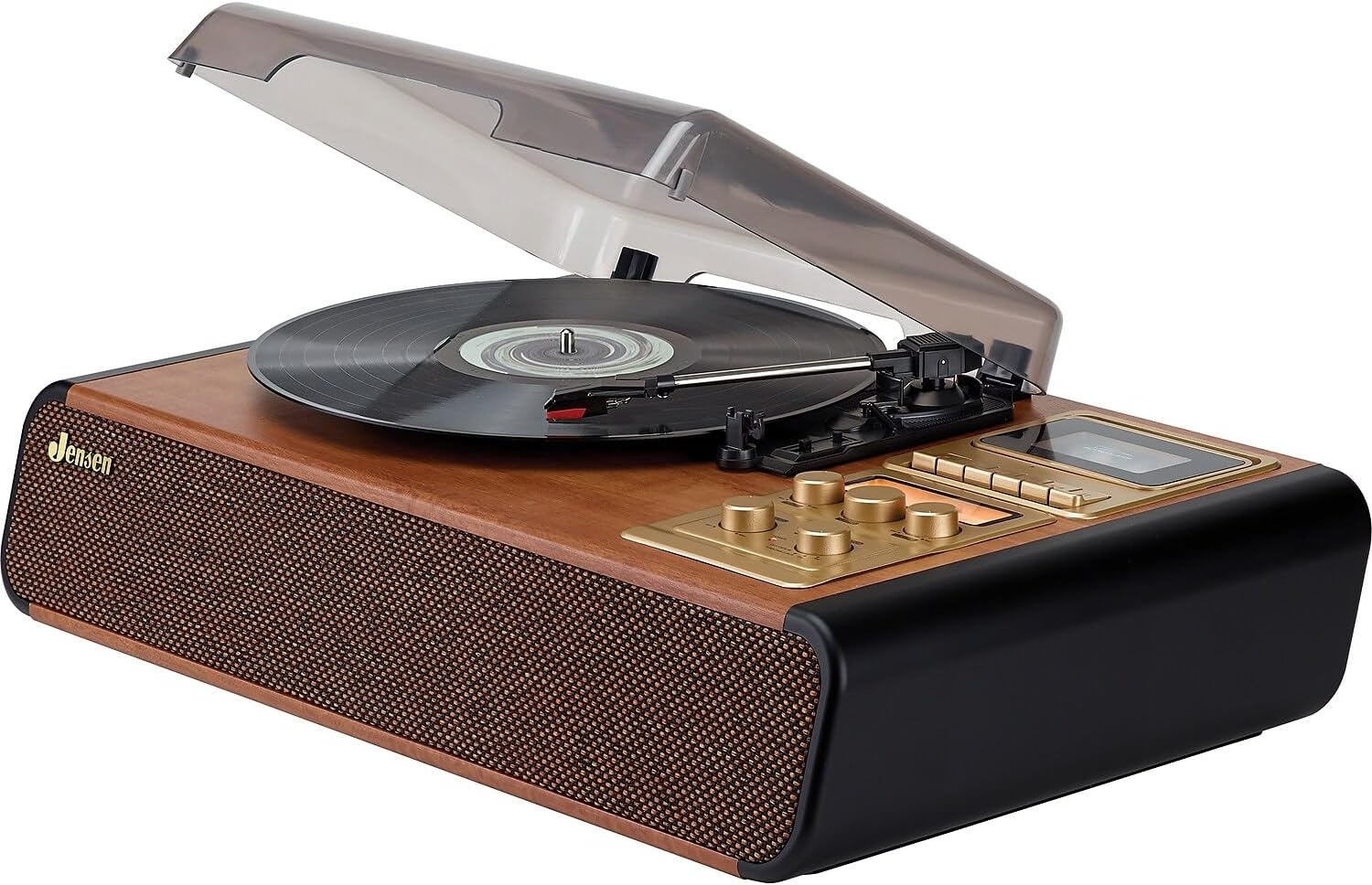
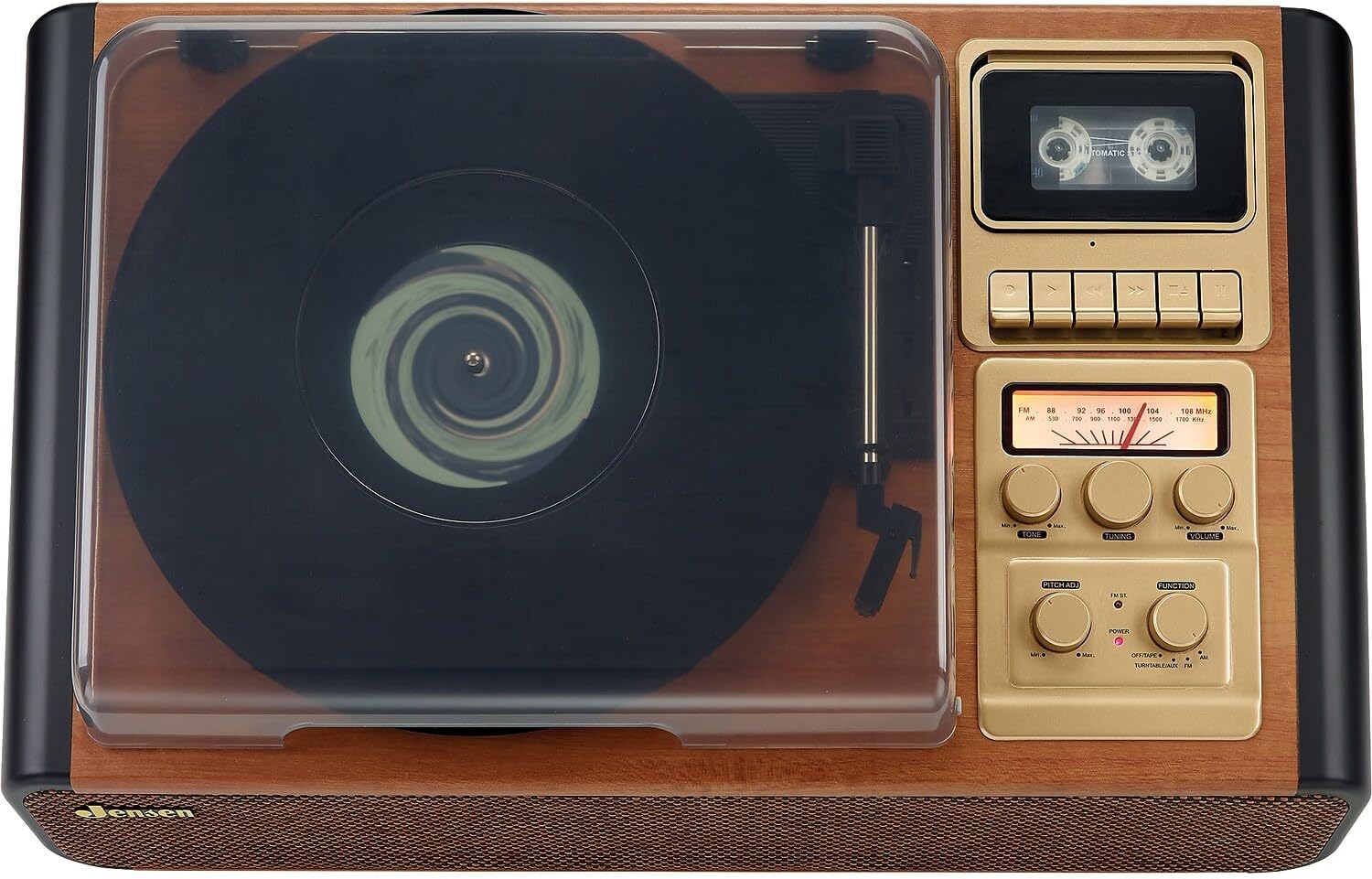
The unit features a top-loading turntable under a clear dust cover, a cassette player/recorder on the right side of the top panel, and an AM/FM radio tuner with various control knobs on the front panel. Built-in speakers are located on the front of the unit.
Setup
- Unpacking: Carefully remove the unit from its packaging. Retain the packaging materials for future transport or storage.
- Placement: Place the unit on a stable, level surface away from direct sunlight, heat sources, and excessive dust or moisture.
- Power Connection: Connect the AC power cord to a standard 120V AC wall outlet.
- Dust Cover: Ensure the clear dust cover is properly hinged and can be opened and closed smoothly.
- 45 RPM Adapter: The 45 RPM adapter is included for playing 7-inch records with large center holes. Keep it in a safe place when not in use.
Operating the Turntable
- Power On: Turn the FUNCTION knob to select 'TURNTABLE/AUX'. The POWER indicator will light up.
- Place a Record: Open the dust cover and place a record on the turntable platter. If playing a 45 RPM single, use the included adapter.
- Select Speed: Set the SPEED SELECTOR switch to the appropriate speed (33-1/3, 45, or 78 RPM) for your record.
- Start Playback: Lift the tone arm using the cueing lever. Position the stylus over the desired track of the record. Gently lower the tone arm onto the record using the cueing lever. The turntable will begin to spin and play.
- Adjust Pitch: Use the PITCH ADJ control to fine-tune the playback speed if needed.
- Adjust Volume: Rotate the VOLUME knob to set the desired listening level.
- Auto Stop: The AUTO STOP switch can be set to ON or OFF. When ON, the turntable will automatically stop spinning when the record finishes. When OFF, the turntable will continue to spin.

Operating the Cassette Player/Recorder
- Select Cassette Function: Turn the FUNCTION knob to 'OFF/TAPE'.
- Insert Cassette: Open the cassette door and insert a cassette tape. Close the door securely.
- Playback: Press the PLAY button to start cassette playback. Use the VOLUME knob to adjust the sound level.
- Recording: To record from the turntable, radio, or AUX input, first select the desired source using the FUNCTION knob. Then, switch the FUNCTION knob to 'OFF/TAPE', insert a blank cassette, and press the RECORD button. The unit will begin recording from the selected source.
- Stop/Eject: Press the STOP/EJECT button to stop playback or recording and eject the cassette.
Operating the AM/FM Radio
- Select Radio Function: Turn the FUNCTION knob to 'AM' or 'FM'.
- Tune to a Station: Rotate the TUNING knob to select your desired radio station. The analog tuning dial will indicate the frequency.
- Adjust Volume: Use the VOLUME knob to set the desired listening level.
- Antenna: For optimal FM reception, extend the FM wire antenna. For AM reception, rotate the unit for best signal.
External Connections
- AUX Input: Connect an external audio device (e.g., MP3 player, smartphone) to the AUX IN jack using a 3.5mm audio cable. Select 'TURNTABLE/AUX' with the FUNCTION knob.
- Headphone Jack: Plug headphones into the HEADPHONE jack for private listening. The built-in speakers will be muted.
- RCA Line Out: Connect the RCA LINE OUT jacks to an external amplifier or stereo system using RCA cables. This allows you to play audio from the JTA-385 through external speakers.
Maintenance
- Cleaning: Wipe the unit with a soft, dry cloth. Do not use abrasive cleaners or solvents.
- Dust Cover: Keep the dust cover closed when not in use to protect the turntable from dust and debris.
- Stylus Care: Handle the stylus carefully to avoid damage. Clean the stylus periodically with a soft brush.
- Cassette Head Cleaning: Regularly clean the cassette player's head with a cotton swab lightly dampened with isopropyl alcohol to ensure optimal sound quality.
Troubleshooting
If you experience issues with your JTA-385, please refer to the troubleshooting section in the full product manual included in the box. Common issues may include:
- No power: Check power connection and outlet.
- No sound: Check volume levels, function selection, and external connections.
- Turntable not spinning: Ensure power is on and tone arm is lifted.
- Poor radio reception: Adjust antenna or unit position.
For further assistance, please contact Jensen customer support.
Product Specifications
| Product Dimensions | 14 x 22.1 x 5.8 inches |
| Item Weight | 11.7 pounds |
| Item Model Number | JTA-385 |
| Brand | Jensen |
| Maximum Rotational Speed | 78 RPM |
| Material | Wood |
| Color | Brown |
| Compatible Devices | Headphone |
| Motor Type | AC Motor |
Official Product Video
Warranty and Support
This product includes a user manual. For detailed warranty information and customer support, please refer to the documentation provided in the product packaging. If you have any questions or require assistance, please contact Jensen customer service.


