1. Introduction
This manual provides essential instructions for the setup, operation, and maintenance of your VINABTY AH59-02733E replacement remote control. This remote is designed to be compatible with various Samsung Sound Bar models, offering a straightforward and effective solution for controlling your audio system.
2. Product Overview
The VINABTY AH59-02733E is a direct replacement remote control, requiring no programming. It is compatible with a wide range of Samsung Sound Bar models, including but not limited to:
- HW-KM36C, HW-K551, HW-J6000R, HW-J6001R
- HW-K430, HW-J4000, HW-JM4000C, HW-K360
- HW-K369, HW-K370, HW-K450, HW-K460
- HW-K470, HW-K550, HW-K650, AH59-02733B
- HW-KM36, HW-KM37, HW-KM38, HW-KM39
- HW-KM45, HW-KM45C, HW-KM55C, HW-KM57C
- PS-WK450, PS-WK360

Image: The AH59-02733E remote control shown with a compatible Samsung Sound Bar.
3. Setup
3.1 Battery Installation
- Locate the battery compartment on the back of the remote control.
- Slide the battery cover downwards or in the direction indicated by an arrow to open it.
- Insert two (2) AAA batteries, ensuring the positive (+) and negative (-) terminals align correctly with the markings inside the compartment.
- Replace the battery cover by sliding it back into position until it clicks securely.

Image: Battery compartment with two AAA battery slots.
3.2 Initial Use
The VINABTY AH59-02733E remote control is designed for immediate use with compatible Samsung Sound Bars. No programming or pairing is required. Simply install the batteries, and the remote is ready to operate your device.
4. Operating Instructions
This remote control provides intuitive access to your Samsung Sound Bar's primary functions. Point the remote directly at your sound bar for optimal performance.

Image: Front view of the remote control with button layout.
4.1 Button Functions
- Power (Red Button): Turns the sound bar on or off.
- Source: Cycles through available input sources (e.g., HDMI, Optical, Bluetooth).
- VOL (+/-): Adjusts the master volume level.
- Mute: Toggles sound mute on or off.
- Playback Controls (Skip Back, Play/Pause, Skip Forward): Controls media playback when applicable (e.g., Bluetooth audio).
- Sound Effect: Cycles through various sound effects or modes.
- Sound Control: Accesses sound settings or adjustments.
- Bluetooth Power: Activates or deactivates Bluetooth functionality.
5. Maintenance
5.1 Cleaning
To clean the remote control, gently wipe its surface with a soft, dry cloth. Avoid using liquid cleaners, solvents, or abrasive materials, as these can damage the remote's finish or internal components.
5.2 Battery Replacement
Replace the AAA batteries when the remote's performance diminishes or if it stops responding. Refer to Section 3.1 for battery installation instructions. Always replace both batteries simultaneously with new ones of the same type.
5.3 Storage
When not in use for extended periods, store the remote control in a cool, dry place away from direct sunlight and extreme temperatures. Consider removing the batteries to prevent leakage if storing for several months.
6. Troubleshooting
6.1 Remote Not Responding
- Check Batteries: Ensure batteries are inserted correctly with the correct polarity (+/-).
- Replace Batteries: If the batteries are old or depleted, replace them with two new AAA batteries.
- Line of Sight: Ensure there are no obstructions between the remote control and the sound bar's infrared receiver.
- Distance: Confirm you are within the effective operating range of the remote control.
6.2 Intermittent Functionality
- Battery Strength: Weak batteries can cause inconsistent performance. Replace them.
- Interference: Other electronic devices or strong light sources might interfere with the remote's signal. Try operating the remote in a different environment.
7. Specifications
| Model Number | AH59-02733E |
| Brand | VINABTY |
| Product Dimensions | 5.4 x 1.6 x 0.65 inches |
| Item Weight | 1.16 ounces |
| Batteries Required | 2 AAA batteries |
| Color | Black |
| Compatible Devices | Samsung Sound Bars (Home Theater) |
| Special Feature | Ergonomic design |
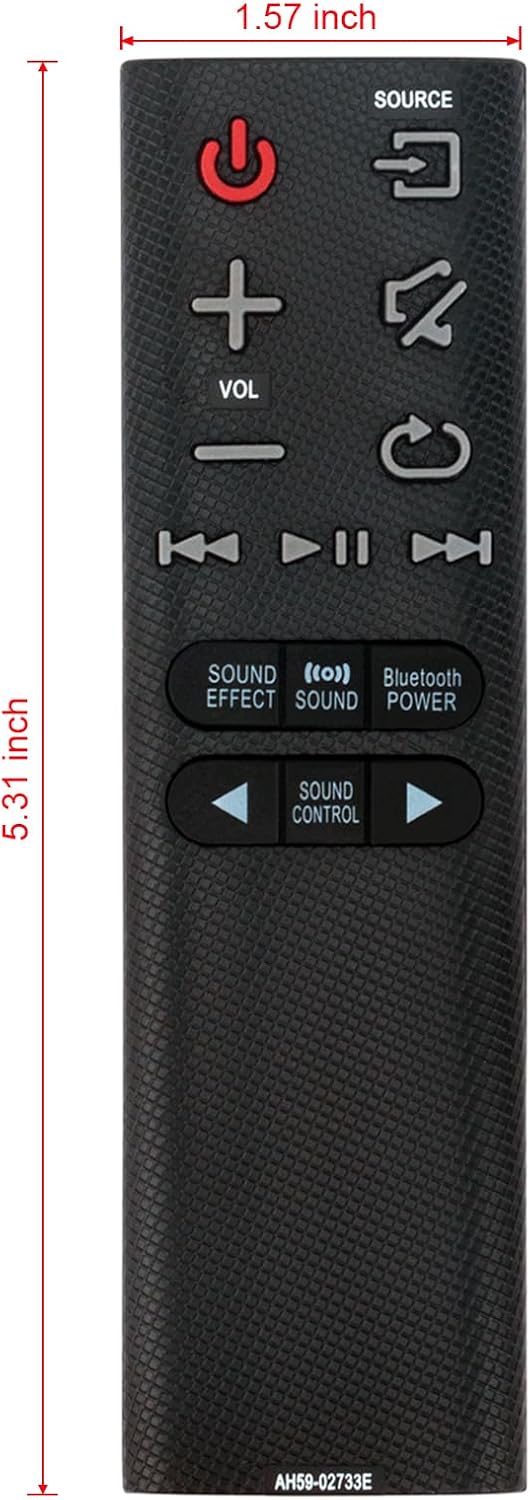
Image: Remote control dimensions.
8. Warranty and Support
While specific warranty details are not provided, for any questions, concerns, or issues regarding your VINABTY AH59-02733E remote control, please contact the seller, Promotion-Shopping store. They commit to providing a reply within 24 hours to assist you.
For further assistance, you may refer to the product listing on Amazon or contact Amazon customer service.


