
1. Product Overview
The Onforu SK03 is a portable Bluetooth speaker designed for outdoor activities such as cycling, hiking, and camping. It features a robust IP65 waterproof rating, Bluetooth 5.0 connectivity, and a dedicated bicycle mount for secure attachment. Its compact design and long battery life make it suitable for extended use.

Figure 1.1: Onforu SK03 Speaker with Bicycle Mount
Key Features:
- Bicycle Mount: Adjustable holder and thick gasket for secure attachment during rides.
- IP65 Waterproof: Resistant to water splashes and dust, suitable for various weather conditions.
- Portable & Compact: Small size (3.24 inches) with a metal hook for easy carrying.
- 10-Hour Playtime: Extended battery life for prolonged audio playback.
2. What's in the Box
Verify that all components are present upon unpacking:
- Bluetooth Speaker x 1
- Cycling Mount x 1
- Clip x 1
- Rubber for Size Adjustment x 2
- USB Charge Cable (60cm) x 1
- Audio Cable (100cm) x 1
- English User Manual x 1

Figure 2.1: Retail packaging for Onforu SK03 Wireless Speaker
3. Setup
3.1 Mounting the Speaker
- Select a suitable position on your bicycle handlebar.
- Place one or both rubber pads (for size adjustment) inside the cycling mount to ensure a snug fit for your handlebar diameter.
- Attach the cycling mount to the handlebar and tighten the screw securely until the mount is stable.
- Slide the speaker into the mount until it clicks into place. Ensure it is firmly seated.

Figure 3.1: Speaker securely mounted on a bicycle
3.2 Charging the Speaker
Before first use, fully charge the speaker. Use the provided USB charging cable.
- Connect the micro USB end of the charging cable to the speaker's micro USB port.
- Connect the standard USB end to a USB power adapter (not included) or a computer's USB port.
- The indicator light will illuminate during charging and turn off when fully charged.
3.3 Power On/Off
Press and hold the Play/Pause/Power button for approximately 3 seconds to turn the speaker ON or OFF.
4. Operating Instructions
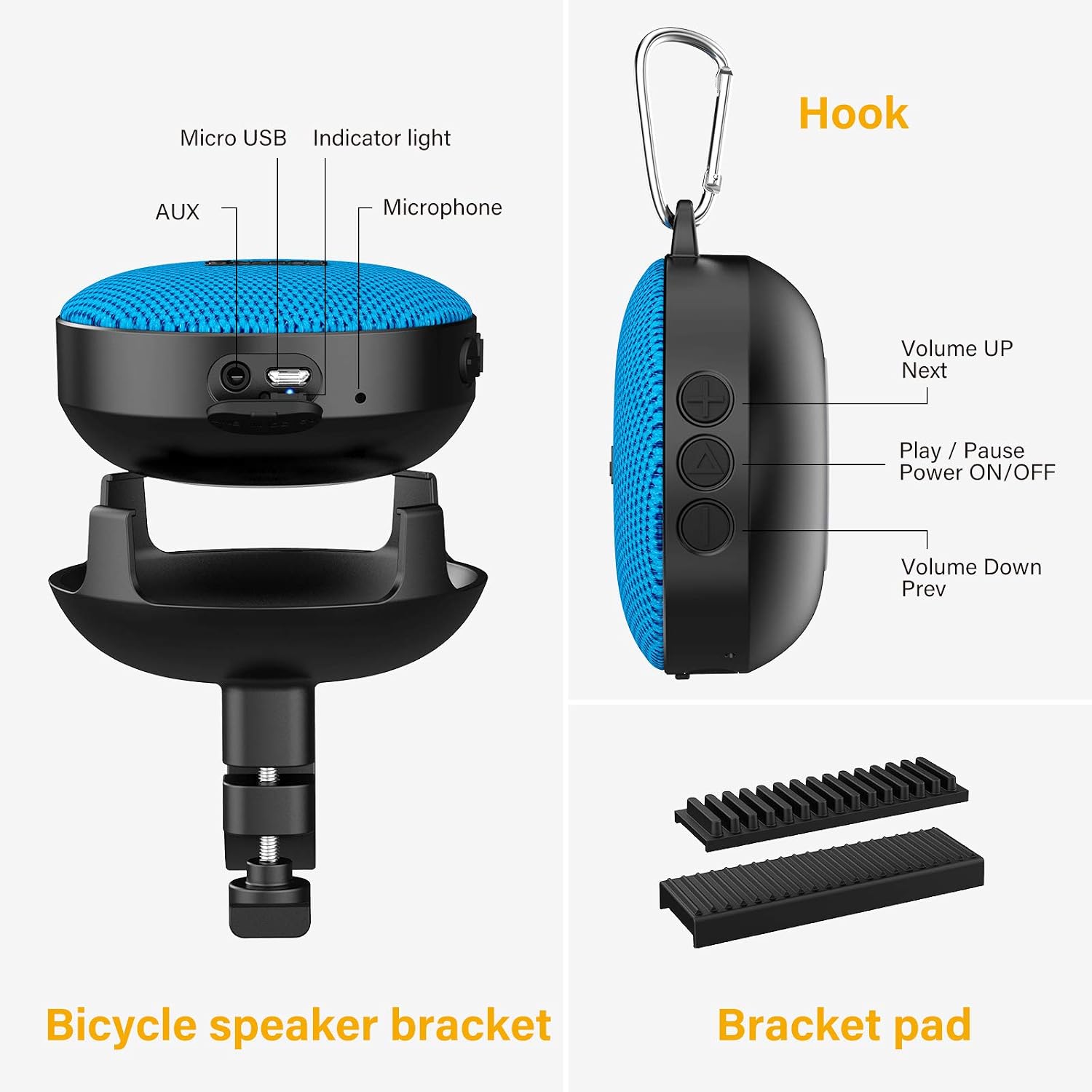
Figure 4.1: Speaker Controls and Ports
4.1 Bluetooth Pairing
- Ensure the speaker is powered ON and in Bluetooth mode (indicated by a flashing blue light). If not, short press the Play/Pause/Power button to cycle through modes until Bluetooth mode is active.
- On your device (smartphone, tablet), enable Bluetooth and search for available devices.
- Select "Onforu SK03" from the list.
- Once paired, the speaker will emit a confirmation tone, and the blue indicator light will stop flashing.

Figure 4.2: Bluetooth 5.0 Connectivity
4.2 Basic Controls
- Play/Pause: Short press the Play/Pause/Power button.
- Volume Up: Long press the Volume Up / Next button.
- Volume Down: Long press the Volume Down / Prev button.
- Next Track: Short press the Volume Up / Next button.
- Previous Track: Short press the Volume Down / Prev button.
4.3 Call Functionality
The speaker includes a built-in microphone for hands-free calls.
- Answer Call: Short press the Play/Pause/Power button.
- End Call: Short press the Play/Pause/Power button during a call.
- Reject Call: Long press the Play/Pause/Power button.
4.4 AUX Mode
To use the speaker with devices that do not support Bluetooth, use the provided 3.5mm audio cable.
- Connect one end of the 3.5mm audio cable to the speaker's AUX port.
- Connect the other end to the audio output of your device.
- The speaker will automatically switch to AUX mode, or you may need to short press the Play/Pause/Power button to cycle to AUX mode.
4.5 Micro SD Card Mode
The speaker supports audio playback directly from a Micro SD card.
- Insert a Micro SD card (with audio files) into the designated slot on the speaker.
- The speaker will automatically switch to Micro SD card mode upon insertion, or you may need to short press the Play/Pause/Power button to cycle to this mode.
- Use the Volume Up / Next and Volume Down / Prev buttons to navigate between tracks.
5. Maintenance
5.1 Cleaning
Wipe the speaker with a soft, damp cloth. Do not use abrasive cleaners or solvents. Ensure all ports are dry before charging or connecting cables.
5.2 Water Resistance (IP65)
The speaker is IP65 rated, meaning it is protected against dust ingress and low-pressure water jets from any direction. It is not designed for submersion. Ensure the port cover is securely closed to maintain water resistance.

Figure 5.1: IP65 Waterproof Feature
5.3 Storage
Store the speaker in a cool, dry place away from direct sunlight and extreme temperatures when not in use for extended periods. Charge the battery periodically to maintain its health.
6. Troubleshooting
- No Power: Ensure the speaker is charged. Connect to a power source using the USB cable.
- Cannot Pair via Bluetooth:
- Ensure the speaker is in Bluetooth pairing mode (flashing blue light).
- Make sure your device's Bluetooth is enabled and within range (up to 15 meters).
- Forget the device from your phone's Bluetooth list and try pairing again.
- Ensure no other devices are currently connected to the speaker.
- No Sound:
- Check the volume level on both the speaker and your connected device.
- Ensure the correct input mode (Bluetooth, AUX, Micro SD) is selected.
- If using AUX, ensure the cable is fully inserted and functional.
- Poor Sound Quality:
- Move the speaker closer to your Bluetooth device to reduce interference.
- Ensure the speaker is not obstructed.
- Check the audio source quality.
7. Specifications

Figure 7.1: Product Specifications on Packaging
| Feature | Specification |
|---|---|
| Model Name | Portable Bluetooth Bike Speaker (SK03) |
| Material | Plastic |
| Speaker Type | Portable, Bluetooth, Wireless, Waterproof, Small |
| Special Feature | Portable, Stereo Pairing |
| Recommended Uses | Travel, Cycling, Outdoor, Hiking, Camping |
| Compatible Devices | Smartphone, Tablet |
| Surround Sound Channel Configuration | 4.2 |
| Color | Blue |
| Product Dimensions | 3.24"D x 3.24"W x 3.07"H (82.5mm x 82.5mm x 78mm) |
| Item Weight | 163 Grams (5.7 ounces) |
| Waterproof Rating | IP65 |
| Maximum Range (Bluetooth) | 15 Meters |
| Control Method | Touch (Buttons) |
| Wireless Communication Technology | Bluetooth 5.0 |
| Speaker Size | 8 Centimeters |
| Power Source | Battery Powered (1 Lithium Ion battery included) |
| Audio Driver Type | Dynamic Driver |
| Charging Time | Approximately 10 Hours (Playtime, not charging time. Charging time is not specified but typically 2-3 hours for 1200mAh) |
| Speaker Maximum Output Power | 5 Watts |
| Audio Output Mode | Stereo |
| Mounting Type | Bicycle mount, or No need to install (portable) |
| Battery Capacity | 1200mAh |
8. Warranty and Support
8.1 Warranty Information
Onforu provides a 2-year after-sale service for this product. Please retain your proof of purchase for warranty claims. The warranty covers manufacturing defects under normal use.
8.2 Customer Support
For technical assistance, troubleshooting, or warranty inquiries, please contact Onforu customer service:
- Email: support@onforuleds.com
- Website: www.onforuleds.com
Onforu offers 24/7 customer service to assist you.

Figure 8.1: Onforu Brand Logo


