
1. Introduction
Thank you for choosing the Santos N 01 Professional Coffee Grinder with Drawer. This traditional, powerful grinder is designed for grinding coffee and dry spices, suitable for various professional environments. It offers easy operation, efficient performance, and adjustable grinding from extra-fine to coarse. This manual provides essential information for the safe and effective use of your appliance.

Figure 1: Santos N 01 Professional Coffee Grinder with Drawer. This image shows the complete grinder unit, including the bean hopper at the top, the main grinding mechanism, and the integrated drawer at the bottom for collecting ground coffee.
2. Important Safety Instructions
Please read all safety instructions carefully before operating the appliance. Failure to follow these instructions may result in electric shock, fire, or serious injury.
- Ensure the power supply voltage matches the rating label on the appliance.
- Do not immerse the motor unit, cord, or plug in water or other liquids.
- Always unplug the grinder from the power outlet before cleaning, assembling, or disassembling parts.
- Keep hands and utensils away from moving parts during operation to prevent injury.
- Never operate the appliance with a damaged cord or plug, or after the appliance malfunctions or has been damaged in any manner.
- This appliance is not intended for use by persons (including children) with reduced physical, sensory, or mental capabilities, or lack of experience and knowledge, unless they have been given supervision or instruction concerning use of the appliance by a person responsible for their safety.
- Use only attachments and accessories recommended by the manufacturer.
- Do not use the appliance outdoors.
- Avoid contact with moving parts.
- Do not grind anything other than whole roasted coffee beans or dry spices as specified.
3. Setup and First Use
- Unpacking: Carefully remove the grinder from its packaging. Retain packaging materials for future transport or storage.
- Placement: Place the grinder on a stable, flat, and dry surface. Ensure there is adequate ventilation around the unit.
- Initial Cleaning: Before first use, wipe down the exterior of the grinder with a damp cloth. Clean the bean hopper and the ground coffee drawer with warm, soapy water, rinse thoroughly, and dry completely.
- Assemble Hopper: Ensure the bean hopper is securely placed on top of the grinding mechanism.
- Connect Power: Plug the power cord into a grounded electrical outlet.
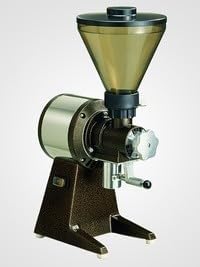
Figure 2: Santos N 01 Coffee Grinder without the drawer. This view highlights the main body of the grinder and the bean hopper, illustrating the compact design before the ground coffee drawer is inserted.
4. Operating Instructions
- Fill Hopper: Open the lid of the bean hopper and pour whole roasted coffee beans or dry spices into it. The hopper has a capacity of 1 kg.
- Set Grind Size: Adjust the grind size selector to your desired fineness. Refer to the "Adjusting Grind Size" section for detailed instructions.
- Start Grinding: Turn on the grinder using the power switch. The grinding mechanism will start, and ground coffee will be dispensed into the integrated drawer.
- Monitor Drawer: The plastic drawer has a capacity of 800 g. Monitor its fill level and empty it as needed to prevent overflow.
- Stop Grinding: Once the desired amount of coffee is ground, turn off the grinder using the power switch.
- Empty Drawer: Carefully pull out the drawer to access the freshly ground coffee.
5. Adjusting Grind Size
The Santos N 01 grinder features an adjustable grinding mechanism, allowing you to select from extra-fine to coarse grinds. The adjustment is typically made via a knob or lever located on the front or side of the grinding unit.
- To achieve a finer grind, turn the adjustment mechanism in the indicated direction (usually clockwise).
- To achieve a coarser grind, turn the adjustment mechanism in the opposite direction (usually counter-clockwise).
- It is recommended to adjust the grind size only when the grinder is running or completely empty to prevent damage to the burrs.
- Perform small adjustments and test the grind to find your preferred setting.
6. Maintenance and Cleaning
Regular cleaning and maintenance will ensure the longevity and optimal performance of your Santos N 01 coffee grinder.
- Unplug: Always unplug the grinder from the power outlet before cleaning.
- Empty Hopper and Drawer: Remove any remaining coffee beans from the hopper and empty the ground coffee drawer.
- Clean Drawer: The plastic ground coffee drawer can be washed with warm, soapy water. Rinse thoroughly and dry completely before reinserting.
- Clean Hopper: Wipe the inside of the bean hopper with a dry or slightly damp cloth. Ensure no moisture enters the grinding mechanism.
- Clean Burrs: For thorough cleaning of the grinding burrs, it may be necessary to disassemble the upper burr. Consult the manufacturer's specific instructions for burr removal and cleaning. Use a brush or vacuum cleaner to remove coffee residue. Do not wash burrs with water.
- Exterior Cleaning: Wipe the exterior of the grinder with a damp cloth. Do not use abrasive cleaners or immerse the main unit in water.
7. Troubleshooting
| Problem | Possible Cause | Solution |
|---|---|---|
| Grinder does not start. |
|
|
| Inconsistent grind or no grinding. |
|
|
| Grinder makes unusual noise. |
|
|
8. Specifications
| Brand | Santos |
| Model Number | N 01 |
| Material | Plastic (drawer), Metal (body, burrs) |
| Power | 600 W (220-240V, 50/60 Hz) / 650 W (100-120V, 50/60 Hz) |
| Voltage | 220 - 240 V (50/60 Hz) or 100 - 120 V (50/60 Hz) |
| Speed | 1500 RPM (50 Hz) / 1800 RPM (60 Hz) |
| Hopper Capacity | 1 kg (2.2 lbs) |
| Drawer Capacity | 800 g (1.8 lbs) |
| Average Output | 14 kg/h |
| Net Dimensions (W x D x H) | 250 mm (10") x 320 mm (13") x 550 mm (22") |
| Net Weight | 14 kg (31 lbs) |
| Burr Diameter | Ø 63.5 mm |
| UPC | 650414458630 |
| ASIN | B08JCR8CSG |
9. Warranty and Support
For warranty information, please refer to the warranty card included with your product or contact your retailer or the manufacturer directly.
If you encounter any issues not covered in the troubleshooting section, or require technical assistance, please contact Santos customer support. Contact details can typically be found on the manufacturer's official website or on the product packaging.


