
GODOX ML600+Battery Kit
Contents
Godox ML60 LED Video Light User Manual
Model: ML600+Battery Kit
Brand: GODOX
1. Introduction
Thank you for purchasing the Godox ML60 LED Video Light. This compact and powerful continuous light source is designed for professional photography and videography, offering high brightness, accurate color rendition, and versatile control options. This manual provides detailed instructions for the safe and effective use of your ML60 light.

Figure 1.1: Godox ML60 LED Video Light with included accessories.
2. Safety Information
Please read these safety instructions carefully before using the product to prevent damage to the product or injury to yourself or others. Keep this manual for future reference.
- Do not disassemble or modify the product. If the product fails, it must be repaired by an authorized maintenance center.
- Keep this product dry. Do not handle with wet hands or immerse in water.
- Do not use the product in the presence of flammable gases, chemicals, or other similar materials.
- Do not leave or store the product in environments with high temperatures or direct sunlight.
- Do not point the light directly at human eyes, especially children's eyes, as this may cause temporary visual impairment or damage.
- Always disconnect the power supply before cleaning or performing maintenance.
- Ensure proper ventilation during use to prevent overheating.
3. Product Overview
The Godox ML60 is a compact and powerful LED light designed for portability and ease of use. It features a robust build, intuitive controls, and a quiet cooling system.

Figure 3.1: The Godox ML60 LED light in hand, demonstrating its ergonomic design and accessible controls.
3.1 Key Features
- 60W Output: Provides bright, continuous illumination.
- High CRI/TLCI: CRI 96+ and TLCI 97+ ensure accurate color reproduction.
- Adjustable Color Temperature: 2800K-6500K for versatile lighting scenarios.
- 8 Preset FX Effects: Creative lighting effects for dynamic scenes.
- Ultra-Quiet Fan: Designed for sound-sensitive environments.
- Multiple Power Options: Supports AC power, NP-F970 batteries, or V-mount batteries (optional accessories).
- APP Control: Full control via the Godox Light APP.
- Compatibility: Works with Godox-mount modifiers and Bowens mount accessories via an S2 bracket (optional).
3.2 Components
- LED Light Body
- Reflector
- Handle/Battery Holder
- AC Power Adapter
- Power Cable
- Carrying Bag
- User Manual
4. Setup
4.1 Unboxing and Initial Inspection
Carefully remove all components from the packaging. Inspect the light and accessories for any signs of damage. If any items are missing or damaged, contact your retailer immediately.
4.2 Power Supply Options
The ML60 offers flexible power options for both studio and on-location use.
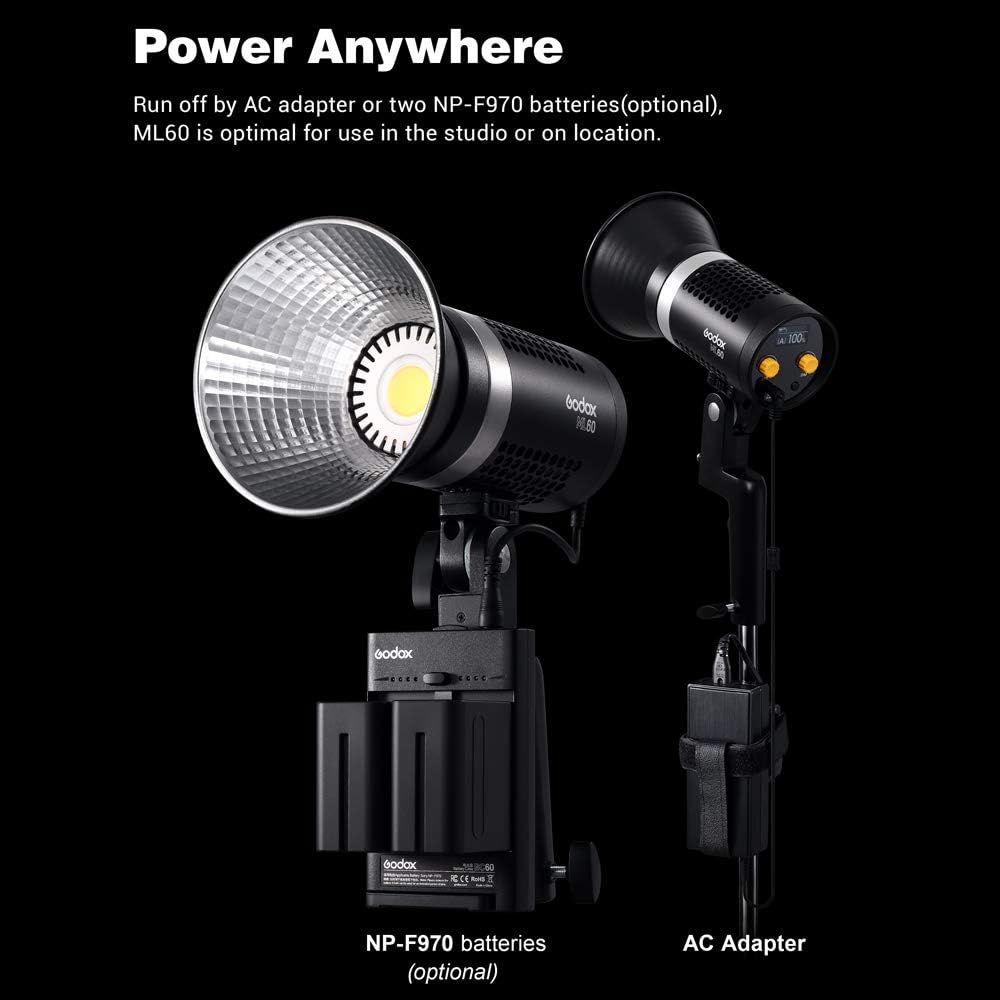
Figure 4.1: The ML60 can be powered by AC adapter or optional NP-F970 batteries.
- AC Power: Connect the AC adapter to the light's power input and then to a wall outlet.
- Battery Power (Optional): Insert two NP-F970 batteries into the battery slots on the handle/battery holder. Ensure the batteries are fully charged before use. The light can also be powered by a V-mount battery with an appropriate adapter (sold separately).
4.3 Attaching Modifiers
The ML60 is compatible with Godox-mount modifiers. For broader compatibility, you can use an optional Bowens mount adapter (S2 bracket).

Figure 4.2: The ML60 supports various light modifiers for creative control.

Bowens Mount Adapter (Optional)
To attach a modifier:
- Align the modifier's mount with the light's mount.
- Twist the modifier clockwise until it clicks into place.
- To remove, press the release button and twist counter-clockwise.
5. Operating
5.1 Basic Operation
- Power On/Off: Press the power button to turn the light on or off.
- Brightness Adjustment: Rotate the dial to adjust the light output from 0% to 100%.
- Color Temperature Adjustment: Use the dedicated control to change the color temperature between 2800K and 6500K.
5.2 FX Effects
The ML60 includes 8 preset lighting FX effects to simulate various scenarios.
- Access the FX menu using the dedicated button.
- Rotate the dial to cycle through the available effects.
- Press the dial to select an effect.
5.3 APP Control
Take full control of your ML60 via the Godox Light APP, available for iOS and Android devices.
- Download and install the Godox Light APP from your device's app store.
- Ensure Bluetooth is enabled on your mobile device.
- Open the APP and follow the on-screen instructions to connect to your ML60 light.
- Once connected, you can adjust brightness, color temperature, FX effects, and more directly from your phone.
5.4 Remote Control Operation
The ML60 can be controlled wirelessly using an optional RC-A6 remote control.

Figure 5.1: The ML60 can be controlled via its onboard interface or an optional remote.

RC-A6 Remote Control (Optional)
- The remote allows control over 16 groups, 32 channels, and 99 IDs.
- Refer to the RC-A6 remote control manual for detailed pairing and operation instructions.
5.5 Silent Mode
The ML60 features an ultra-quiet fan, but for completely silent operation in sound-sensitive environments, you can activate the silent mode.

Figure 5.2: The ML60's internal fan system for efficient cooling.
- Consult the light's display or the Godox Light APP for the option to enable/disable silent mode.
- Note that in silent mode, the maximum output may be reduced to prevent overheating.
6. Maintenance
6.1 Cleaning
- Always disconnect the power before cleaning.
- Use a soft, dry cloth to wipe the surface of the light.
- Do not use harsh detergents or solvents.
- For the reflector and LED surface, use a lens cleaning cloth and solution if necessary, ensuring no liquid enters the light body.
6.2 Storage
- Store the light in a cool, dry place, away from direct sunlight and excessive humidity.
- If storing for an extended period, remove any batteries.
- Use the provided carrying bag for protection during transport and storage.
6.3 Battery Care (for NP-F970 batteries)
- Charge batteries fully before first use.
- Do not expose batteries to fire or excessive heat.
- Store batteries in a cool, dry place. For long-term storage, charge them to about 50% capacity.
- If batteries are not used for a long time, recharge them every three months to maintain performance.
7. Troubleshooting
| Problem | Possible Cause | Solution |
|---|---|---|
| Light does not turn on. | No power supply; Battery depleted; Power cable loose. | Check AC connection; Charge/replace batteries; Ensure power cable is securely connected. |
| Light output is weak. | Brightness set too low; Battery low; Silent mode activated. | Increase brightness; Charge/replace batteries; Disable silent mode if full power is needed. |
| Remote control not working. | Remote batteries low; Incorrect channel/group/ID; Interference. | Replace remote batteries; Verify channel/group/ID settings; Move closer to the light or away from interference sources. |
| Light overheats. | Poor ventilation; Fan obstructed. | Ensure adequate airflow around the light; Check for and clear any obstructions to the fan vents. |
8. Specifications
| Feature | Detail |
|---|---|
| Model | ML60 |
| Power Output | 60W |
| Color Temperature | 2800K-6500K |
| CRI | ≥96 |
| TLCI | ≥97 |
| Brightness Range | 0%-100% |
| FX Effects | 8 types |
| Control Methods | On-board, Godox Light APP, RC-A6 Remote (optional) |
| Power Supply | AC Adapter (included), 2x NP-F970 Batteries (optional), V-mount Battery (optional) |
| Dimensions | 5.71 x 3.46 x 5.24 inches (Light body only) |
| Weight | 0.77 Kg / 1.7 lbs (without grip and reflector) |
9. Warranty and Support
This Godox product is covered by a limited warranty. For detailed warranty terms and conditions, please refer to the warranty card included with your product or visit the official Godox website. Keep your proof of purchase for warranty claims.
For technical support, troubleshooting assistance, or service inquiries, please contact your authorized Godox dealer or visit the official Godox support channels. You can find more information and resources on the GODOX Store on Amazon.
Ask a question about this manual
Ask about setup, troubleshooting, compatibility, parts, safety, or missing instructions. Manuals+ will review the question and use this page’s manual context to help answer it.