
1. Introduction
This manual provides essential instructions for the proper installation, operation, and maintenance of your Retevis RA27 Marine VHF Transceiver. The RA27 is a robust, IP67 waterproof marine radio featuring Class D DSC, integrated GPS, and 88 VHF channels, designed for reliable communication in marine environments. Please read this manual thoroughly before using the device to ensure safe and optimal performance.

Figure 1: Retevis RA27 Marine VHF Transceiver main unit and microphone.
2. Safety Information
Observe the following safety precautions to prevent injury, damage to the device, or interference with other equipment:
- Do not operate the transceiver in explosive atmospheres.
- Ensure proper power supply voltage (13.8V) to avoid damage.
- Maintain a safe distance from the antenna during transmission to minimize RF exposure.
- Do not disassemble or modify the unit; this voids the warranty and may cause malfunction.
- Keep the unit away from strong magnetic fields.
- This device is IP67 waterproof, but ensure all covers and connectors are securely fastened before exposure to water.
3. Package Contents
Verify that all items are present in your package:
- Retevis RA27 Marine VHF Transceiver Unit
- Hand Microphone
- Mounting Bracket and Hardware
- Power Cable
- User Manual
- GPS Antenna (if included with specific model variant)
4. Product Overview
The Retevis RA27 features a clear LCD display, intuitive controls, and a robust design suitable for marine use. Below is an illustration of the front panel controls and the microphone.

Figure 2: Front Panel Controls. Includes Speaker, Distress Button, Select Buttons, 16/Call Channel, PWR/VOL/SQL knob, Menu, OK, and Back buttons.

Figure 3: Multifunctional Microphone. Features H/L (High/Low power), Up/Down channel selection, and a clear sound quality.
5. Setup
5.1 Mounting the Transceiver
Use the provided mounting bracket and hardware to securely install the RA27 in a suitable location on your vessel. Ensure it is easily accessible for operation and away from direct sunlight or excessive heat.
5.2 Power Connection
Connect the power cable to a 13.8V DC power source. Ensure correct polarity (red to positive, black to negative). Improper connection can damage the unit.
5.3 Antenna Connection
Connect a suitable marine VHF antenna to the antenna connector on the rear of the transceiver. Ensure the connection is tight and waterproof.

Figure 4: Rear view of the RA27, showing power, antenna, and other connections.
5.4 GPS Connection (Optional)
The RA27 has an integrated GPS. If connecting an external GPS device, refer to the wiring diagram in the full manual for NMEA 0183 input. The integrated GPS provides location data for DSC functions.

Figure 5: RA27 highlighting built-in GPS and option for external GPS connection.
6. Operating Instructions
6.1 Power On/Off and Volume/Squelch
- Power: Rotate the PWR/VOL/SQL knob clockwise to turn on the unit. Rotate counter-clockwise until it clicks to turn off.
- Volume: Adjust the PWR/VOL/SQL knob to set the desired audio volume.
- Squelch: Press the PWR/VOL/SQL knob to enter squelch adjustment mode. Rotate the knob to set the squelch level, eliminating background noise when no signal is present.
6.2 Channel Selection
The RA27 supports 88 channels across International, USA, and Canada channel groups. Use the Up/Down buttons on the microphone or the front panel to change channels. Press the '16/Call Channel' button to quickly switch to Channel 16 (distress and calling channel).

Figure 6: RA27 supports 88 channels and 3 channel groups for international use.
6.3 Dual/Tri-Watch Function
The Dual/Tri-watch function allows monitoring of multiple channels simultaneously.
- Dual Watch: Monitors the current working channel and Channel 16.
- Tri-Watch: Monitors the current working channel, Channel 16, and a designated call channel.
Refer to the menu options to activate and configure these watch modes.
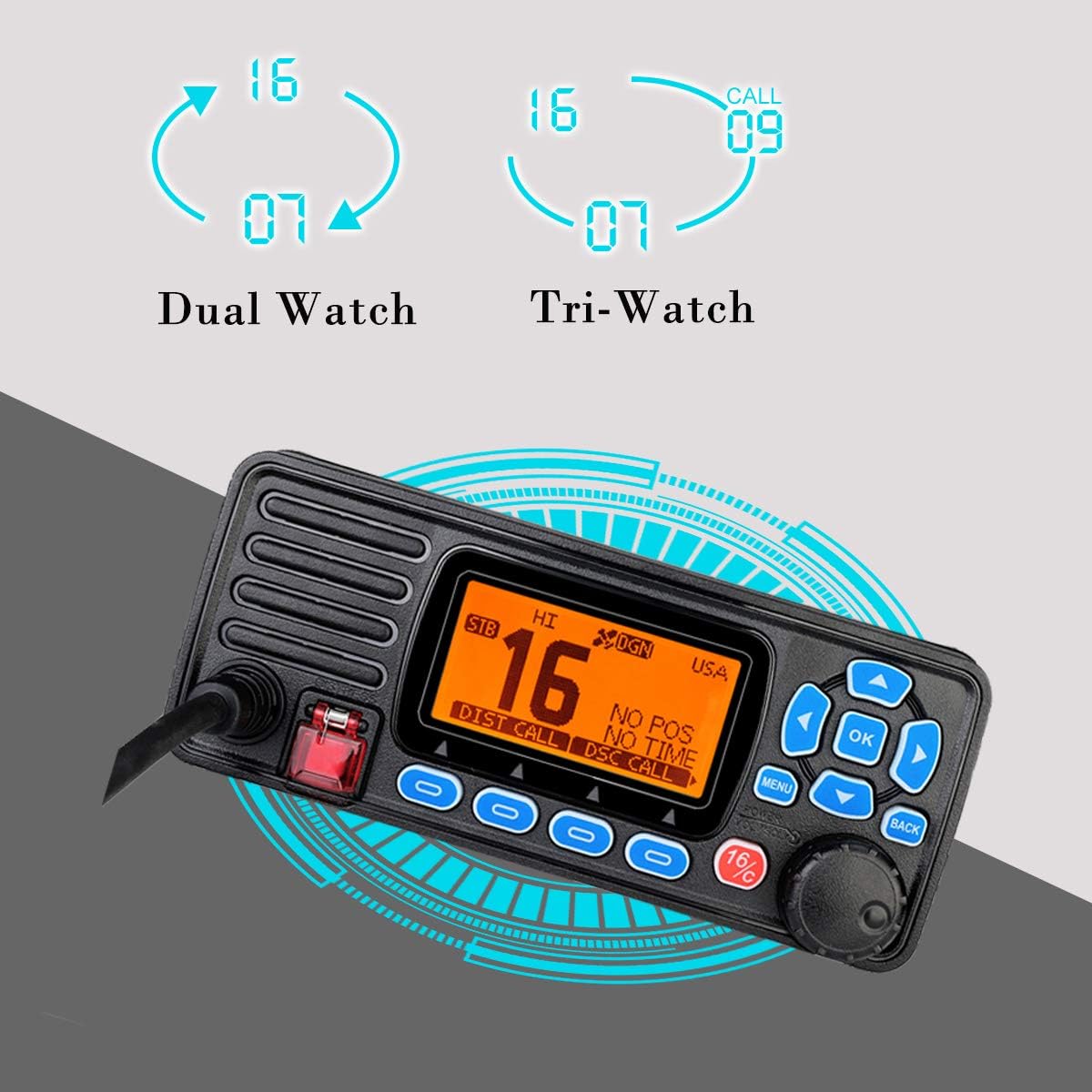
Figure 7: Visual representation of Dual Watch (Channel 16 and current) and Tri-Watch (Channel 16, current, and call channel).
6.4 DSC (Digital Selective Calling) Operation
The RA27 features Class D DSC for enhanced safety. It has a dedicated DSC receiving channel. To initiate a distress call, press and hold the red DISTRESS button on the front panel. Ensure your MMSI (Maritime Mobile Service Identity) is programmed into the radio for DSC functionality.

Figure 8: RA27 showing the one-click distress button for DSC calls in emergencies.
6.5 Vibration Drainage
The RA27 includes a vibration drainage function to remove water from the speaker grille after exposure to water, ensuring clear audio. Activate this feature via the menu if audio clarity is reduced after the unit has been wet.
Figure 9: The RA27 is IP67 waterproof, capable of withstanding immersion. The vibration drainage feature helps clear water from the speaker.
7. Maintenance
7.1 Cleaning
Wipe the transceiver with a soft, damp cloth. Do not use harsh chemicals or abrasive cleaners. Ensure all connectors are clean and dry.
7.2 Waterproofing Care
Regularly inspect rubber seals and connector caps for wear or damage. Ensure they are properly seated to maintain the IP67 waterproof rating.
7.3 Battery Information
The RA27 uses a Lithium-ion battery (included). For optimal battery life, avoid extreme temperatures and fully charge the battery before extended storage.
8. Troubleshooting
If you encounter issues with your Retevis RA27, refer to the following common problems and solutions:
| Problem | Possible Cause | Solution |
|---|---|---|
| No Power | Loose power connection, blown fuse, incorrect voltage. | Check power cable, inspect fuse, verify 13.8V DC supply. |
| No Reception/Transmission | Antenna not connected, squelch too high, incorrect channel. | Check antenna connection, adjust squelch, select correct channel. |
| Poor Audio Quality | Water in speaker, low volume, interference. | Activate vibration drainage, increase volume, check for interference sources. |
| GPS Not Acquiring Signal | Unit indoors, obstructed view of sky, faulty GPS antenna. | Move to an open area, ensure clear sky view, check external GPS connection if applicable. |
| DSC Distress Call Fails | MMSI not programmed, no GPS fix. | Ensure MMSI is correctly programmed, verify GPS signal acquisition. |
9. Specifications
| Feature | Specification |
|---|---|
| Brand | Retevis |
| Model Number | RA27 |
| Color | Black |
| Water Resistance Level | IP67 (Waterproof) |
| Frequency Range | VHF |
| Number of Channels | 88 |
| Maximum Range | 2 Kilometers |
| Voltage | 13.8 Volts |
| Product Dimensions (D x W x H) | 39.4 x 17.3 x 21.8 cm |
| Item Weight | 721 Grams |
| Battery Composition | Lithium-ion (1 included) |
| Compatible Devices | Hand microphone, mounting bracket, other VHF devices |
10. Warranty and Support
Retevis provides the following warranty for the RA27 Marine VHF Transceiver:
- Radio Body: 2-year warranty.
- Accessories: 1-year warranty.
- Returns: 30-day no-reason return policy.
Beyond the warranty period, maintenance services are available, with buyers responsible for associated costs.
For support, please contact Retevis through Amazon. We aim to respond to inquiries within 12 hours.


