
Product Overview
The Retevis RA26 is a professional marine walkie talkie designed for reliable communication in harsh marine environments. It features IP67 waterproof rating, allowing it to be submerged in water up to 1 meter for 30 minutes, and it can float, accompanied by a flashing backlight and a buzzing sound for easy retrieval. With 88 VHF channels, a high-visibility backlit LCD screen, and versatile monitoring functions like Dual and Tri-watch, the RA26 ensures clear and efficient communication at sea.
Equipped with a 1500mAh Li-ion battery, it offers extended operation time and convenient USB charging. Its robust construction provides strong resistance to salt spray and corrosion, making it an ideal choice for various marine activities, including fishing boats.

Image: Front view of the Retevis RA26 Marine Walkie Talkie, showcasing its compact design and display.
Package Contents
- 1 x Retevis RA26 Marine Walkie Talkie
- 1 x Antenna
- 1 x Belt Clip
- 1 x USB Adapter
- 1 x User Manual
- 1 x Wrist Strap
Getting Started: Setup
1. Attaching the Antenna
Carefully screw the antenna clockwise into the connector on the top of the radio until it is firmly seated. Do not overtighten.

Image: The Retevis RA26 radio body next to its detachable antenna, illustrating how they connect.
2. Charging the Battery
The Retevis RA26 is equipped with a 1500mAh Li-ion battery. Before first use, fully charge the battery. Connect the USB adapter to the USB charging jack located on the side of the radio. The charging indicator will show the charging status.

Image: Close-up of the Retevis RA26 showing the USB charging port with a battery icon indicating 1500mAh capacity.

Image: Detailed view of the USB charging port on the Retevis RA26, with its protective cover open.
A full charge typically takes several hours. The battery can last 12 to 14 hours in normal use and up to 48 hours in standby mode.
3. Attaching the Belt Clip
Align the belt clip with the designated slots on the back of the radio and secure it with the provided screws.
Operating Instructions
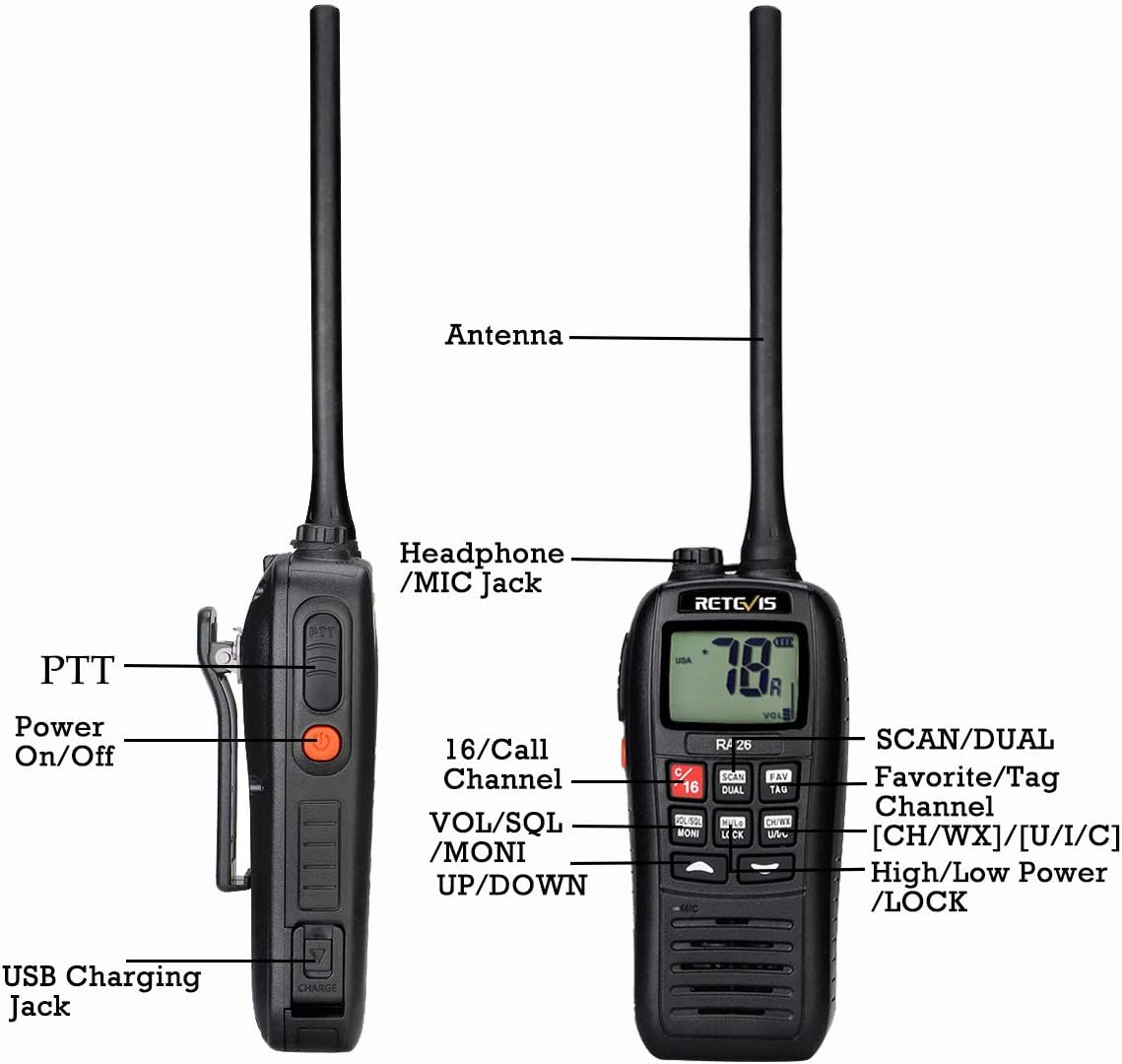
Image: Labeled diagram of the Retevis RA26, highlighting key controls such as PTT, Power On/Off, Headphone/MIC Jack, 16/Call Channel, VOL/SQL/MONI, UP/DOWN, SCAN/DUAL, Favorite/Tag Channel, CH/WX/U/I/C, High/Low Power/LOCK, and USB Charging Jack.
1. Power On/Off
Press and hold the Power On/Off button (usually orange) on the side of the radio to turn it on or off. The LCD screen will illuminate.
2. Adjusting Volume and Squelch (VOL/SQL)
Use the VOL/SQL knob or buttons to adjust the audio volume. The squelch level controls the threshold for receiving signals, reducing background noise. Refer to the on-screen indicator for current settings.
3. Channel Selection
Use the UP/DOWN arrow buttons to navigate through the 88 available VHF channels. The selected channel number will be displayed on the LCD screen.
Press the 16/Call button to quickly switch to Channel 16 (distress and calling channel) or the designated call channel.

Image: A close-up view of the "16/Call" button on the Retevis RA26, indicating its function for quick channel access.
4. Transmitting (PTT)
To transmit, press and hold the PTT (Push-To-Talk) button on the side of the radio. Speak clearly into the microphone. Release the PTT button to listen.
5. Scan and Dual/Tri-Watch Functions
- Scan: Press the SCAN button to initiate channel scanning. The radio will cycle through active channels.
- Dual Watch: Press the DUAL button to activate Dual Watch mode. The radio will alternately monitor the current working channel and Channel 16.
- Tri-Watch: This mode allows the radio to alternately monitor the current working channel, Channel 16, and a designated call channel.

Image: Diagrams illustrating the Dual Watch (monitoring current channel and Channel 16) and Tri-Watch (monitoring current channel, Channel 16, and a call channel) functions on the Retevis RA26.

Image: A visual representation of how Dual Watch and Tri-Watch modes cycle through different channels for monitoring.
6. Channel Groups (International Seas)
The RA26 supports channel groups for various international seas. To use the radio in different countries' waters, simply switch to the corresponding channel group as per local regulations. Consult the full user manual for detailed instructions on switching channel groups.
7. Backlit LCD Screen
The high-visibility backlit LCD screen ensures clear readability even in low-light conditions, making it easy to adjust channel functions and monitor status at sea.
Maintenance and Care
1. Waterproof and Floating Design
The Retevis RA26 boasts an IP67 waterproof rating, meaning it is protected from dust and can withstand immersion in water up to 1 meter for 30 minutes. Its floating design prevents loss if dropped overboard. If the radio falls into water, it will float and emit a flashing backlight and buzzing sound to aid in retrieval.

Image: The Retevis RA26 floating partially submerged in water, demonstrating its IP67 waterproof and floating capabilities.
2. Vibration Drainage Function
After exposure to water, activate the vibration drainage function to remove moisture from the speaker grille. This helps maintain clear audio quality. Refer to the full user manual for specific steps to activate this function.

Image: The Retevis RA26 with visual effects suggesting sound waves emanating from its speaker, representing the vibration drainage feature.
3. Salt Spray and Corrosion Resistance
The RA26 is built with strong resistance to salt spray and corrosion, making it suitable for prolonged use in harsh marine environments. Regular rinsing with fresh water after exposure to saltwater is recommended to prolong its lifespan.
4. General Cleaning
Clean the radio's exterior with a soft, damp cloth. Do not use harsh chemicals or abrasive cleaners. Ensure the USB port cover is securely closed when not charging to maintain water resistance.
Troubleshooting
| Problem | Possible Cause | Solution |
|---|---|---|
| Radio does not power on. | Battery is low or depleted. | Charge the battery fully. |
| No sound or weak sound. | Volume too low; Squelch level too high; Speaker blocked by water. | Increase volume; Adjust squelch; Use vibration drainage function. |
| Cannot transmit or receive. | Incorrect channel selected; Out of range; Antenna not properly attached. | Verify channel; Move closer to other radio; Re-attach antenna securely. |
| Radio floats but backlight doesn't flash/no buzzing. | Battery too low to activate features. | Ensure battery is adequately charged for all features to function. |
Specifications
| Feature | Detail |
|---|---|
| Model Number | RA26 |
| Brand | Retevis |
| Color | Black |
| Number of Channels | 88 |
| Tuning Technology | VHF |
| Maximum Range | 5 Kilometers (approx. 3.1 miles) |
| Water Resistance Level | IP67 (Waterproof, Floats) |
| Battery Type | 1500mAh Lithium-ion (included) |
| Voltage | 3.7 Volts |
| Item Weight | 220 Grams (approx. 0.48 lbs) |
| Dimensions (approx.) | 14cm (Height) x 6.4cm (Width) x 3.5cm (Depth) |

Image: Diagram showing the approximate dimensions of the Retevis RA26: 14cm height, 6.4cm width, and 3.5cm depth.
Warranty and Support
Retevis offers a 2-year warranty for the radio body and a 1-year warranty for accessories. Additionally, there is a 30-day no-reason return policy.
Beyond the warranty period, maintenance services are still available, though buyers are responsible for associated costs.
For any inquiries or support, please contact Retevis directly on Amazon. They aim to respond within 12 hours.
For more information, visit the official Retevis store: Retevis Amazon Store


