
Introduction
This manual provides essential information for the safe and efficient use of your hjh OFFICE Priority II Folding Visitor Chair. Please read these instructions carefully before assembly and use, and retain them for future reference.
The Priority II chair is designed for versatility and comfort, featuring a folding mechanism for easy storage and multi-functional casters for mobility. It is constructed with a durable alloy steel frame and upholstered with high-quality fabric and mesh.

Image: The hjh OFFICE Priority II folding visitor chair positioned in a modern office environment, showcasing its design and functionality.
Safety Information
- Always assemble the chair according to the provided instructions.
- Exercise caution when folding and unfolding the chair to prevent injuries.
- Ensure the chair is placed on a stable surface.
- Engage the caster locks (if applicable) when the chair is not in use to prevent unexpected movement.
- Do not exceed the maximum recommended load capacity of 150 kg (330 lbs).
Setup and Assembly
The hjh OFFICE Priority II chair is largely pre-assembled for quick setup. Follow these general steps to prepare your chair for use:
- Unpacking: Carefully remove all components from the packaging. Inspect for any damage.
- Unfolding: Gently unfold the chair frame until it locks into place. Ensure all locking mechanisms are securely engaged.
- Caster Installation (if separate): If casters are not pre-installed, insert them firmly into the base of the chair legs until they click into place.
- Final Check: Before sitting, ensure the chair is stable and all parts are correctly assembled and secured.
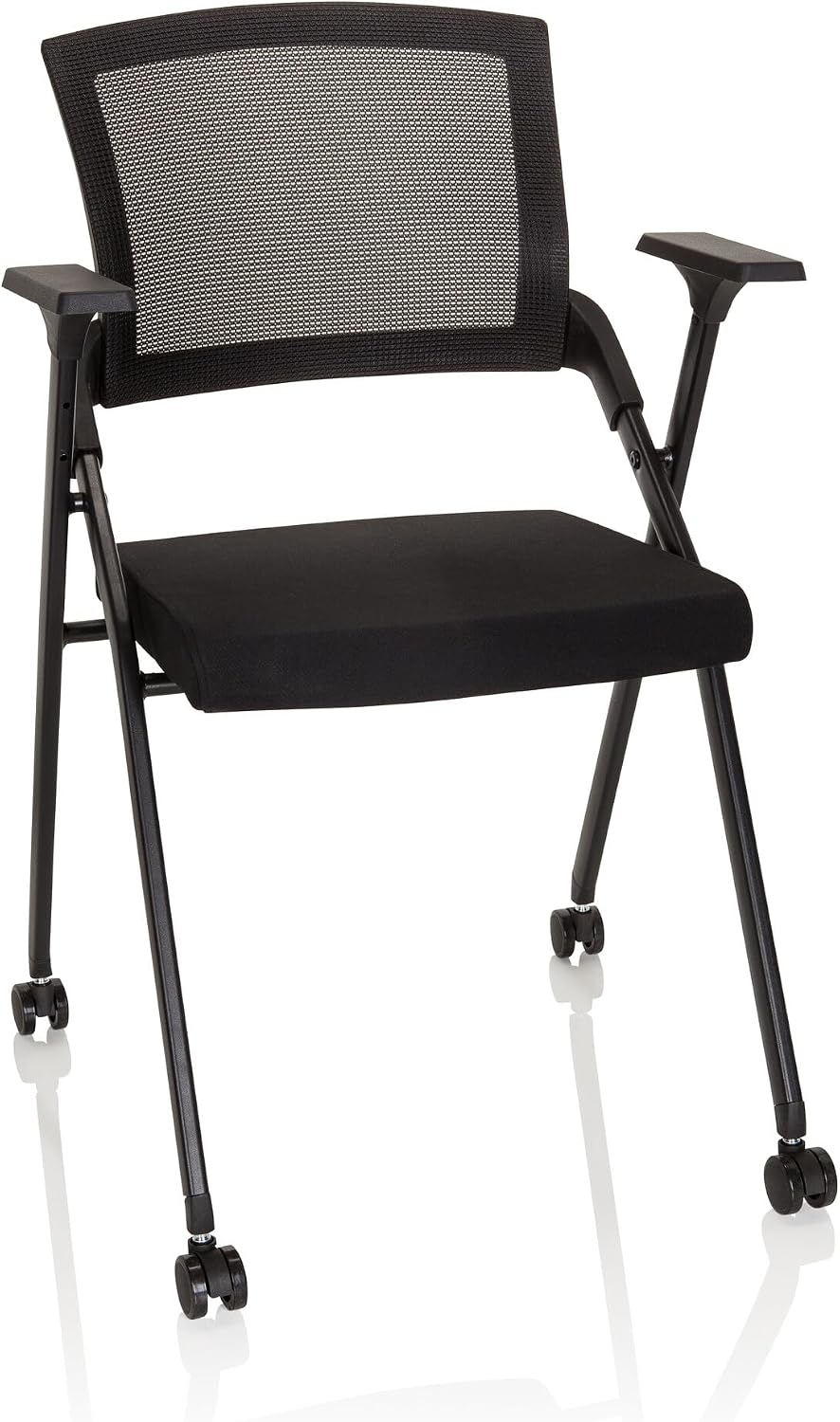
Image: The hjh OFFICE Priority II chair in its fully unfolded state, ready for use.
Operating Instructions
Folding the Chair for Storage
The Priority II chair features a convenient folding mechanism for compact storage.
- Clear the Area: Ensure there is enough space around the chair to fold it safely.
- Initiate Fold: Locate the folding release mechanism, typically under the seat or near the backrest hinge. Activate the mechanism.
- Collapse: Gently push the backrest towards the seat, allowing the chair to collapse into its folded position. Ensure your fingers are clear of pinch points.
- Secure: Verify that the chair is fully folded and stable for storage.

Image: The hjh OFFICE Priority II chair shown in its compact, folded state, ideal for storage.

Image: Several hjh OFFICE Priority II chairs neatly folded and stored, demonstrating their space-saving design.
Armrests and Seat Mechanism
The chair is equipped with fixed armrests for comfort and a robust seat mechanism that facilitates the folding action.

Image: A close-up view of the chair's armrest, showing its design and integration with the frame.

Image: A detailed shot of the seat and the underlying mechanism responsible for the chair's folding capability.
Using the Casters
The chair is equipped with multi-functional casters suitable for various floor types. These casters are designed for smooth movement and high abrasion resistance.
- Movement: The casters allow the chair to be easily moved across hard floors and carpets without causing scratches due to their soft rolling surface.
- Stability: For stationary use, ensure the chair is on a level surface. While the casters are non-braking, the chair's design provides stability when occupied.

Image: A detailed view of the multi-functional casters, highlighting their design for smooth movement and floor protection.
Maintenance
To ensure the longevity and appearance of your hjh OFFICE Priority II chair, follow these simple maintenance guidelines:
- Cleaning: Regularly wipe down the frame with a soft, damp cloth. For fabric and mesh surfaces, use a mild upholstery cleaner as needed. Avoid harsh chemicals or abrasive materials.
- Inspection: Periodically check all screws and connections to ensure they are tight. Retighten if necessary.
- Casters: Keep casters free of hair and debris to maintain smooth operation.
- Storage: When storing the chair in its folded position, ensure it is in a dry, temperate environment away from direct sunlight to prevent material degradation.
Troubleshooting
If you encounter any issues with your chair, consider the following common solutions:
- Chair feels unstable:
- Ensure the chair is fully unfolded and all locking mechanisms are engaged.
- Check that all screws and connections are securely tightened.
- Verify the chair is on a flat, even surface.
- Difficulty folding/unfolding:
- Ensure the release mechanism is fully activated.
- Check for any obstructions in the folding joints.
- Casters not rolling smoothly:
- Inspect casters for accumulated dirt, hair, or debris and clean them thoroughly.
If problems persist, please contact customer support.
Specifications
| Brand | hjh OFFICE |
| Model Name | Priority II |
| Model Number | 660946 |
| Color | Black |
| Material | Fabric / Mesh (Seat: Fabric, Filling: Foam) |
| Frame Material | Alloy Steel |
| Product Dimensions (D x W x H) | 58 x 61 x 98 cm (22.8 x 24 x 38.6 inches) |
| Folded Dimensions (H x W x D) | 108 x 61 x 20 cm (42.5 x 24 x 7.9 inches) |
| Seat Height | 51 cm (20.1 inches) |
| Seat Depth | 43 cm (16.9 inches) |
| Backrest Height | 51 cm (20.1 inches) |
| Item Weight | 7 kg (15.4 lbs) |
| Maximum Load Capacity | 150 kg (330 lbs) |
| Special Features | Foldable, With armrests, With backrest, Breathable mesh, Casters |
| Recommended Use | Office, Conference |
| Caster Type | Multi-functional, non-braking, suitable for hard floors and carpets |

Image: A diagram illustrating the key dimensions of the hjh OFFICE Priority II chair in both unfolded and folded states, including its 150 kg weight capacity.
Warranty and Support
Your hjh OFFICE Priority II chair comes with standard legal guarantees. For specific warranty details, please refer to your purchase documentation or contact the seller directly.
For any questions, technical assistance, or support regarding your product, please contact hjh OFFICE specialized customer support. Contact information can typically be found on the seller's page or your purchase invoice.
Returns: The product is eligible for 30-day returns as per seller policy.
