
1. Introduction
Thank you for choosing the BAOFENG UV-S9 Plus 8W VHF UHF Dual Band Handheld Two-Way Radio. This manual provides detailed instructions to help you understand and operate your radio effectively. Please read this manual thoroughly before using the device to ensure proper function and safety.
The BAOFENG UV-S9 Plus is a high-power, dual-band radio designed for reliable long-range communication, featuring a large 2200mAh battery and versatile charging options.
2. Product Overview and Components
Familiarize yourself with the radio's components and the items included in the package.

Figure 2.1: Included Components. This image displays all items typically found in the BAOFENG UV-S9 Plus package, including the radio unit, antenna, rechargeable battery, belt clip, desktop charging cradle, AC power adapter, USB charging cable, and an earpiece.

Figure 2.2: Radio Parts Diagram. This diagram labels the various parts of the radio, such as the antenna, power/volume knob, frequency/channel mode switch, LED indicator, frequency display switch, speaker/microphone, flashlight LED, FM/Alarm button, PTT (Push-to-Talk) button, flashlight/monitor button, band key, and keypad.
3. Setup
3.1 Battery Installation
- Ensure the radio is powered off.
- Align the battery pack with the grooves on the back of the radio.
- Slide the battery pack upwards until it clicks securely into place.
- To remove, press the battery release latch (if present, typically at the bottom of the battery) and slide the battery downwards.

Figure 3.1: Battery Compartment. This image shows the rear of the radio with the battery attached, highlighting the secure fit and the product information label.
3.2 Antenna Attachment
Screw the antenna clockwise into the connector on the top of the radio until it is finger-tight. Do not overtighten.
3.3 Charging the Battery
The BAOFENG UV-S9 Plus offers two convenient charging methods:
- Desktop Charging Cradle: Place the radio (with battery installed) into the charging cradle. Connect the AC power adapter to the cradle and plug it into a wall outlet. The indicator light on the cradle will show charging status.
- USB Direct Charging: Connect the provided USB charging cable to the radio's charging port (typically on the side, under a protective cover) and to a USB power source (e.g., computer USB port, USB wall adapter, car charger).

Figure 3.2: Charging Methods. This image illustrates both the desktop charging cradle and the USB direct charging cable in use with the radio.

Figure 3.3: USB Charging Connection. A detailed view of the USB charging cable plugged into the radio's charging port.
4. Operating Instructions
4.1 Power On/Off and Volume Control
Rotate the top knob clockwise to power on the radio and adjust the volume. Rotate counter-clockwise until a click is heard to power off.
4.2 Frequency/Channel Mode Switch (VFO/MR)
Press the VFO/MR button to switch between Frequency Mode (VFO) and Channel Mode (MR). In VFO mode, you can manually input frequencies. In MR mode, you can select pre-programmed channels.
4.3 Push-to-Talk (PTT) Button
Press and hold the large PTT button on the side of the radio to transmit. Release it to receive.
4.4 Power Output Adjustment
The UV-S9 Plus allows you to select between different power output levels (1W, 4W, 8W) to optimize battery life or maximize range. This setting can typically be adjusted through the radio's menu system.
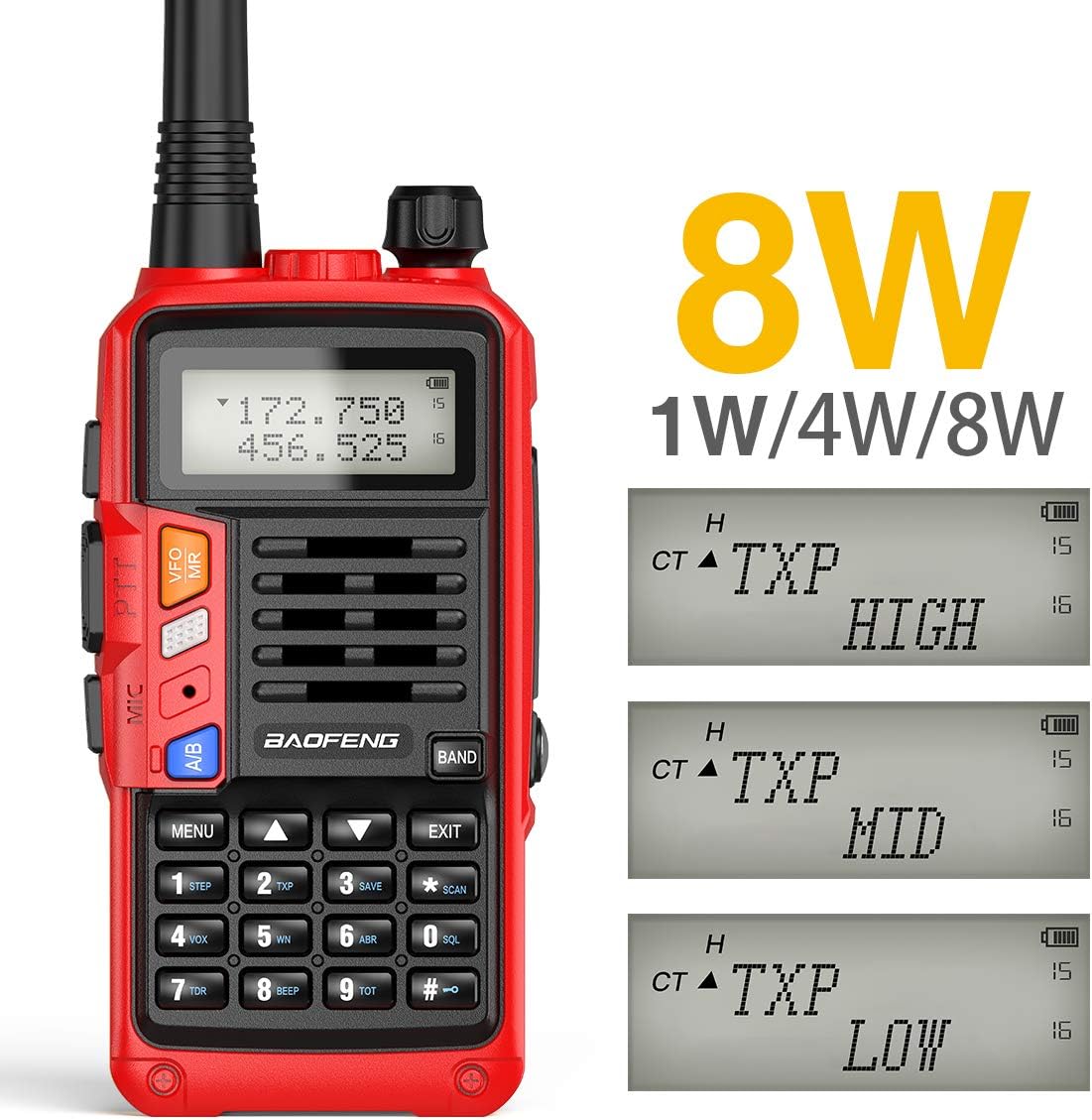
Figure 4.1: Adjustable Power Levels. The radio's display indicates the current transmit power setting, which can be toggled between High (8W), Mid (4W), and Low (1W).
Video 4.1: Power Output Demonstration. This video demonstrates the actual power output of the BAOFENG UV-S9 Plus radio when connected to an SWR meter, showing it can achieve over 8 Watts.
4.5 Flashlight Function
The radio includes a built-in LED flashlight. Refer to the radio's specific button layout (Figure 2.2) for the dedicated flashlight button, or consult the menu for activation.
4.6 FM Radio
The UV-S9 Plus can also function as an FM radio receiver. Press the FM/ALARM button to enter FM radio mode. Use the keypad to tune to desired frequencies.
5. Maintenance
5.1 Cleaning
Wipe the radio's surface with a soft, damp cloth. Do not use harsh chemicals or abrasive cleaners. Ensure all port covers are securely closed to maintain water resistance.
5.2 Battery Care
- Charge the battery fully before first use.
- Avoid overcharging or completely draining the battery.
- If storing the radio for extended periods, charge the battery to approximately 50% capacity.
5.3 Storage
Store the radio in a cool, dry place away from direct sunlight, extreme temperatures, and corrosive materials. Remove the battery if storing for a long duration.
6. Troubleshooting
| Problem | Possible Cause | Solution |
|---|---|---|
| Radio does not power on. | Battery is low or not installed correctly. | Charge the battery. Ensure the battery is securely attached. |
| Cannot transmit or receive. | Incorrect frequency/channel, antenna not connected, or out of range. | Verify frequency/channel settings. Ensure antenna is securely attached. Move closer to the other radio or repeater. |
| Poor audio quality. | Low battery, weak signal, or microphone/speaker obstruction. | Charge battery. Check signal strength. Ensure microphone and speaker are clear. |
| Battery not charging. | Charger or cable faulty, or improper connection. | Check charger and cable for damage. Ensure connections are secure. Try a different power source. |
7. Specifications
| Feature | Detail |
|---|---|
| Model Number | UV-S9 Plus |
| Brand | BAOFENG |
| Frequency Range | VHF: 136-174 MHz, UHF: 400-520 MHz, FM Radio: 65-108 MHz |
| Number of Channels | 128 |
| Power Output | 8W / 4W / 1W (selectable) |
| Battery Capacity | 2200mAh (Lithium-Ion) |
| Voltage | 7.4 Volts |
| Dimensions (H x W x D) | 5.91 x 2.28 x 1.26 inches (150 x 58 x 32 mm approx, excluding antenna) |
| Weight | 1.04 pounds (approx. 470g with battery and antenna) |
| Water Resistance Level | Waterproof (specific IP rating not provided) |
| Compatible Devices | BAOFENG two-way radios, other devices using the same frequency bands |

Figure 7.1: Measured Power Output. This image shows the radio's actual power output measured by an SWR meter, confirming its capability to transmit at 8 Watts or higher when fully charged.

Figure 7.2: Product Dimensions. A visual representation of the radio's physical dimensions.
8. Warranty and Support
For warranty information, technical support, or service inquiries, please refer to the contact information provided by your retailer or visit the official BAOFENG website. Keep your purchase receipt as proof of purchase for warranty claims.
Additional resources, including software for programming and advanced guides, may be available online from the manufacturer or community forums.