Introduction
The ASUS ROG Zephyrus M15 is a high-performance gaming laptop designed for an immersive gaming and computing experience. Featuring a 10th Gen Intel Core i7-10750H processor, NVIDIA GeForce RTX 2070 Max-Q graphics, 16GB RAM, and a 1TB PCIe SSD, it delivers powerful performance for demanding applications and games. This manual provides essential information for setting up, operating, maintaining, and troubleshooting your device.

Figure 1: ASUS ROG Zephyrus M15 Gaming Laptop (Angled View)
This image shows the ASUS ROG Zephyrus M15 laptop from an angled perspective, highlighting its sleek design and the vibrant display. The keyboard is visible, along with the overall compact form factor.
Setup
1. Unboxing and Initial Inspection
Carefully remove all components from the packaging. Verify that the following items are present:
- ASUS ROG Zephyrus M15 Laptop
- Power Adapter and Cable
- User Manual (this document)
Inspect the laptop for any physical damage. If any damage is found, contact your retailer immediately.
2. Connecting the Power Adapter
Connect the power adapter to the laptop's power input port, typically located on the left side. Plug the power cable into a wall outlet. The battery indicator light will illuminate, indicating that the laptop is charging.

Figure 2: Left Side Ports (including Power Input)
This image displays the left side of the ASUS ROG Zephyrus M15, clearly showing the power input port, USB-C port, and other connectivity options.
3. First Boot and Windows Setup
Press the power button to turn on the laptop. Follow the on-screen instructions to complete the Windows 10 setup process. This includes selecting your region, language, connecting to a Wi-Fi network, and creating a user account.
Operating Your Laptop
1. Keyboard and Touchpad
The ASUS ROG Zephyrus M15 features an RGB backlit keyboard. You can customize the lighting effects and colors using the pre-installed ASUS Armoury Crate software. The precision touchpad supports multi-touch gestures for enhanced navigation.
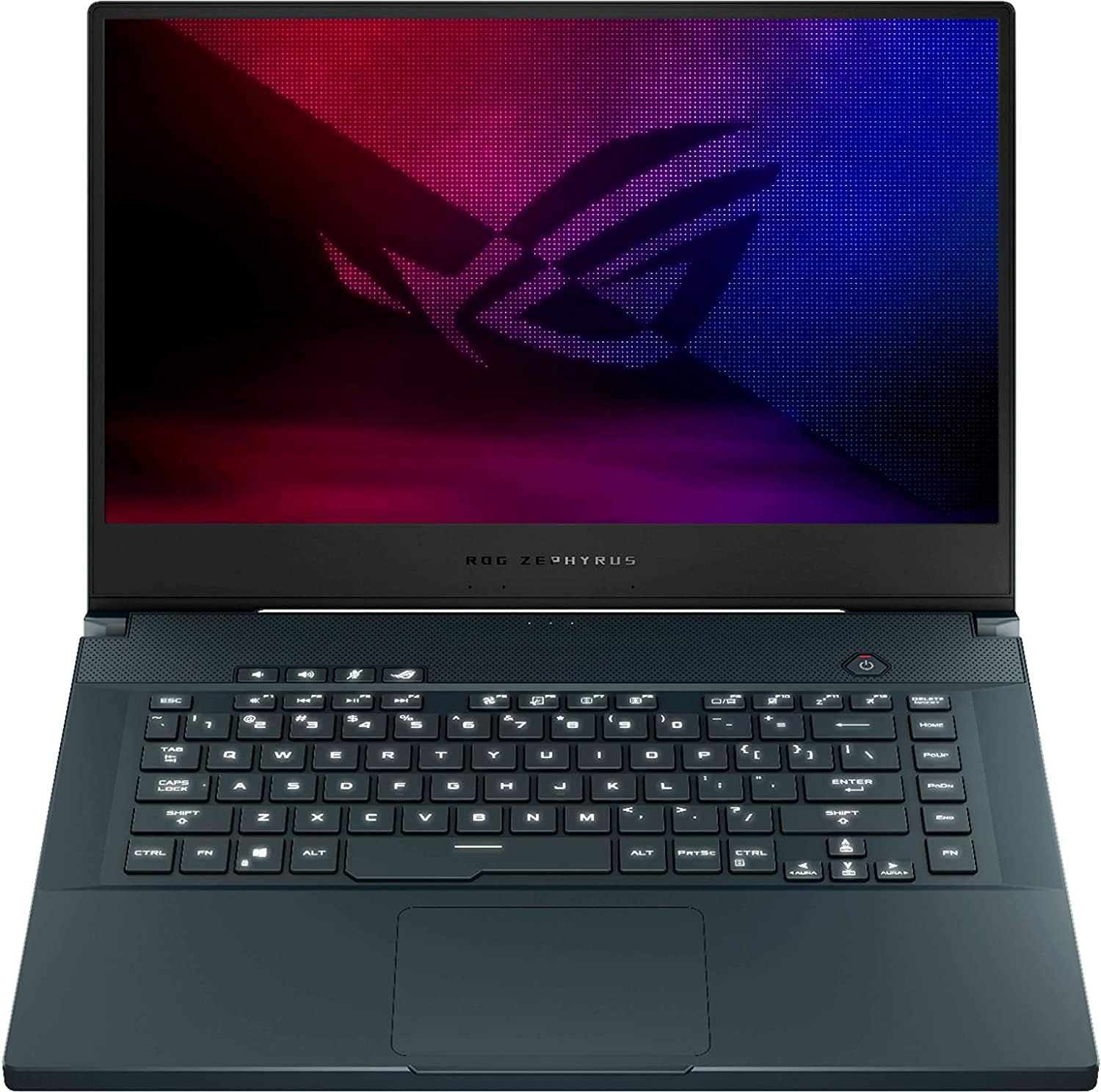
Figure 3: Keyboard and Touchpad Layout
This image provides a clear top-down view of the ASUS ROG Zephyrus M15's keyboard and touchpad, showcasing the full layout and key spacing.
2. Display and Graphics
Your laptop is equipped with a 15.6" FHD 240Hz IPS-Level display, offering smooth visuals and accurate colors. The NVIDIA GeForce RTX 2070 Max-Q graphics card provides exceptional performance for gaming and creative tasks. Ensure your graphics drivers are always up to date for optimal performance.
3. Connectivity Ports
The laptop includes various ports for connecting peripherals:
- USB 3.1 Type-C: 1 port for high-speed data transfer and display output.
- USB 3.1 Type-A: 3 ports for connecting standard USB devices.
- HDMI: 1 port for connecting external displays.
- Headphone/Speakers/Line Out Jack: 1 port for audio output.
- RJ-45 (Ethernet): 1 port for wired network connection.

Figure 4: Right Side Ports
This image shows the right side of the ASUS ROG Zephyrus M15, detailing the arrangement of its USB and other connectivity ports.
Maintenance
1. Cleaning Your Laptop
Regular cleaning helps maintain performance and longevity:
- Screen: Use a microfiber cloth and a screen-specific cleaning solution.
- Keyboard: Use compressed air to remove dust and debris from between keys. Wipe keys with a damp, lint-free cloth.
- Vents: Periodically use compressed air to clear dust from the cooling vents to ensure proper airflow.

Figure 5: Rear Cooling Vents
This image highlights the rear cooling vents of the ASUS ROG Zephyrus M15, which are crucial for heat dissipation during intensive use.
2. Software Updates
Keep your operating system and drivers updated. Windows Update will handle OS updates, while ASUS Armoury Crate and NVIDIA GeForce Experience can assist with driver updates for optimal performance and security.
3. Battery Care
To prolong battery life, avoid consistently discharging the battery completely or keeping it at 100% charge for extended periods. ASUS Armoury Crate may offer battery health management features.
Troubleshooting
| Problem | Possible Cause | Solution |
|---|---|---|
| Laptop not turning on | No power, discharged battery, hardware issue. | Ensure power adapter is connected and outlet is working. Charge battery for at least 30 minutes. If problem persists, contact support. |
| Overheating during use | Blocked vents, intensive tasks, dust accumulation. | Clean cooling vents. Ensure laptop is on a hard, flat surface. Reduce background applications. Consider a cooling pad. |
| Poor gaming performance | Outdated drivers, incorrect power settings, background processes. | Update graphics drivers. Set power plan to "High Performance". Close unnecessary applications. Use Armoury Crate to optimize settings. |
| Wi-Fi connectivity issues | Driver issues, router problems, interference. | Restart router and laptop. Update Wi-Fi drivers. Check for interference from other devices. |
Specifications
| Feature | Detail |
|---|---|
| Processor | 10th Gen Intel Core i7-10750H (6 Cores, 2.6 GHz up to 5.0 GHz) |
| Graphics | NVIDIA GeForce RTX 2070 Max-Q 8GB GDDR6 |
| Display | 15.6" FHD (1920x1080) 240Hz 3ms IPS-Level, Anti-Glare |
| RAM | 16GB DDR4 SDRAM 3200MHz |
| Storage | 1TB PCIe SSD |
| Operating System | Windows 10 Home 64-bit |
| Connectivity | Wi-Fi 6 (802.11ax), Bluetooth 5.0, 10/100/1000Mbps Ethernet |
| Ports | 1x USB 3.1 Type-C, 3x USB 3.1 Type-A, 1x HDMI, 1x Headphone/Line Out, 1x RJ-45 |
| Battery | 4-cell lithium-ion |
| Dimensions (LxWxH) | 14.2 x 9.9 x 0.8 inches |
| Weight | 4.43 pounds |
Warranty and Support
ASUS provides a limited warranty for your ROG Zephyrus M15 laptop. Please refer to the warranty card included in your product packaging for specific terms and conditions, including warranty period and coverage details. Keep your proof of purchase for warranty claims.
For technical support, driver downloads, and further assistance, please visit the official ASUS support website. You can also find FAQs and community forums there.
ASUS Support Website: www.asus.com/support/


