
Introduction
Welcome to the user manual for your QZT Q1-16g Mini Voice Recorder. This compact and lightweight device is designed for high-quality audio recording in various environments. It features one-touch recording, voice activation (VOS), 16GB internal storage, and OTG compatibility for easy file management. Please read this manual carefully to ensure proper use and maintenance of your device.
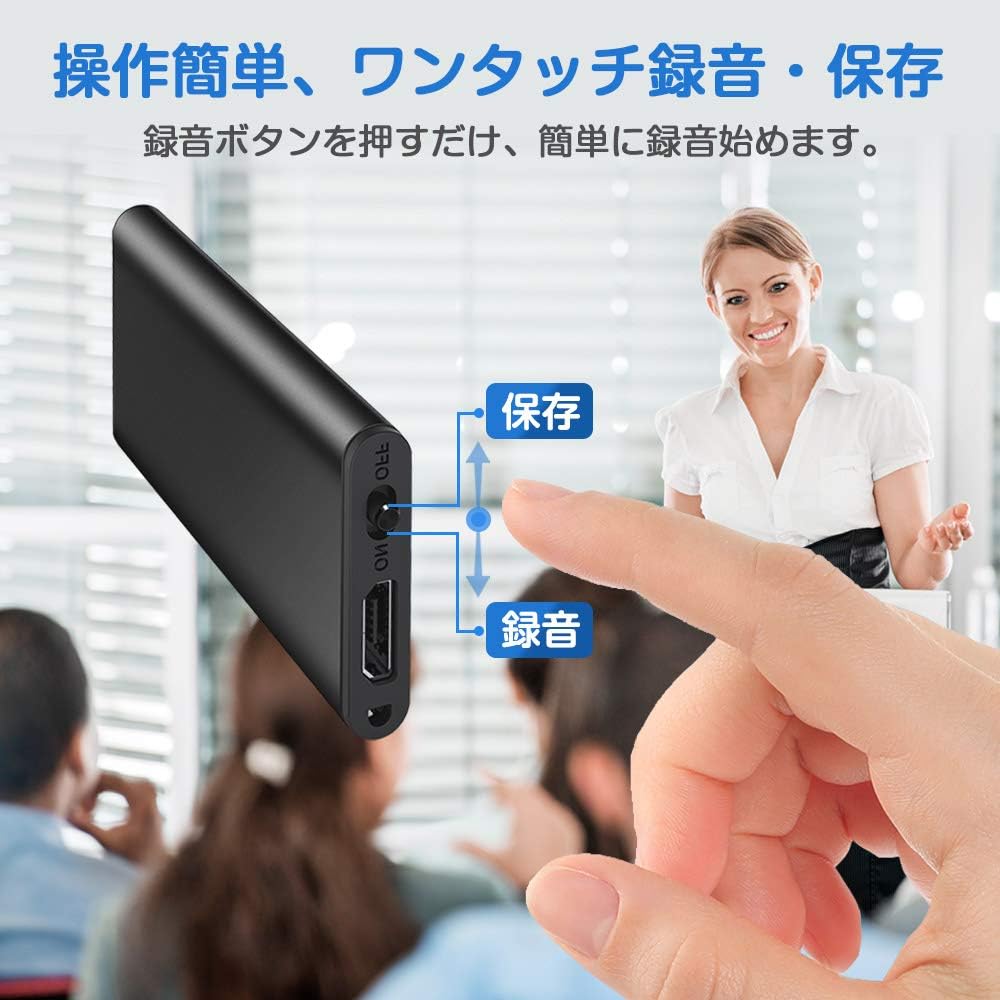
Image: The QZT Q1-16g Mini Voice Recorder, showcasing its sleek, compact design.
Package Contents
- QZT Q1-16g Mini Voice Recorder
- USB Charging/Data Cable
- User Manual (this document)
Device Layout
Familiarize yourself with the buttons and ports on your QZT Q1-16g Mini Voice Recorder.

Image: Diagram showing the ON/OFF switch, indicating positions for "Record" and "Save".
- ON/OFF Switch: Used to power on/off the device and initiate recording/saving.
- USB Port: For charging and data transfer.
- Indicator Light: Provides status feedback (e.g., recording, charging, low battery).
Setup
1. Charging the Device
Before first use, fully charge the voice recorder.
- Connect the small end of the USB cable to the recorder's USB port.
- Connect the standard USB end to a computer's USB port or a USB wall adapter (not included).
- The indicator light will show charging status (e.g., solid light while charging, off when fully charged).
- A full charge provides approximately 15 hours of continuous recording.

Image: The voice recorder connected via USB cable, illustrating the charging and data transfer connection.
2. Setting the Time (Optional)
To ensure your recordings have accurate timestamps, connect the device to a computer. The device typically synchronizes its internal clock with the computer's time. Refer to the device's internal storage for a "Time Setting" file or instructions if manual adjustment is needed.
Operating Instructions
1. One-Touch Recording
The QZT Q1-16g features simple one-touch operation for recording.
- To start recording, slide the ON/OFF switch to the "ON" or "Record" position. The indicator light will flash briefly and then turn off, indicating recording has started discreetly.
- To stop recording and save the file, slide the ON/OFF switch to the "OFF" or "Save" position. The indicator light will flash briefly, and the recording will be saved automatically.
Image: A close-up of the voice recorder's switch, illustrating the "Record" and "Save" positions for one-touch operation.
2. Voice Activated Recording (VOS)
The VOS function allows the recorder to start recording automatically when sound is detected (above 50dB) and pause when silence occurs, saving storage space.
- To activate VOS mode, ensure the device is off.
- Slide the ON/OFF switch to the "ON" position. The device will enter VOS mode automatically if enabled. (Specific steps to enable/disable VOS might be in a configuration file on the device when connected to a PC. Please check the device's root directory for a settings file if VOS doesn't activate by default.)
- Recording will begin when sound is detected and pause when sound drops below the threshold.
- To stop VOS recording and save, slide the ON/OFF switch to the "OFF" position.

Image: A graphic illustrating how voice activated recording works, showing recording starting and stopping based on sound levels.
3. Playback and File Management (OTG Compatible)
You can manage and play back your recordings by connecting the device to a computer or an OTG-compatible Android smartphone.
- Connect to PC: Connect the recorder to your computer using the USB cable. It will appear as a removable disk. Open the disk to access your recording files (usually in WAV or MP3 format).
- Connect to Android Phone (OTG): Use an OTG adapter (not included) to connect the recorder to an OTG-compatible Android smartphone. The phone will recognize the recorder as external storage, allowing you to play, copy, or delete files using a file manager app.

Image: The voice recorder connected to an Android smartphone using an OTG adapter, demonstrating direct file access.
4. Low Battery Automatic Save
The device is equipped with an automatic save function to prevent data loss. When the battery level is critically low during recording, the device will automatically save the current recording file before powering off.

Image: A visual representation of the low battery auto-save process: low power detected, file saving, then power off.
Maintenance
- Keep the device dry and away from extreme temperatures.
- Avoid dropping or subjecting the device to strong impacts.
- Clean the device with a soft, dry cloth. Do not use liquid cleaners.
- Regularly back up important recordings to a computer or cloud storage.
- Periodically charge the device even if not in use to maintain battery health.
Troubleshooting
| Problem | Possible Cause / Solution |
|---|---|
| Device does not turn on. | Battery is depleted. Charge the device for at least 30 minutes. |
| Cannot record. |
|
| Poor recording quality. |
|
| Device not recognized by computer. |
|
Specifications
| Feature | Detail |
|---|---|
| Brand | QZT |
| Model | Q1-16g (QZT-002) |
| Storage Capacity | 16 GB (approx. 192 hours recording) |
| Recording Format | 192kbps (High Quality) |
| Battery Life | Approx. 15 hours continuous recording (fully charged) |
| Dimensions | Approx. 4.4cm x 2.2cm x 0.4cm |
| Weight | Approx. 9g |
| Microphone | Built-in high-sensitivity stereo microphone |
| Features | One-touch recording, VOS (Voice Activated Recording), Noise Cancelling, OTG Compatible, Low Battery Auto Save |
Warranty and Support
For warranty information and technical support, please refer to the documentation included with your purchase or visit the official QZT website.
Contact Information: Please check the product packaging or the seller's page for the most up-to-date contact details for customer service.