
BONTEC 110SB-FBA
BONTEC TV Wall Mount Bracket User Manual
Model: 110SB-FBA
Introduction
This user manual provides comprehensive instructions for the installation, operation, and maintenance of your BONTEC TV Wall Mount Bracket. Designed for 17-45 inch LED, OLED, LCD Flat Screen TVs up to 66lbs, this low-profile, ultra-slim mount offers a secure and aesthetically pleasing solution for mounting your television. Please read this manual thoroughly before installation to ensure safe and correct usage.
Safety Information
- Ensure the wall structure can safely support the combined weight of the mount and the television.
- Do not mount on drywall alone. Always mount into wood studs, concrete, or brick walls.
- Verify your TV's VESA pattern and weight are within the mount's specifications (Max VESA 200x200mm, Max 66lbs).
- Use all provided hardware. If any parts are missing or damaged, contact BONTEC customer support.
- Always use a stud finder to locate wood studs accurately.
- During installation, ensure no electrical wires or plumbing are behind the drilling area.
- Two people are recommended for installation to ensure safety and ease of handling.
- After installation, double-check all connections and ensure the TV is securely fastened to the mount.
Package Contents
Please verify that all components are present before beginning installation:
- TV Wall Mount Bracket (Main Frame)
- TV Mounting Brackets (x2)
- Assorted Screws and Washers for TV attachment
- Lag Bolts and Wall Anchors for wall attachment
- Spirit Level
- Cable Ties (x3)
- Installation Manual

Image: All components of the BONTEC TV Wall Mount Bracket, including the main frame, TV brackets, and installation hardware.
Specifications
| Brand | BONTEC |
| Model Number | 110SB-FBA |
| Compatible TV Sizes | 17-45 inches |
| Maximum Weight Capacity | 66 lbs (30 kg) |
| VESA Compatibility | 50x50mm, 75x75mm, 100x100mm, 200x100mm, 100x200mm, 200x200mm |
| Wall Distance (Low Profile) | 1.18 inches (30mm) |
| Tilt Angle | Up to 10 degrees forward |
| Material | High-strength Steel |
| Color | Black |
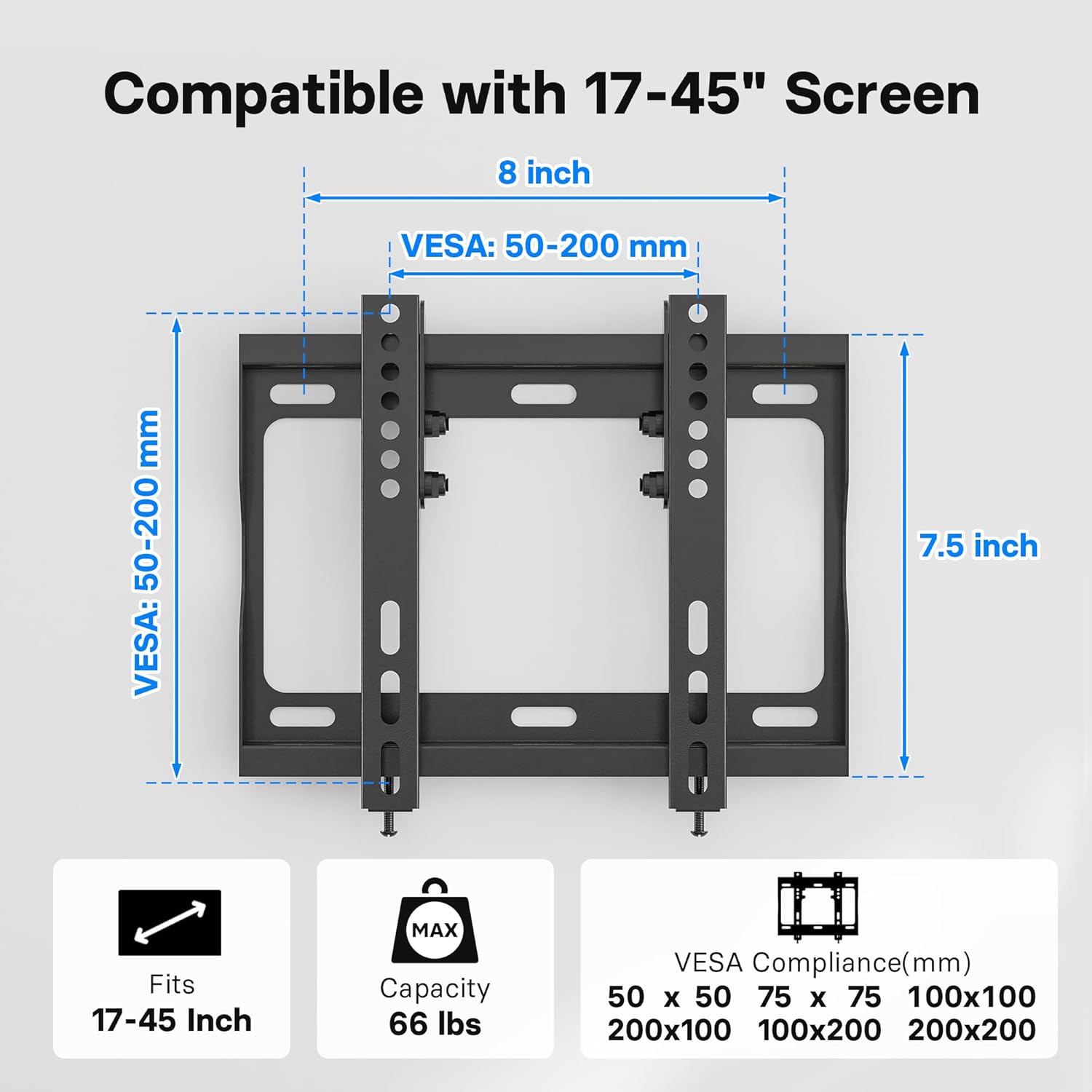
Image: Diagram illustrating the VESA compatibility (50-200mm) and screen size range (17-45 inches) for the mount.
Setup and Installation
Follow these steps carefully to install your BONTEC TV Wall Mount Bracket. It is highly recommended to have two people for this process.
Step 1: Attach TV Brackets to TV
- Carefully place your TV face down on a soft, clean surface to prevent scratches.
- Identify the VESA mounting holes on the back of your TV.
- Select the appropriate screws and washers from the provided hardware kit that fit your TV's mounting holes.
- Attach the two vertical TV mounting brackets to the back of your TV. Ensure the hooks on the brackets are facing inward, towards the center of the TV.
- Tighten the screws securely, but do not overtighten.

Image: A television mounted flat against a wall, demonstrating the ultra-slim 1.18-inch profile of the mount.
Step 2: Mark and Drill Holes on Wall
- Determine the desired height for your TV.
- Place the wall plate against the wall at the desired height and use the included spirit level to ensure it is perfectly horizontal.
- Mark the drilling points through the holes on the wall plate using a pencil.
- For Wood Studs: Use a stud finder to locate the center of the wood studs. Drill pilot holes (recommended size: 7/32" or 5.5mm) at the marked locations.
- For Concrete/Brick Walls: Drill pilot holes (recommended size: 3/8" or 10mm) at the marked locations. Insert the plastic wall anchors into the drilled holes. Tap gently with a hammer if needed until flush with the wall surface.

Image: Visual guide demonstrating the applicability of the mount to wood studs, concrete walls, and brick walls. A warning states: "DO NOT MOUNT ON DRYWALL ALONE".
Step 3: Mount Wall Plate to Wall
- Align the wall plate with the drilled holes.
- Secure the wall plate to the wall using the lag bolts and washers. For concrete/brick walls, ensure the lag bolts go into the previously inserted wall anchors.
- Tighten all bolts firmly to ensure the wall plate is securely fastened to the wall.
Step 4: Hang TV on Wall Plate
- With assistance, carefully lift the TV with the attached brackets.
- Align the hooks on the TV brackets with the top edge of the wall plate.
- Gently lower the TV, ensuring the brackets engage securely with the wall plate.
- Once the TV is hanging, locate the safety lock bolts at the bottom of the TV brackets. Tighten these bolts to secure the TV to the wall plate and prevent accidental dislodging.

Image: A visual representation of the easy 15-minute installation process, showing the TV being mounted onto the wall plate.

Image: A close-up view of the safety lock bolts, which secure the TV brackets to the wall plate after the TV is hung.
Installation Video Guide
Video: An official BONTEC video demonstrating the installation process and key features of the Low Profile TV Wall Mount Bracket for 17-45 inch TVs.
Operating the Mount (Tilt Feature)
The BONTEC TV Wall Mount features a 10-degree forward tilt to optimize your viewing experience and reduce glare.
- To adjust the tilt, loosen the tilt adjustment bolts on the side of the TV mounting brackets.
- Carefully tilt the TV to your desired angle (up to 10 degrees forward).
- Once the desired angle is achieved, tighten the tilt adjustment bolts securely to lock the TV in place.

Image: A diagram illustrating the 10-degree tilt capability of the mount and the space provided for cable management behind the TV.

Image: A family enjoying television, demonstrating how the BONTEC TV wall mount allows for optimal viewing angles in a living room setting.
Maintenance
To ensure the longevity and safe operation of your BONTEC TV Wall Mount Bracket:
- Periodically check all screws and bolts to ensure they remain tight and secure.
- Clean the mount with a soft, dry cloth. Avoid using abrasive cleaners or solvents.
- Do not hang anything from the mount other than the specified television.
Troubleshooting
| Problem | Possible Cause | Solution |
|---|---|---|
| TV not level after installation. | Wall plate not perfectly level during installation. | Loosen the wall plate bolts slightly, adjust with a spirit level, then re-tighten. |
| TV feels loose on the mount. | Safety lock bolts not tightened or TV brackets not fully engaged. | Ensure TV brackets are fully seated on the wall plate. Tighten the safety lock bolts at the bottom of the TV brackets. |
| Cannot achieve desired tilt angle. | Tilt adjustment bolts are too tight. | Loosen the tilt adjustment bolts on the side of the TV brackets, adjust tilt, then re-tighten. |
| Mounting screws for TV do not fit. | Incorrect screw size or type selected. | Refer to your TV's manual for correct screw size. Use the appropriate screws from the provided kit or purchase compatible ones. |
Warranty and Support
For warranty information and customer support, please refer to the product packaging or visit the official BONTEC website. Keep your purchase receipt for warranty claims.
If you encounter any issues not covered in this manual, please contact BONTEC customer service for assistance.
Related documents110SB-FBA


Ask a question about this manual
Ask about setup, troubleshooting, compatibility, parts, safety, or missing instructions. Manuals+ will review the question and use this page’s manual context to help answer it.