
Introduction
The Garmin Sport PRO is a compact and lightweight handheld dog training device designed for intuitive, one-handed operation. It allows for the training of up to three dogs simultaneously (additional dog devices required, sold separately) and offers a range of up to three-quarters of a mile. This device is equipped with various training functions including stimulation, vibration, and tone, along with a built-in bark limiter for comprehensive training.

Image: The Garmin Sport PRO handheld device shown alongside its quick release lanyard, illustrating the complete product package.
What's in the Box
- Garmin Sport PRO Handheld Dog Training Device
- Garmin 010-11733-00 Quick Release Lanyard
Setup
Charging the Device
Ensure the Garmin Sport PRO handheld device is fully charged before first use. Connect the charging cable to the device and a power source. The device features a rechargeable, user-replaceable battery.
Attaching the Lanyard
The included quick release lanyard can be attached to the handheld device for convenient carrying, keeping your hands free during outdoor activities. Securely loop the lanyard through the designated attachment point on the device.

Image: A close-up view of the Garmin Quick Release Lanyard, highlighting its design for easy attachment and detachment.
Pairing with Dog Device
To begin training, the Sport PRO handheld device must be paired with a compatible Garmin dog device (e.g., Astro 320 compatible collars, sold separately). Refer to the specific dog device's manual for detailed pairing instructions. The Sport PRO can control up to three dog devices.
Operating the Device
Controls Overview
The Sport PRO is designed for intuitive, one-handed operation with clearly labeled buttons and a quick-turn dial for adjustments.
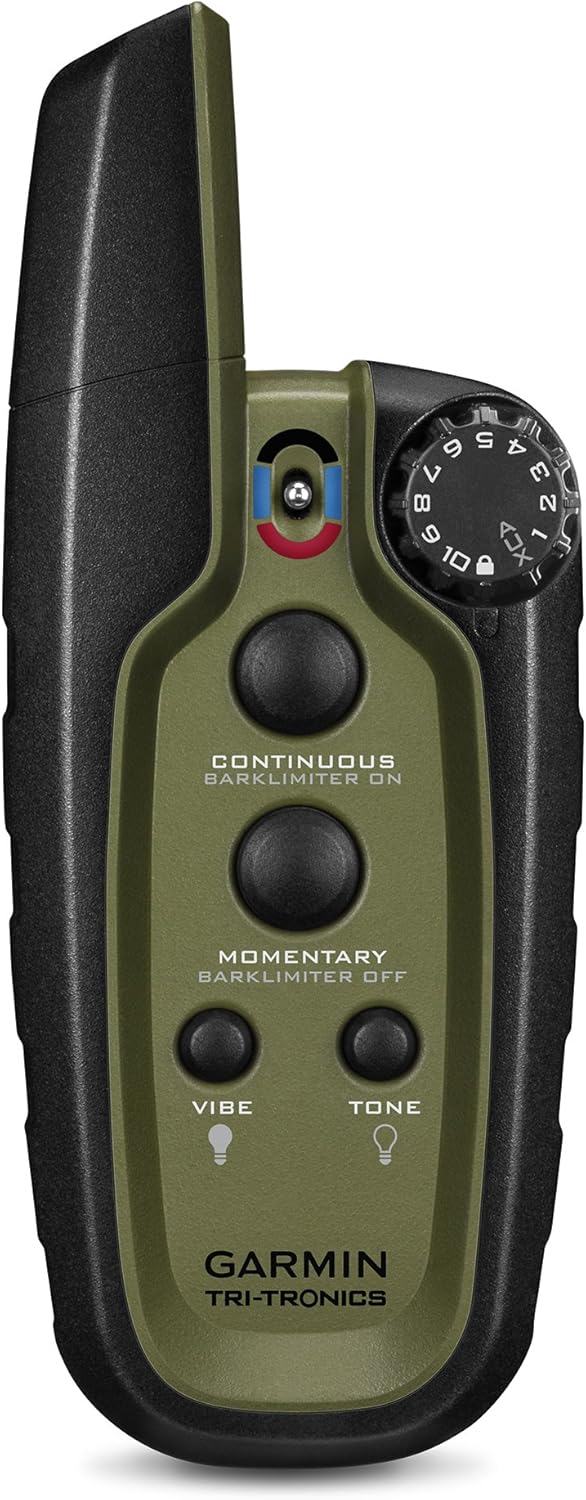
Image: A detailed view of the Garmin Sport PRO handheld device, showing the quick turn dial and the four training buttons.
- Quick Turn Dial: Located on the side, this dial provides positive clicks when changing between 10 levels of stimulation.
- Continuous Stimulation Button: Delivers continuous stimulation to the dog device.
- Momentary Stimulation Button: Delivers momentary stimulation to the dog device.
- Vibration Button: Activates a vibration signal on the dog device.
- Tone Button: Activates an audible tone signal on the dog device.
Bark Limiter Function
The device includes a built-in bark limiter with settable levels, which can be activated to help manage excessive barking from your dog. This feature functions similarly to a dedicated bark collar.
Beacon Lights
For low-light conditions, the handheld device allows for remote control of LED beacon lights on the dog device. These lights are visible up to 100 yards away, enhancing visibility and safety during night walks or hunts.
Maintenance
The Garmin Sport PRO handheld and its compatible dog devices are designed to be waterproof, tough, and reliable for rugged use. To ensure longevity and optimal performance:
- Cleaning: Wipe the device with a damp cloth to remove dirt and debris. Avoid harsh chemicals.
- Battery: The device features a user-replaceable battery. If battery life diminishes significantly, consider replacing it according to the instructions provided in the full user manual.
- Contact Points: The dog device and collar feature interchangeable, replaceable long and short contact points. Ensure these are clean and properly installed for effective stimulation.
Troubleshooting
If you encounter issues with your Garmin Sport PRO, consider the following common troubleshooting steps:
- Device Not Turning On/Charging: Ensure the charging cable is securely connected and the power source is active. Check for any damage to the cable or charging port.
- Dog Device Not Responding: Verify that the handheld and dog device are properly paired. Check the battery level of both units. Ensure the dog device is within the operational range of ¾ mile.
- Inconsistent Stimulation/Vibration/Tone: Check the contact points on the dog collar for proper fit and cleanliness. Ensure the collar is snug on the dog's neck.
- Bark Limiter Issues: Confirm the bark limiter is activated and set to an appropriate level.
For more detailed troubleshooting, refer to the comprehensive user manual available for download.
Specifications
| Feature | Detail |
|---|---|
| Model Name | Sport PRO |
| Brand | Garmin |
| Range | Up to ¾ mile |
| Stimulation Levels | 10 |
| Dog Capacity | Up to 3 dogs (additional devices sold separately) |
| Training Functions | Continuous Stimulation, Momentary Stimulation, Vibration, Tone |
| Additional Features | Built-in Bark Limiter, Remote LED Beacon Lights |
| Water Resistance | Waterproof handheld and receiver |
| Battery Type | Rechargeable, user-replaceable |
| Connectivity Technology | Auxiliary |
| Human Interface Input | Buttons |
| Special Features | Easy to use, lightweight, quick release lanyard |
Warranty and Support
For detailed warranty information, product registration, and technical support, please visit the official Garmin website. You can also contact Garmin customer service for assistance with any product-related inquiries.
A comprehensive PDF user manual is available for download, providing in-depth instructions and additional information: