Introduction
Thank you for choosing the SCS Sentinel AirVisio 150 Wireless Video Intercom. This system provides enhanced security and convenience by allowing you to control access to your home or workplace. It features a portable indoor monitor and a weather-resistant outdoor call station. This manual will guide you through the installation, operation, and maintenance of your new video intercom system.
Package Contents
Please verify that all components are present in your package:
- 1 x Portable Handset with Charging Base
- 1 x Outdoor Call Station with Mounting Support
- 1 x Lithium Battery (for handset)
- 1 x Power Adapter
- Mounting Screws
- 1 x User Manual

Image: All components included in the SCS Sentinel AirVisio 150 Wireless Video Intercom package, laid out on a white surface. This includes the portable handset, charging base, outdoor call station, power adapter, and a bag of screws.
Safety Information
Read all instructions carefully before installation and use. Keep this manual for future reference.
- Do not expose the indoor unit to moisture or extreme temperatures.
- Ensure proper power supply as specified in the technical data.
- Only use accessories and spare parts approved by SCS Sentinel.
- Installation should be performed by a qualified person if electrical wiring is involved.
Setup and Installation
1. Outdoor Call Station Installation
The outdoor call station is designed for surface mounting and is weather-resistant (IP54). Choose a location near your entrance, at a height that allows visitors to be clearly seen by the camera.
- Mark the drilling points for the mounting support on the wall.
- Drill holes and insert wall plugs if necessary.
- Secure the mounting support to the wall using the provided screws.
- Attach the outdoor call station to its support. Ensure it is firmly in place.
- Power Supply: The outdoor unit can be powered by 2 x LR14 batteries (not supplied) or a 12V DC transformer (not supplied). Connect the power source according to the diagram in the full manual.

Image: The outdoor call station of the SCS Sentinel AirVisio 150, mounted on a white wall next to a metal gate. This demonstrates a typical installation scenario for the unit.
2. Indoor Handset Setup
The indoor handset is portable and comes with a charging base.
- Insert the provided lithium battery into the handset.
- Connect the power adapter to the charging base and plug it into a wall outlet.
- Place the handset on the charging base to charge the battery. Allow a full charge before first use (approximately 10 hours for initial charge).
- The handset and outdoor unit are pre-paired. If re-pairing is needed, refer to the full manual.

Image: The portable indoor handset of the SCS Sentinel AirVisio 150, resting on its charging base on a wooden shelf. A small potted plant is visible next to it, indicating a typical indoor placement.
Operating Instructions
Receiving a Call
When a visitor presses the call button on the outdoor unit, the indoor handset will ring and display the visitor's image on its 2.4-inch screen.
- Press the Answer button on the handset to establish two-way audio and video communication.
- To open a connected door or gate, press the Unlock button (if wired for this function).
- To end the call, press the End Call button.
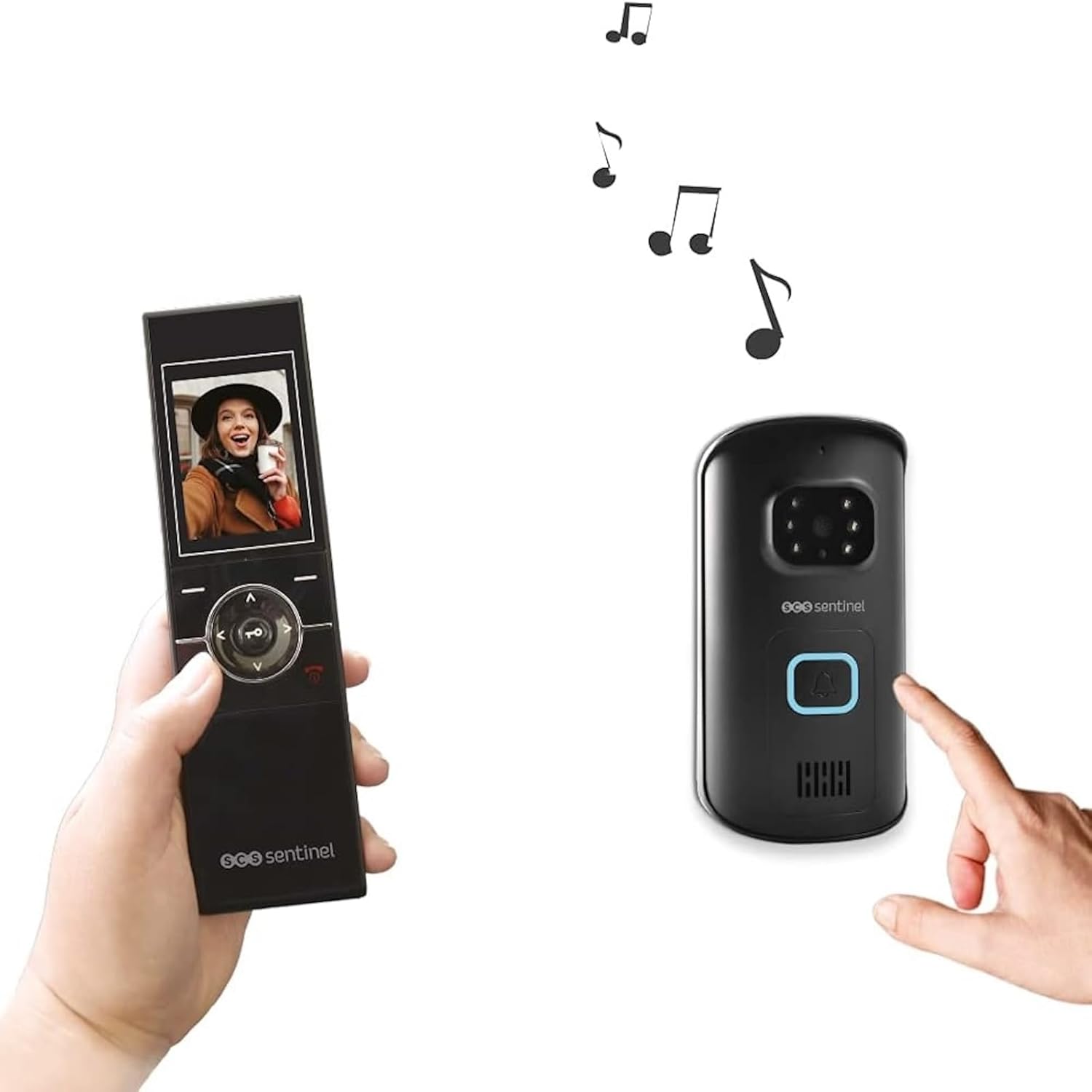
Image: A person holding the portable indoor handset, which displays a visitor's face. In the background, another person is pressing the call button on the outdoor unit, with musical notes indicating a chime. This illustrates the call reception process.
Night Vision
The outdoor call station is equipped with 6 LEDs for night vision, allowing clear visibility of visitors even in low-light conditions.
Adjusting Settings
The handset menu allows you to adjust various settings, including melody selection (3 options), volume, and brightness. Refer to the detailed manual for navigation instructions.
Maintenance
- Cleaning: Use a soft, dry cloth to clean the surfaces of both the indoor and outdoor units. Do not use abrasive cleaners or solvents.
- Battery: The indoor handset's lithium battery provides up to 10 hours of standby time. Recharge regularly. If the outdoor unit is battery-powered, replace LR14 batteries as needed.
- Outdoor Unit Inspection: Periodically check the outdoor unit for any obstructions to the camera or microphone, and ensure its mounting remains secure.
Troubleshooting
| Problem | Possible Cause | Solution |
|---|---|---|
| No image/audio on handset. | Out of range, low battery, pairing issue. | Move closer to the outdoor unit, charge handset, re-pair units (refer to full manual). |
| Outdoor unit not ringing. | No power to outdoor unit, faulty button. | Check battery/transformer connection, contact support if button is faulty. |
| Poor video quality. | Obstruction on camera, poor signal. | Clean camera lens, reduce distance or obstacles between units. |
| Handset battery drains quickly. | Old battery, frequent use. | Ensure full charge, consider battery replacement if performance degrades significantly. |
For more complex issues, please refer to the complete user manual or contact SCS Sentinel customer support.
Technical Specifications
| Model | PVS0010 (AirVisio 150) |
| Connectivity | Wireless (2.4 GHz, 2.415 MHz to 2.475 MHz) |
| Max. Transmission Power | <20 dBm |
| Range | Up to 150 meters (open field) |
| Indoor Handset Screen | 2.4 inches, Color |
| Handset Power | Rechargeable 1100 mAh Lithium Battery (10h standby) |
| Outdoor Unit Camera Angle | 70° (adjustable to 110°) |
| Night Vision | 6 LEDs |
| Weather Resistance | IP54 (Outdoor Unit) |
| Outdoor Unit Power | 2 x LR14 batteries (not supplied) or 12V DC transformer (not supplied) |
| Melodies | 3 options |
| Door/Gate Opening | Yes (requires compatible electric lock/gate opener) |
| Manufacturer | SCS SENTINEL |
Warranty Information
This SCS Sentinel product is covered by a 2-year manufacturer's warranty from the date of purchase. This warranty covers defects in materials and workmanship under normal use. Please retain your proof of purchase for warranty claims.
For detailed warranty terms and conditions, please refer to the full warranty document included with your product or visit the SCS Sentinel website.
Customer Support
SCS Sentinel is committed to providing high-quality products and excellent customer service. If you encounter any issues during installation or operation, or if you have any questions, our technical support team is available to assist you.
Our technical assistance is based in France and is ready to provide expert and personalized advice.
Contact Information: Please refer to the contact details provided in your product packaging or on the official SCS Sentinel website for the most up-to-date support information.


