
Introduction
This document provides comprehensive instructions for the setup, operation, and maintenance of your Easytry123 replacement remote control. This remote is designed to be compatible with various LG air conditioner models, including AKB74375403, AKB73757604, AKB35149806, AKB35149807, CC07AWV, CC12AWV, CC18AWV, CC24AWV, CC09AWR, CC12AWR, and CC18AWR. Please read this manual carefully to ensure proper use and functionality.
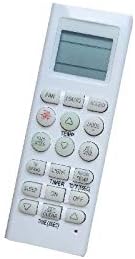
Image 1: Front view of the Easytry123 replacement remote control. This image displays the remote's overall design, including the LCD screen and various control buttons.
Setup
Battery Installation
The remote control requires two AAA batteries (not included). Follow these steps to install the batteries:
- Locate the battery compartment cover on the back of the remote control.
- Slide the cover downwards or press the latch (if present) to open the compartment.
- Insert two AAA batteries, ensuring the positive (+) and negative (-) terminals align correctly with the markings inside the compartment.
- Slide the battery compartment cover back into place until it clicks securely.
Note: Always replace both batteries at the same time with new ones. Do not mix old and new batteries, or different types of batteries. Remove batteries if the remote will not be used for an extended period.
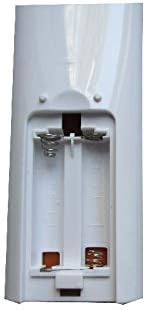
Image 2: Back view of the remote control with the battery compartment open, illustrating where to insert two AAA batteries.
Operating Instructions
This section details the functions of the buttons on your Easytry123 replacement remote control.

Image 3: Angled view of the remote control, providing a clearer look at the button layout and labels.
Basic Functions
- ON/OFF: Press to turn the air conditioner unit on or off.
- MODE: Cycles through operating modes such as Cool, Heat, Fan, Dry, and Auto.
- FAN: Adjusts the fan speed (e.g., Low, Medium, High, Auto).
- TEMP ▲ / ▼: Increases or decreases the desired temperature setting.
Advanced Functions
- TIMER: Sets a timer for the unit to turn on or off automatically. Refer to your air conditioner's specific manual for detailed timer programming.
- SLEEP: Activates sleep mode, which typically adjusts temperature gradually for comfortable sleep and energy saving.
- LIGHT: Controls the display light on the air conditioner unit.
- SWING: Controls the louver movement for air direction.
- JET COOL / JET HEAT: (If present) Provides rapid cooling or heating.
- ROOM TEMP: (If present) Displays the current room temperature.
Maintenance
Cleaning the Remote Control
To maintain the remote control's appearance and functionality:
- Wipe the surface with a soft, dry cloth.
- For stubborn dirt, lightly dampen the cloth with water and a mild detergent, then wipe dry immediately.
- Do not use abrasive cleaners, alcohol, or solvents, as these can damage the remote's finish or internal components.
Battery Care
- Replace batteries when the remote's range decreases or buttons become unresponsive.
- Remove batteries if the remote is not used for an extended period (e.g., one month or more) to prevent leakage.
- Dispose of used batteries according to local regulations.
Troubleshooting
If you encounter issues with your remote control, refer to the following common solutions:
- Remote not responding:
- Check if the batteries are inserted correctly with the correct polarity.
- Replace old batteries with new AAA batteries.
- Ensure there are no obstructions between the remote control and the air conditioner's receiver.
- Confirm the remote is pointed directly at the air conditioner unit.
- Limited range:
- Replace batteries.
- Ensure no strong light sources (like direct sunlight) are interfering with the infrared signal.
- Specific functions not working:
- While this remote is a replacement, some advanced functions may not be fully supported by all compatible LG air conditioner models. Refer to your specific air conditioner's manual for its full range of remote-controlled features.
Specifications
| Brand | Easytry123 |
| Compatible Devices | LG Air Conditioners (Models: AKB74375403, AKB73757604, AKB35149806, AKB35149807, CC07AWV, CC12AWV, CC18AWV, CC24AWV, CC09AWR, CC12AWR, CC18AWR) |
| Connectivity Technology | Infrared |
| Controller Type | Button Control |
| Special Feature | Ergonomic |
| Batteries Required | 2 AAA batteries (not included) |
Warranty and Support
This product is provided by Easytry123. For specific warranty information or technical support, please contact the seller directly through your purchase platform. General return policies may apply as per the retailer's terms and conditions.