Introduction
This manual provides detailed instructions for the setup, operation, and maintenance of your Technical Pro RX113BT Home Theater Amplifier Receiver and Rockville HC55 5.25" In-Ceiling Speakers. Please read this manual thoroughly before use to ensure proper functionality and to maximize your audio experience.
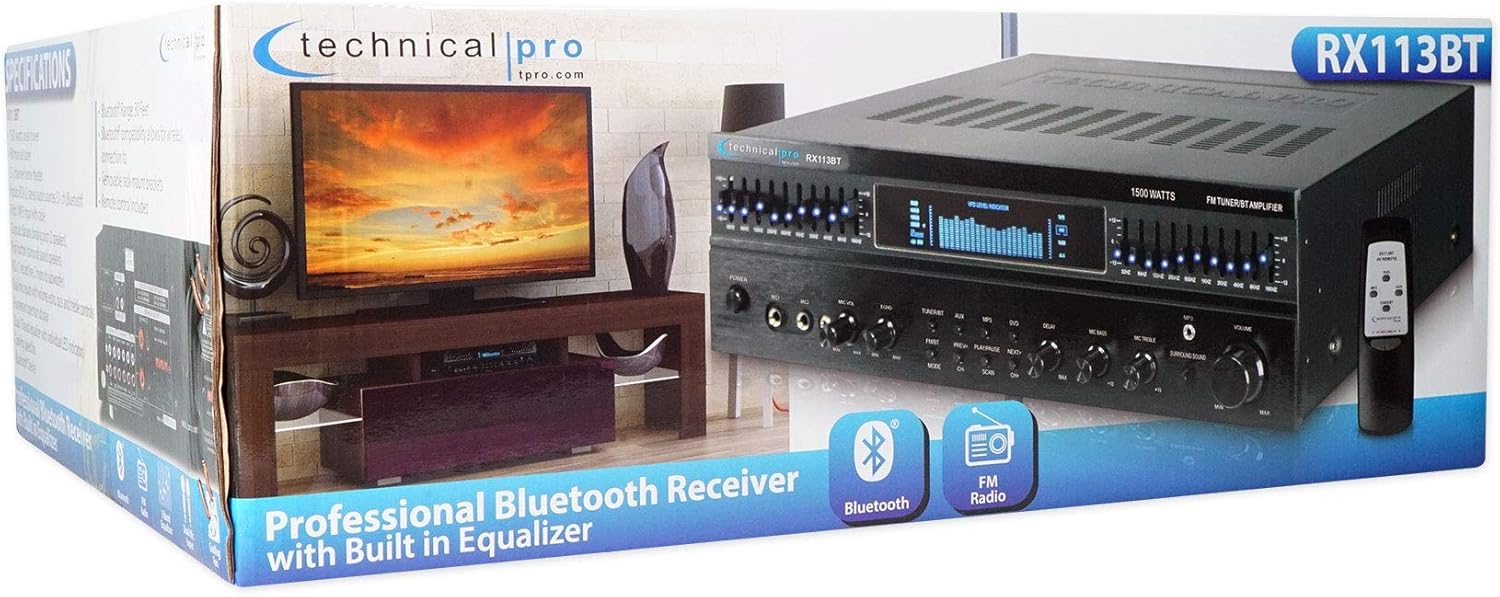
The RX113BT amplifier features 1500 watts peak power, Bluetooth connectivity, a 10-band equalizer, and multiple audio inputs. The HC55 speakers are designed for in-ceiling installation, offering clear audio reproduction for home theater environments.
Important Safety Instructions
- Read these instructions.
- Keep these instructions.
- Heed all warnings.
- Follow all instructions.
- Do not use this apparatus near water.
- Clean only with a dry cloth.
- Do not block any ventilation openings. Install in accordance with the manufacturer's instructions.
- Do not install near any heat sources such as radiators, heat registers, stoves, or other apparatus (including amplifiers) that produce heat.
- Do not defeat the safety purpose of the polarized or grounding-type plug. A polarized plug has two blades with one wider than the other. A grounding-type plug has two blades and a third grounding prong. The wide blade or the third prong are provided for your safety. If the provided plug does not fit into your outlet, consult an electrician for replacement of the obsolete outlet.
- Protect the power cord from being walked on or pinched, particularly at plugs, convenience receptacles, and the point where they exit from the apparatus.
- Only use attachments/accessories specified by the manufacturer.
- Use only with the cart, stand, tripod, bracket, or table specified by the manufacturer, or sold with the apparatus. When a cart is used, use caution when moving the cart/apparatus combination to avoid injury from tip-over.
- Unplug this apparatus during lightning storms or when unused for long periods of time.
- Refer all servicing to qualified service personnel. Servicing is required when the apparatus has been damaged in any way, such as power-supply cord or plug is damaged, liquid has been spilled or objects have fallen into the apparatus, the apparatus has been exposed to rain or moisture, does not operate normally, or has been dropped.
WARNING: To reduce the risk of fire or electric shock, do not expose this apparatus to rain or moisture.
CAUTION: To prevent electric shock, do not use this (polarized) plug with an extension cord, receptacle or other outlet unless the blades can be fully inserted to prevent blade exposure.
Package Contents
Verify that all items are present in your package:
- Technical Pro RX113BT Amplifier Receiver
- (2) Rockville HC55 5.25" In-Ceiling Speakers
- Detachable Rack Ears
- Remote Antenna
- Power Plug
- Remote Control
- User Manual (this document)
- 3.5mm to RCA Audio Cable
Setup and Installation
1. Amplifier Placement
Place the RX113BT amplifier on a stable, flat surface or install it into a standard 19-inch equipment rack using the provided rack ears. Ensure adequate ventilation around the unit to prevent overheating. Do not block the cooling fan vents.

2. Speaker Installation (Rockville HC55)
The HC55 speakers are designed for in-ceiling installation. Follow these steps:
- Choose Location: Select a suitable location in your ceiling, avoiding joists or electrical wiring. Ensure there is enough clearance behind the ceiling panel for the speaker depth (2.6 inches).
- Cut Hole: Using the provided template (if available, otherwise measure the cut-out diameter of 6.5 inches), carefully cut a circular hole in the ceiling.
- Connect Wires: Run speaker wire from the amplifier to the speaker location. Connect the speaker wires to the spring-loaded push terminals on the back of the HC55 speaker, ensuring correct polarity (+ to + and - to -).
- Mount Speaker: Insert the speaker into the cut-out. The mounting clamps will secure the speaker to the ceiling. Tighten the screws on the front baffle to engage the clamps.
- Attach Grille: Place the magnetic grille onto the speaker.


3. Connecting Speakers to Amplifier
The RX113BT amplifier supports 5-channel surround sound. Connect your HC55 speakers to the "Speaker Output" terminals on the rear panel of the amplifier. Ensure correct polarity for all connections.
- Front Speakers: Use the Banana Binding Post terminals for the main front speakers.
- Surround Speakers: Use the Push Button terminals for surround sound speakers.
- Subwoofer: Connect an active subwoofer to the RCA Sub pre-amp output.

4. Connecting Audio Sources
The RX113BT offers various input options:
- RCA Inputs: Connect up to three audio sources (e.g., DVD player, CD player, TV) using RCA cables to the "AUDIO INPUT" section (AUX, MP3, Main).
- 1/8" (3.5mm) Input: Use the front panel 1/8" input for portable devices like smartphones or MP3 players.
- Bluetooth: Pair your Bluetooth-enabled device wirelessly (see "Operating Instructions" for details).
- Microphones: Connect up to two microphones to the front panel 1/4" MIC1 and MIC2 inputs.
5. Power Connection
After all audio and speaker connections are made, connect the power cord to the amplifier and then to a suitable AC power outlet. Ensure the voltage selector switch on the rear panel matches your local power supply (110V/220V).
Operating Instructions
1. Power On/Off
Press the POWER button on the front panel to turn the amplifier on or off. The digital display will illuminate.
2. Source Selection
Use the input selector buttons on the front panel (TUNER, AUX, MP3, DVD) or the remote control to choose your desired audio source.
3. Volume Control
Adjust the main VOLUME knob on the front panel or use the volume buttons on the remote control to set the overall listening level.
4. Equalizer Adjustment
The RX113BT features dual 10-band equalizers. Use the individual sliders on the front panel to adjust the frequency response for different audio ranges. Each band has an LED indicator for visual feedback.
5. Bluetooth Operation
- Select BLUETOOTH as the input source. The display will indicate "BT".
- On your mobile device, enable Bluetooth and search for available devices.
- Select "RX113BT" from the list to pair.
- Once paired, you can stream audio from your device to the amplifier.
6. FM Tuner Operation
Select TUNER as the input source. Use the tuning controls on the front panel or remote to scan for FM radio stations. The digital display will show the frequency.
7. Microphone Inputs (Karaoke/DJ)
Connect microphones to the MIC1 or MIC2 inputs. Use the MIC VOL, ECHO, MIC BASS, and MIC TREBLE controls to adjust microphone levels and effects.
The MICROPHONE DELAY controls (50MS, 100MS, 150MS, 200MS) can be used to add a delay effect to the microphone audio.
8. Surround Sound
The amplifier supports 5-channel surround sound. Ensure your speakers are connected correctly to the respective output terminals. Adjust the SURROUND SOUND knob to control the effect level.
Maintenance
- Cleaning: Disconnect the power before cleaning. Use a soft, dry cloth to wipe the exterior surfaces of the amplifier and speakers. Do not use liquid cleaners or aerosols.
- Ventilation: Ensure that the ventilation openings on the amplifier are not blocked. Proper airflow is crucial for preventing overheating.
- Storage: If storing the unit for an extended period, disconnect it from power and store in a cool, dry place away from direct sunlight and extreme temperatures.
- Speaker Grilles: The magnetic grilles on the HC55 speakers can be removed for cleaning if necessary. Use a soft brush or cloth to remove dust.
Troubleshooting
| Problem | Possible Cause | Solution |
|---|---|---|
| No power | Power cord not connected; Power outlet faulty; Voltage selector incorrect; Fuse blown. | Ensure power cord is securely connected. Test outlet with another device. Verify voltage selector (110V/220V) matches local supply. Check and replace fuse if necessary (refer to rear panel for fuse specifications). |
| No sound from speakers | Incorrect input source selected; Speaker wires disconnected or incorrect polarity; Volume too low; Mute function active; Faulty audio source. | Select the correct input source. Check all speaker wire connections for secure fit and correct polarity. Increase volume. Ensure mute is off. Test with a different audio source. |
| Bluetooth not connecting | Bluetooth not enabled on device; Device too far from amplifier; Amplifier not in pairing mode; Interference. | Ensure Bluetooth is enabled on your device. Move device closer to the amplifier. Select Bluetooth input on amplifier to enter pairing mode. Reduce interference from other wireless devices. |
| Distorted sound | Volume too high; Incorrect equalizer settings; Poor audio source quality; Speaker impedance mismatch. | Reduce volume. Adjust equalizer settings. Use a high-quality audio source. Ensure speakers are 4-16 Ohms as specified. |
| Microphone not working | Microphone not connected; MIC VOL too low; ECHO/BASS/TREBLE settings incorrect. | Ensure microphone is securely connected. Increase MIC VOL. Adjust ECHO, MIC BASS, and MIC TREBLE controls. |
Specifications
Technical Pro RX113BT Amplifier Receiver
- Peak Power: 1500 Watts
- Channels: 5 Channel Surround Sound
- Inputs: RCA (3 audio sources), 1/8" (MP3), Microphone (Dual)
- Outputs: Banana Binding Post (2 Speakers), Push Button (Surround Sound Speakers), RCA (1 Record Line, 2 Mono to Subwoofer)
- Connectivity: Bluetooth, Auxiliary, RCA
- Equalizer: Dual 10-band with individual LED indicators
- Tuner: FM Manual Tuner
- Microphone Features: Dual inputs with volume, echo, bass, treble controls, and delay (50ms, 100ms, 150ms, 200ms)
- Display: Digital Fluorescent Output Display Meter
- Cooling: Speed Fan
- Rack Mountable: Yes (removable brackets)
- Voltage: 110-220V Switchable
- Dimensions: 17"w (19" w/ brackets) x 5"h x 12.25"d
- Weight: 15 lbs
Rockville HC55 5.25" In-Ceiling Speakers
- Speaker Type: 2-Way In-Ceiling
- Woofer: 5.25" Polypropylene Cone with Rubber Surround, 1" Aluminum Voice Coil, 8 oz. Ferrite Magnet
- Tweeter: Mylar Dome, Aim-able Swivel
- Peak Power Handling: 150 Watts (per speaker) / 300 Watts (per pair)
- RMS Power Handling: 60 Watts (per speaker) / 120 Watts (per pair)
- Frequency Response: 80Hz - 20KHz
- Sensitivity: 88dB
- Impedance: 8 Ohms
- Mounting Depth: 2.6"
- Cut-out Diameter: 6.5"
- Color: Black
Warranty and Support
For warranty information and technical support, please contact Technical Pro customer service. Retain your proof of purchase for warranty claims.
For further assistance, visit the official Technical Pro website or contact their support channels.


