
UNIWA E1801
UNIWA E1801 Senior Mobile Phone User Manual
Model: E1801
1. Introduction
The UNIWA E1801 is a user-friendly mobile phone designed with large buttons and a clear display, making it ideal for seniors. It features essential functions such as calling, messaging, FM radio, MP3/MP4 playback, and a built-in flashlight. This manual provides comprehensive instructions for setting up, operating, and maintaining your device.
2. Safety Information
- Do not disassemble or modify the device.
- Use only original or approved batteries and chargers.
- Avoid exposing the phone to extreme temperatures, direct sunlight, or moisture.
- Keep the phone away from medical devices to prevent interference.
- Dispose of the phone and battery responsibly according to local regulations.
3. Package Contents
Please check the package contents upon unboxing. If any items are missing or damaged, contact your retailer.
- UNIWA E1801 Mobile Phone
- BL-5C 800mAh Battery
- Charger
- User Manual (this document)
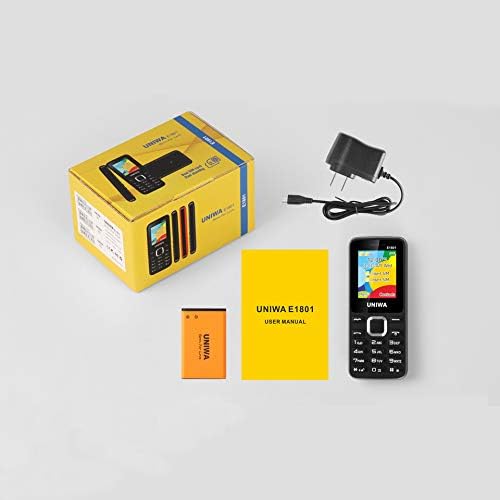
Image: Contents of the UNIWA E1801 package, showing the phone, battery, charger, and user manual neatly arranged next to the product box.
4. Product Overview
Familiarize yourself with the physical components of your UNIWA E1801 phone.

Image: The UNIWA E1801 mobile phone held in a hand, showcasing its compact size, large keypad, and clear color display with the UNIWA logo.
- Display: 1.77-inch QQVGA screen (160 x 128 pixels) for clear visibility.
- Keypad: Large, ergonomic buttons with clear numbering for easy dialing and navigation.
- Navigation Keys: Plated navigation keys for intuitive menu control.
- Rear Camera: 0.08 MP camera for basic photo capture.
- Speaker: Integrated 2030 box speaker for loud and clear audio.
- Flashlight: Built-in LED flashlight for convenience.
- Non-slip Frame: Textured frame design for a secure grip.

Image: A close-up view of the UNIWA E1801's keypad, highlighting the ergonomic design and the metallic finish of the central navigation keys.

Image: The UNIWA E1801 phone with an inset showing the detailed texture of its non-slip frame, designed for a secure grip.

Image: The rear of the UNIWA E1801 phone, with an overlay illustrating the powerful 2030 box speaker and its sound projection.
5. Setup
5.1. Installing SIM Cards
The UNIWA E1801 supports dual SIM cards, allowing you to use two different numbers simultaneously.
- Remove the back cover of the phone.
- Locate the SIM card slots.
- Carefully insert your SIM cards into the designated slots with the gold contacts facing down.
- Ensure the SIM cards are securely seated.

Image: The back of the UNIWA E1801 phone with the cover removed, clearly showing the two SIM card slots and an illustration of two SIM cards.
5.2. Installing the Battery
- After inserting the SIM cards, place the BL-5C 800mAh battery into the battery compartment, aligning the gold contacts.
- Gently press down until the battery is securely in place.
- Replace the back cover, ensuring it clicks into position.
5.3. Charging the Phone
Before first use, fully charge the phone's battery.
- Connect the charger to the charging port on the phone.
- Plug the charger into a power outlet.
- The battery indicator on the screen will show the charging status.
- Once fully charged, disconnect the charger.
6. Operating Instructions
6.1. Power On/Off
- To Power On: Press and hold the Power/End Call button until the screen lights up.
- To Power Off: Press and hold the Power/End Call button until the power off options appear, then select "Power off".
6.2. Making Calls
- From the idle screen, enter the phone number using the keypad.
- Press the Green Call button to initiate the call.
- To end a call, press the Red End Call button.
6.3. Sending Messages
- Go to "Menu" > "Messages" > "Write message".
- Enter your message using the keypad.
- Enter the recipient's phone number or select from contacts.
- Press "Send".
6.4. Using the FM Radio
The phone features a wireless FM radio.
- Go to "Menu" > "FM Radio".
- Select "Auto search" to find available stations.
- Use the navigation keys to switch between stations.

Image: The UNIWA E1801 phone displaying its FM radio interface, showing a frequency of 142.2 MHz, with musical notes and a classic radio in the background, indicating its wireless FM capability.
6.5. Using the Flashlight
The built-in flashlight can be easily activated.
- Typically, a dedicated button or a long press on a specific key (refer to your phone's quick guide) activates the flashlight.
- Alternatively, access it via "Menu" > "Tools" > "Flashlight".

Image: The UNIWA E1801 phone with a bright beam of light emanating from its top, illustrating the built-in flashlight function.
6.6. Other Features
- MP3/MP4 Playback: Supports multimedia playback. Transfer files to a TF card (up to 16GB, not included) and access them via the "Multimedia" menu.
- Phonebook: Store up to 300 contacts.
- Tools: Includes games, calendar, alarm clock, calculator, world clock, and recorder.
7. Maintenance
- Cleaning: Use a soft, dry cloth to clean the phone's surface. Do not use liquid cleaners or aerosols.
- Storage: Store the phone in a cool, dry place away from direct sunlight and extreme temperatures.
- Battery Care: Avoid fully discharging the battery frequently. Charge it regularly to prolong its lifespan.
8. Troubleshooting
| Problem | Possible Cause | Solution |
|---|---|---|
| Phone does not power on. | Battery is low or not installed correctly. | Charge the battery. Ensure the battery is correctly inserted. |
| Cannot make or receive calls. | No SIM card, SIM card not inserted correctly, or no network signal. | Ensure SIM card is inserted. Check network signal strength. Contact your service provider. |
| Poor audio quality. | Low volume, poor network signal, or speaker/microphone obstruction. | Adjust volume. Move to an area with better signal. Clean speaker/microphone openings. |
| Battery drains quickly. | Frequent use, background applications, or old battery. | Reduce screen brightness. Close unused applications. Consider replacing the battery if it's old. |
9. Specifications
| Feature | Detail |
|---|---|
| Model Number | E1801 |
| Dimensions | 108 x 45 x 14 mm |
| Weight | 68 g |
| CPU | SC6531E |
| Network Band | 2G: GSM850/900/1800/1900 MHz, GPRS |
| SIM Card | Dual SIM, Dual Standby |
| Phonebook Capacity | 300 entries |
| Display | 1.77 inch QQVGA, 160 x 128 pixels |
| Camera | 0.08 MP Rear Camera, 640 x 480 pixels |
| Multimedia | MP3, MP4 |
| Memory | Supports TF card up to 16 GB (max) |
| Bluetooth | V2.1 |
| Battery | BL-5C 800mAh |
| Talk Time | Up to 240 minutes |
| Standby Time | Up to 200 hours |
| Languages | English, Russian, Hebrew, Arabic, French, Spanish, Polish, German, Italian, Portuguese, Chinese |
| Features | Games, Calendar, Alarm Clock, Calculator, World Clock, Flashlight, E-book, WAP, Recorder |
10. Warranty and Support
Your UNIWA E1801 mobile phone comes with a standard manufacturer's warranty. Please refer to the warranty card included in your package for specific terms and conditions.
For technical support, troubleshooting assistance, or warranty claims, please contact your point of purchase or the official UNIWA customer service. Keep your purchase receipt as proof of purchase.
For more information, visit the official UNIWA website or contact their support channels.
Related Documents - E1801
 |
UNIWA V202T User Manual: Features, Specifications, and Support Comprehensive user manual for the UNIWA V202T mobile phone, covering unboxing, basic functions, contact management, settings, SOS emergency call, product specifications, and technical support. |
 |
UNIWA V1000 4G Senior Phone User Manual User manual for the UNIWA V1000 4G senior phone, detailing features, setup, operation, and specifications. Supports global 2G/3G bands and US 4G bands. |
 |
UNIWA V202T 4G Flip Feature Phone User Manual User manual for the UNIWA V202T 4G flip feature phone, covering unboxing, basic functions, contact management, settings, SOS emergency calls, product specifications, and technical support. |
 |
Manual del Usuario UNIWA F400: Guía Completa del Dispositivo Inteligente Rugged Guía completa del manual de usuario para el UNIWA F400, un intercomunicador PDA Android robusto con clasificación IP65. Descubra sus características, especificaciones técnicas, configuración inicial, funciones PoC y mantenimiento para comunicación profesional. |
 |
UNIWA V808G 3G Feature Phone User Guide Comprehensive user guide for the UNIWA V808G 3G Feature Phone, covering setup, calls, messages, personalization, multimedia, tools, SOS functions, and safety instructions. |
 |
UNIWA V202T User Manual - Features, Specifications, and Support Comprehensive user manual for the UNIWA V202T mobile phone, covering unboxing, basic functions, settings, SOS emergency features, product specifications, and technical support. |
Ask a question about this manual
Ask about setup, troubleshooting, compatibility, parts, safety, or missing instructions. Manuals+ will review the question and use this page’s manual context to help answer it.