
COLZER PD223A
COLZER 70 Pints Home Dehumidifier User Manual
Model: PD223A
1. Introduction
This user manual provides detailed instructions for the safe and efficient operation of your COLZER 70 Pints Home Dehumidifier, Model PD223A. Designed for basements and large rooms up to 4500 sq ft, this unit effectively removes excess moisture, improving air quality and comfort. Please read this manual thoroughly before use and retain it for future reference.
2. Safety Information
To prevent injury to the user or property damage, please follow these safety instructions. Failure to observe these instructions may result in improper operation due to disregard of instructions.
- Always place the dehumidifier on a level, stable surface to prevent tipping.
- Ensure proper electrical grounding and use a power outlet with the correct voltage.
- Do not operate the unit with a damaged power cord or plug.
- Keep the air inlet and outlet grilles clear of obstructions to ensure proper airflow.
- Do not insert fingers or foreign objects into the grilles.
- Unplug the unit before cleaning or performing any maintenance.
- Do not use the dehumidifier in areas where flammable gases or liquids are stored.
- This appliance is not intended for use by persons (including children) with reduced physical, sensory or mental capabilities, or lack of experience and knowledge, unless they have been given supervision or instruction concerning use of the appliance by a person responsible for their safety.
3. Product Overview
The COLZER PD223A Dehumidifier is designed for high-efficiency moisture removal, capable of extracting up to 70 pints of moisture per day. It is suitable for large areas up to 4500 sq ft, including basements, living rooms, bathrooms, garages, and apartments. Its compact design and portability make it easy to move between rooms.
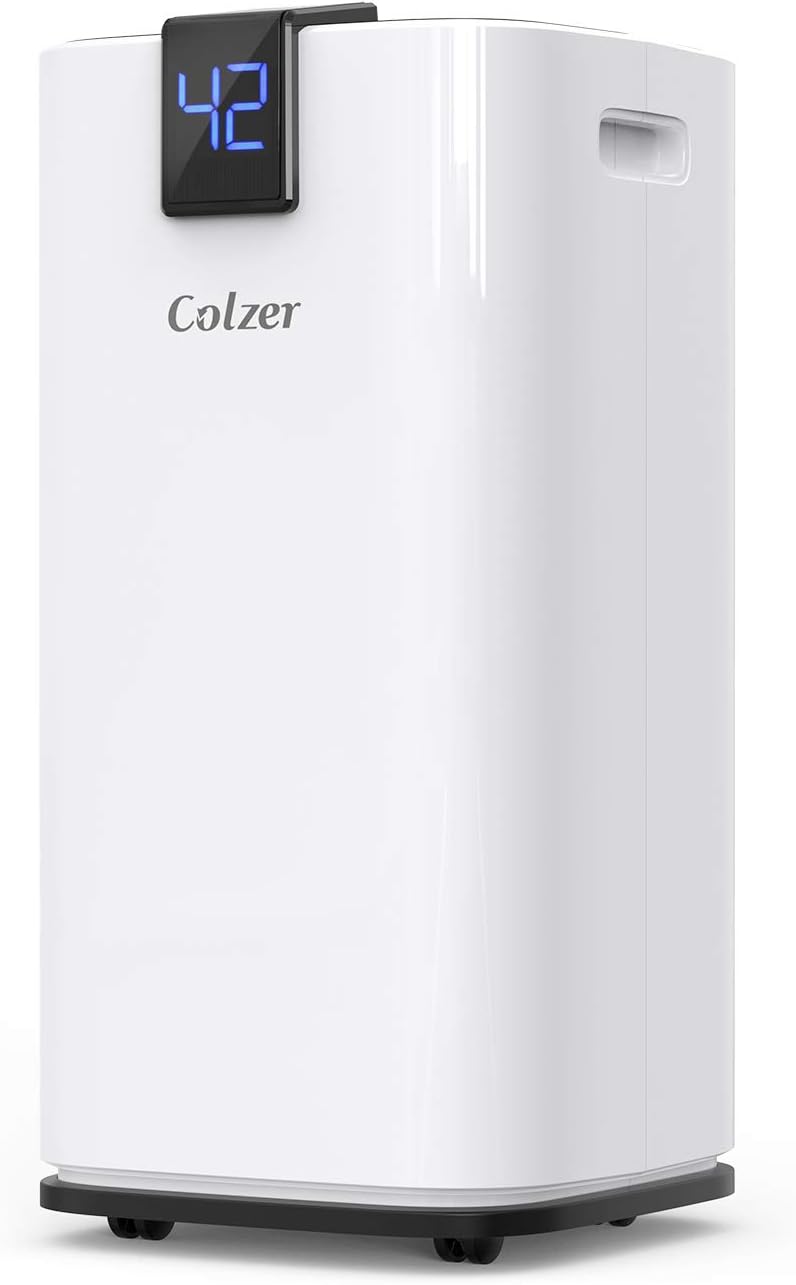
Figure 3.1: Front view of the COLZER 70 Pints Home Dehumidifier.
Key Features:
- High Capacity: Removes up to 70 pints of moisture per day, covering up to 4500 sq ft.
- Unique Laundry-Dry Mode: Specifically designed to quickly dry delicate clothes that require hang drying.
- Advanced LED Digital Control Panel: Allows precise humidity percentage setting, 24-hour on/off timer programming, and fan speed adjustment. Humidity readings are displayed on both the top and front for convenience.
- Dual Drainage Options: Features a 9.5-pint water tank with auto-off and alarm when full, and supports continuous drainage via an included 6.56 ft hose for gravity-fed self-draining.
- Portable Design: Equipped with easy-roll hidden casters and side recessed handles for effortless movement between rooms.
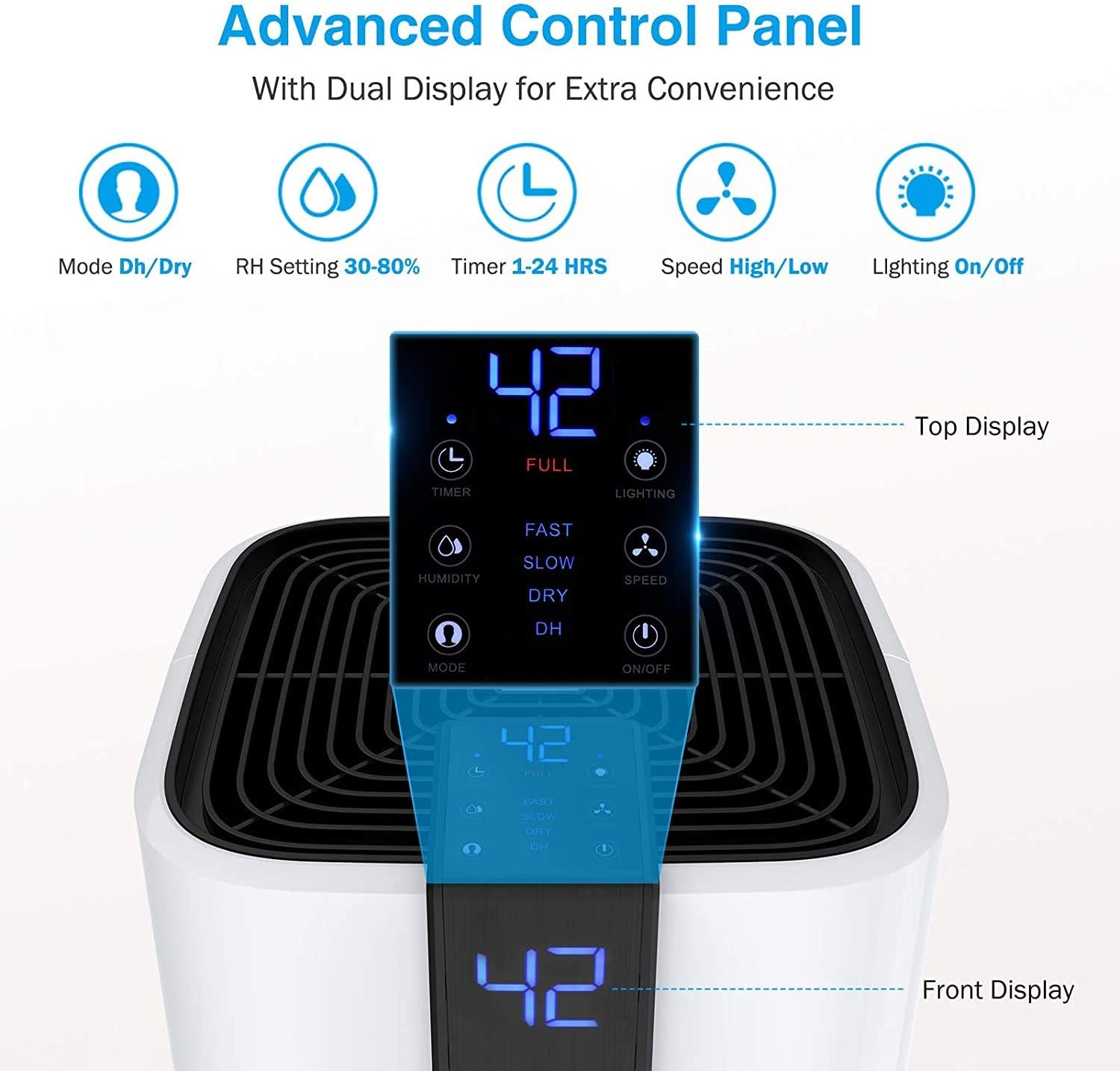
Figure 3.2: Detailed view of the advanced LED digital control panel with dual display for extra convenience.

Figure 3.3: The dehumidifier operating in Laundry Dry Mode, efficiently drying clothes.

Figure 3.4: Illustration of the two optional draining methods: emptying the water tank or continuous drainage.

Figure 3.5: The portable design of the dehumidifier, featuring easy-roll hidden casters and recessed handles.
Product Video:
Video 3.1: An official product video demonstrating the features and operation of the Colzer 70 Pint Dehumidifier.
4. Setup
4.1 Unpacking
Carefully remove the dehumidifier from its packaging. Inspect the unit for any shipping damage. Retain the packaging materials for future storage or transport.
4.2 Placement
For optimal performance, place the dehumidifier in a location where the humidity is highest and air circulation is good. Ensure there is at least 8 inches (20 cm) of space around the unit for proper airflow.

Figure 4.1: Proper placement of the dehumidifier in a room for effective operation.
If the unit has been tilted during transport, allow it to stand upright for at least 24 hours before plugging it in. This allows the refrigerant to settle.
5. Operating Instructions
5.1 Control Panel Overview
The dehumidifier features an intuitive LED digital control panel with dual displays (top and front) for easy monitoring and control. Refer to Figure 3.2 for a visual guide to the control panel buttons and indicators.
- Power Button: Turns the unit On or Off.
- Mode Button: Cycles through available operating modes (DEHUMIDIFY, Laundry-Dry).
- Humidity Setting Buttons (+/-): Adjusts the desired humidity level (30% - 80% RH).
- Timer Button: Sets the 24-hour on/off timer.
- Fan Speed Button: Selects between High and Low fan speeds.
- Lighting Button: Toggles the display lighting On/Off.
- Full Indicator: Illuminates when the water tank is full, triggering auto-off.
5.2 Setting Desired Humidity
Press the "Humidity" button and use the "+" or "-" buttons to set your desired relative humidity (RH) level between 30% and 80%. The unit will automatically stop when the ambient humidity reaches the set level and restart when it rises above it (within a ±3% tolerance).

Figure 5.1: The intelligent humidity control system automatically maintains the set humidity level.
5.3 Operating Modes
- DEHUMIDIFY Mode (DH Mode): Standard operation for general moisture removal. The unit will dehumidify based on the set humidity level.
- Laundry-Dry Mode (DRY Mode): Activates continuous high-speed fan operation to quickly dry clothes. The compressor will run continuously regardless of the ambient humidity.
5.4 Timer Function
The 24-hour timer allows you to program the unit to turn on or off automatically. Press the "Timer" button and use the "+" or "-" buttons to set the desired time in hours.
6. Maintenance
6.1 Emptying the Water Tank
When the 9.5-pint water tank is full, the unit will automatically shut off, and an audible alarm will sound. Carefully pull out the water tank from the front of the unit using the handle, empty the collected water, and then reinsert the tank firmly until it clicks into place.
6.2 Continuous Drainage Setup
For continuous operation without manual emptying, attach the included 6.56 ft drain hose to the water outlet at the back of the unit. Ensure the hose is sloped downwards to allow gravity drainage into a suitable floor drain or larger container. Do not allow the hose to be kinked or elevated, as this will prevent proper drainage.
6.3 Cleaning the Air Filter
A clean air filter is crucial for efficient operation. The filter should be cleaned every two weeks or more frequently depending on usage and air quality. To clean:
- Turn off and unplug the dehumidifier.
- Remove the air filter from the back of the unit.
- Wash the filter with warm, soapy water. Rinse thoroughly.
- Allow the filter to air dry completely before reinserting it into the unit.
6.4 Storage
If the unit will not be used for an extended period, ensure the water tank is empty and the unit is clean. Store the dehumidifier in an upright position in a cool, dry place, away from direct sunlight and extreme temperatures. It is recommended to cover the unit to protect it from dust.
7. Troubleshooting
Before contacting customer support, please refer to the following troubleshooting guide for common issues.
| Problem | Possible Cause | Solution |
|---|---|---|
| Dehumidifier does not turn on. | No power; Power cord not plugged in; Water tank full or not properly seated. | Check power supply; Plug in power cord firmly; Empty and re-seat water tank. |
| Unit is running but not collecting water. | Ambient humidity is too low; Air filter is clogged; Room temperature is too low. | Increase target humidity or wait for humidity to rise; Clean air filter; Ensure room temperature is above 41°F (5°C). |
| Unit is noisy. | Unit not on a level surface; Air filter clogged; Obstruction in fan. | Place on a level surface; Clean air filter; Check for and remove any obstructions. |
| Water leaks from the unit. | Water tank not properly seated; Continuous drain hose is kinked or blocked. | Re-seat water tank; Straighten or clear continuous drain hose. |
8. Specifications
| Feature | Detail |
|---|---|
| Brand | COLZER |
| Model Name | PD223A |
| Floor Area Coverage | 4500 Square Feet |
| Dehumidification Capacity | 70 Pints per Day |
| Water Tank Capacity | 9.5 Pints (approx. 1.2 Gallons / 4.3 Liters) |
| Product Dimensions | 11.4 x 11.4 x 23.8 inches |
| Item Weight | 28.7 Pounds |
| Color | White |
| Material | Acrylonitrile Butadiene Styrene (ABS) |
| Wattage | 360 watts |
| Number of Speeds | 2 |
| Special Features | Automatic Restart, Automatic Shutoff |
| Recommended Use | Home |
9. Warranty and Support
9.1 Warranty Information
This COLZER dehumidifier comes with a 2-Year Free Warranty. Please retain your proof of purchase for warranty claims. The warranty covers defects in materials and workmanship under normal use.
9.2 Customer Support
For any questions, technical assistance, or warranty claims, please contact COLZER customer support. Contact details can typically be found on the product packaging, the official COLZER website, or your purchase platform.
We are committed to providing you with the best possible experience with your COLZER dehumidifier.
Ask a question about this manual
Ask about setup, troubleshooting, compatibility, parts, safety, or missing instructions. Manuals+ will review the question and use this page’s manual context to help answer it.