
Introduction
This manual provides comprehensive instructions for the setup, operation, and maintenance of your xiaovv Youpin USB Web Camera. Please read this manual carefully before using the product to ensure optimal performance and longevity.
Product Overview
Key Features
- 150-degree super wide angle lens for broad coverage.
- 1080P High Definition (HD) image quality for clear visuals.
- Automatic focus for precise and fast image clarity.
- Built-in noise-cancelling microphone for clear audio.
- Optimized for beauty, enhancing visual appearance during calls.
- Automatic system identification and plug-and-play functionality via USB 2.0 interface.
- 1.5-meter cable length for flexible placement.
- Supports a wide range of audio and video applications.
Components
The xiaovv USB Web Camera includes the main camera unit with an integrated stand/clip and a USB cable.

Figure 1: Front view of the xiaovv USB Web Camera, showing the lens, indicator light, and power button.

Figure 2: The HD web USB camera, highlighting its sleek design and compact form factor.
Setup Instructions
- Unpack the Camera: Carefully remove the camera from its packaging.
- Position the Camera: Place the camera on top of your monitor, laptop screen, or a flat surface. The integrated clip allows for stable positioning.
- Connect to Computer: Insert the USB connector of the camera's cable into an available USB 2.0 port on your computer.
- Automatic Driver Installation: The camera features automatic system identification and is plug-and-play. Your operating system (Windows, macOS, Linux) should automatically detect and install the necessary drivers. No manual driver installation is typically required.
- Verify Connection: Once connected, the camera's indicator light may illuminate, and your computer should recognize the device. You can verify this in your computer's Device Manager (Windows) or System Information (macOS).

Figure 3: Illustrates the simple plug-and-play connection of the webcam to a laptop via USB, requiring no additional drivers.
Operating Instructions
Using the Camera
After successful setup, the xiaovv USB Web Camera is ready for use with various applications.
- Video Conferencing: Open your preferred video conferencing software (e.g., Zoom, Microsoft Teams, Google Meet, Skype). In the application's settings, select the "xiaovv USB Web Camera" as your video input device.
- Audio Input: The camera features a built-in noise-cancelling microphone. Select "xiaovv USB Web Camera" or a similar name as your audio input device in your application settings for clear voice transmission.
- Auto Focus: The camera automatically adjusts focus to ensure your image remains sharp and clear during calls or recordings.
- Wide Angle View: The 150-degree super wide angle lens captures a broad field of view, ideal for group calls or showing more of your surroundings.
- Image Optimization: The camera's image quality is optimized for beauty, providing a flattering visual output.

Figure 4: Diagram indicating the location of the built-in noise reduction microphone, ensuring clear voice communication.
Maintenance
To ensure the longevity and optimal performance of your xiaovv USB Web Camera, follow these simple maintenance guidelines:
- Cleaning the Lens: Gently wipe the camera lens with a soft, lint-free cloth. For stubborn smudges, slightly dampen the cloth with a lens cleaning solution. Avoid abrasive materials or harsh chemicals.
- Cleaning the Body: Use a dry or slightly damp soft cloth to clean the camera body.
- Storage: When not in use, store the camera in a cool, dry place away from direct sunlight and extreme temperatures.
- Handling: Avoid dropping the camera or subjecting it to strong impacts. Do not attempt to disassemble the camera, as this will void the warranty.
Troubleshooting
If you encounter issues with your xiaovv USB Web Camera, please refer to the following common troubleshooting steps:
- Camera Not Detected:
- Ensure the USB cable is securely plugged into both the camera and the computer.
- Try plugging the camera into a different USB port on your computer.
- Restart your computer.
- Check your operating system's device manager to see if the camera is listed.
- No Video Output:
- Verify that the camera is selected as the video input device in your application settings (e.g., Zoom, Skype).
- Ensure no other application is currently using the camera.
- Check privacy settings on your operating system that might restrict camera access for certain applications.
- No Audio Input (Microphone):
- Ensure the camera's microphone is selected as the audio input device in your application settings.
- Check your computer's sound settings to ensure the microphone is enabled and not muted.
- Adjust microphone volume levels in your system settings.
- Poor Image Quality:
- Ensure the camera lens is clean.
- Check lighting conditions in your environment; adequate lighting improves image quality.
- Ensure your internet connection is stable if streaming video.
Specifications
| Feature | Detail |
|---|---|
| Model Number | XVV-6320S-USB-WH |
| Brand | xiaovv |
| Product Dimensions | 10 x 4 x 5 cm |
| Weight | 50 g |
| Video Capture Resolution | 1080p |
| Photo Sensor Technology | BSI CMOS |
| Connectivity Technology | USB (USB 2.0) |
| Cable Length | 1.5 m |
| Field of View | 150 degrees (Super Wide Angle) |
| Focus Type | Auto Focus |
| Microphone | Built-in Noise Cancelling Microphone |
| Color | Black |
| Special Features | Low Light performance, Optimized for beauty |
| Date First Available | 10 September 2020 |
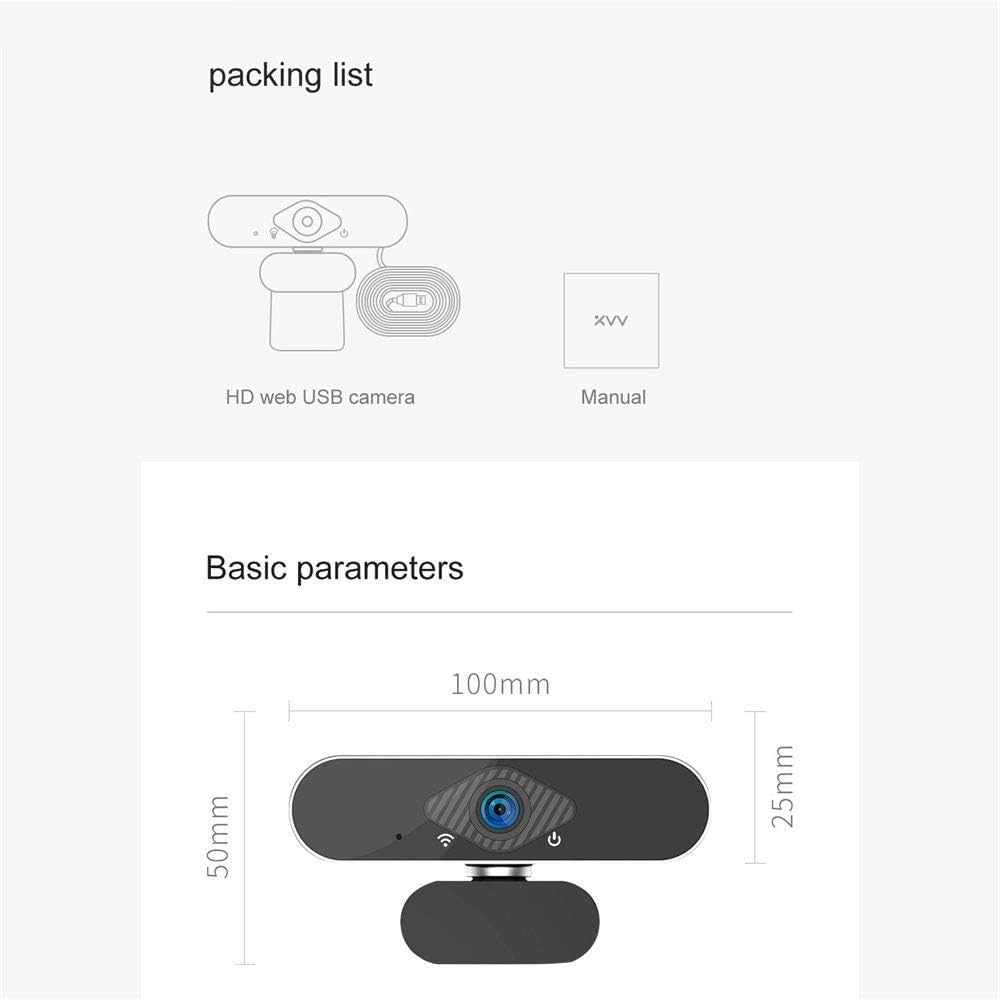
Figure 5: Illustration showing the packing list (HD web USB camera, Manual) and basic dimensions of the camera (100mm length, 50mm height including stand, 25mm camera body height).
Warranty and Support
This product is manufactured by xiaovv. For specific warranty information and support, please refer to the documentation included with your purchase or contact xiaovv customer service directly. Keep your purchase receipt as proof of purchase for warranty claims.