
1. Introduction
Thank you for choosing the K&F Concept 8-32X50 HD Monocular. This device is designed to provide clear and magnified views for various outdoor activities such as bird watching, hunting, hiking, and attending concerts. Its continuous zoom feature allows for flexible magnification adjustment from 8x to 32x, while the 50mm objective lens ensures ample light collection for bright and wide field of view. Please read this manual carefully before using the monocular to ensure proper operation and maintenance.
For optimal performance and longevity of your monocular, adhere to the instructions provided herein. Keep this manual for future reference.
2. Package Contents
Upon opening the package, please verify that all the following items are included:
- K&F Concept 8-32X50 HD Monocular
- Smartphone Adapter
- Mini Tripod
- Carrying Case
- Wrist Strap
- Lens Cleaning Cloth
- User Manual (this document)
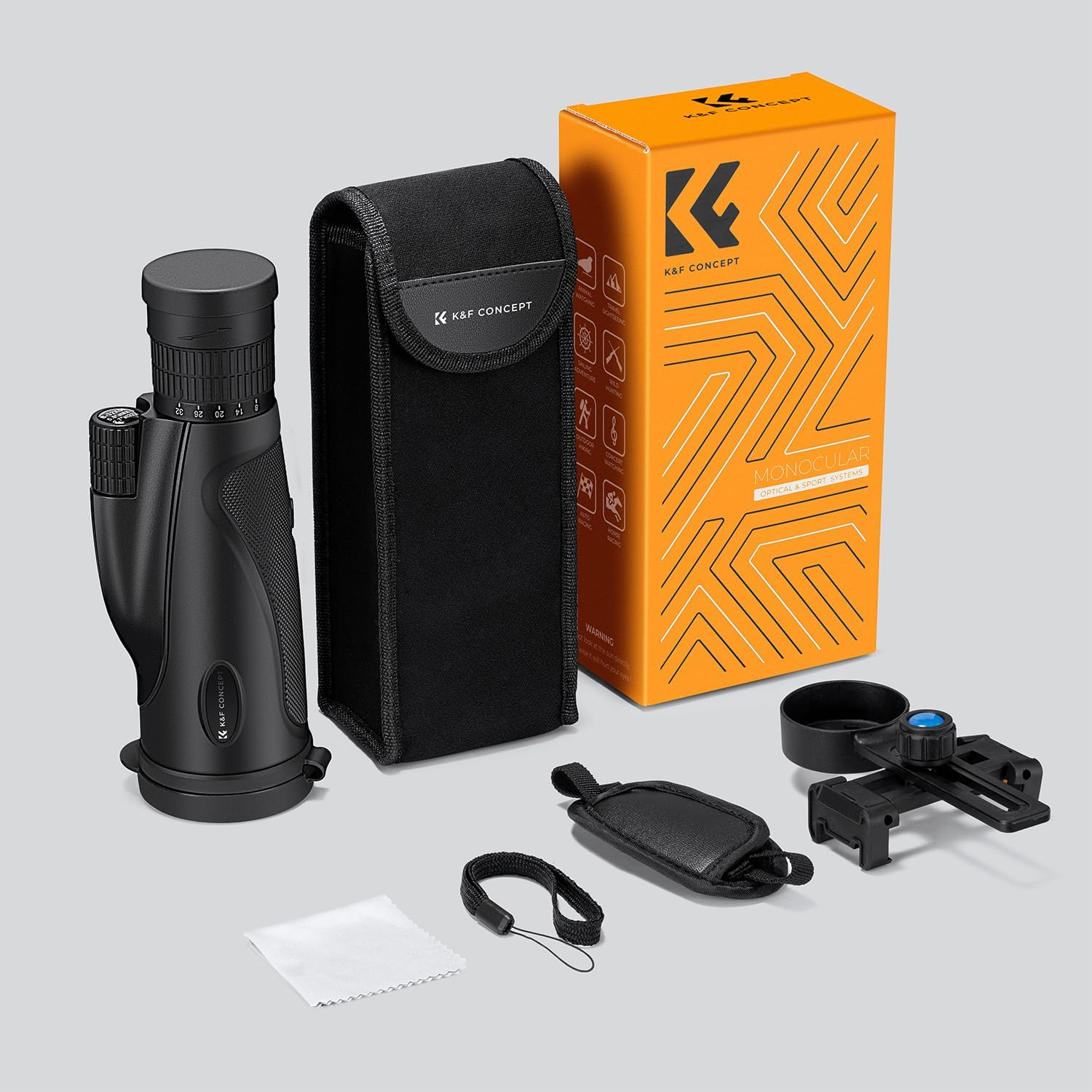
Figure 2.1: All included components of the K&F Concept 8-32X50 HD Monocular, including the monocular itself, smartphone adapter, mini tripod, carrying case, wrist strap, and cleaning cloth.
3. Product Overview
Familiarize yourself with the main components of your monocular:
- Objective Lens (50mm): The large front lens that gathers light.
- Eyepiece: Where you look through to view the magnified image.
- Focus Wheel: Used to adjust the clarity of the image.
- Zoom Ring: Used to change the magnification level (8x to 32x).
- Tripod Mount: Threaded hole for attaching the monocular to a tripod.

Figure 3.1: K&F Concept 8-32X50 HD Monocular with its primary components visible.

Figure 3.2: Detail of the zoom ring indicating the continuous magnification range.

Figure 3.3: Internal optical design featuring the 20mm eyepiece and BAK4 prism.

Figure 3.4: The benefit of a 50mm objective lens for light intake and image quality.
4. Setup
4.1 Attaching the Wrist Strap
- Locate the small loop on the side of the monocular body.
- Thread the thin end of the wrist strap through this loop.
- Pass the larger part of the strap through the threaded loop to secure it.
4.2 Mounting on the Mini Tripod
- Extend the legs of the mini tripod for stability.
- Locate the tripod mount thread on the bottom of the monocular.
- Align the tripod's screw with the monocular's tripod mount and rotate the monocular clockwise until securely fastened. Do not overtighten.
4.3 Attaching the Smartphone Adapter
- Open the phone clamp on the smartphone adapter and place your smartphone securely within it. Ensure the phone's camera lens is aligned with the adapter's opening.
- Slide the adapter's eyepiece clamp over the monocular's eyepiece.
- Adjust the position of the phone within the clamp until its camera lens is perfectly centered over the monocular's eyepiece. This may require fine adjustments to achieve a full, circular view on your phone screen.
- Tighten any securing screws on the adapter to hold the phone firmly in place.
5. Operating Instructions
5.1 Adjusting Magnification (Zoom)
- Hold the monocular firmly.
- Rotate the zoom ring (located near the eyepiece) to increase or decrease the magnification. The monocular offers continuous zoom from 8x to 32x.
- Adjust the zoom to your desired level for the target you are observing.

Figure 5.1: Adjusting the continuous zoom on the monocular.
5.2 Focusing the Image
- Point the monocular towards your desired object.
- Look through the eyepiece.
- Slowly rotate the focus wheel until the image appears sharp and clear.
- For best results, start with a lower magnification, focus, then zoom in and fine-tune the focus if necessary.
5.3 Using with a Smartphone for Photos and Videos
- Ensure the smartphone adapter is securely attached to both your phone and the monocular's eyepiece (refer to Section 4.3).
- Open your phone's camera application.
- Adjust the monocular's zoom and focus until the image is clear on your phone screen.
- You may need to use your phone's digital zoom to fill the screen and eliminate the circular vignetting, especially at lower monocular magnifications.
- Once the image is satisfactory, capture photos or record videos using your phone's camera controls.

Figure 5.2: Monocular connected to a smartphone for capturing images and videos.
6. Maintenance and Care
Proper care will extend the life and performance of your monocular:
- Cleaning Lenses: Use the provided lens cleaning cloth or a soft, lint-free cloth specifically designed for optical surfaces. Gently wipe the lenses to remove dust or smudges. For stubborn dirt, a small amount of lens cleaning fluid can be applied to the cloth, not directly to the lens.
- Cleaning Body: Wipe the monocular body with a soft, damp cloth. Do not use abrasive cleaners or solvents.
- Storage: Store the monocular in its carrying case in a cool, dry place when not in use. Avoid extreme temperatures and high humidity.
- Avoid Impact: Protect the monocular from drops or strong impacts, which can damage the internal optics.
- Water Resistance: While the monocular is designed for outdoor use, avoid submerging it in water.
7. Troubleshooting
If you encounter issues with your monocular, refer to the following common problems and solutions:
| Problem | Possible Cause | Solution |
|---|---|---|
| Image is blurry or out of focus. | Incorrect focus adjustment. | Rotate the focus wheel until the image is sharp. |
| Dark edges or partial view when using with smartphone. | Smartphone camera not aligned with monocular eyepiece. | Adjust the smartphone's position within the adapter until the camera lens is perfectly centered over the monocular's eyepiece. Use phone's digital zoom if necessary. |
| Image is dim. | Insufficient ambient light or dirty objective lens. | Ensure adequate lighting. Clean the objective lens with the provided cleaning cloth. |
| Difficulty adjusting zoom or focus. | Mechanism might be stiff or dirty. | Ensure no debris is obstructing the rings. If new, mechanisms may loosen with use. Do not force. |
If the problem persists after trying these solutions, please contact K&F Concept customer support for further assistance.
8. Specifications
Detailed technical specifications for the K&F Concept 8-32X50 HD Monocular:
| Feature | Specification |
|---|---|
| Brand | K&F Concept |
| Model | KF33.081 |
| Magnification | 8-32X (Continuous Zoom) |
| Objective Lens Diameter | 50 Millimeters |
| Eyepiece Lens Description | Barlow |
| Focus Type | Manual Focus |
| Compatible Devices | Smartphone |
| Product Dimensions (L x W x H) | 17.5 x 7.5 x 15 cm (6.89 x 2.95 x 5.91 inches) |
| Item Weight | 620 grams (1.37 pounds) |
| Country of Origin | China |
9. Warranty and Support
K&F Concept is committed to providing high-quality products. For any questions, concerns, or technical support regarding your 8-32X50 HD Monocular, please refer to the warranty information provided with your purchase or visit the official K&F Concept website for customer service contact details.
Please retain your proof of purchase for any warranty claims.