
Honor KAN-B19
Honor Watch GS Pro Instruction Manual
Multisport Smartwatch with 25-Day Battery Life
1. Introduction
The Honor Watch GS Pro is a rugged multisport smartwatch designed for outdoor enthusiasts. It features a durable build with 14 military-grade certifications, extended battery life, and comprehensive health and fitness tracking capabilities. This manual provides essential information for setting up, operating, maintaining, and troubleshooting your device.

Image 1.1: The Honor Watch GS Pro in blue with a camouflage strap, showcasing its display.

Image 1.2: A display of three Honor Watch GS Pro models, highlighting its recognition at IFA 2020.
2. Setup
2.1 Initial Charging
Before first use, fully charge your Honor Watch GS Pro. Connect the charging cable to the charging port on the back of the watch and plug the USB end into a power adapter (not included) or a computer's USB port. The watch display will indicate charging status.
2.2 Pairing with Your Smartphone
- Download and install the latest Huawei Health app from your device's app store (HUAWEI AppGallery, iOS App Store, Google Playstore).
- Open the Huawei Health app and log in or register an account.
- Ensure Bluetooth is enabled on your smartphone.
- In the Huawei Health app, navigate to 'Devices' and tap 'Add device'. Select 'Smartwatches' and then 'Honor Watch GS Pro'.
- Follow the on-screen instructions in the app to complete the pairing process. Confirm the pairing request on both your phone and the watch.
2.3 Basic Settings
Once paired, the watch will automatically synchronize time and language settings from your phone. You can further customize watch faces, notification preferences, and other settings through the Huawei Health app.
3. Operating Your Honor Watch GS Pro
3.1 Navigation
- Touch Screen: Swipe up, down, left, or right to navigate through menus and notifications. Tap to select items.
- Up Button: Press to access the app list or return to the home screen.
- Down Button: Press to access workout modes or customize its function via the app.
3.2 Workout Modes
The Honor Watch GS Pro supports over 100 workout modes, including outdoor running, cycling, swimming, mountaineering, and more. To start a workout:
- Press the Down Button or navigate to 'Workout' from the app list.
- Select your desired workout mode.
- Tap 'Start' to begin tracking.

Image 3.1: A visual representation of the extensive range of workout modes supported by the watch.
3.3 GPS and Route Back Functionality
Equipped with built-in GPS + GLONASS, the watch provides accurate positioning and route tracking. The unique 'Route Back' feature helps you retrace your steps, ensuring you can find your way back to your starting point, even in unfamiliar terrain.
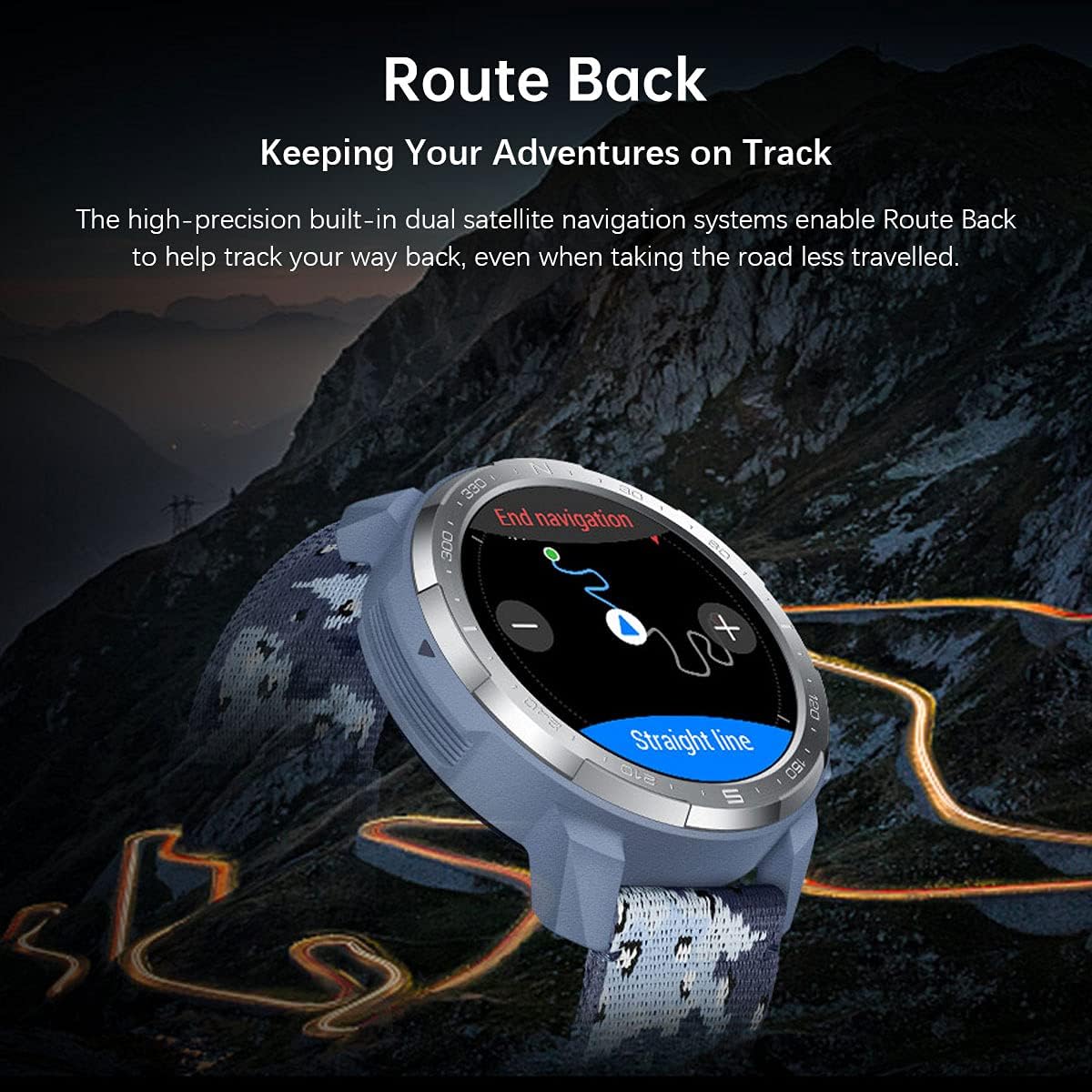
Image 3.2: The 'Route Back' feature in action, guiding users back along their original path.
3.4 Health Monitoring
The watch continuously monitors various health metrics:
- Heart Rate Tracking: 24/7 heart rate monitoring.
- SpO2 Monitoring: Measures blood oxygen saturation levels.
- Sleep Monitoring: Tracks sleep stages and provides insights for better sleep.
- Stress Monitoring: Helps manage daily stress levels.

Image 3.3: Overview of health tracking features including heart rate, sleep, and SpO2.
3.5 Smart Features
Stay connected with your Honor Watch GS Pro:
- Notifications: Receive call, SMS, and app notifications directly on your wrist.
- Music Control: Control music playback on your smartphone.
- Call Management: Answer or reject calls from your watch.

Image 3.4: The watch's capabilities for controlling music and receiving smart notifications.
3.6 IP68 Water Resistance
The Honor Watch GS Pro is IP68 water-resistant, allowing you to wear it during swimming, showering, or in rainy conditions. It is suitable for shallow-water activities but not for diving or high-pressure water activities.

Image 3.5: The Honor Watch GS Pro is designed to withstand water exposure, suitable for swimming.
4. Maintenance
4.1 Cleaning and Care
- Regularly clean the watch body and strap with a soft, damp cloth.
- Ensure the charging contacts are clean and dry before charging.
- Avoid exposing the watch to extreme temperatures or harsh chemicals.
4.2 Battery Life Optimization
The Honor Watch GS Pro boasts an impressive 25-day battery life under typical usage. Battery performance can vary based on usage patterns, GPS activity, and continuous health monitoring. To optimize battery life:
- Disable continuous heart rate monitoring if not needed 24/7.
- Reduce screen brightness.
- Limit the number of apps sending notifications to the watch.
- Use power-saving modes when available.
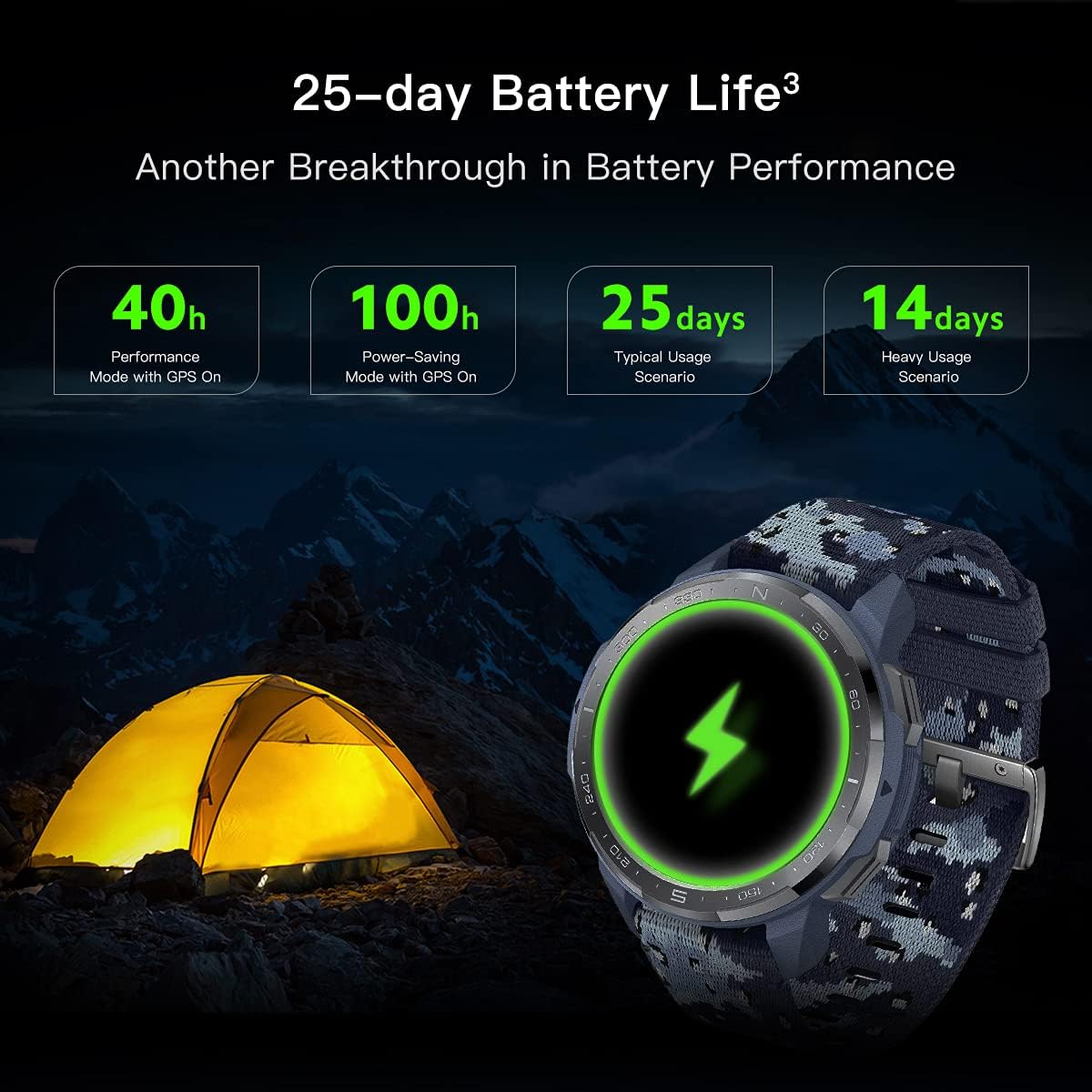
Image 4.1: Detailed breakdown of the Honor Watch GS Pro's exceptional battery performance under various conditions.
4.3 Software Updates
Regularly check for and install software updates via the Huawei Health app to ensure optimal performance, new features, and bug fixes. Keep your app updated to the latest version for the best experience.
5. Troubleshooting
If you encounter issues with your Honor Watch GS Pro, try the following:
- Watch not turning on: Ensure it is fully charged.
- Cannot pair with phone: Ensure Bluetooth is on, the watch is discoverable, and the Huawei Health app is updated. Try restarting both devices.
- GPS inaccuracy: Ensure you are in an open area with a clear view of the sky. Allow the watch time to acquire a signal.
- Inaccurate health data: Ensure the watch is worn snugly on your wrist, not too tight or too loose. Clean the sensor on the back of the watch.
- Short battery life: Refer to Section 4.2 for optimization tips.
- Watch unresponsive: Try a force restart by pressing and holding the Up button for approximately 16 seconds until the watch vibrates and restarts.
For persistent issues, consult the help section within the Huawei Health app or visit the official Honor support website.
6. Specifications
| Feature | Specification |
|---|---|
| Model Name | GS Pro |
| Model Number | KAN-B19 |
| Display Size | 1.39 Inches AMOLED |
| Dimensions | 1.89 x 1.89 x 0.54 inches (48 mm × 48 mm × 13.6 mm) |
| Item Weight | 12.3 ounces |
| Battery Life (Typical) | Up to 25 days |
| GPS | Built-in GPS, GLONASS |
| Water Resistance | IP68 |
| Certifications | 14 Military Grade Certifications (MIL-STD-810G) |
| Connectivity | Bluetooth |
| Memory Storage Capacity | 4000 MB |
7. Warranty and Support
For detailed information regarding the product warranty, return policy, and customer support, please refer to the official Honor website or the documentation provided with your purchase. You can also find support resources within the Huawei Health app.
Related documentsKAN-B19


Ask a question about this manual
Ask about setup, troubleshooting, compatibility, parts, safety, or missing instructions. Manuals+ will review the question and use this page’s manual context to help answer it.