
1. Introduction
Welcome to the user manual for your Behringer RHYTHM DESIGNER RD-6 Analog Drum Machine. This device is designed to provide authentic analog drum sounds with modern connectivity and sequencing capabilities. The RD-6 features true analog circuitry, 8 distinct drum voices, a 16-step sequencer, and a built-in distortion effect. Please read this manual thoroughly to ensure proper setup, operation, and maintenance, allowing you to fully explore its creative potential.
2. Important Safety Instructions
- Read these instructions.
- Keep these instructions.
- Heed all warnings.
- Follow all instructions.
- Do not use this apparatus near water.
- Clean only with dry cloth.
- Do not block any ventilation openings. Install in accordance with the manufacturer’s instructions.
- Do not install near any heat sources such as radiators, heat registers, stoves, or other apparatus (including amplifiers) that produce heat.
- Do not defeat the safety purpose of the polarized or grounding-type plug. A polarized plug has two blades with one wider than the other. A grounding type plug has two blades and a third grounding prong. The wide blade or the third prong are provided for your safety. If the provided plug does not fit into your outlet, consult an electrician for replacement of the obsolete outlet.
- Protect the power cord from being walked on or pinched particularly at plugs, convenience receptacles, and the point where they exit from the apparatus.
- Only use attachments/accessories specified by the manufacturer.
- Use only with the cart, stand, tripod, bracket, or table specified by the manufacturer, or sold with the apparatus. When a cart is used, use caution when moving the cart/apparatus combination to avoid injury from tip-over.
- Unplug this apparatus during lightning storms or when unused for long periods of time.
- Refer all servicing to qualified service personnel. Servicing is required when the apparatus has been damaged in any way, such as power-supply cord or plug is damaged, liquid has been spilled or objects have fallen into the apparatus, the apparatus has been exposed to rain or moisture, does not operate normally, or has been dropped.
3. What's in the Box
- Behringer RHYTHM DESIGNER RD-6 Analog Drum Machine
- Power Adapter
- USB Cable
- Quick Start Guide
4. Controls and Connectors Overview
The Behringer RD-6 features an intuitive layout for easy access to all its functions, designed for both performance and studio integration.
4.1 Front Panel Controls

Image: Top-down view of the Behringer RD-6 front panel, showing various knobs, buttons, and the 16-step sequencer.
- TEMPO: Adjusts the playback speed of patterns.
- ACCENT: Controls the intensity of accented steps.
- BASS DRUM, SNARE DRUM, L.H. TOM, CYMBAL/CLAP, O.C. HI HAT: Individual controls for tone, decay, and level of each drum voice.
- DISTORTION: Activates the built-in distortion effect.
- TONE/LEVEL (Distortion): Adjusts the character and intensity of the distortion.
- VOLUME: Master output volume control.
- SELECT: Used to select various functions or parameters.
- TRACK/INSTRUMENT: Selects the current track or instrument for editing.
- MODE (WRITE/PLAY/PATTERN): Switches between pattern writing, playback, and pattern selection modes.
- 16 STEP BUTTONS: Used to program steps in a pattern or select patterns.
- START/STOP: Initiates or halts pattern playback.
- CLEAR: Erases patterns or steps.
- SCALE FUNCTION: Adjusts the timing scale for patterns.
- SYNC: Selects the synchronization source (Internal, MIDI, USB, Clock).
- WRITE/NEXT: Saves patterns or advances to the next step/pattern.
- TAP/STEP RESET: Used for tap tempo or resetting the step sequencer.
4.2 Rear Panel Connectors
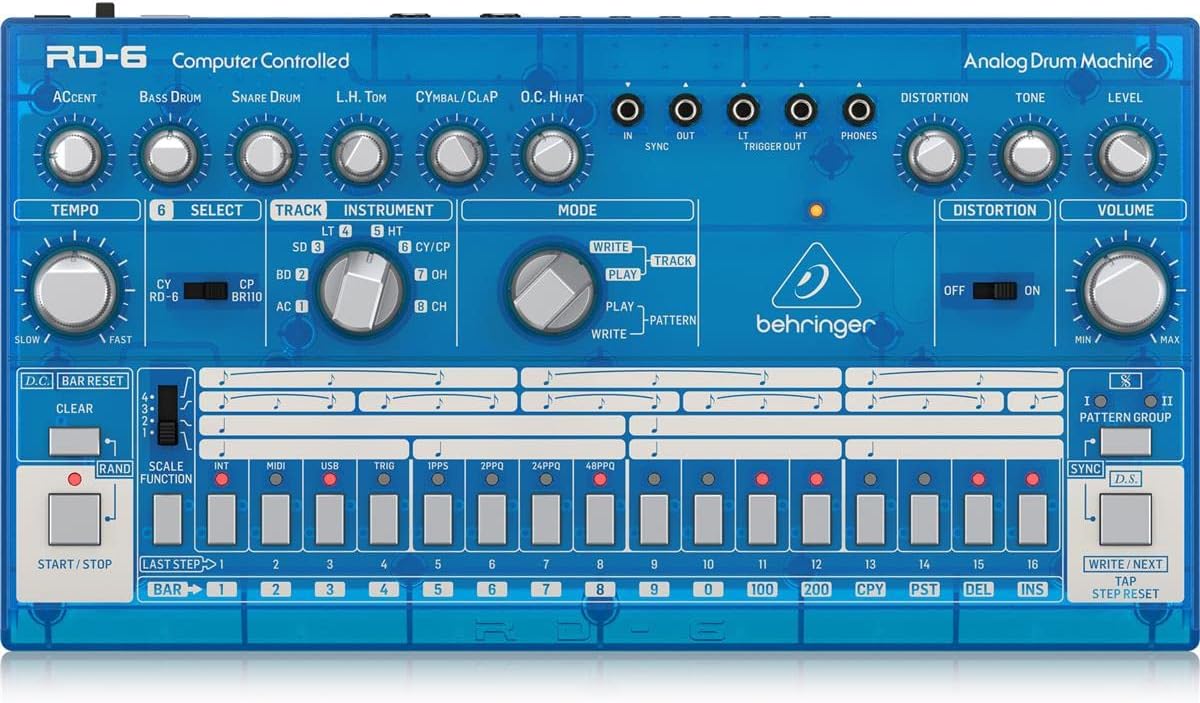
Image: Rear view of the Behringer RD-6, highlighting the various audio outputs, MIDI ports, USB port, and power input.
- VOICE OUT (OH/CH, CP, CY, LT/HT, SD, BD): Individual 3.5 mm TS outputs for each drum voice, allowing for external processing.
- MIX OUT: 6.35 mm TS output for the main stereo mix.
- START/STOP: 3.5 mm TS input for external start/stop control.
- MIDI IN/OUT/THRU: 5-pin DIN connectors for MIDI communication with other devices.
- USB: USB-B port for MIDI over USB and firmware updates.
- POWER DC INPUT: Connection for the included 9V DC power adapter.
5. Initial Setup
5.1 Power Connection
Connect the included 9V DC power adapter to the POWER DC INPUT on the rear panel. Plug the adapter into a suitable power outlet. Ensure the POWER switch is in the OFF position before connecting the power supply.
5.2 Audio Connection
For a combined stereo mix, connect the MIX OUT (6.35 mm TS) to your mixer or audio interface. For individual drum sound processing and recording, use the dedicated VOICE OUT jacks (3.5 mm TS) for each drum voice (OH/CH, CP, CY, LT/HT, SD, BD).
5.3 USB/MIDI Connection
Connect the USB port to your computer for MIDI control and firmware updates. Use the MIDI IN/OUT/THRU ports for connecting to other MIDI devices such as synthesizers, sequencers, or MIDI interfaces.
6. Basic Operation
6.1 Powering On/Off
Flip the POWER switch on the rear panel to the ON position. The unit will power up and be ready for use. To power off, flip the switch back to OFF.
6.2 Creating a Pattern
- Select a pattern bank (I or II) using the PATTERN GROUP buttons.
- Press the WRITE button to enter pattern write mode. The WRITE LED will illuminate.
- Select an instrument (e.g., Bass Drum, Snare Drum) using the INSTRUMENT selector knob.
- Use the 16 step buttons to program your rhythm. Pressing a button will activate or deactivate a step for the selected instrument. Illuminated buttons indicate active steps.
- Adjust parameters like ACCENT, TEMPO, and individual drum sound controls (e.g., Tone, Decay) as desired to shape your sound.
- Press PLAY to hear your pattern.
- Press WRITE again to exit write mode and save the pattern.
6.3 Real-time Recording
While in PLAY mode, press the WRITE button to enable real-time recording. The WRITE LED will flash. Play the drum sounds using the step buttons or an external MIDI controller. The notes will be recorded into the current pattern. Press WRITE again to stop real-time recording.
6.4 Using Distortion
Engage the DISTORTION switch to activate the built-in distortion effect. Adjust the TONE and LEVEL knobs to shape the distortion character and intensity to add grit and aggression to your drum sounds.
7. MIDI and USB Connectivity
7.1 MIDI Control
The RD-6 supports MIDI In, Out, and Thru via its 5-pin DIN connectors. Connect to other MIDI devices to synchronize tempo, trigger sounds, or control parameters. The MIDI THRU port allows you to daisy-chain multiple MIDI devices. Refer to the full MIDI implementation chart in the comprehensive manual for detailed CC messages and settings.
7.2 USB Audio/MIDI
The USB port provides class-compliant MIDI connectivity to your computer. This allows the RD-6 to be used as a MIDI controller or to receive MIDI data from your Digital Audio Workstation (DAW) for seamless integration into your production environment.
8. Maintenance
8.1 Cleaning
Keep the unit clean using a soft, dry cloth. Avoid abrasive cleaners, solvents, or waxes, as these can damage the finish and internal components.
8.2 Storage
Protect the RD-6 from dust, moisture, and extreme temperatures. When not in use for extended periods, store it in a cool, dry place, preferably in its original packaging or a protective case.
8.3 Servicing
Do not attempt to service the unit yourself. Refer all servicing to qualified service personnel to prevent electric shock or damage to the device.
9. Troubleshooting
9.1 No Sound Output
- Check that the power adapter is securely connected and the unit is powered ON.
- Verify all audio cables are correctly connected to the MIX OUT or individual VOICE OUT ports and to your audio system.
- Ensure the master VOLUME knob and individual instrument level knobs are turned up.
- Confirm that a pattern is playing and that the selected instrument has active steps.
9.2 MIDI Not Responding
- Verify MIDI cables are correctly connected to the MIDI IN/OUT ports of the RD-6 and your external device.
- Check that the MIDI channel settings on both the RD-6 and your external device match.
- Ensure the RD-6 is in the correct sync mode (e.g., MIDI Sync, USB Sync) if synchronizing with an external clock.
9.3 Unexpected Behavior
If the unit exhibits unexpected behavior, try powering it off and on again. If the issue persists, a factory reset may resolve it. Refer to the comprehensive manual for instructions on how to perform a factory reset.
10. Technical Specifications
| Feature | Detail |
|---|---|
| Model Name | RD-6 |
| Brand | Behringer |
| Item Weight | 1.98 pounds (900 Grams) |
| Product Dimensions | 17.2 x 8.95 x 3.8 inches |
| Body Material | Coal Fiber |
| Material | Stainless Steel |
| Color | Blue |
| Connector Type | USB |
| Voltage | 230 Volts |
| Item Model Number | 000-EE204-00010 |
| UPC | 644216639205 |
| Manufacturer | Music Tribe US |
10.1 Key Features
- True analog circuitry for authentic sound reproduction.
- 8 original drum sounds, including Bass Drum, Snare Drum, Low Tom, High Tom, Cymbal, Clap, Open Hi-Hat, and Closed Hi-Hat.
- 16-step sequencer with 256 patterns for complex rhythm creation.
- Built-in distortion effect with Tone and Level controls.
- USB/MIDI connectivity for seamless integration with modern DAWs and external MIDI devices.
- 7 independent analog outputs for flexible mixing and individual drum sound processing.
- Multiple sync options: USB, MIDI, Clock, and Internal.
11. Warranty and Support
For detailed warranty information, product registration, and technical support, please visit the official Behringer website or contact your local distributor. It is recommended to keep your proof of purchase for any warranty claims.


