
1. Introduction
Thank you for choosing the Acouto 12V RV Roof Fan with LED Light. This manual provides essential information for the safe installation, operation, and maintenance of your new ventilation fan. Please read these instructions thoroughly before installation and use, and retain them for future reference.
This fan is designed to provide efficient air circulation and illumination in recreational vehicles, campers, travel trailers, and motorhomes. It features a compact, top-mounted design for space-saving installation.
2. Safety Information
- Always disconnect power before installing, servicing, or cleaning the fan.
- Ensure the power supply matches the fan's voltage requirements (12V DC).
- Wiring should be performed by a qualified professional to prevent electrical hazards.
- Do not operate the fan if any part is damaged.
- Keep fingers and other objects away from moving fan blades.
- This product is designed for indoor RV use only.
3. Package Contents
Please verify that all components are present in the package:
- Acouto 12V RV Roof Fan with Integrated LED Light
- Air Outlet Grille
- Mounting Screws (quantity may vary, typically 4-5)

Figure 1: Acouto 12V RV Roof Fan with LED Light and mounting screws. This image shows the complete fan unit from the front, highlighting the integrated switch and the included hardware for installation.
4. Specifications
| Brand | Acouto |
| Model Name | RV Fan (Ventilation RV) |
| Voltage | 12V DC |
| Wattage | 12 Watts |
| Speed | 5000 RPM |
| Air Flow Capacity | 200 CFM |
| Switch Type | Push Button |
| Hole Diameter (Approx.) | 118 mm / 4.6 inches |
| Material | High-quality ABS |
| Special Feature | Dustproof, Integrated LED Light |
| Item Weight | 850 Grams (1.87 pounds) |
5. Installation Instructions
The Acouto RV Fan is designed for top-mounted installation. Professional installation is recommended.
- Prepare the Mounting Location: Choose a suitable location on your RV's ceiling. Ensure there is sufficient clearance above and around the installation area. The required hole diameter for mounting is approximately 118 mm (4.6 inches). Carefully cut the opening if one does not already exist.
- Wiring:
- Identify the positive (+) and negative (-) 12V DC power wires in your RV.
- Connect the fan's red wire to the positive (+) power supply and the black wire to the negative (-) power supply. Ensure all connections are secure and properly insulated.
- The fan includes an integrated switch for controlling both the fan and the LED light. Refer to the operating instructions for switch functionality.

Figure 2: Detailed view of the Acouto RV Fan's internal wiring and fan blades. This image provides a clear look at the electrical connections and the fan mechanism, essential for understanding installation and troubleshooting.
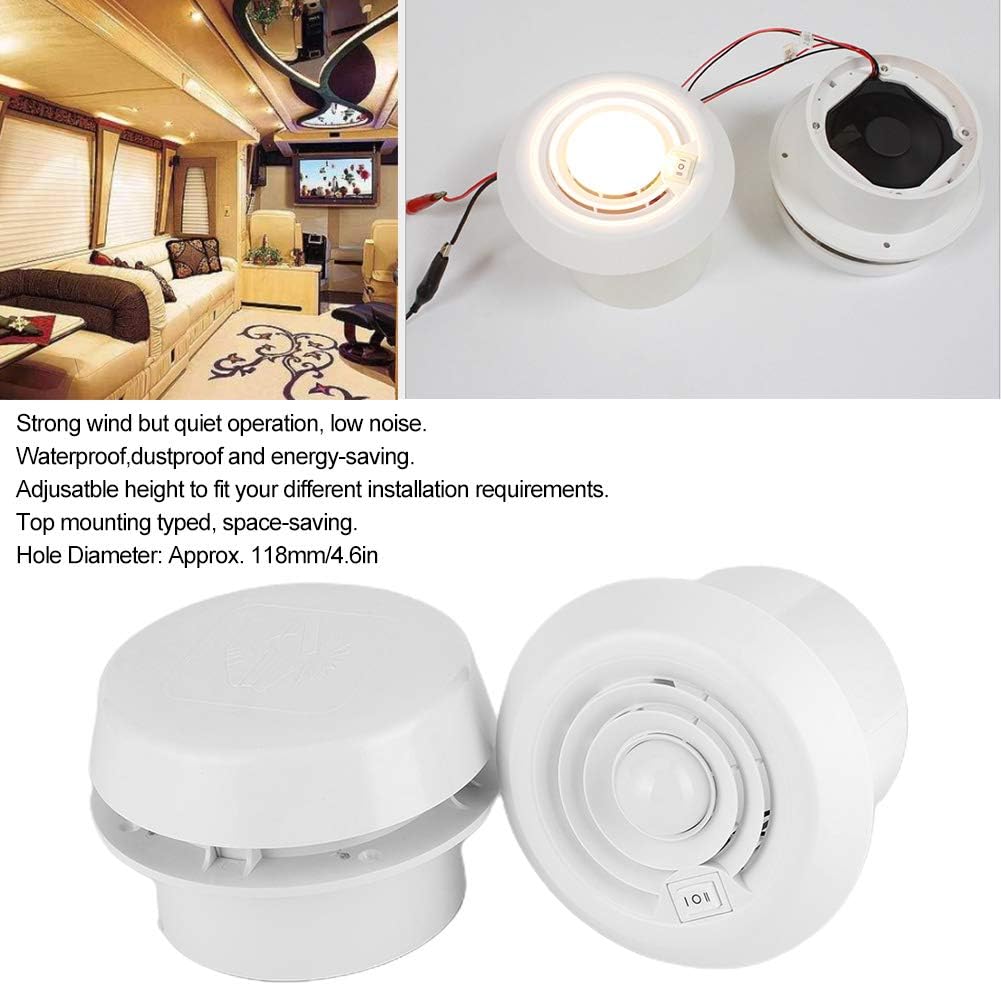
Figure 3: Internal components of the Acouto RV Fan. This image displays the separate LED light module and the fan motor assembly, providing a view of the electrical connections and the fan blades. An RV interior is visible in the background, illustrating a typical installation environment.
- Mounting the Fan: Insert the fan unit into the prepared opening. Secure it using the provided mounting screws. Ensure the fan is flush with the ceiling surface.
- Attach Air Outlet Grille: Once the fan is securely mounted, attach the air outlet grille to complete the installation.
- Test Functionality: Restore power and test the fan and LED light operation using the integrated push-button switch.
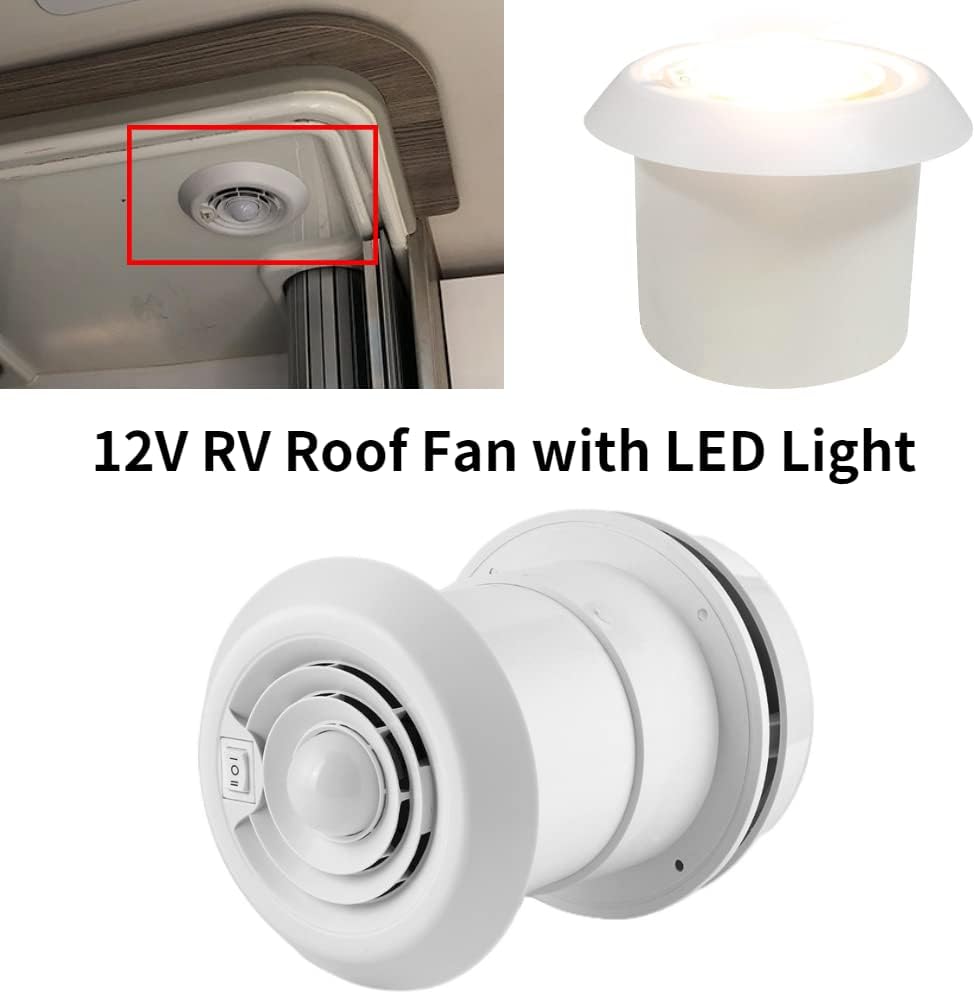
Figure 4: Acouto RV Fan with LED light illuminated and an example installation. This image shows the fan with its LED light turned on, alongside a view of the fan discreetly installed in an RV ceiling, demonstrating its compact design.

Figure 5: Acouto RV Fan in a travel trailer setting. This image illustrates the fan's wide application in various recreational vehicles, showing a travel trailer exterior and interior.
6. Operating Instructions
The Acouto RV Fan features a simple push-button switch for control.
- Power On/Off: Press the push-button switch once to turn on the fan and LED light. Press it again to turn them off.
- Fan and Light Operation: The fan and LED light are designed to operate together. If you experience issues with both functions not activating simultaneously, please refer to the Troubleshooting section.
7. Maintenance
Regular maintenance ensures optimal performance and longevity of your RV fan.
- Cleaning: Periodically clean the fan grille and blades to remove dust and debris. Use a soft, damp cloth. Ensure power is disconnected before cleaning. Do not use abrasive cleaners or solvents.
- Inspection: Regularly inspect the wiring for any signs of wear or damage. Check that mounting screws are secure.
- Ventilation: Note that this fan does not feature a closeable vent for winter operation. It remains open to the outside, which may affect insulation in colder climates.
8. Troubleshooting
If you encounter issues with your Acouto RV Fan, please consult the following common problems and solutions:
| Problem | Possible Cause | Solution |
|---|---|---|
| Fan or LED light does not turn on. | No power supply, loose wiring, faulty switch. | Check 12V DC power connection. Ensure wiring is secure and correctly connected (red to positive, black to negative). Verify the push-button switch is functioning correctly. |
| Fan works, but LED light does not (or vice-versa). | Internal wiring issue, faulty component. | This indicates a potential internal wiring discrepancy or component failure. Double-check all external wiring connections. If the issue persists, contact customer support. |
| Fan is excessively noisy. | Obstruction in fan blades, loose mounting, normal operating noise. | Disconnect power and check for any obstructions around the fan blades. Ensure the fan is securely mounted. Some operational noise is normal for ventilation fans. |
| Poor airflow. | Blocked grille, fan running at low speed (if applicable), insufficient power. | Clean the air outlet grille. Ensure the fan is receiving adequate 12V DC power. This model operates at a single speed. |
If these troubleshooting steps do not resolve the issue, please contact Acouto customer support for further assistance.
9. Warranty and Support
Acouto is committed to providing high-quality products. This product has undergone quality inspection before leaving the factory.
For any product inquiries, technical support, or warranty claims, please refer to the seller's contact information or visit the official Acouto store on Amazon:
Visit the Acouto Store on Amazon
Please have your product model (Ventilation RV) and purchase details ready when contacting support.