
Introduction
Thank you for choosing the GEEKRIA Headband Cover and Pad Set. This product is designed to protect your headphone headband from wear and tear, while also providing enhanced comfort during extended use. This manual will guide you through the installation process and provide important information regarding care and maintenance.
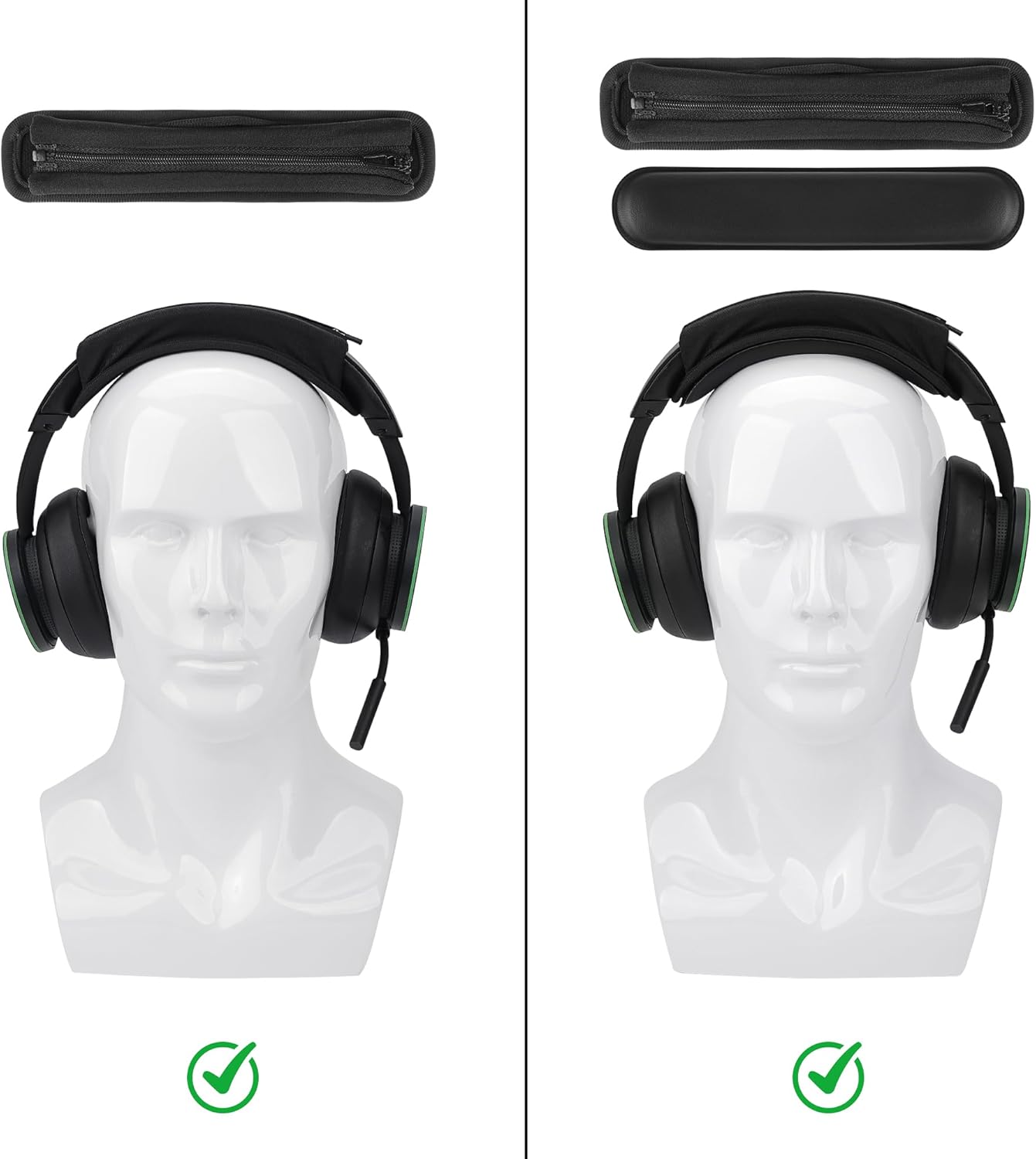
Image: Comparison of headphones with and without the GEEKRIA headband cover and pad installed, demonstrating the protective and comfort benefits.
Package Contents
- 1 x Headband Cover (with zipper closure)
- 1 x Headband Pad (with hook and loop attachment)

Image: Detailed view of the headband cover's components, including the zipper, hook and loop fasteners, and optional lanyard attachment point.
Compatibility
This GEEKRIA Headband Cover and Pad Set (Model PJZ159-02, M/Black Protein Leather) is compatible with a wide range of medium-sized headphone headbands. Key compatible models include, but are not limited to:
- Bose: QC2, QC25, QC35, QC35II Gaming, QC35II, QC45, QCSE, QCUltra, QC700, QuietComfort, SoundLink2, OnEar, AE2, SoundTrueAE2
- Beats: Executive, Mixr, Solo4, SoloHD, Solo2Wired, Solo2 wireless, Solo3 Wireless, Studio 3, Studio Pro, Studio Wireless, ATH-M20x, M20xBT, M30, M30x, M40x, M50x, M50xBT, M50xBT2, M50xSTS
- Sony: INZONE H3, H7, H9, MDR-1A, 1AM2, 1R, 1RBT, 10R, 10RBT, 10RNC, 7506, CD900ST, HW700, XB650BT, Z7M2, ZX110NC, ZX220BT, PSGold, WH-1000XM2, 1000XM3, 1000XM4, 1000XM5, 1000XM6, CH710N, CH720N, H810, 910N, RF400, XB700, XB900N, XB910N
- Skullcandy: Crusher, Crusher Wireless, EVO, ANC, Hesh, Hesh2, Hesh3, Hesh EVO, Grind, PLYR2, Venue, RIFF, Uproar, Riff 2, Aviator, Agent, SLYR, G.I.
- Logitech: G433, G430, G533, G231, PRO X
- HyperX: Cloud Stinger 7.1, Cloud Stinger Core, Cloud Flight S, CloudX Flight, CloudX Stinger
- Sennheiser: HD598, HD579, HD595, HD599, HD559, HD569, HD518, HD555, HD558, HD515, HD201, HD419, HD429, HD429s, HD439, HD449, HD400 Pro, HD280 pro, HD300 pro, MOMENTUM 2.0, MOMENTUM 3, PC350, PC363D, HD 4.50BT, HD 4.50, HD 4.50BTNC, HD 4.40BT, HD 4.30G, HD 4.20S, HD 458BT, HD 450, HD 450BT, HD 400S, HD 350BT
- JBL: Everest 710, EVEREST 750, EVEREST 310, EVEREST 700, JR460
- JVC: HAS91NB, HAS100N
- Plantronics: BACKBEAT 500, BACKBEAT GO 600, BACKBEAT GO 810
- Master & Dynamic: MG20
- EDIFIER: W808BT, W830BT, W800BT, W860NB
The cover is designed for headbands with a width of 1 inch to 1.4 inches (2.5 cm - 3.5 cm).

Image: Size guide illustrating the dimensions for medium and large headband covers, along with examples of compatible headphone models for each size.
Installation Instructions
Follow these steps to install the GEEKRIA Headband Cover and Pad Set onto your headphones:
- Prepare the Headband Cover: Unzip the headband cover completely.
- Insert the Pad: Place the separate headband pad inside the unzipped cover. Ensure the hook and loop side of the pad aligns with the corresponding fastener inside the cover.
- Position on Headphones: Carefully place the open headband cover, with the pad inside, over your headphone's existing headband.
- Zip Up: Slowly and carefully zip up the cover around your headphone's headband. Ensure the zipper does not snag on any part of your headphones or the internal pad.
- Adjust for Comfort: Once zipped, adjust the cover and pad to ensure it sits evenly and comfortably on your headphone's headband.

Image: Step-by-step visual instructions for assembling and installing the headband cover and pad onto headphones.
Installation Video Guide
Video: A detailed demonstration by GeekriaDirect on how to properly install the over-ear headband cover onto your headphones.
Usage
Once installed, the headband cover provides an additional layer of cushioning and protection. The protein leather material offers a smooth feel, while the internal foam sponge enhances comfort by distributing pressure more evenly across the top of your head. The cover also helps to keep your original headphone headband clean and free from sweat and oils.

Image: Cross-section diagram illustrating the construction of the headband, highlighting the protein leather exterior and the senior foam sponge interior for comfort.
Maintenance
To ensure the longevity and hygiene of your GEEKRIA Headband Cover and Pad Set, follow these maintenance guidelines:
- Cleaning: Wipe the protein leather surface with a soft, damp cloth. For stubborn dirt, a mild soap solution can be used, followed by wiping with a clean, damp cloth. Avoid harsh chemicals or abrasive cleaners.
- Drying: Allow the cover to air dry completely before reattaching it to your headphones. Do not expose to direct sunlight or high heat.
- Storage: When not in use, store the headband cover in a clean, dry place away from extreme temperatures.
- Zipper Care: Periodically check the zipper for smooth operation. If it becomes stiff, a small amount of zipper lubricant can be applied.
Troubleshooting
- Cover feels loose or slips: Ensure the internal pad is correctly positioned and secured with its hook and loop fasteners. Verify that your headphone headband width falls within the compatible range (1 inch - 1.4 inches or 2.5 cm - 3.5 cm).
- Zipper is difficult to close: Make sure the headphone headband is fully inserted and not obstructing the zipper path. Gently guide the zipper, ensuring the fabric is not caught.
- Reduced comfort after installation: Re-adjust the internal pad to ensure it is centered and evenly distributed along the headband. Confirm that the cover is not too tight or unevenly zipped.
Specifications
| Model Number: | PJZ159-02 |
| Color: | Black Protein Leather |
| Material: | Faux Leather (Protein Leather) and Senior Foam Sponge |
| Item Dimensions (L x W x H): | 7.48 x 1.77 x 0.39 inches (19 x 4.5 x 1 cm) |
| Item Weight: | 28 g |
| Unit Count: | 1 Headband Cover, 1 Headband Pad |
| Compatible Headband Width: | 1 inch - 1.4 inches (2.5 cm - 3.5 cm) |
Warranty and Support
This GEEKRIA product comes with a 1-year manufacturer's warranty from the date of purchase. This warranty covers defects in materials and workmanship under normal use.
For technical support, warranty claims, or any inquiries regarding your product, please contact GEEKRIA customer service through their official channels or visit the GEEKRIA Store on Amazon.