
1. Introduction
This manual provides detailed instructions for the installation, operation, and maintenance of your ATOTO S8G2094MS 9-inch QLED Double Din Android Car Stereo. Please read this manual thoroughly before using the product to ensure proper functionality and safety.
The ATOTO S8G2094MS is an advanced car stereo system designed to enhance your in-car experience with its 9-inch QLED display, Android operating system, and versatile connectivity options. It features an 8-core processor, 4GB RAM, 32GB internal storage, and supports various internet access methods, smartphone integration, and audio enhancements.

Image 1.1: The ATOTO S8G2094MS main interface displaying various applications.
2. Package Contents
Verify that all items are present in the package before proceeding with installation:
- ATOTO S8G2094MS Car Stereo Unit
- GPS Antenna
- External Microphone
- Line Out Converter (if included)
- Power Cable
- 4G LTE Antenna
- Rear Camera Input Cable
- RCA Connector Cables
- USB External Storage Cable
- USB Phone Link Cable
- Front Recording Camera Cable
- Double-DIN Brackets
- Mounting Brackets
- Screen Protector
- Mounting Screws

Image 2.1: Overview of the ATOTO S8G2094MS unit dimensions and included accessories.
3. Setup and Installation
The ATOTO S8G2094MS features an IAH09D mounting style (Integrated and Adaptive Head-unit of 9-inch Display) and is a standard double DIN car stereo. Installation may require additional vehicle-specific accessories (dash frame kit, wiring harness, antenna adapter, data interface) not included in the package. It is recommended to consult a professional for installation or refer to vehicle-specific guides.
3.1 Wiring Diagram
Refer to the following diagram for proper wiring connections. Ensure all connections are secure before powering on the unit.
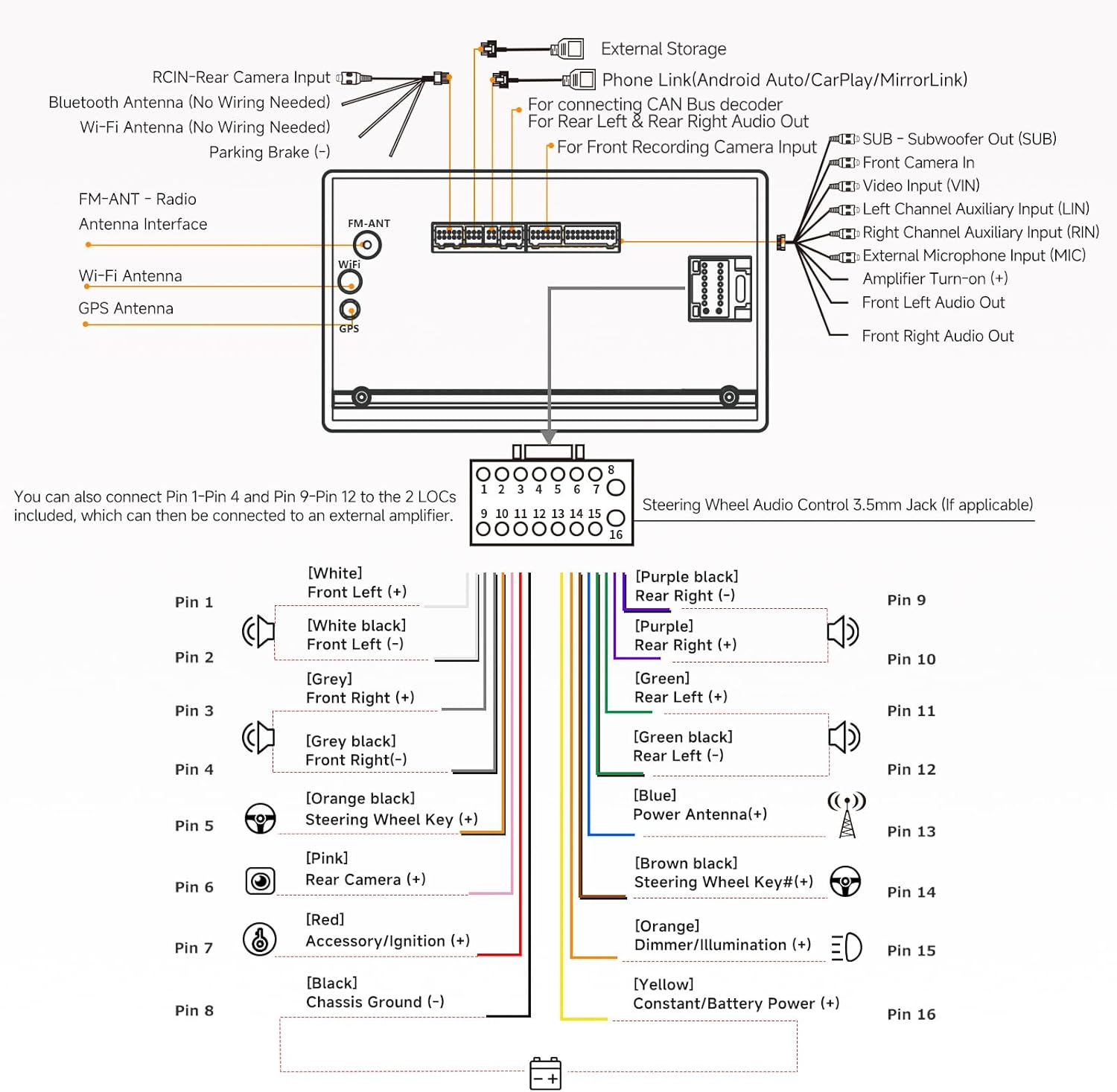
Image 3.1: Detailed wiring diagram for the ATOTO S8G2094MS car stereo, showing connections for power, speakers, antennas, and external devices.
3.2 Initial Power-Up
After installation, turn on your vehicle's ignition. The unit should power on automatically. Follow the on-screen prompts for initial setup, including language selection and network configuration.
4. Operating Instructions
4.1 Display and User Interface
The S8G2094MS features a 9-inch 1280x720 QLED touchscreen with a 178° viewing angle. The ATOTO AICE UI 11.0, based on Android 10.0, provides a customizable and responsive interface. The display supports 5-touch capacitive input for gestures like pinch-to-zoom and scrolling.
- Split Screen Display: Run two applications simultaneously, such as navigation and a media player.
- Touch Gestures: Utilize six touch gestures for quick access to multi-task menus, EQ modes, and brightness adjustments.
- Digital Photo Frame: Display memorable photos from a specified gallery folder.

Image 4.1: Illustration of touch gestures for controlling the ATOTO S8G2094MS.
4.2 Internet Access
The unit offers four methods for internet connectivity:
- Built-in 4G Cellular Modem: Insert a Micro SIM card (not included) into the dedicated slot for direct 4G LTE access. Supports various 2G, 3G, and 4G LTE bands.
- Wi-Fi Hotspot: Connect to your phone's Wi-Fi hotspot for internet access.
- Bluetooth Tethering: Share your phone's data via Bluetooth. This method consumes less phone battery compared to Wi-Fi tethering.
- USB Tethering: Share your phone's data with the S8 via a USB connection using the CarbitLink app. This can help conserve or slightly increase phone battery.

Image 4.2: Visual representation of the S8G2094MS hardware specifications and the four internet access options.
4.3 Smartphone Integration
The S8G2094MS supports seamless integration with both iOS and Android smartphones:
- Wireless CarPlay & Android Auto: Connect your smartphone wirelessly for navigation, calls, messages, music, and news.
- Wired CarPlay & Android Auto: Connect your smartphone via USB using the factory/original USB cable.
- Phone Mirroring (CarbitLink): Use the pre-installed CarbitLink app to cast your phone's screen to the S8 display via USB or Wi-Fi.

Image 4.3: Demonstrates wireless CarPlay and Android Auto functionality, along with GPS tracking features.
4.4 Audio Features
- Digital Signal Processor (DSP): Built-in DSP allows for precise equalization, signal delay, bass boost, and bass filter settings.
- Advanced EQ: Features 9 preset EQ modes and 32 adjustable frequency bands (16 for front, 16 for rear).
- Speed Compensated Volume Control (SCVC): Automatically adjusts the system volume based on vehicle speed to compensate for road noise (effective at speeds of 50mph or above, using GPS-based algorithms).
- Built-in Amplifier: Max 4*45W BTL Amplifier with RMS 4*24W.

Image 4.4: Illustrates the Digital Signal Processor (DSP) with time alignment, Speed Compensated Volume Control (SCVC), and advanced equalizer settings.
4.5 Navigation and GPS Tracking
- Built-in GPS Receiver: Comes with an external GPS antenna and Google Maps pre-installed. Other navigation apps (Waze, HereWeGo) can be installed from the Google Play Store.
- TrackHU App: ATOTO's exclusive GPS tracking feature allows real-time vehicle location, custom alerts, geofences, and historical data viewing.
4.6 AI Voice Assistant (DriveChat)
The S8G2094MS integrates DriveChat, an AI voice assistant powered by ChatGPT. This feature allows for intelligent AI conversations and voice control, enabling users to create multiple wake-up words and interact with various AI chatbots.

Image 4.5: Depicts the DriveChat AI Voice Assistant interface and its capabilities for voice control and intelligent conversations.
5. Connectivity and External Devices
5.1 Bluetooth
The unit features dual Bluetooth chips (BT1 5.0 & BT2 4.1) for enhanced connectivity:
- Bluetooth 1 (BT1 5.0): Supports HFP/HSP/A2DP/AVRCP/PBAP protocols for hands-free calling, audio streaming (SBC & AAC codec), and phone contact synchronization. Includes built-in noise cancellation.
- Bluetooth 2 (BT2 4.1): Used for Bluetooth tethering internet, connecting to Bluetooth gamepads, OBD2 scanners, TPMS devices, etc.
- Voice Assistant Activation: Customize Bluetooth to wake up your phone's voice assistant (Siri, Google Assistant) via screen button, steering wheel controls, or ATOTO AC-44F8 wireless remote.
5.2 Inputs and Outputs
- AUX Audio/Video Input: (L/R) / Video input.
- FCAM Front Camera Video Input: For connecting a front camera.
- Rearview Camera Input: Supports 720P HD video signal for compatible HD rearview cameras.
- USB Interfaces (x2): For data communication (USB drives, optional USB devices), phone mirroring/integration.
- 4G SIM Slot: For Micro SIM card.
5.3 Camera Features
- Live RearView (LRV): Access rearview camera feed even when the vehicle is moving forward, enhancing visibility and reducing blind spots.
- AHD 1080P Camera Support: Compatible with specific ATOTO AC-HD02LR or AC-HD03LR cameras for high-definition rearview imaging.
- Backlight Compensation (BLC) & Automatic Gain Control (AGC): Features to improve image clarity under various lighting conditions.

Image 5.1: Illustrates AHD 1080P camera recording capabilities, Backlight Compensation (BLC), Automatic Gain Control (AGC), and Live Rear View (LRV).
6. Optional Accessories (Sold Separately)
Enhance your ATOTO S8G2094MS experience with these compatible accessories:
- ATOTO CA-AEC01/CA-AEC02 Compact 4 Channel Car Amplifier
- ATOTO AC-44P2 1080P On-dash DVR Camera
- ATOTO AC-44F8 Steering Wheel Remote
- ATOTO AC-4450 Bluetooth OBD II Scanner / Code Reader
- ATOTO AC-HD02LR HD Rear-view Camera
- ATOTO AC-UTP1 USB TPMS (Tire Pressure Monitoring Sensor)
- ATOTO Video Output Adaptors (AC-AHV68: USB to HDMI; AC-AHV48: USB To RCA)
- ATOTO AC-HAV50 HDMI to AHD Video Converter
- ATOTO CS-101SW 10" Slim Amplified Subwoofer
- ATOTO CS-651DC 6.5in Coaxial 2-way Car Speakers
7. Specifications
| Feature | Specification |
|---|---|
| Model Number | S8G2094MS (S8G2BAA-10US) |
| Screen Size | 9 Inches |
| Display Type | QLED, 1280x720 HD, 178° Viewing Angle |
| Operating System | ATOTO AICE UI 11.0 (based on Android Q/10.0) |
| SoC Chip | UIS 7862 ARM Cortex Octa-Core (up to 1.8GHz) CPU with ARM Mali-G52 MP2 GPU |
| RAM/Storage | 4GB RAM / 32GB ROM |
| Internet Access | Built-in 4G LTE, Wi-Fi Hotspot, Bluetooth Tethering, USB Tethering |
| Bluetooth | Dual Bluetooth (BT1 5.0 & BT2 4.1) |
| Radio Tuner | High sensitivity FM/AM with RDS/RBDS |
| Amplifier | Max 4*45W BTL, RMS 4*24W |
| DSP | Built-in Digital Signal Processor, 32-band EQ |
| Phone Integration | Wireless/Wired CarPlay, Wireless/Wired Android Auto, Phone Mirroring (CarbitLink) |
| GPS/Navigation | Built-in GPS, Google Maps, TrackHU App |
| Item Weight | 4.38 pounds |
| Package Dimensions | 11.57 x 9.69 x 4.45 inches |
8. Maintenance
To ensure the longevity and optimal performance of your ATOTO S8G2094MS car stereo, follow these general maintenance guidelines:
- Cleaning: Use a soft, dry cloth to clean the screen and unit. Avoid abrasive cleaners or solvents.
- Software Updates: Regularly check for and install system updates via OTA (Over-The-Air) through the FindApps application to ensure the latest features and security patches.
- Environmental Conditions: Avoid exposing the unit to extreme temperatures, direct sunlight for prolonged periods, or excessive moisture.
- Cable Connections: Periodically check all cable connections to ensure they are secure and free from damage.
9. Troubleshooting
If you encounter issues with your ATOTO S8G2094MS, consider the following basic troubleshooting steps:
- No Power: Check the power cable connections and ensure the vehicle's ignition is on. Verify fuses if necessary.
- No Sound: Check speaker connections, volume levels, and EQ settings. Ensure the amplifier (if external) is powered on.
- Touchscreen Unresponsive: Perform a soft reset of the unit. If the issue persists, check for software updates.
- GPS Signal Loss: Ensure the GPS antenna is properly connected and has a clear view of the sky.
- Bluetooth/Wi-Fi Connectivity Issues: Restart the unit and your connected device. Ensure both devices are within range and not experiencing interference.
- App Crashes: Clear the cache of the problematic app or reinstall it. Ensure the system software is up to date.
For more complex issues, refer to the ATOTO support website or contact customer service.
10. Warranty and Support
ATOTO offers product care for 12+6 months. For technical assistance, warranty claims, or further inquiries, please contact ATOTO customer support.
- Email Support: You can reach ATOTO support at support@myatoto.com. Responses are typically provided within 24 hours on workdays.
- Online Resources: Visit the official ATOTO website for FAQs, troubleshooting guides, and software updates.
- SBV (Search By Vehicle) Tool: Utilize the ATOTO SBV tool online to find compatible installation parts for your specific vehicle.