Apevia ATX-SN900 Signature 900W Power Supply User Manual
Model: ATX-SN900
Introduction
This manual provides comprehensive instructions for the installation, operation, and maintenance of your Apevia ATX-SN900 Signature 900W 80+ Bronze Certified Active PFC ATX Semi-Modular Gaming Power Supply. Please read this manual thoroughly before using the product to ensure proper function and safety.
Safety Information
WARNING: Failure to follow these safety instructions may result in fire, electric shock, or other injury or damage.
- Do not overload, abuse, or modify the power supply unit.
- Ensure the power supply is disconnected from the power outlet before installation or maintenance.
- Do not expose the power supply to water or excessive humidity.
- Do not open the power supply casing. There are no user-serviceable parts inside.
- Use of this unit for Bitcoin Mining is not suggested as it will shorten the life and cause failures of the power supply. Use for mining purposes is not covered by warranty.
- Ensure proper ventilation around the power supply during operation.
Product Features
- 900W 80+ Bronze Certified Active PFC ATX Gaming Semi-Modular Power Supply.
- Modular Design Supports Cable Management. Connectors: 1 x 20/24pin Main Power, 1 x P8(4+4P) ESP 12V, 4 x SATA + 4 x 8(6+2)pin PCI-E, 4 x Peripheral, 1 x Floppy. Single 12V Output for Higher Power Usage.
- Auto-Thermally Controlled 135mm Blue LED Fan. Output: +3.3V@20A, +5V@20A, +12V@66A, -12V@0.3A, +5Vsb@2.5A
- Heavy Duty Protections: Short-Circuit/ Over-Voltage/ Over-Power/ Under-Voltage Protections. Double Forward Converter Design.
- Supports ATX 12V 2.3 Version. Supports Dual/Quad Core CPUs. Supports SLI/Crossfire/ Haswell.
Product Overview
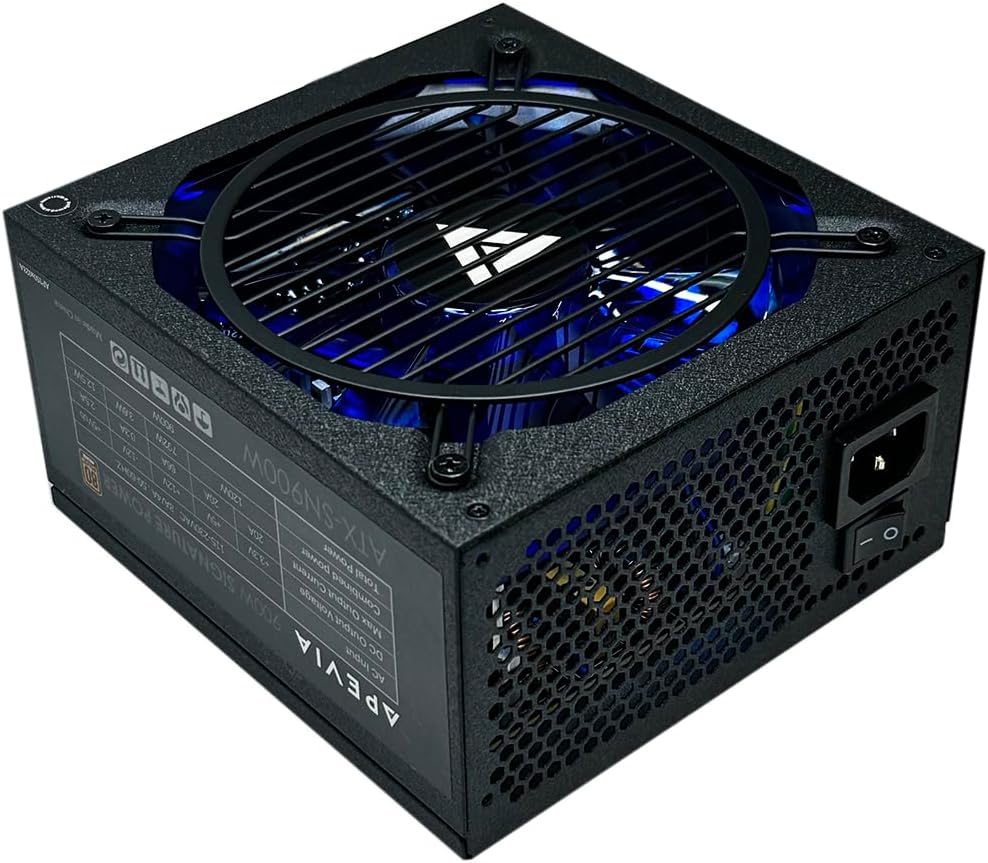
The Apevia ATX-SN900 power supply features a sleek black design with a prominent blue LED fan for aesthetic appeal. It is designed for gaming systems, offering robust power delivery and efficient operation.
Package Contents
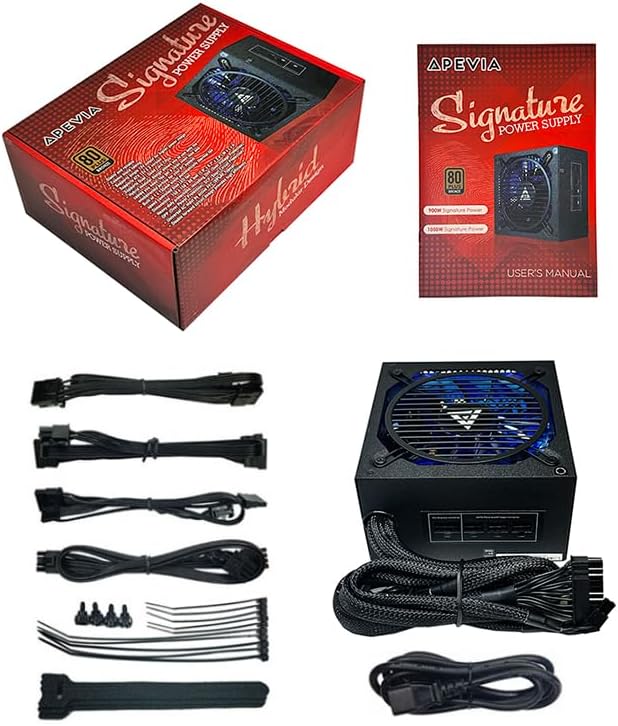
The package includes the Apevia ATX-SN900 power supply unit, a user's manual, various modular cables for connectivity, mounting screws, and cable ties for organization.
Setup and Installation
The semi-modular design of the ATX-SN900 allows for cleaner cable management by only connecting the necessary cables. Follow these steps for installation:
- Mounting the PSU: Secure the power supply unit into your PC case's PSU bay using the provided screws. Ensure the fan is facing the correct direction for optimal airflow (typically facing down if your case has a bottom vent, or up if it's a top-mounted PSU).
- Connecting Main Power: Connect the 20/24-pin Main Power connector to your motherboard.
- Connecting CPU Power: Connect the P8 (4+4P) ESP 12V connector to your motherboard's CPU power socket.
- Connecting Modular Cables: Identify the peripheral devices (graphics card, SSDs, HDDs, etc.) that require power. Connect the appropriate modular cables (PCI-E, SATA, Peripheral, Floppy) to the power supply's modular ports and then to your components.
Modular Cable Connections

The image above shows the modular ports on the power supply. Connect only the cables you need for your system's components.
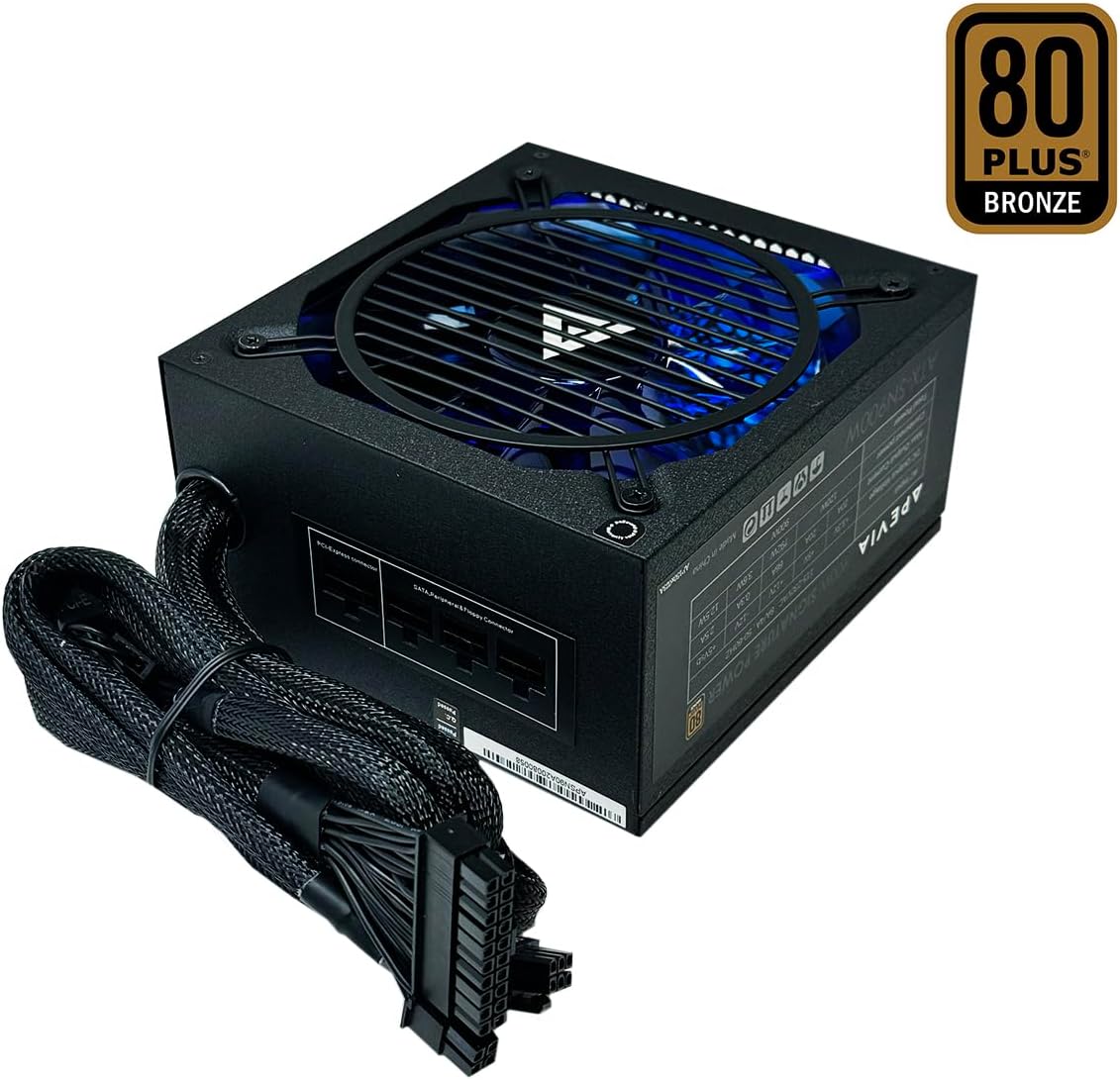
This view illustrates the fixed main power cables and the semi-modular design, allowing for flexible cable management.
Connector Descriptions and Dimensions

The diagram above details the various connectors available with the ATX-SN900 power supply, including their lengths and types. This helps in planning cable routing within your PC case.
- ATX Main Connector: 20+4Pin
- EPS 12V Connector: 4+4Pin
- PCI Express Connectors: 6+2Pin/6+2Pin
- Peripheral/SATA/Floppy Connectors: Various configurations available.
Dimensions: 150mm x 158mm x 86mm (5.9" x 6.2" x 3.4") W x L x H
Operating Instructions
Once all connections are securely made and the power supply is mounted, connect the AC power cord to the power supply and then to a wall outlet. Flip the power switch on the back of the PSU to the 'ON' position. The 135mm blue LED fan will illuminate and begin operating, indicating the power supply is active.

The auto-thermally controlled fan adjusts its speed based on the power supply's temperature, ensuring efficient cooling and quiet operation under varying loads.
Maintenance
To ensure the longevity and optimal performance of your Apevia ATX-SN900 power supply, periodic maintenance is recommended:
- Dust Removal: Regularly clean the power supply's fan and vents to prevent dust buildup, which can impede airflow and lead to overheating. Use compressed air for best results.
- Cable Inspection: Periodically check all connected cables for any signs of wear, fraying, or loose connections.
- Environment: Ensure the PC operates in a well-ventilated area, free from excessive heat, humidity, and direct sunlight.
Troubleshooting
If you encounter issues with your power supply, refer to the following common troubleshooting steps:
- No Power: Ensure the power cable is securely connected to both the PSU and the wall outlet. Check that the power switch on the PSU is in the 'ON' position. Test the wall outlet with another device.
- System Instability/Crashes: This could indicate insufficient power or a faulty component. Verify all power connections are secure. Ensure your system's power requirements do not exceed the PSU's capacity.
- Excessive Fan Noise: While the fan is auto-thermally controlled, persistent loud noise might indicate dust buildup or a fan issue. Clean the fan and vents. If the issue persists, contact support.
- Blue LED Not Lit: If the power supply is on and functioning but the LED is not lit, it may indicate an issue with the LED itself. This typically does not affect the power supply's core functionality.
Specifications
| Feature | Detail |
|---|---|
| Output Wattage | 900 Watts |
| 80 PLUS Certification | Bronze Certified |
| PFC Type | Active PFC (99% factor correction) |
| Form Factor | ATX |
| Fan Size | 135mm (Blue LED, Auto-Thermally Controlled) |
| Main Power Connector | 1 x 20/24pin |
| CPU Power Connector | 1 x P8(4+4P) ESP 12V |
| PCI-E Connectors | 4 x 8(6+2)pin |
| SATA Connectors | 4 |
| Peripheral Connectors | 4 |
| Floppy Connector | 1 |
| Input Voltage Switching | Automatic (110V/240V) |
| Protections | Short-Circuit/ Over-Voltage/ Over-Power/ Under-Voltage |
| Product Dimensions (L x W x H) | 6.2 x 5.9 x 3.4 inches |
| Item Weight | 4.51 pounds |
Warranty and Support
Apevia provides a warranty for its power supply units. Please refer to the product packaging or the official Apevia website for specific warranty terms and conditions. Note that use of this unit for Bitcoin Mining is not covered by the warranty due to the potential for accelerated wear and failure.
For technical support, troubleshooting assistance, or warranty claims, please contact Apevia customer service through their official channels. Keep your proof of purchase handy when contacting support.


